1. Introducció
Thank you for choosing the KACOLA A4-Basic Ultra-Thin Light Box. This versatile light pad is designed to enhance your creative and professional projects, offering adjustable brightness and a comfortable viewing experience. It is ideal for a variety of applications including tracing, diamond painting, sketching, 2D animation, and more.

Figure 1: KACOLA A4-Basic Ultra-Thin Light Box in use for tracing.
2. Característiques clau
- Disseny ultra prim: Measures only 0.24 inches (6mm) thick for portability and easy storage.
- Brillantor ajustable: Features 3 levels of adjustable brightness (or stepless dimming, depending on model variation) up to 4500 Lux.
- Tecnologia per a la cura dels ulls: Provides mild, natural, and uniformly produced light to help prevent eye fatigue.
- Construcció duradora: Crafted from textured matte plastic with a white plexi front and non-slip cushions.
- Alimentat per USB tipus C: Easily connects to power banks, laptops, or USB-enabled devices. Requires a power outlet to operate (non-rechargeable).
- Dual-Scale Rulers: Integrated centimeter and inch rulers for precise work.
- Aplicació àmplia: Suitable for diamond painting, vinyl weeding, sketching, 2D animation, sewing, calligraphy, stained glass, quilting, scrapbooking, and office work.

Figure 2: Various applications for the light box, including sketching, industrial design, and diamond painting.
3. Configuració
- Desembalar: Carefully remove the light box and all accessories from its packaging.
- Connectar l'alimentació: Insert the USB Type-C cable into the port on the side of the light box. Connect the other end of the USB cable to a compatible power source (e.g., power bank, laptop, or USB wall adapter).
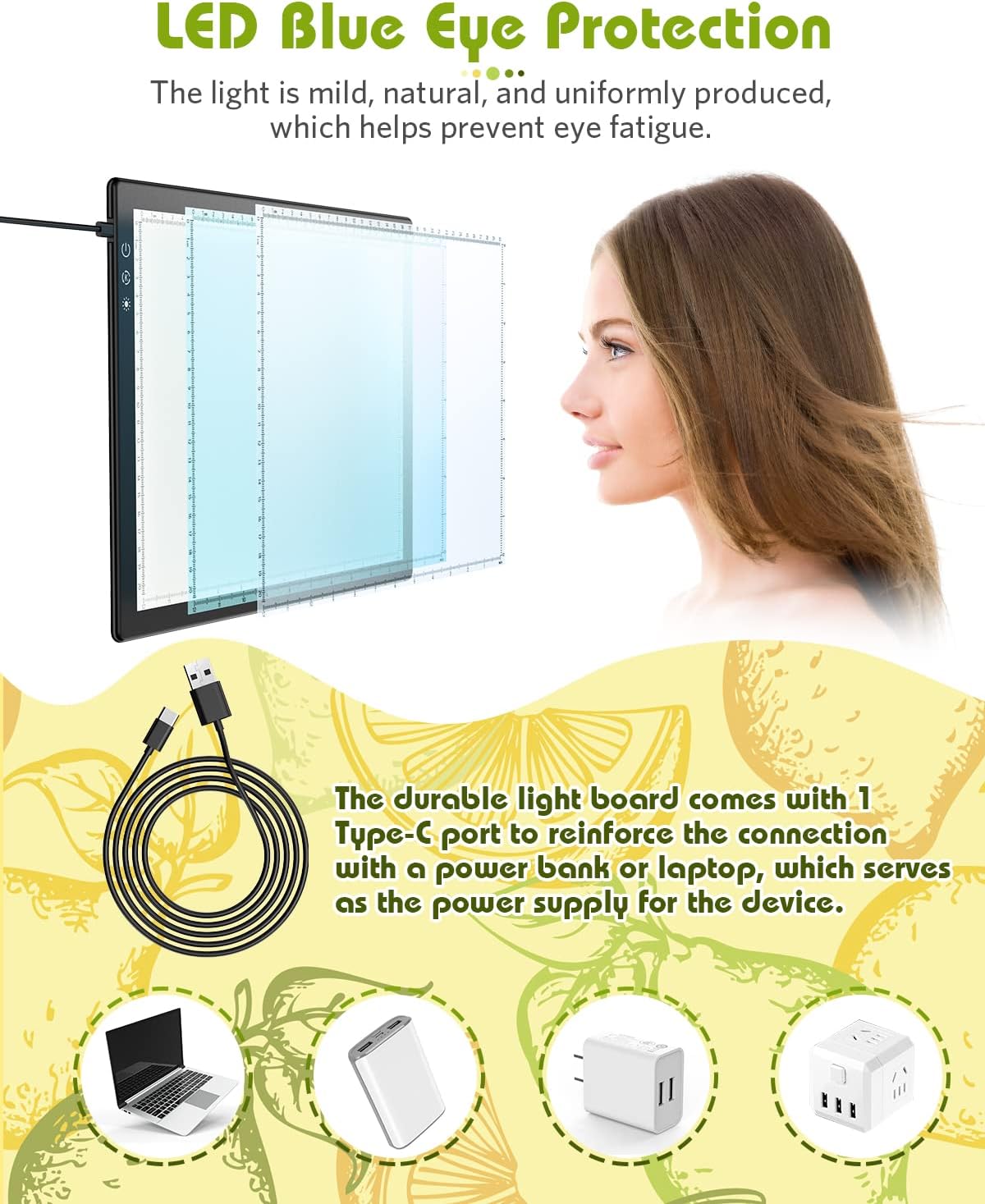
Figure 3: Connecting the light box to various USB power sources.
- Col·locació: Place the light box on a flat, stable surface. The non-slip cushions on the bottom will help secure it during use.
4. Instruccions de funcionament
- Encès/apagat: Lightly touch the power button (usually indicated by a circle with a vertical line) located on the light box to turn it on or off.
- Ajusta la brillantor: After powering on, tap the brightness control button (often indicated by a sun icon) to cycle through the 3 available brightness levels. For stepless dimming models, press and hold the brightness button to gradually adjust the light intensity. Release when the desired brightness is achieved.
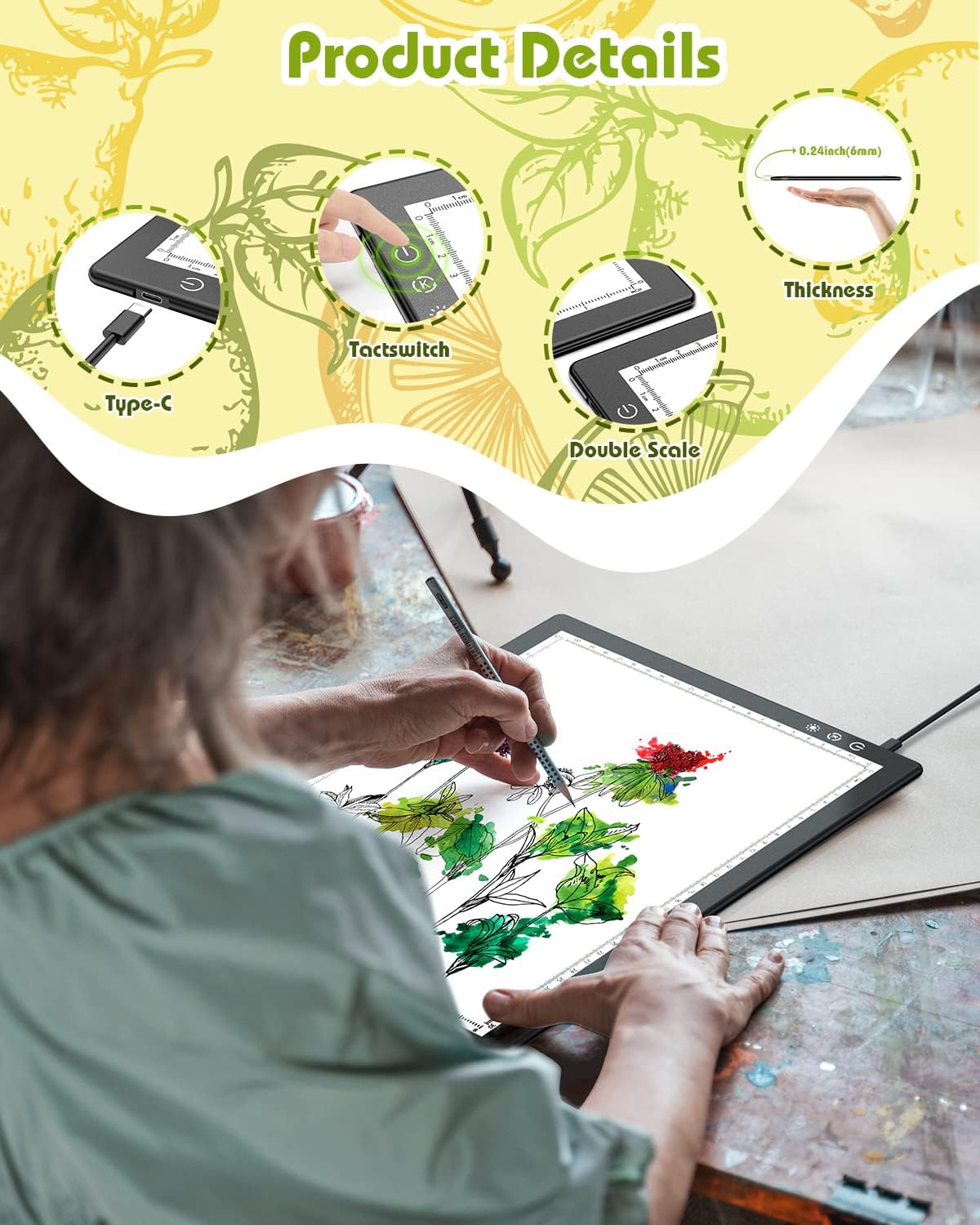
Figure 4: Power and brightness control buttons, along with Type-C port and dual-scale rulers.
- Tracing/Working: Place your original image or template on the light surface. Then, place your working paper on top of the original. The illuminated surface will allow you to clearly see through the top paper for tracing or other detailed work.
- Using Rulers: Utilize the integrated centimeter and inch rulers along the edges for precise measurements and alignment during your projects.

Figure 5: The ultra-thin design and integrated rulers of the light box.
5. Manteniment
- Neteja: Use a soft, dry cloth to wipe the surface of the light box. Avoid abrasive cleaners or solvents that may damage the plexi surface.
- Emmagatzematge: When not in use, store the light box in a dry, dust-free environment. Its ultra-thin profile allows for easy storage in drawers or upright against a wall.
- Manipulació: Handle with care to avoid dropping or impacting the device, which could damage the internal components or the surface.
6. Solució De Problemes
- Light Box Not Turning On:
- Ensure the USB Type-C cable is securely connected to both the light box and a functioning power source.
- Verify that the power source (wall adapter, power bank, laptop) is providing adequate power (5V, 1-2A recommended).
- Try a different USB cable or power source to rule out a faulty component.
- Brillantor inconsistent:
- Ensure the power button is not being accidentally pressed or held, which could change the brightness setting.
- If using stepless dimming, ensure you are holding the button for the desired duration to reach the preferred brightness.
- Light Leakage: The light box features safe rounded edges to minimize light leakage. If you notice significant light leakage, ensure the device is placed on a flat surface.
7. Especificacions
| Característica | Detall |
|---|---|
| Nom del model | A4-Basic |
| Número de model de l'article | 01 |
| Marca | KACOLA |
| Dimensions del producte | 13.7" de llargada x 8.5" d'amplada x 0.24" d'alçada (35 x 25 x 0.7 cm) |
| Visual Workspace | 12.5" x 8.5" (31.8 x 21.8 cm) |
| Gruix de l'article | 0.24 polzades (6 mm) |
| Material | Acrylic, Textured Matte Plastic |
| Color | Blanc i negre |
| Font d'alimentació | USB Powered (Type-C Charging Port) |
| Tipus de font de llum | Díode emissor de llum (LED) |
| Brillantor | Up to 4500 Lux (3 Levels/Stepless Adjustable) |
| Vida útil | Fins a 50,000 hores |
| Pes de l'article | 1.32 lliures (0.6 quilograms) |
8. Garantia i Suport
For warranty information or technical support, please refer to the product packaging or contact KACOLA customer service directly. Keep your purchase receipt for any warranty claims.


