1. Introducció
Thank you for choosing the SEHMUA 2K Light Bulb Security Camera. This manual provides detailed instructions for the setup, operation, and maintenance of your new security camera. Please read this manual thoroughly before use to ensure proper functionality and safety.

Figure 1: SEHMUA 2K Light Bulb Security Camera and Mobile Application Interface.
2. Producte acabatview
2.1 Contingut del paquet
- SEHMUA 2K Light Bulb Security Camera (Model L1)
- Manual d'usuari
- Mounting Accessories (if applicable, not specified in data but common)
2.2 Característiques clau
- 2K Full HD Resolution: Proporciona un vídeo clar i detallattage.
- 360° Pan/Tilt/Zoom (PTZ) & Remote Control: Allows for comprehensive area coverage and remote adjustment via mobile app.
- Visió nocturna en color: Enhanced visibility in low-light conditions with integrated spotlight.
- Motion Detection & Siren Alert: Automatically detects movement and can trigger an audible siren for deterrence.
- Seguiment automàtic: Follows detected motion within its field of view.
- Àudio bidireccional: Enables communication through the camera's built-in microphone and speaker.
- SD Card & Cloud Storage: Supports local storage (SD card not included) and optional cloud storage for continuous recording.
- Fàcil instal·lació: Designed for E26/E27 light bulb sockets.
- Connectivitat Wi-Fi: Connects to your home 2.4GHz Wi-Fi network.
- Compatibilitat amb Alexa: Integrates with Amazon Alexa for voice control.
3. Configuració
3.1 Descàrrega de l'aplicació i registre del compte
- Scan the QR code provided on the product packaging or in the quick start guide to download the official SEHMUA security camera application from your device's app store (iOS or Android).
- Open the application and follow the on-screen prompts to register a new account or log in if you already have one.
3.2 Instal·lació de la càmera
The SEHMUA Light Bulb Security Camera is designed for easy installation into standard E26/E27 light bulb sockets. Ensure the power to the socket is turned off before installation.
- Locate a suitable E26/E27 light bulb socket where you wish to install the camera. This can be indoors or outdoors, provided the socket is protected from direct weather exposure if outdoors (IP65 rating means it's dust tight and protected against water jets, but not submersion).
- Carefully screw the camera into the light bulb socket until it is securely fastened. Do not overtighten.
- Turn on the power to the light bulb socket. The camera will power on and initiate its startup sequence.

Figure 2: Easy installation into an E27 socket.

Figura 3: Instal·lació examples for indoor and outdoor use.
3.3 Connexió de xarxa
Once powered on, the camera will enter pairing mode (indicated by a specific light pattern or voice prompt). Follow these steps to connect it to your Wi-Fi network:
- In the SEHMUA app, tap "Add Device" or the "+" icon.
- Seleccioneu el model de la càmera de la llista.
- Follow the in-app instructions to connect the camera to your 2.4GHz Wi-Fi network. This typically involves entering your Wi-Fi password and scanning a QR code generated by the app with the camera's lens.
- Once connected, the camera will confirm successful pairing, and you can begin viewemetent el transmissió en directe.
4. Instruccions de funcionament
4.1 Viu View and Remote Control (PTZ)
Access the live video feed from your camera through the SEHMUA mobile application. The app allows you to remotely control the camera's pan (horizontal) and tilt (vertical) movements for a 360-degree viewangle de ing.
- Open the SEHMUA app and select your camera from the device list.
- The live feed will display. Use the directional controls within the app to pan the camera horizontally (350°) and tilt it vertically (90°).

Figure 4: Pan, Tilt, and Zoom (PTZ) functionality.

Figure 5: The camera provides 2K Full HD resolution for clearer details.
4.2 Enregistrament i emmagatzematge
The camera supports 24/7 continuous recording and event-triggered recording. Footage can be stored locally on a microSD card (not included) or via optional cloud storage.
- Targeta MicroSD: Insert a compatible microSD card (up to 128GB, Class 10 or higher recommended) into the camera's SD card slot. The camera will automatically begin recording.
- Emmagatzematge al núvol: Subscribe to the cloud storage service through the SEHMUA app for secure, off-site storage of your video recordings.
- View foo gravattage by navigating to the "History" or "Cloud" sections within the app.

Figure 6: Storage options include Cloud and SD Card (not included).
4.3 Detecció de moviment i alertes
The camera is equipped with motion detection capabilities to alert you to activity in its monitored area.
- Activa la detecció de moviment: In the app settings for your camera, enable motion detection. You can adjust sensitivity levels to minimize false alerts.
- Zones d'activitat: Defineix àrees específiques dins de la càmera view where you want motion detection to be active, ignoring other areas.
- Alertes en temps real: Receive push notifications on your smartphone when motion is detected.
- Seguiment automàtic: When enabled, the camera will automatically pan and tilt to follow detected motion.
- Siren and Strobe Light: Configure the camera to activate an audible siren and/or a bright strobe light upon motion detection for deterrence.

Figure 7: Motion detection with real-time alerts and auto tracking.

Figure 8: Adjusting activity zones for precise motion detection.

Figure 9: Auto-tracking feature in action.

Figure 10: Deterrence with siren and strobe light.
4.4 Visió nocturna
The camera features color night vision, providing clear images even in very low light conditions, enhanced by an integrated spotlight.
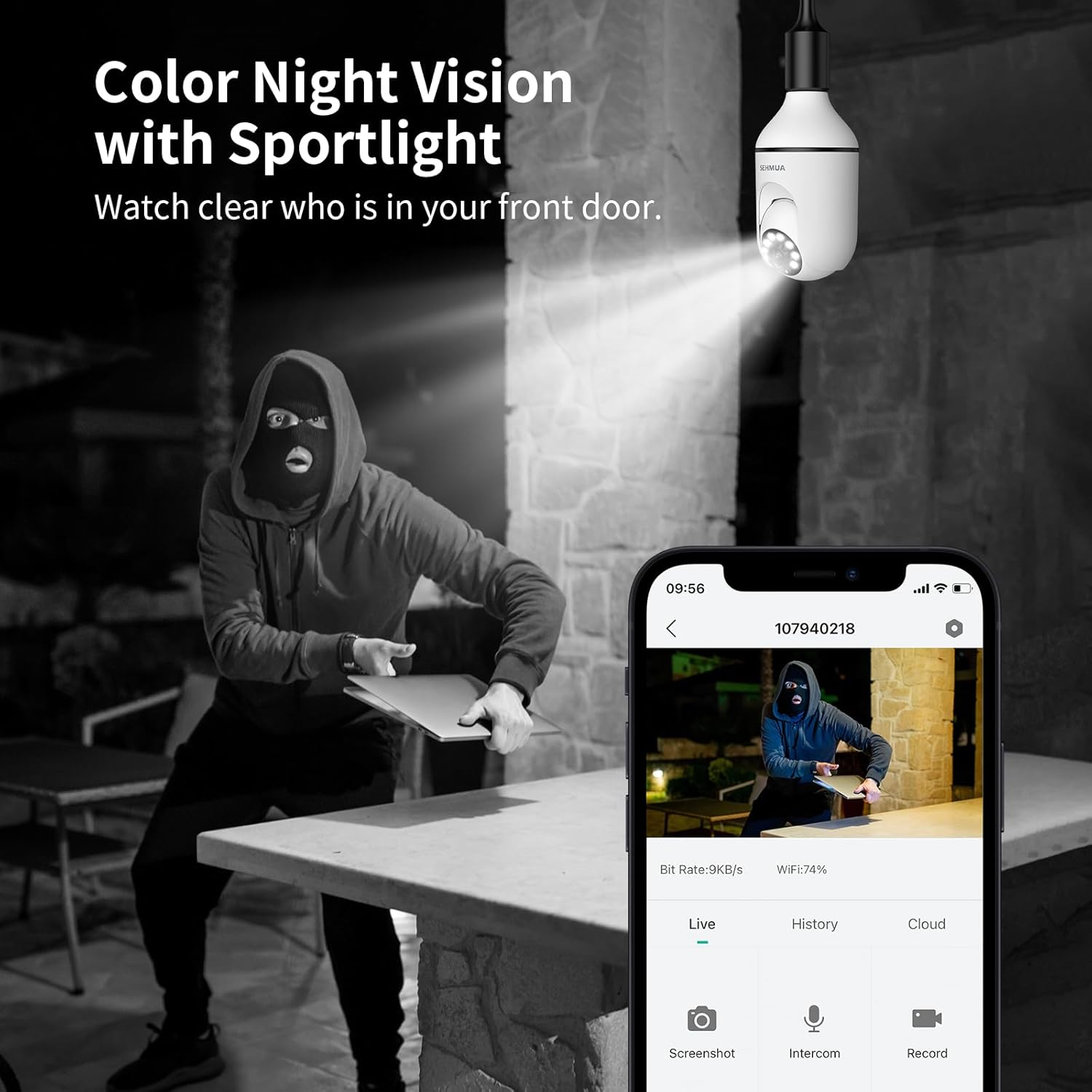
Figure 11: Color Night Vision with spotlight.
4.5 Àudio bidireccional
Communicate with visitors or deter intruders using the camera's two-way audio feature.
- Del directe view A l'aplicació, toca la icona del micròfon per parlar a través de l'altaveu de la càmera.
- The camera's built-in microphone will capture audio from the camera's location, which you can hear through your phone.

Figure 12: Two-Way Audio communication.
4.6 Integració amb Amazon Alexa
The SEHMUA camera can be integrated with Amazon Alexa for convenient voice control and viewen pantalles intel·ligents compatibles.
- Obre l'aplicació Alexa al teu telèfon intel·ligent.
- Cerca and enable the "SEHMUA" skill.
- Link your SEHMUA account with your Alexa account.
- Discover devices. You can now use voice commands like "Alexa, show me the [camera name]" on your Echo Show or other compatible devices.
5. Manteniment
- Neteja: Netegeu suaument la lent i el cos de la càmera amb un drap suau i sec. No utilitzeu productes químics agressius ni netejadors abrasius.
- Actualitzacions de firmware: Regularly check the SEHMUA app for available firmware updates to ensure optimal performance and security.
- Condicions ambientals: While rated IP65 for outdoor use, avoid exposing the camera to extreme temperatures, direct water submersion, or high-pressure water jets.
6. Solució De Problemes
| Problema | Causa possible | Solució |
|---|---|---|
| La càmera no s'encén. | No power to the socket; camera not screwed in properly. | Ensure the light socket has power. Re-screw the camera firmly into the socket. |
| No es pot connectar a la Wi-Fi. | Incorrect Wi-Fi password; camera too far from router; 5GHz Wi-Fi network. | Verify Wi-Fi password. Move camera closer to the router during setup. Ensure you are connecting to a 2.4GHz Wi-Fi network. |
| Sense alertes de detecció de moviment. | Motion detection disabled; sensitivity too low; activity zones not set correctly. | Enable motion detection in the app. Adjust sensitivity. Check and configure activity zones. |
| Poca qualitat de vídeo. | Weak Wi-Fi signal; dirty lens. | Millora la intensitat del senyal Wi-Fi (per exemple, utilitza un extensor Wi-Fi). Neteja la lent de la càmera. |
| L'àudio bidireccional no funciona. | Microphone/speaker muted in app; volume too low. | Check audio settings in the app. Ensure microphone and speaker are not muted and volume is adequate. |
7. Especificacions
| Característica | Detall |
|---|---|
| Número de model | L1 |
| Resolució | 2K Full HD |
| Connectivitat | Wi-Fi de 2.4 GHz |
| Font d'alimentació | Corded Electric (E26/E27 Socket) |
| Angle de panoràmica/inclinació | 350° Pan, 90° Tilt (360° Field of View) |
| Visió nocturna | Color Night Vision with Spotlight |
| Opcions d'emmagatzematge | MicroSD Card (up to 128GB, not included), Cloud Storage (optional) |
| Àudio | Àudio bidireccional |
| Alertes | Motion Detection, Siren, Strobe Light |
| Compatibilitat | Amazon Alexa, Smartphone (iOS/Android) |
| Ús interior/exterior | Exterior (classificació IP65) |
| Pes de l'article | 10.5 unces |
| Dimensions del paquet | 6.89 x 3.31 x 3.23 polzades |
8. Garantia i Suport
For detailed warranty information and technical support, please refer to the warranty card included with your product or visit the official SEHMUA website. You may also find additional resources and FAQs on the product support page.
For further assistance, please contact SEHMUA customer service through the contact information provided on their official weblloc web o dins de l'aplicació mòbil.
A PDF version of the Instructions for Use (IFU) is available for download aquí.


