Producte acabatview
The Aigo Darkflash DK352 Mesh Gaming PC Case is designed for enthusiasts seeking efficient cooling, aesthetic appeal, and ease of use. This mid-tower case supports ATX, Micro-ATX, and Mini-ITX motherboards, offering ample space for high-performance components. It features a mesh front panel for optimal airflow and a tempered glass side panel to showcase your build. Four pre-installed ARGB fans provide immediate cooling and customizable lighting.
Model: DK352-MESH
Marca: Aigo

Figura 1: Frontal esquerre view of the Aigo Darkflash DK352 Mesh Gaming PC Case.
Característiques clau
- Ventiladors ARGB preinstal·lats: Comes with 4 ARGB pre-installed fans for efficient cooling performance and customizable lighting.
- Thermal Enhancement: Supports up to 140mm fans and a 360mm radiator for superior temperature management.
- Easy To Manage: Features a fully transparent front panel and easy-to-detach dust filters on the top and bottom. The 4mm tempered glass left-side panel is easy to attach and detach for maintenance.
- Top I/O Layout: Conveniently located USB 3.0 port for faster data transfer and HD audio output for media management.
- Easy Expansion: Provides 7 expansion slots for effortless upgrades and a bottom-situated power supply for optimized space management.
Especificacions tècniques
| Especificació | Valor |
|---|---|
| Dimensions del producte | 45 x 20 x 39 cm; 5.54 kg |
| Fabricant | Aigo |
| Número de model de l'article | DK352-MESH |
| Compatibilitat amb la placa base | ATX, Micro ATX, Mini ITX |
| Tipus de cas | Torre mitja |
| Usos recomanats | Jocs |
| Color | DK352 Mesh |
| Ventiladors preinstal·lats | 4 ventiladors ARGB de 120 mm |
| Suport del radiador | Fins a 360 mm |
| Panell lateral | Vidre temperat de 4 mm |
| E/S frontal | USB 3.0, HD Audio |
Guia de configuració
Follow these steps to properly set up your Aigo Darkflash DK352 Mesh PC Case and install your components.
1. Unboxing i Inspecció
Carefully remove the PC case from its packaging. Inspect the case for any signs of damage that may have occurred during shipping. Ensure all accessories, such as screws, standoffs, and cable ties, are present.
2. Preparació del cas
Before installing components, remove the tempered glass side panel by unscrewing the four thumb screws. Gently pull the panel away from the case. You may also need to remove the solid right-side panel for cable management access.

Figura 2: Interior view of the PC case, ready for component installation.
3. Instal·lació de la placa base
Install the necessary motherboard standoffs into the motherboard tray according to your motherboard's form factor (ATX, Micro-ATX, or Mini-ITX). Carefully place your motherboard onto the standoffs, aligning the screw holes, and secure it with screws.
4. Instal·lació de la font d'alimentació
The power supply unit (PSU) is installed at the bottom of the case. Slide your PSU into the designated compartment from the rear of the case and secure it with screws.

Figura 3: A baix view, showing the PSU intake area.
5. Instal·lació de la unitat d'emmagatzematge
Install your 2.5-inch SSDs or 3.5-inch HDDs into the designated drive bays. The case provides multiple mounting options for storage devices.
6. Instal·lació de la targeta gràfica i la targeta d'expansió
Remove the necessary PCIe slot covers from the rear of the case. Insert your graphics card or other expansion cards into the appropriate PCIe slots on your motherboard and secure them with screws.
7. Gestió de cables
Utilize the cable routing cutouts and tie-down points behind the motherboard tray to manage your cables. This improves airflow and gives your build a cleaner appearance.

Figura 4: Interior view highlighting cable management possibilities.
8. Instal·lació del ventilador i del radiador
The DK352 Mesh comes with four pre-installed ARGB fans. If you wish to add more fans or a liquid cooling radiator, install them in the designated mounting locations (front, top, or rear) and connect them to your motherboard or fan controller.
Funcionament
Fan Control and Airflow
The pre-installed ARGB fans are designed to provide optimal airflow. Ensure that the fans are properly connected to your motherboard's fan headers or a compatible ARGB controller to manage their speed and lighting effects. The mesh front panel facilitates excellent air intake, while the rear and top fan mounts allow for efficient exhaust, creating a positive pressure system to minimize dust accumulation.
Front I/O Panel Usage
The top-mounted I/O panel provides convenient access to essential ports. Connect your peripherals to the USB 3.0 port for high-speed data transfer. Use the HD audio jacks for headphones and microphones. Ensure all front panel connectors are correctly attached to your motherboard during the setup process.
Manteniment
Neteja del filtre de pols
To maintain optimal airflow and prevent dust buildup inside your PC, regularly clean the dust filters. The Darkflash DK352 Mesh includes easy-to-detach dust filters on the top and bottom (for the PSU intake). Gently slide out the filters, clean them with a soft brush or rinse with water (ensure they are completely dry before re-installing), and then re-attach them.
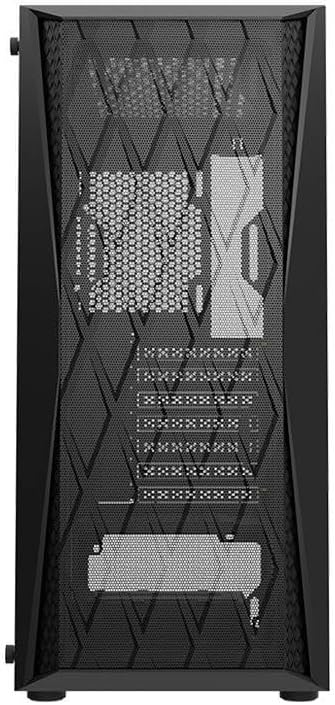
Figure 5: Front mesh panel, which also acts as a dust barrier.
Neteja general
For the exterior of the case, use a soft, damp cloth to wipe down surfaces. Avoid using harsh chemicals or abrasive materials that could damage the finish or tempered glass. For the interior, use compressed air to blow out any accumulated dust from components and hard-to-reach areas.
Resolució de problemes
Problemes comuns i solucions
- Flux d'aire deficient/Temperatures altes:
- Ensure all fans are spinning correctly and are connected to power.
- Netegeu els filtres de pols i els components interns.
- Verify correct fan orientation (intake/exhaust).
- Check for obstructions blocking airflow inside or outside the case.
- Fans Not Lighting Up (ARGB):
- Confirm ARGB cables are securely connected to the motherboard's ARGB header or a dedicated controller.
- Check your motherboard's software or BIOS settings for ARGB control.
- Ports d'E/S frontals no funcionen:
- Ensure all front panel cables (USB 3.0, HD Audio, Power, Reset, LED) are correctly connected to the corresponding headers on your motherboard. Refer to your motherboard manual for header locations.
- Side Panel Difficult to Remove/Attach:
- Ensure all four thumb screws are fully loosened.
- Handle the tempered glass panel carefully to avoid damage.
Garantia i Suport
For warranty information and technical support regarding your Aigo Darkflash DK352 Mesh Gaming PC Case, please refer to the warranty card included with your purchase or visit the official Aigo website. You may also contact the retailer from whom you purchased the product for assistance. Keep your proof of purchase for warranty claims.
Fabricant: Aigo


