Introducció
This manual provides comprehensive instructions for the installation, operation, and maintenance of your Defender Guard Pro PTZ 2K HD Wi-Fi Security Camera. Please read this manual thoroughly before using the product to ensure proper functionality and safety.
Què s'inclou
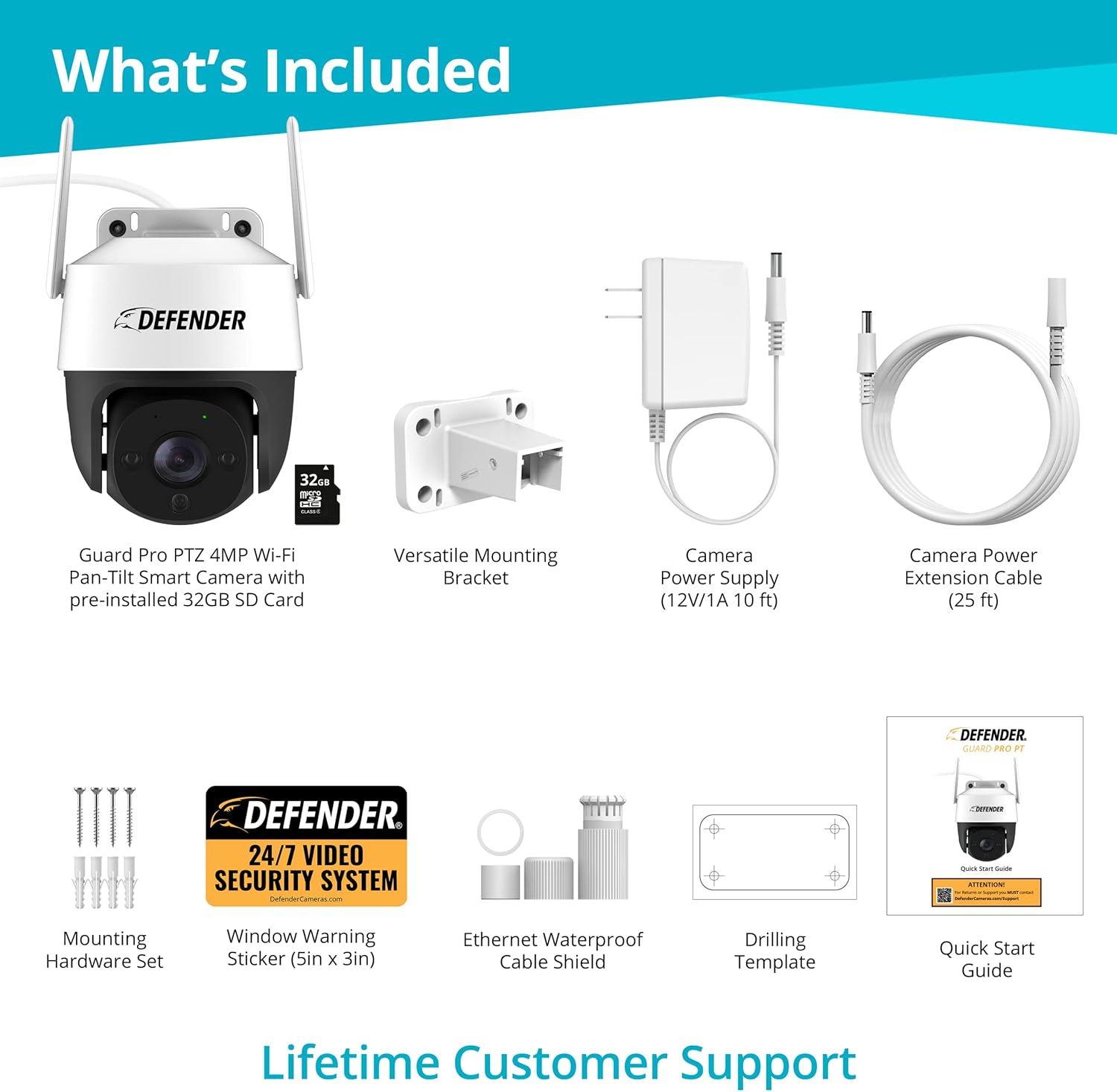
Verifiqueu que tots els components que s'enumeren a continuació s'inclouen al paquet:
- Defender Guard Pro PTZ Color Night Vision 4 MP Wi-Fi Pan, Tilt and Digital Zoom Smart Camera with pre-installed 32GB SD Card
- Set de maquinari de muntatge
- Versatile Mounting Bracket
- Camera Power Supply (12V/1A 10 ft)
- Extension Cable (25 ft)
- 1 x Window Warning Sticker (5” x 3”)
- Ethernet Waterproof Cable Shield
- 1 x plantilla de perforació
- 1 x Guia d'inici ràpid
- 1 x Warranty Registrations Insert
- Lifetime Live Chat Support
Configuració
1. Descarrega l'aplicació
Begin by downloading the Defender Guard app from your smartphone's app store. This app is essential for controlling and managing your camera.

2. Enceneu la càmera
Connect the camera to the provided power supply and plug it into an electrical outlet. The camera will initiate its startup sequence.

3. Pair and Customize Settings
Follow the in-app instructions to pair your camera with your smartphone. Once paired, you can customize various settings such as recording schedules, motion detection sensitivity, and notification preferences.
Instruccions d'ús i característiques
Smart Human & Motion Tracking
The Guard Pro PTZ camera utilizes advanced motion tracking technology to detect and follow humans or any object in motion. When enabled, the camera will automatically track the movement, providing continuous surveillance and sending notifications to your device.

2K QHD ClearVu™ Technology
Experience unparalleled clarity with 2K QHD ClearVu™ Technology. The 3.6mm lens captures crisp details, including license plates, at an impressive 25 frames per second (FPS), ensuring high-quality footage for ultimate protection.

360 Degree Pan, Tilt & Zoom Coverage
Eliminate blind spots with the camera's ability to pan 360 degrees and tilt 90 degrees. You can digitally zoom in and out to precisely view every detail, near or far. The versatile mounting bracket allows for easy installation on any wall or ceiling.

Vibrant Color Night Vision
Capture every detail up to 100 ft away, day or night, with vibrant color night vision. This advanced feature allows you to see full color even in complete darkness, providing enhanced surveillance capabilities.

Crystal Clear Audio & Two-Way Talk
The Guard Pro PTZ provides crystal clear audio, ensuring sound and picture are perfectly synchronized. Use the two-way audio function to communicate with visitors or deter intruders directly from your app, regardless of your location.

Manteniment
To ensure optimal performance and longevity of your Defender Guard Pro PTZ camera, regular maintenance is recommended:
- Neteja: Netegeu periòdicament la lent i la carcassa de la càmera amb un drap suau i sec.amp drap per eliminar la pols i la brutícia. Eviteu utilitzar productes químics o materials abrasius.
- Actualitzacions de firmware: Check the Defender Guard app regularly for available firmware updates. Keeping your camera's firmware up-to-date ensures you have the latest features and security enhancements.
- Connexió d'alimentació: Ensure the power cable and connections are secure and free from damage. As the power cord is not weather-proof, ensure it is installed in a protected location.
- Seguretat de muntatge: Periodically check that the camera's mounting bracket is securely fastened to its surface.
Resolució de problemes
If you encounter issues with your Defender Guard Pro PTZ camera, refer to the following common troubleshooting steps:
- Sense energia: Ensure the power adapter is correctly plugged into both the camera and a working electrical outlet. Check if the outlet is receiving power.
- Sense canal de vídeo: Verify that the camera is connected to your Wi-Fi network. Restart the camera by unplugging and re-plugging the power. Check your internet connection.
- Poca qualitat de vídeo: Ensure the camera lens is clean. Check your Wi-Fi signal strength; a weak signal can affect video quality.
- Problemes de detecció de moviment: Adjust the motion detection sensitivity settings in the app. Ensure the detection zone is correctly configured.
- Problemes d'àudio bidireccional: Check the microphone and speaker settings in the app. Ensure your phone's volume is up.
For further assistance, please contact Defender customer support.
Especificacions
| Característica | Detall |
|---|---|
| Marca | Defensor |
| Model | Guard Pro PTZ 2K HD |
| Tecnologia de connectivitat | Sense fil (Wi-Fi) |
| Resolució de captura de vídeo | 2K/4MP |
| Velocitat de fotogrames | 25 fps |
| Gamma de visió nocturna | 100 peus |
| Camp de View | 360 graus (panoràmica i inclinació) |
| Tipus de zoom | Zoom digital |
| Tipus d'alerta | Motion Only (Human Detection) |
| Font d'alimentació | Corded Electric (12V/1A) |
| Material | Plàstic |
| Ús interior/exterior | A l'aire lliure |
| Classificació de protecció internacional | IP65 |
| Emmagatzematge | Pre-installed 32GB SD Card (Supports up to 256GB Micro SD card) |
| Dimensions | 4.75 x 5.36 x 7.22 polzades |
| Pes de l'article | 1.96 lliures |
Garantia i Suport
Your Defender Guard Pro PTZ camera comes with a warranty. Please refer to the included Warranty Registrations Insert for detailed information regarding warranty coverage and terms. For immediate assistance, Lifetime Live Chat Support is available.
Additional resources, including a detailed fact sheet, can be found aquí.


