1. Producte acabatview
The Logicool Brio 300 is a Full HD 1080p webcam designed to enhance your online meeting experience. It features automatic light correction, a noise-reduction microphone, and a convenient privacy shutter. With its modern design and compatibility with major video conferencing platforms, the Brio 300 ensures clear visuals and audio for all your virtual interactions.

Figure 1: Logicool Brio 300 Weblleva
2. Característiques clau
- Vídeo Full HD 1080p: Delivers crisp and clear video at 30 frames per second, ensuring you look your best in every call.
- Tecnologia RightLight 2: Automatically corrects lighting conditions, from dim environments to direct sunlight, to ensure natural and balanced images.
- Noise Reduction Microphone: The built-in mono microphone captures your voice clearly while suppressing ambient background noise, ensuring your message is heard without distraction.
- Obturador de privacitat integrat: A simple twist of the integrated shutter instantly blocks the camera lens, providing complete privacy when the webla càmera no està en ús.
- Disseny sostenible: Constructed with over 48% recycled plastic, contributing to a more climate-positive world.
- Compatibilitat certificada: Officially certified for Zoom, Microsoft Teams, and Google Meet, ensuring seamless integration and reliable performance across popular video conferencing platforms.
- Logi Tune Software: Free software available for download to customize webcam settings, including color tone, screen resolution, and automatic firmware updates. (Note: Logi Tune currently supports English, French, German, Italian, Spanish, and Portuguese only.)

Figure 2: Full HD 1080p Video Quality

Figure 3: RightLight 2 Automatic Light Correction

Figure 4: Noise Reduction Microphone

Figure 5: Privacy Shutter in Action

Figure 6: Environmentally Conscious Product
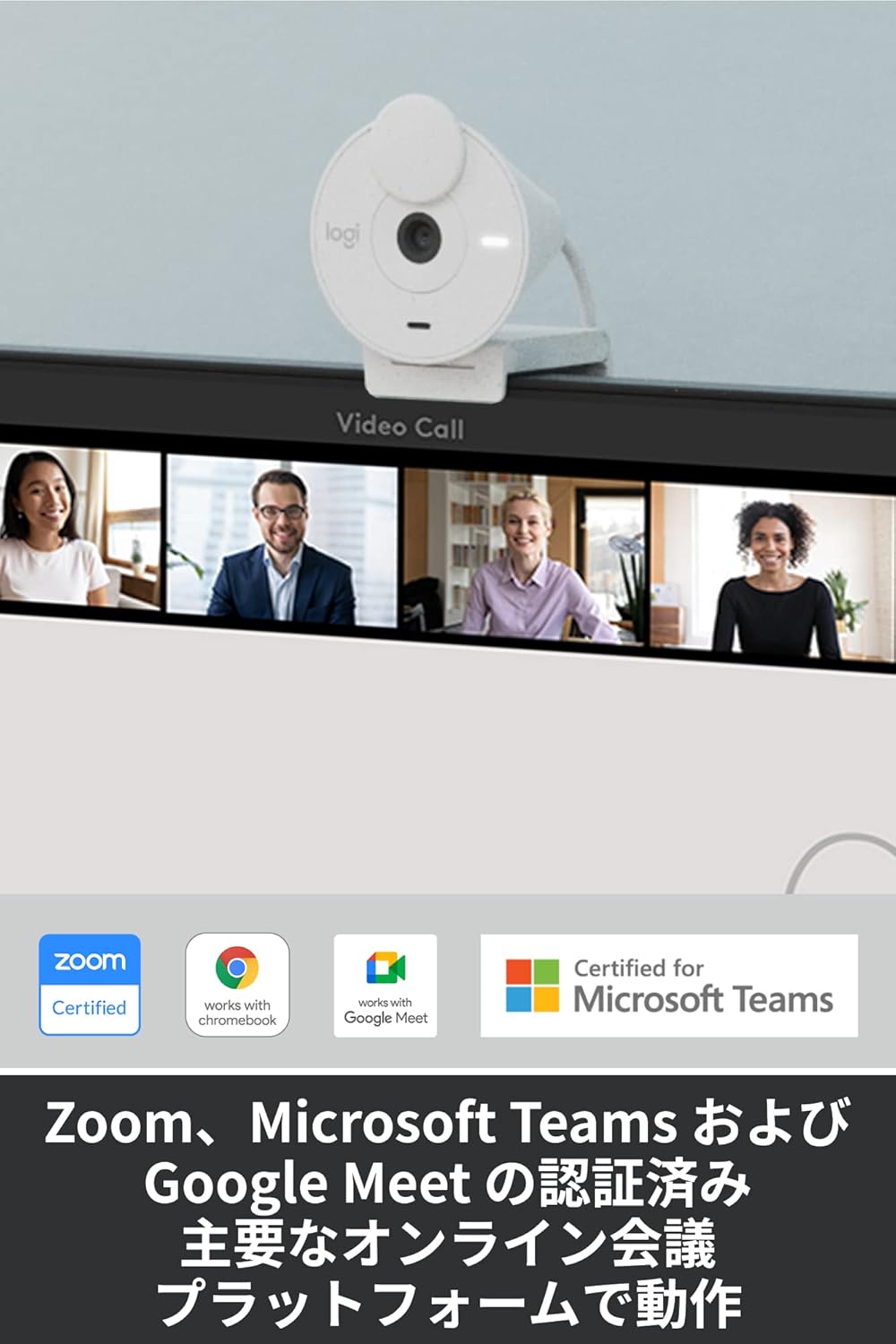
Figure 7: Certified for Major Platforms
3. Configuració
3.1 Connexió física
- Unpack the Brio 300 websortit del seu embalatge.
- Connect the integrated USB-C cable from the webcam to an available USB-C port on your computer (laptop or desktop).
- El webLa càmera és plug-and-play i el sistema operatiu l'hauria de reconèixer automàticament.
3.2 Muntatge
The Brio 300 comes with a versatile mount clip suitable for laptops and monitors.
- Open the mount clip to fit over the top edge of your laptop screen or monitor.
- Assegureu-vos el webcam is stable and positioned centrally for optimal framing.
3.3 Instal·lació de programari (opcional)
For advanced customization and features, download the free Logi Tune software from the official Logicool weblloc.
- Visit the Logicool support weblloc.
- Locate and download the Logi Tune software compatible with your operating system (Windows or macOS).
- Seguiu les instruccions a la pantalla per instal·lar el programari.
4. Instruccions de funcionament
4.1 Ús de l'obturador de privacitat
- To block the camera lens and ensure privacy, simply rotate the integrated privacy shutter until it covers the lens completely.
- To use the camera, rotate the shutter back to expose the lens.
4.2 Adjusting Settings with Logi Tune
Once Logi Tune is installed, you can fine-tune your webcam's performance:
- Open the Logi Tune application.
- Adjust settings such as color tone, brightness, contrast, and resolution to suit your preferences and lighting conditions.
- Enable automatic firmware updates to keep your webcam's software current.
4.3 Compatibility with Video Conferencing Applications
The Brio 300 is designed for seamless use with most video conferencing platforms:
- Obriu la vostra aplicació de videoconferència preferida (per exemple, Zoom, Microsoft Teams, Google Meet, Skype).
- In the application's video settings, select the Logicool Brio 300 as your camera and microphone input.
- Ensure the privacy shutter is open before starting your video feed.
5. Manteniment
- Neteja: Utilitzeu un drap suau i sec per netejar-lo webcam lens and body. Avoid abrasive cleaners or solvents.
- Emmagatzematge: Quan no s’utilitzi, emmagatzemeu el fitxer webcam in a clean, dry place. Utilize the privacy shutter to protect the lens from dust and scratches.
- Cura del cable: Eviteu doblegar o doblegar bruscament el cable USB-C per evitar danys.
6. Solució De Problemes
- Sense vídeo/àudio:
- Ensure the USB-C cable is securely connected to your computer.
- Check that the privacy shutter is open.
- Verify that the Logicool Brio 300 is selected as the camera and microphone in your video conferencing application's settings.
- Intenta connectar el webcam to a different USB-C port or a different computer to rule out port issues.
- Mala qualitat d'imatge:
- Assegureu-vos que la lent estigui neta i sense taques.
- Check your lighting conditions. While RightLight 2 helps, adequate lighting is always beneficial.
- Use Logi Tune software to adjust brightness, contrast, and color settings.
- Mala qualitat d'àudio:
- Assegureu-vos que el micròfon no estigui obstruït.
- Minimitza el soroll de fons del teu entorn.
- Verify microphone levels in your computer's sound settings and the conferencing application.
7. Especificacions
| Característica | Detall |
|---|---|
| Número de model | C700OW |
| Dimensions (with mount clip) | Alçada: 65.63 mm, Amplada: 53.1 mm, Profunditat: 45 mm |
| Pes | 74.6 g |
| Resolució de vídeo | 1080p/30fps (1920x1080 pixels) or 720p/30fps (1280x720 pixels) |
| Camera Megapixels | 2MP |
| Tipus d'enfocament | Enfocament fix |
| Camp Diagonal de View (dFoV) | 70° |
| Hardware Zoom | Zoom digital de 1x |
| Automatic Light Correction | RightLight 2 |
| Tipus de lent | Logi custom 4-element lens with anti-reflective coating |
| Tipus de micròfon | Mono with noise reduction |
| Interval de captació del micròfon | Fins a 1.2 m |
| Connectivitat | USB-C Plug & Play |
| Longitud del cable | 1.5 m |
| Compatibilitat | Windows 10 o posterior, macOS 10.15 o posterior, Chrome OS |
| Certificacions | Zoom, Microsoft Teams, Google Meet, Works with Chromebook |

Figure 8: Product Dimensions and Cable Length
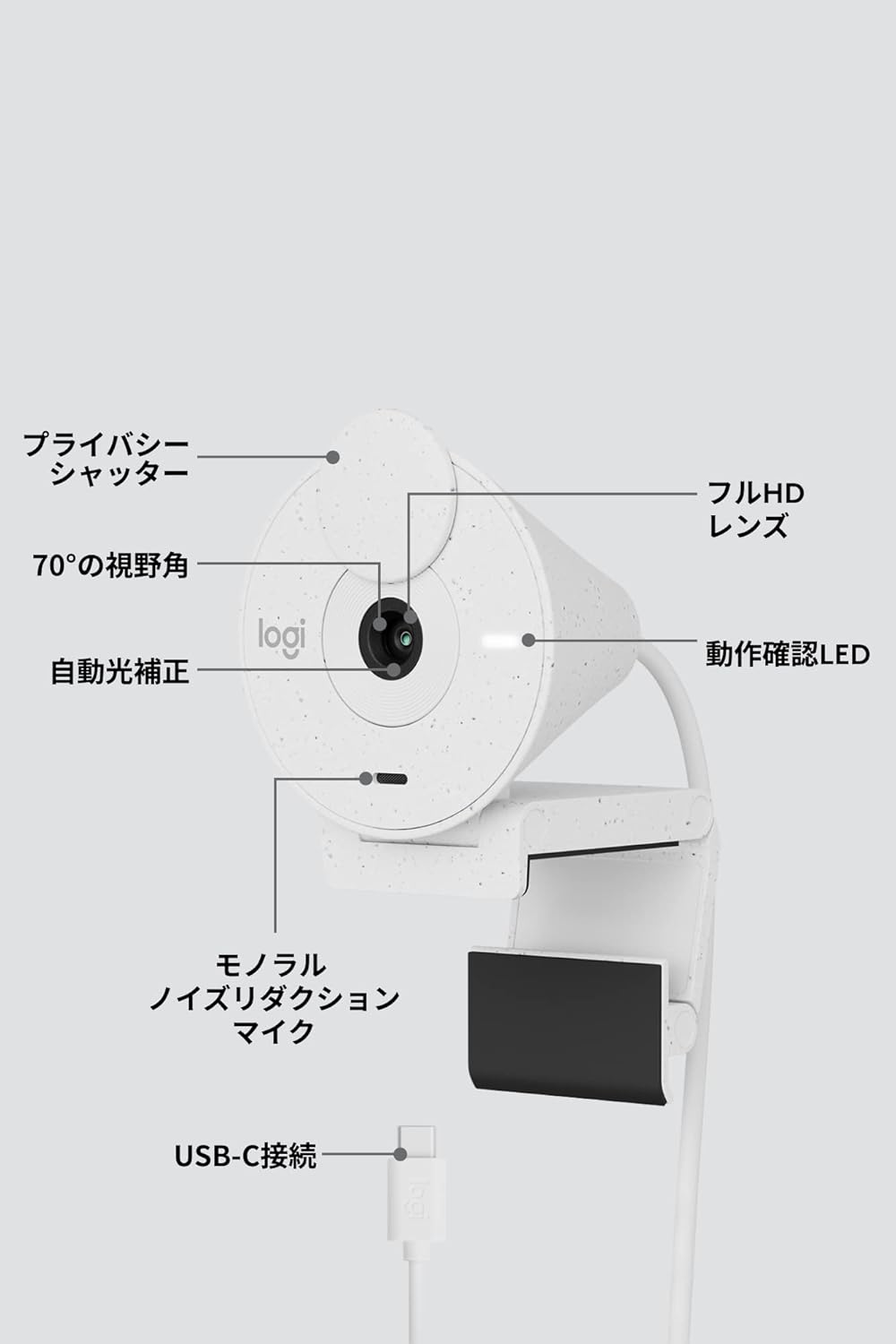
Figura 9: Webcam Component Diagram
8. Garantia i Suport
8.1 Garantia del fabricant
This Logicool Brio 300 webla càmera ve amb una Garantia del fabricant de 1 anys des de la data de compra. Aquesta garantia cobreix els defectes de materials i de mà d'obra en ús normal.
El contingut del paquet inclou:
- Product Body (with integrated USB-C cable)
- Mount Clip and Removable Adapter
- Targeta de garantia
- Normativa de garantia
8.2 Atenció al client
For product defects or technical assistance, please contact the Logicool Customer Center:
- Número de telèfon: 050-3196-5644
- Horari de funcionament: Monday - Friday (excluding holidays and December 31 - January 2), 9:00 AM - 6:00 PM JST
- Web Consulta: https://support.logi.com/hc/ja/
Please note: The Logicool brand is used for products sold in Japan. Logitech is the international brand. Warranty coverage applies to genuine domestic products.


