1. Producte acabatview
The Dangbei DBX3 Pro is an infrared remote control designed for seamless interaction with compatible Dangbei devices, primarily televisions. It features an ergonomic design for comfortable handling and intuitive button placement for easy navigation and control.
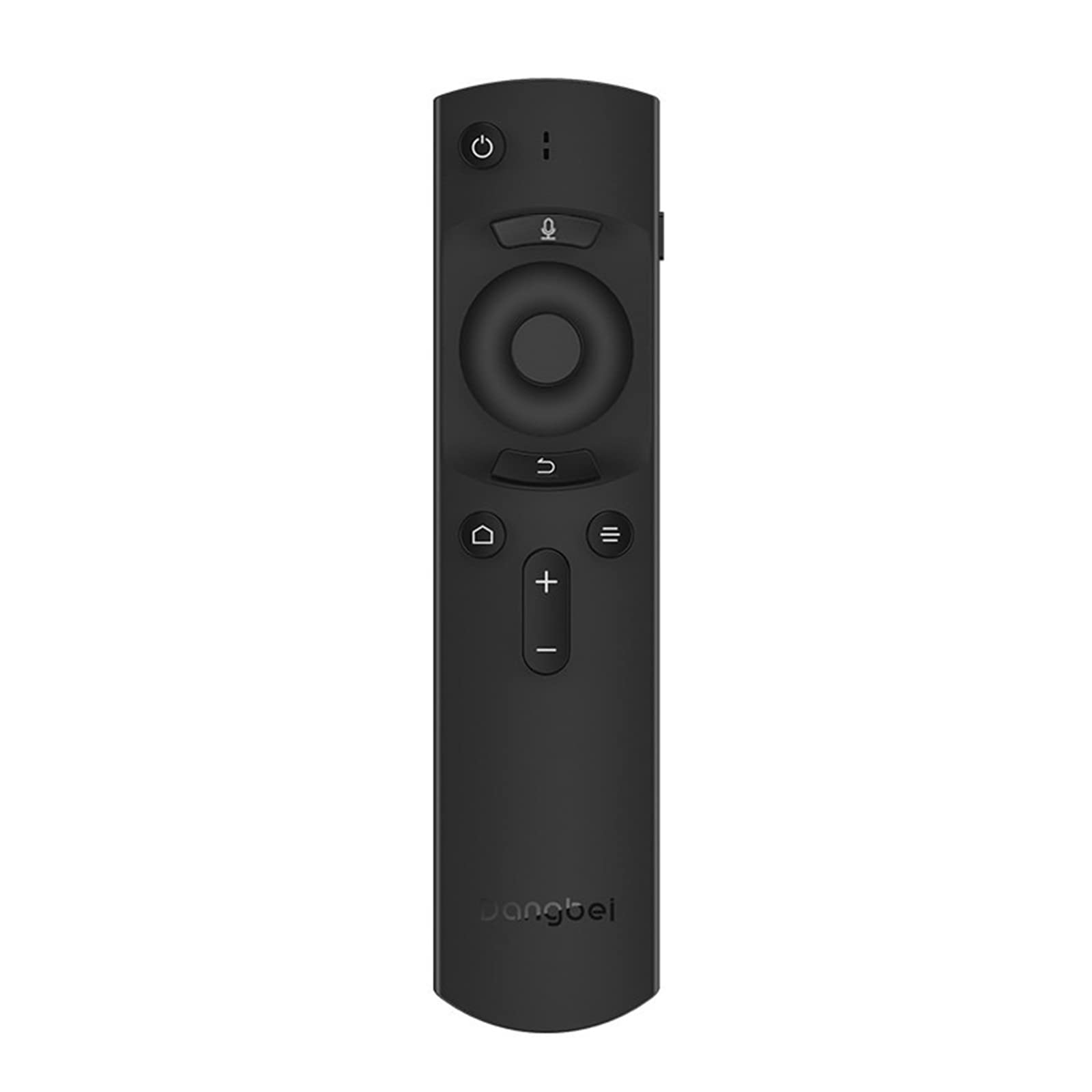
Figura 1: Dangbei DBX3 Pro Remote Control. This image displays the remote control from an angled perspective, highlighting its ergonomic shape and the layout of its primary control buttons, including power, navigation, volume, and home.
Funcions del botó:
- Botó d'encendre (⏻): Encén o apaga el dispositiu connectat.
- Microphone Button (🎙): Activates voice control or voice search features (if supported by the connected device).
- Panell de navegació (amunt, avall, esquerra, dreta): S'utilitza per navegar pels menús i seleccionar elements.
- Botó D'acord: Confirma seleccions o accedeix a menús.
- Botó enrere (↩): Torna a la pantalla o menú anterior.
- Menu/Options Button (☰): Accedeix a opcions addicionals o menús contextuals.
- Botó d'inici (🏠): Returns to the main home screen of the connected device.
- Botons per pujar/baixar el volum (+/-): Ajusta el volum d'àudio.
2. Configuració
2.1. Instal·lació de la bateria
- Localitzeu la tapa del compartiment de la bateria a la part posterior del comandament a distància.
- Feu lliscar la coberta cap avall o premeu el pestell per obrir-la.
- Introduïu dues piles AAA (no incloses), assegurant-vos que els terminals positiu (+) i negatiu (-) s'alineïn correctament amb les marques de l'interior del compartiment.
- Torneu a col·locar la tapa del compartiment de la bateria fins que sentiu un clic i quedi ben fixada al seu lloc.
2.2. Ús inicial
The Dangbei DBX3 Pro remote control operates using infrared (IR) technology. For the remote to function, ensure there is a clear line of sight between the remote's IR emitter (located at the front tip) and the IR receiver on your compatible Dangbei device. Point the remote directly at the device you wish to control.
3. Instruccions de funcionament
3.1. Navegació bàsica
- Utilitza el Bloc de navegació (Up, Down, Left, Right arrows) to move through menus, lists, and content on your screen.
- Premeu el botó Botó D'acord to select a highlighted item, confirm an an action, or open an application.
- Premeu el botó Botó enrere per tornar a la pantalla anterior o sortir d'un menú.
- Premeu el botó Botó d'inici to quickly access the main interface of your device.
3.2. Power and Volume Control
- Premeu el botó Botó d'engegada once to turn your device on or off.
- Utilitza el Puja el volum (+) i Baixar el volum (-) botons per ajustar el nivell de so.
3.3. Voice Control (If Supported)
If your connected Dangbei device supports voice control, press and hold the Botó del micròfon. Speak clearly into the remote control's microphone. Release the button when you have finished speaking. Refer to your device's manual for specific voice command capabilities.
4. Manteniment
4.1. Neteja
Per netejar el comandament a distància, netegeu suaument la superfície amb un drap suau i sec. Per a la brutícia resistent, netegeu lleugeramentampen the cloth with water or a mild, non-abrasive cleaner. Avoid using harsh chemicals, solvents, or abrasive materials, as these can damage the remote's finish or internal components.
4.2. Substitució de la bateria
Replace batteries when the remote's response becomes sluggish or stops working. Always replace both batteries simultaneously with new AAA batteries. Do not mix old and new batteries, or different types of batteries, as this can lead to leakage or malfunction. Dispose of used batteries according to local regulations.
4.3. Emmagatzematge
Store the remote control in a cool, dry place away from direct sunlight, extreme temperatures, and high humidity. If the remote will not be used for an extended period, it is recommended to remove the batteries to prevent potential leakage.
5. Solució De Problemes
| Problema | Causa possible | Solució |
|---|---|---|
| El comandament a distància no respon. |
|
|
| Els botons no responen o són enganxosos. |
|
|
| Curt abast operatiu. |
|
|
6. Especificacions
- Model: DBX3 Pro
- Marca: Dangbei
- Tecnologia de connectivitat: Infrarojos (IR)
- Dispositius compatibles: Television (specifically compatible Dangbei devices)
- Font d'alimentació: 2 piles AAA (no incloses)
- Dimensions del producte: 1.5 x 9.06 x 3.94 polzades (aproximadament 3.8 x 23.0 x 10.0 cm)
- Pes de l'article: 4.6 unces (aproximadament 130 grams)
- Característica especial: Disseny ergonòmic
7. Garantia i assistència
7.1. Informació de la garantia
This Dangbei product is covered by a limited manufacturer's warranty. The specific terms and duration of the warranty may vary by region and purchase date. Please retain your proof of purchase for warranty claims. For detailed warranty information, refer to the documentation provided with your primary Dangbei device or visit the official Dangbei weblloc.
7.2. Atenció al client
For technical assistance, troubleshooting, or inquiries regarding your Dangbei DBX3 Pro remote control, please contact Dangbei customer support. Contact information can typically be found on the official Dangbei website or within the support section of your primary Dangbei device's user interface.
Oficial Weblloc: www.dangbei.com (Si us plau, consulteu les variacions regionals)


