1. Introducció
Thank you for choosing the Amstrad AMS-900-LED-BK Gaming Chair. This chair is designed to provide comfort and an immersive experience with its adjustable features and integrated LED lighting. This manual provides essential information for the safe assembly, operation, and maintenance of your new gaming chair. Please read it thoroughly before use and retain it for future reference.

Figura 1: Frontal view of the Amstrad AMS-900-LED-BK Gaming Chair.
2. Informació de seguretat
- Capacitat de pes màxim: The chair has a maximum weight capacity of 130 kg (286 lliures)No supereu aquest límit per evitar danys o lesions.
- Estabilitat: Always ensure the chair is stable before and during use, especially when reclining the backrest. Avoid sudden movements or leaning excessively to one side.
- Font d'alimentació LED: The integrated LED lighting requires an external 2A minimum USB power supply (not included). Use only compatible power sources.
- Muntatge: Follow all assembly instructions carefully. Ensure all screws and bolts are securely tightened before using the chair.
- Nens i animals de companyia: Keep children and pets away from the chair during assembly. Do not allow children to play on or with the chair unsupervised.
- Manteniment: Periodically check all connections and fasteners to ensure they remain tight. Loose components can lead to instability and potential injury.
- Medi ambient: Use the chair on a flat, stable surface. Avoid exposing the chair to extreme temperatures or direct sunlight for prolonged periods.
3. Muntatge i muntatge
Assembly of the Amstrad AMS-900-LED-BK Gaming Chair is straightforward. It is recommended to assemble the chair on a soft, clean surface to prevent damage to components.
3.1. Desembalatge i comprovació de components
- Traieu amb cura tots els components de l'embalatge.
- Verify that all parts listed in the included parts list are present and undamaged.
3.2. Passos de muntatge
- Fixeu les rodes a la base: Insert the five caster wheels into the holes on the star-shaped chair base until they click securely into place.
- Inseriu l'elevador de gas: Place the gas lift cylinder into the central hole of the assembled chair base. Place the gas lift cover over the cylinder.
- Fixar els reposabraços al seient: Fixeu els reposabraços a la part inferior del coixí del seient amb els cargols proporcionats. Assegureu-vos que estiguin orientats correctament.
- Fixar el respatller al seient: Connect the backrest to the seat cushion using the metal brackets and screws. Do not fully tighten the screws until all are in place.
- Attach Seat Assembly to Gas Lift: Col·loqueu amb cura el seient i el respatller muntats sobre el cilindre d'elevació de gas, assegurant-vos que estigui centrat.
- Instal·lar coixins: Attach the lumbar support cushion and headrest cushion using their integrated straps.
- Connect LED Power: Locate the USB cable for the LED lighting, typically found near the seat. Connect this cable to an external 2A minimum USB power supply (e.g., a power bank or USB wall adapter, not included). The chair features a power bank support area under the seat for convenience.
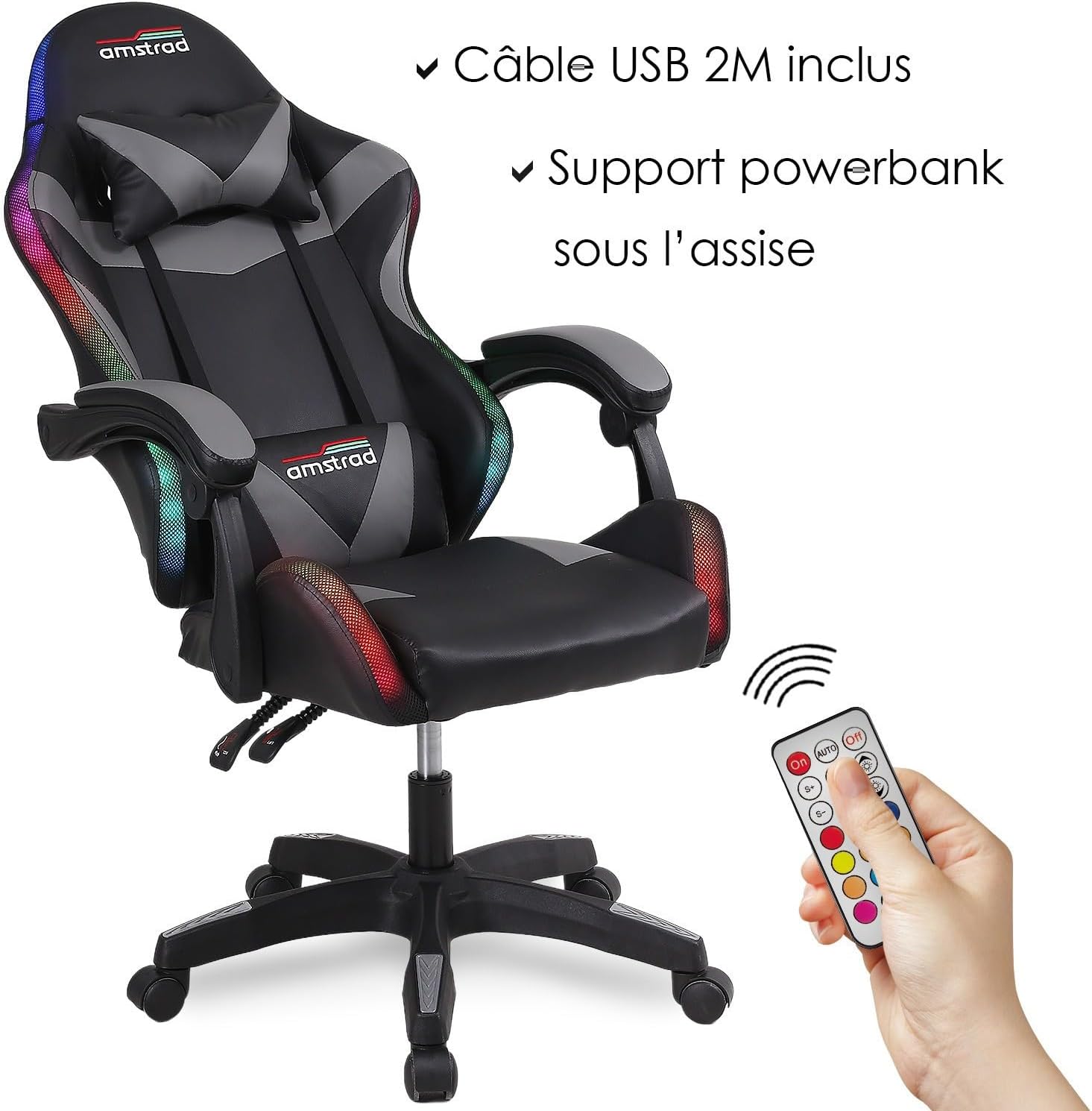
Figure 2: USB cable for LED power and remote control.
4. Instruccions de funcionament
4.1. Chair Adjustments
- Ajust d'alçada: To adjust the seat height, pull the lever located under the seat upwards while applying or releasing body weight. The seat height can be adjusted from approximately 42 cm to 52 cm.
- Reclinació del respatller: To recline the backrest, pull the lever on the side of the chair upwards and lean back. Release the lever at the desired angle (between 90° and 150°). Ensure the chair is stable before reclining.
- Reposabraços: The chair is equipped with two fixed armrests.
- Lumbar and Headrest Cushions: These cushions are adjustable and can be positioned for optimal comfort and support.

Figure 3: Illustration of recline and height adjustment.
4.2. Funcionament de la il·luminació LED
The LED lighting system is controlled by the included remote control.

Figure 4: LED remote control.
- Encès/apagat: Premeu el botó On button to turn on the LEDs and the Apagat botó per desactivar-los.
- Automatic Dynamic Modes: Premeu el botó AUTO button to cycle through 366 dynamic lighting effects.
- Static Color Modes: Select one of the 6 static colors (Red, Green, Violet, Yellow, Blue, Cyan) by pressing the corresponding color button on the remote.
- Ajust de brillantor: Utilitza el S+ i S- buttons to increase or decrease the brightness of the LEDs.
- Selecció del mode: Utilitza el M+ i M- buttons to cycle through different dynamic or static modes.

Figura 5: Mésview of RGB lighting features.
5. Manteniment
Regular maintenance will prolong the life and appearance of your gaming chair.
- Neteja: The chair features a removable cover for easier cleaning. For general cleaning, wipe surfaces with a soft, damp cloth. For stubborn stains, use a mild soap solution and dry thoroughly. Avoid harsh chemicals or abrasive cleaners.
- Elements de fixació: Periodically check all screws, bolts, and connections. Tighten any loose fasteners to maintain stability and prevent squeaking.
- Cura de LED: Ensure the USB cable is not pinched or damaged. Avoid pulling on the LED strips directly.
- Rodes: Clean any debris from the caster wheels to ensure smooth movement.
6. Solució De Problemes
If you encounter issues with your Amstrad gaming chair, refer to the following troubleshooting guide:
| Problema | Causa possible | Solució |
|---|---|---|
| Els LED no s'encenen. | No power supply, incorrect power supply, loose USB connection, remote control battery dead. | Ensure a 2A minimum USB power supply is connected. Check USB cable connection. Replace remote control battery if necessary. |
| Chair feels unstable or makes noise. | Loose screws or bolts, improper assembly. | Check and tighten all assembly screws and bolts, especially those connecting the backrest and armrests. Review passos de muntatge. |
| L'ajust d'alçada no funciona. | Gas lift malfunction, lever mechanism stuck. | Ensure the height adjustment lever is fully engaged. If the issue persists, contact customer support. |
| Backrest does not recline. | Recline lever stuck, mechanism obstruction. | Ensure the recline lever is pulled completely. Check for any obstructions around the recline mechanism. |
7. Especificacions
| Característica | Detall |
|---|---|
| Marca | Amstrad |
| Model | AMS-900-LED-BK |
| Color | Negre / Gris |
| Dimensions del producte (L x A x A) | 47 x 47 x 52 cm (Seat dimensions, overall dimensions vary with recline/height) |
| Ajust de l’altura del seient | 42 cm a 52 cm |
| Angle d'inclinació del respatller | 90° a 150° |
| Material | Polyvinyl Chloride (PVC), Metal Frame |
| Capacitat màxima de pes | 130 kg (286 lliures) |
| Efectes d'il·luminació LED | 366 Dynamic Modes, 6 Static Colors (Red, Green, Violet, Yellow, Blue, Cyan) |
| LED Power Requirement | External 2A minimum USB power supply (not included) |
| Mètode de control | Control remot |
| Característiques especials | Adjustable Armrests, Adjustable Backrest, Adjustable Height, Removable Cover, Reclinable, Lumbar Cushion, Headrest |

Figure 6: Chair dimensions diagram.
8. Garantia i Suport
Informació de la garantia: Specific warranty details for the Amstrad AMS-900-LED-BK Gaming Chair may vary by region and retailer. Please refer to your purchase documentation or contact the retailer where you purchased the product for detailed warranty terms and conditions.
Atenció al client: For technical assistance, missing parts, or any other inquiries, please contact the retailer or the manufacturer directly. Contact information can typically be found on the product packaging or the retailer's weblloc.
Please have your model number (AMS-900-LED-BK) and proof of purchase ready when contacting support.


