1. Introducció
Thank you for choosing the Vetroo 1000W Black Power Supply. This power supply unit (PSU) is designed to provide stable and efficient power to your personal computer, especially for high-performance gaming and workstation builds. It features 80 Plus Gold certification for energy efficiency, full modular cabling for easy management, and is compliant with the latest ATX 3.1 and PCIe 5.1 standards. This manual provides essential information for safe installation, operation, and maintenance of your PSU.
2. Informació de seguretat
Please read and understand all safety warnings before installing or operating this product. Failure to follow these instructions may result in electric shock, fire, or serious injury.
- Vol. Alttage: The PSU contains high voltage components. Do not open the PSU casing. No hi ha peces que l'usuari pugui reparar a l'interior.
- Instal·lació professional: Installation should be performed by qualified personnel. Incorrect installation can damage your system or the PSU.
- Desconnexió d'alimentació: Always disconnect the AC power cord from the wall outlet before installing, removing, or cleaning the PSU or any other components in your computer.
- Posada a terra: Ensure the PSU is properly grounded. Use only the provided power cord.
- Medi ambient: Operate the PSU in a dry, well-ventilated environment. Avoid exposure to moisture, extreme temperatures, or direct sunlight.
- Ventilació: Do not block the ventilation openings of the PSU. Ensure adequate airflow around the unit.
- Gestió de cables: Ensure all cables are securely connected and routed to prevent interference with cooling fans or other components.
3. Contingut del paquet
Verifiqueu que tots els elements siguin presents al vostre paquet:
- Vetroo 1000W Black Power Supply Unit
- Modular Cable Set (including 24-pin ATX, 8-pin CPU, PCIe 5.1 12+4-pin, PCIe 6+2-pin, SATA, Molex, FDD cables)
- Cable d'alimentació CA
- Cargols de muntatge
- Cable Ties/Velcro Straps
- Manual d'usuari (aquest document)


4. Característiques del producte
- Certificació 80+ Gold: Ensures high energy efficiency, reducing power consumption and heat generation.
- Fully Compliant with ATX 3.1 Specifications: Designed to meet the latest power delivery standards for modern PC components.
- Preparat per a PCIe Gen 5.1: Equipped with dedicated 12+4-pin connectors for the latest PCIe 5.1 graphics cards, offering up to 600W power delivery. Also backwards compatible with PCIe 4.0 and 3.0.
- Premium 105° C Capacitors: Utilizes high-quality Japanese capacitors for enhanced stability, reliability, and extended lifespan.
- Disseny modular complet: Allows users to connect only the necessary cables, improving airflow and simplifying cable management within the PC case.
- Eco Mode with 120mm FDB Fan: Features a fluid dynamic bearing (FDB) fan that operates silently under low loads, with an Eco Mode switch to stop the fan entirely when power consumption is below 50%.
- Mida compacta: Designed to fit comfortably in various PC chassis types.
- Protecció integral: Inclou més de Vol.tage Protection (OVP), Over Current Protection (OCP), Over Power Protection (OPP), Short Circuit Protection (SCP), Under Voltage Protection (UVP), and Over Temperature Protection (OTP).
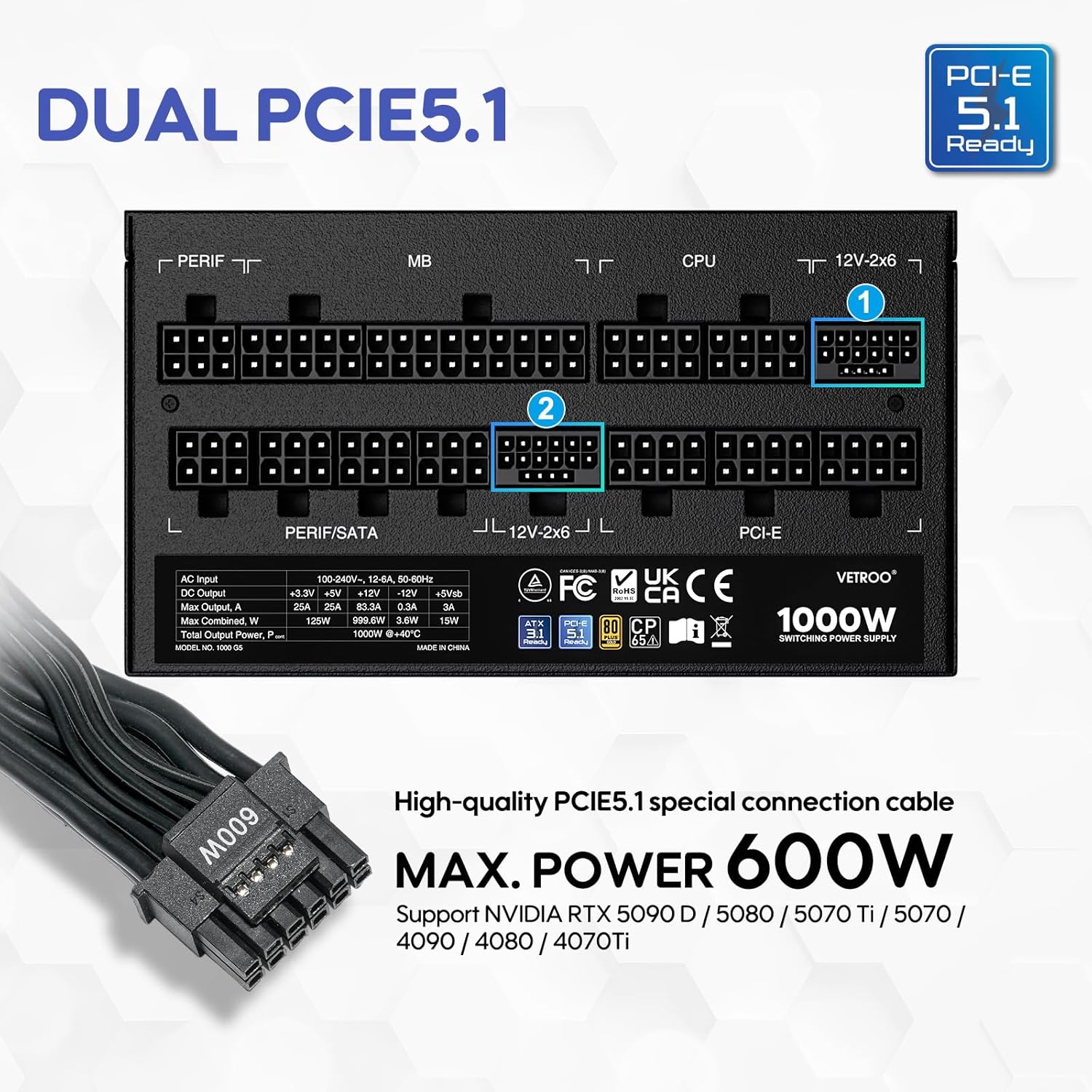

5. Especificacions
| Característica | Detall |
|---|---|
| Nom del model | 1000G5 |
| Potència de sortidatage | 1000 watts |
| Factor de forma | ATX |
| Disseny de fonts d'alimentació | Completament Modular |
| Certificació d'eficiència | 80 més d'or |
| Estàndard ATX | Preparat per ATX 3.1 |
| Estàndard PCIe | PCIe 5.1 Ready (Dual) |
| Mètode de refrigeració | Aire (ventilador FDB de 120 mm) |
| Dimensions del producte (L x A x A) | 5.9 x 5.5 x 3.4 polzades |
| Pes de l'article | 5.83 lliures |
| Dispositius compatibles | Ordinador personal |
| Tipus de connector | ATX & PCIE |

6. Configuració i instal·lació
Follow these steps to install your Vetroo 1000W Power Supply:
- Prepareu el vostre sistema: Assegureu-vos que l'ordinador estigui completament apagat i desendollat de la presa de corrent. Obriu la carcassa de l'ordinador per accedir a la zona de muntatge de la font d'alimentació.
- Traieu la font d'alimentació antiga (si escau): Disconnect all cables from your old power supply and remove it from the chassis.
- Muntar la nova font d'alimentació: Carefully slide the Vetroo 1000W PSU into the designated power supply bay in your PC case. Secure it with the provided mounting screws.
- Connecteu els cables modulars: Identify the necessary cables for your motherboard, CPU, graphics card(s), and storage devices. Connect these cables to the corresponding ports on the PSU first, then route them to your components.
- Placa base: Connecteu el cable ATX de 24 pins a la placa base.
- CPU: Connect the 8-pin (or 4+4-pin) CPU power cable(s) to your motherboard.
- Targetes gràfiques: For modern GPUs, use the PCIe 5.1 12+4-pin cable. For older or additional GPUs, use the PCIe 6+2-pin cables.
- Storage/Peripherals: Connect SATA power cables to SSDs/HDDs and Molex cables for other peripherals as needed.
- Gestió de cables: Use the included cable ties or Velcro straps to organize cables, ensuring optimal airflow and a tidy build.
- Connexions finals: Close your PC case. Connect the AC power cord to the PSU and then to a wall outlet or surge protector.

7. Instruccions de funcionament
- Encès/apagat: After all connections are secure, flip the main power switch on the back of the PSU to the 'ON' position. Your computer can now be powered on via its front panel button. To power off, shut down your computer normally, then flip the PSU switch to 'OFF' for complete power disconnection.
- Mode Eco: The Vetroo 1000W PSU features an Eco Mode switch on the rear panel.
- Eco Mode ON: When the Eco Mode switch is in the 'ON' position, the PSU fan will remain off under low to moderate loads (typically below 50% load) for silent operation. The fan will automatically activate when the load increases or internal temperature rises.
- Eco Mode OFF: When the Eco Mode switch is in the 'OFF' position, the PSU fan will spin continuously regardless of the load, providing constant cooling.

8. Manteniment
Un manteniment adequat garanteix la longevitat i el rendiment òptim de la font d'alimentació:
- Neteja de pols: Periodically clean the PSU fan and ventilation grilles to prevent dust buildup, which can hinder cooling performance. Use compressed air to gently blow dust away. Always disconnect power before cleaning.
- Inspecció del cable: Comproveu regularment totes les connexions dels cables modulars per assegurar-vos que estiguin ben fixades i que no estiguin danyats.
- Condicions ambientals: Maintain a clean, dry, and well-ventilated environment for your PC to prevent excessive heat and moisture exposure to the PSU.
9. Solució De Problemes
If you encounter issues with your Vetroo 1000W Power Supply, try the following steps:
- Sense energia:
- Assegureu-vos que el cable d'alimentació de CA estigui ben connectat tant a la font d'alimentació com a la presa de corrent.
- Verifiqueu que l'interruptor principal de la font d'alimentació estigui en la posició 'ON'.
- Check all modular cable connections, especially the 24-pin ATX and 8-pin CPU cables, to ensure they are fully seated.
- Proveu la presa de corrent amb un altre dispositiu per confirmar que tingui corrent.
- Inestabilitat del sistema/aturades aleatòries:
- Assegureu-vos que la vostra font d'alimentació estigui calentatage és suficient per a tots els components, especialment les GPU d'alta potència.
- Comproveu que la carcassa de l'ordinador estigui ben ventilada per evitar que s'escalfi massa.
- Verify that all PCIe power cables to your graphics card(s) are correctly connected.
- If Eco Mode is enabled, try disabling it to see if continuous fan operation resolves the issue.
- Sorolls inusuals:
- If you hear a fan noise, ensure the PSU fan is not obstructed by cables or dust.
- If a 'coil whine' noise is present, it is often harmless but can sometimes indicate a component under stress. Ensure your system is not drawing excessive power.
If problems persist after performing these checks, please contact Vetroo customer support for further assistance.
10. Garantia i Suport
The Vetroo 1000W Black Power Supply comes with a 10 anys de garantia des de la data de compra. Aquesta garantia cobreix els defectes de materials i de mà d'obra en ús normal.
La garantia no cobreix:
- Danys causats per accident, abús, mal ús, inundació, incendi, terratrèmol o altres causes externes.
- Damage caused by operating the product outside the permitted or intended uses described by Vetroo.
- Damage caused by service (including upgrades and expansions) performed by anyone who is not a representative of Vetroo.
- Products or parts that have been modified to alter functionality or capability without the written permission of Vetroo.
For warranty claims or technical support, please visit the official Vetroo website or contact their customer service department with your product model and proof of purchase.


