Introducció
This user manual provides comprehensive instructions for the setup, operation, maintenance, and troubleshooting of your UNITED LED24HS82A11 24-inch HD Ready Smart Android TV. Please read this manual thoroughly before using your television to ensure proper and safe operation.
The UNITED LED24HS82A11 is a versatile 24-inch HD Ready Smart TV powered by Android 11, offering a wide range of entertainment options. It features pre-installed applications, built-in Chromecast and Airplay for seamless content streaming, and full internet connectivity via Wi-Fi and Ethernet. It also supports DVB/T2/S2/C, MPEG-4, and HEVC Main 10 for various broadcasting standards.
Informació de seguretat
Observeu sempre les següents precaucions de seguretat per evitar incendis, descàrregues elèctriques o lesions:
- No exposeu el televisor a la pluja o la humitat.
- No bloquejar les obertures de ventilació.
- Assegureu-vos que el cable d'alimentació no estigui pessigat ni trepitjat.
- Desendolleu el televisor durant tempestes o quan no l'utilitzeu durant períodes prolongats.
- Demaneu tot el servei a personal de servei qualificat.
Configuració
1. Desembalatge i instal·lació del suport
Carefully remove the TV and all accessories from the packaging. Place the TV face down on a soft, clean surface to prevent screen damage.
Attach the two stand feet to the bottom of the TV using the provided screws. Ensure they are securely fastened.

Figura 1: lateral view of the UNITED LED24HS82A11 TV, illustrating its slim profile and potential port locations.
2. Cables de connexió
- Potència: Connecteu el cable d'alimentació a l'entrada d'alimentació del televisor i després a una presa de corrent.
- Antena/cable: Connect your antenna or cable TV coaxial cable to the "RF In" port.
- Dispositius HDMI: Connect external devices like Blu-ray players, game consoles, or set-top boxes to the HDMI ports.
- Ethernet (opcional): Per a una connexió a Internet per cable, connecteu un cable Ethernet des del router al port LAN del televisor.
3. Assistent de configuració inicial
Once powered on, the TV will guide you through the initial setup process. Follow the on-screen prompts to:
- Seleccioneu el vostre idioma preferit.
- Connect to your Wi-Fi network (if not using Ethernet).
- Sign in with your Google account (optional, but recommended for full Smart TV features).
- Scan for available TV channels (Antenna/Cable).
En funcionament
Control remot acabatview
Familiarize yourself with the buttons on the remote control for easy navigation and control of your TV's functions.
Funcions bàsiques del televisor
- Encès/apagat: Premeu el botó d'engegada del comandament a distància o del televisor.
- Control de volum: Feu servir els botons de pujar/baixar el volum.
- Selecció de canals: Feu servir els botons de canal amunt/avall o el teclat numèric.
- Font d'entrada: Press the "Source" or "Input" button to switch between HDMI, TV, and other inputs.
Smart TV Features (Android 11)
Your TV runs on Android 11, providing access to a vast ecosystem of apps and services.

Figure 2: The UNITED LED24HS82A11 TV showcasing its Android TV home screen, featuring popular streaming applications like YouTube, Prime Video, and Netflix.
- Pantalla d'inici: Navigate the home screen to access pre-installed apps (Netflix, YouTube, Prime Video), recommended content, and settings.
- Google Play Store: Download additional apps, games, and content from the Google Play Store.
- Chromecast integrat: Cast content directly from your compatible smartphone, tablet, or computer to the TV. Look for the Cast icon in supported apps.
- Airplay: For Apple devices, use Airplay to stream videos, photos, and music from your iPhone, iPad, or Mac to the TV.
- Connectivitat a Internet:
- Wi-Fi: Go to Settings > Network & Internet to connect to your wireless network.
- Ethernet: If an Ethernet cable is connected, the TV will automatically use the wired connection.
Manteniment
Neteja del televisor
- Desendolla sempre el televisor abans de netejar-lo.
- Use a soft, lint-free cloth to gently wipe the screen. For stubborn marks, dampen the cloth slightly with water or a screen cleaner specifically designed for electronics.
- Netegeu el televisor casinNetegeu amb un drap suau i sec. Eviteu utilitzar productes de neteja o dissolvents abrasius.
Actualitzacions de programari
Your TV may receive software updates to improve performance and add new features. You can check for updates via Settings > Device Preferences > About > System update.
Resolució de problemes
Si teniu problemes amb el televisor, consulteu els problemes i solucions més comuns següents:
| Problema | Possible causa/solució |
|---|---|
| Sense poder | Comproveu si el cable d'alimentació està ben connectat al televisor i a la presa de corrent. Proveu una altra presa de corrent. |
| Sense imatge / Sense so | Ensure the correct input source is selected (e.g., HDMI 1, TV). Check cable connections. For TV channels, perform a channel scan. |
| No es pot connectar a la Wi-Fi | Verifiqueu la contrasenya del Wi-Fi. Reinicieu el router i el televisor. Assegureu-vos que el televisor estigui dins de l'abast del senyal Wi-Fi. |
| El control remot no funciona | Revisa i substitueix les piles. Assegura't que no hi hagi cap obstrucció entre el comandament a distància i el sensor d'infrarojos del televisor. |
| Les aplicacions no es carreguen / Rendiment lent | Check your internet connection speed. Clear app cache (Settings > Apps > [App Name] > Clear cache). Restart the TV. |
Especificacions
Below are the technical specifications for the UNITED LED24HS82A11 TV:
| Característica | Especificació |
|---|---|
| Marca | Units |
| Número de model | LED24HS82A11 |
| Mida de la pantalla | 24 polzades |
| Tecnologia de visualització | LED |
| Resolució | 768p (1366 x 768 píxels) |
| Freqüència d'actualització | 60 Hz |
| Sistema operatiu | Android 11 |
| Connectivitat | Wi-Fi, Ethernet, HDMI, RF, USB |
| Característiques especials | Flat Screen, Chromecast Built-in, Airplay, Pre-installed Apps (Netflix, YouTube, Prime Video) |
| Relació d'aspecte | 16:9 |
| Dimensions del producte (L x A x A) | 12 D x 60.5 W x 43.2 H centímetres |
| Components inclosos | 1 mini AV adapter cable, 1 remote control with 2 AAA 1.5V batteries |
| Classe d'eficiència energètica | F |
| Consum d'energia (SDR) | 21.0 W |
| Consum d'energia (HDR) | 21.0 W |
| Consum d'energia (en espera) | 0.3 W |

Figure 3: The energy efficiency label for the UNITED LED24HS82A11 TV, indicating an 'F' energy class rating and 21 kWh per 1000 hours of operation.
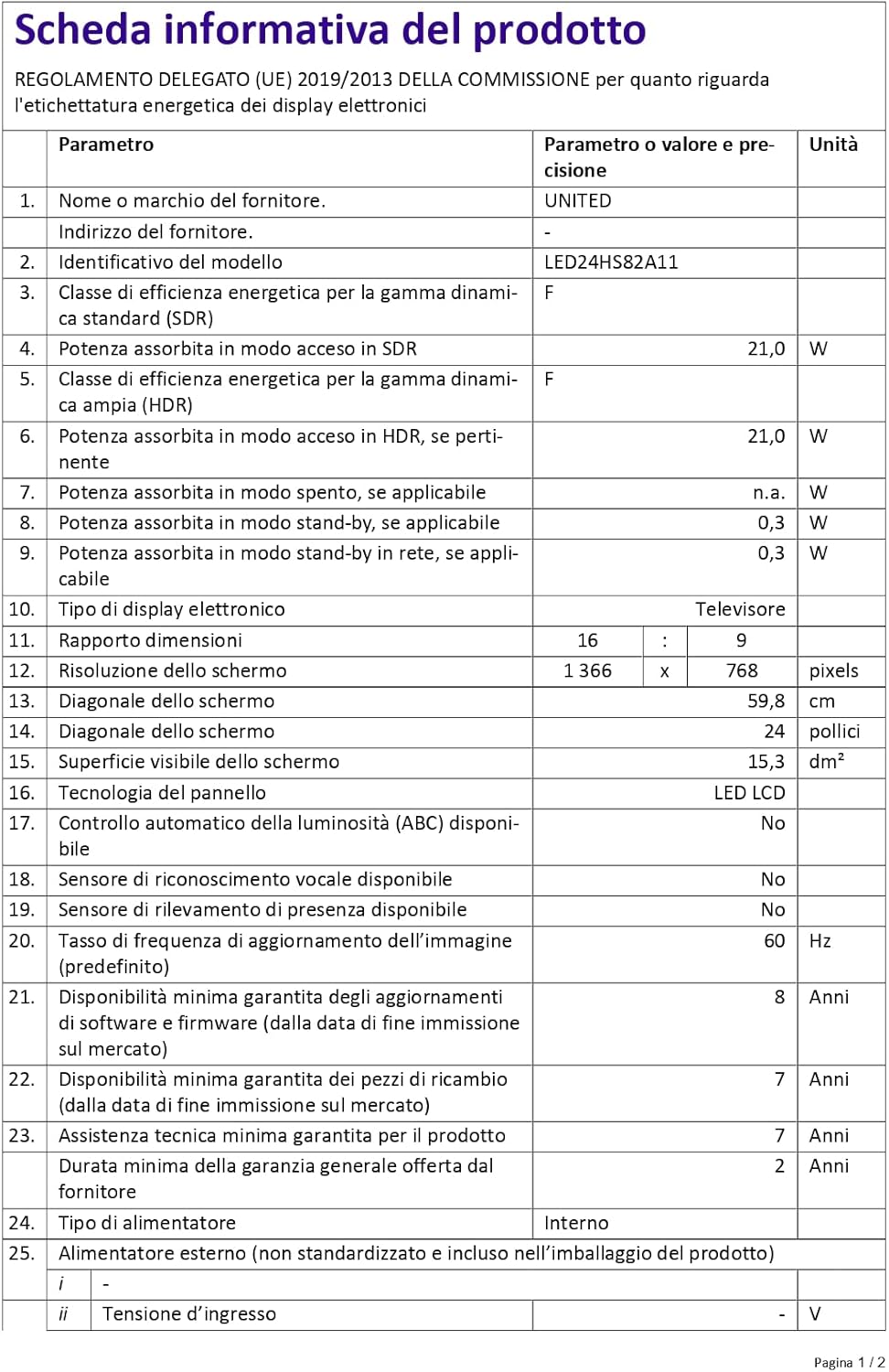
Figure 4: A detailed product information sheet for the UNITED LED24HS82A11 TV, providing comprehensive technical specifications and compliance details.
Per obtenir informació més detallada, consulteu la base de dades oficial d'EPREL: https://eprel.ec.europa.eu/qr/1087921
Garantia i Suport
Your UNITED LED24HS82A11 TV comes with the following support and warranty provisions:
- Minimum General Warranty: 2 Anys
- Technical Assistance Availability: 7 Anys
- Actualitzacions de programari garantides fins a: 8 Years from market placement date
- Disponibilitat de peces de recanvi: 7 Years from market placement date
For technical support or warranty claims, please contact your retailer or the manufacturer's authorized service center. Keep your proof of purchase for warranty validation.


