Introducció
The Kidde Hardwired Smoke & Carbon Monoxide Detector (Model 900-CUAR) is a combination alarm designed to detect both smoke and carbon monoxide gas. This device operates through your home's 120V AC wiring and includes a 2-AA battery backup to ensure continuous protection during power outages. It features self-testing components, LED warning light indicators, and interconnectability with other compatible Kidde alarms for enhanced home safety.

Figure 1: Kidde Hardwired Smoke & Carbon Monoxide Detector with its packaging.
Configuració i instal·lació
Proper installation is crucial for the effective operation of your Kidde detector. This unit is designed for hardwired installation and comes with a mounting bracket for easy setup.
1. Ubicació de muntatge
Install the combination smoke and carbon monoxide detector on every level of your home and near bedrooms to help keep your family safe. Refer to local codes and the provided Home Safety Product Placement Guide for optimal placement.

Figure 2: Home Safety Product Placement Guide for smoke and carbon monoxide alarms.

Figure 3: Map illustrating state-specific carbon monoxide and smoke alarm requirements.
2. Wiring and Power
The detector operates on 120V AC power and includes a 2-AA battery backup (included) for continuous operation during power outages. Ensure power is disconnected before installation. The easy installation mounting bracket allows for quick installation in 4 orientations.

Figure 4: The detector's battery compartment, showing the two AA batteries for backup power.

Figure 5: The mounting bracket, designed for simple and quick installation in various orientations.
3. Interconnexió
This alarm is interconnectable with select Kidde alarms that have hardwired AC interconnect capability. When one alarm sounds, all interconnected alarms will sound to help alert you and your family quicker. Refer to the User Guide for compatible models.

Figure 6: Illustration of interconnected alarms providing comprehensive coverage throughout a home.
4. Vídeo d'instal·lació
Video 1: Official Kidde video demonstrating the installation process for the Hardwired Smoke & Carbon Monoxide Detector.
Instruccions de funcionament
The Kidde detector is designed for continuous operation and provides clear indications of its status.
1. Alarm Status Indicators
The device features LED warning indicators that alert you to various operational statuses:
- LED verd: Indica el funcionament normal.
- LED ambre: Alerts to faulty operation or connection.
- LED vermell: Indicates a smoke, fire, or carbon monoxide event. The alarm will also sound an 85-decibel alarm.
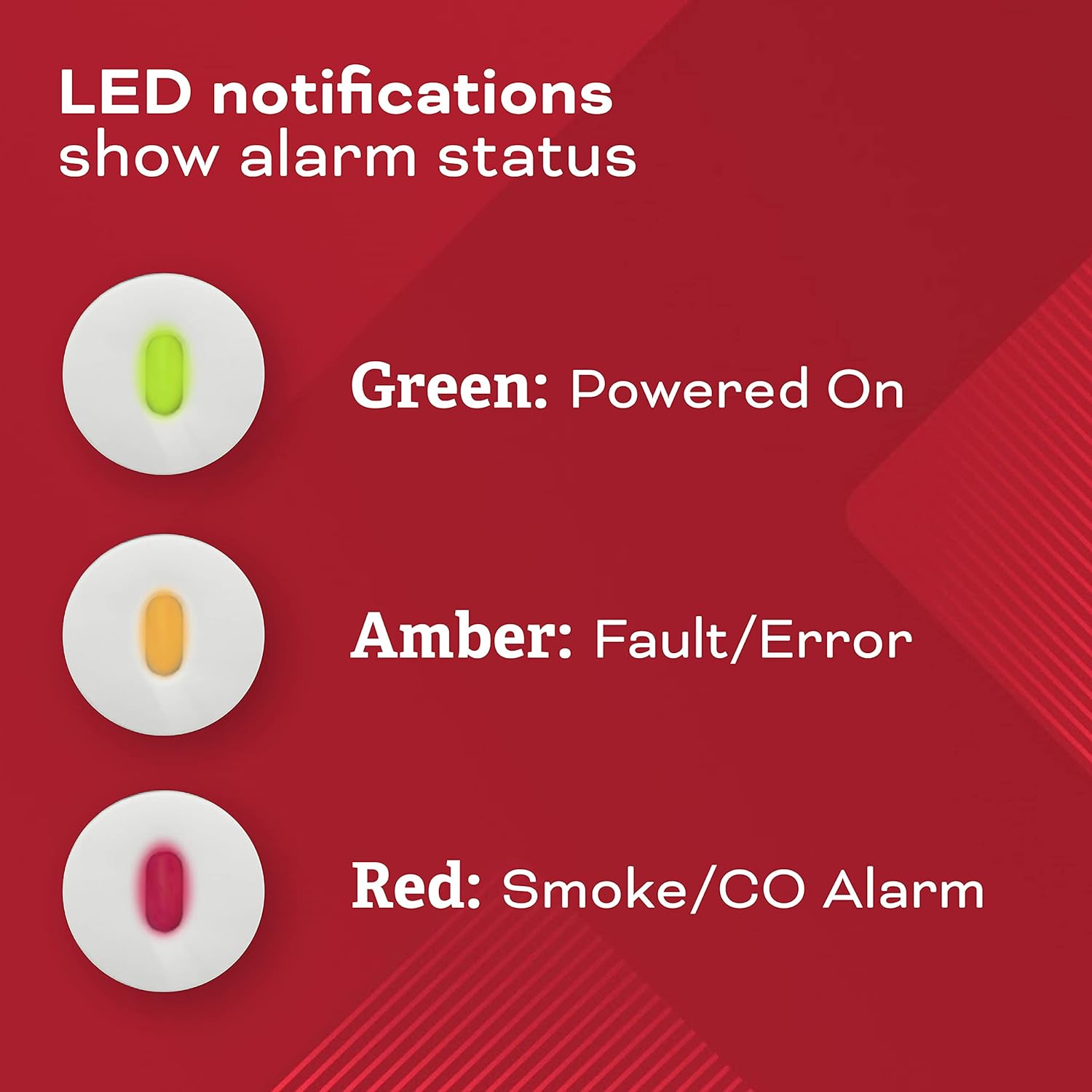
Figure 7: Visual representation of LED indicators for different alarm statuses.
2. Smart-Hush Button
The Smart-Hush button allows you to temporarily silence the unit for approximately 8 minutes. This feature is useful when the alarm sounds due to non-emergency events like routine cooking or shower steam.
3. Self-Testing Components
The detector includes 24/7 self-testing components that continuously check the device to ensure it is operating as expected. This self-testing is not a substitute for a manual push test of the alarm.

Figure 8: Illustration of the 24/7 self-testing capability, ensuring continuous operational integrity.
Manteniment
Regular maintenance ensures the longevity and reliability of your Kidde detector.
1. Manual Testing
Perform a button test once per week to verify proper alarm operation. This confirms the alarm's circuitry, sensor, and horn are functioning correctly.
2. Substitució de la bateria
The detector requires two AA batteries for backup power. These batteries should be replaced at least once a year to ensure continuous protection during power outages. Always disconnect AC power before removing or replacing batteries.
3. End-of-Life Alert
The device is designed for 10 years of detection. After this period, the alarm will alert you when it's time to replace the unit, ensuring optimal safety performance.

Figure 9: The alarm is designed to alert users when it reaches its 10-year end-of-life, indicating time for replacement.
Resolució de problemes
If your Kidde detector is not functioning as expected, refer to the following common issues and solutions:
- Intermittent Chirping: This often indicates a low battery. Replace the AA batteries. If chirping persists after battery replacement, it may indicate a fault.
- Amber LED Indicator: A steady or flashing amber light indicates a fault or error with the unit. Perform a manual test. If the fault persists, the unit may need replacement.
- False Alarms (e.g., from cooking/steam): Use the Smart-Hush button to temporarily silence the alarm. Ensure proper placement away from sources of steam or cooking fumes. Newer models are designed to be less prone to nuisance alarms.
- Sense energia: Ensure the unit is properly hardwired and the circuit breaker is on. Verify that the AA backup batteries are correctly installed and charged.
For persistent issues not covered here, consult the full User Guide or contact Kidde customer support.
Especificacions
| Característica | Detall |
|---|---|
| Marca | Kidde |
| Número de model | 900-CUAR |
| Font d'alimentació | 120V AC Hardwired with 2 AA Battery Backup (included) |
| Tipus d’alarma | Combination Smoke & Carbon Monoxide |
| Tipus de sensor | Photoelectric, Electrochemical |
| Decibels d'alarma | 85-decibel |
| Dimensions del producte | 1.93 "P x 4.95" W x 4.95" H |
| Pes de l'article | 0.45 lliures (7.2 unces) |
| Humitat de funcionament | Humitat relativa del 10% al 95%, sense condensació |
| Classificació de temperatura superior | 100 graus Fahrenheit |
| Certificació | Llistat UL |

Figure 10: Key dimensions of the Kidde combination alarm.
Garantia
The Kidde Hardwired Smoke & Carbon Monoxide Detector comes with a 10-year limited manufacturer's warranty on the alarm unit itself (not a battery performance claim). The warranty period begins when the alarm is powered on. If the power-on date is unknown, it should be assumed that replacement is needed after 10 years from the manufacturing date.
Suport
For additional information, detailed instructions, or technical assistance, please refer to the official User Guide PDF:


