1. Introducció
This user manual provides comprehensive instructions for the setup, operation, maintenance, and troubleshooting of your new SABLUTE Large Print Backlit Keyboard. Designed for enhanced visibility and comfort, this wired USB keyboard is ideal for a wide range of users, including seniors, students, office workers, and individuals with visual impairments.
2. Contingut del paquet
Si us plau, verifiqueu que tots els elements siguin presents al vostre paquet:
- SABLUTE Large Print Backlit Keyboard (with integrated USB cable)
3. Configuració
The SABLUTE Large Print Backlit Keyboard is designed for simple plug-and-play functionality. No additional drivers or software are required for basic operation.
3.1 Connexió del teclat
- Locate an available USB-A port on your computer (PC, Laptop, Windows, macOS, Vista, Chrome OS).
- Insert the USB-A connector of the keyboard's integrated cable into the USB port.
- The keyboard will automatically be recognized by your operating system, and the backlight will illuminate.

Figure 3.1: The SABLUTE Large Print Backlit Keyboard with its integrated USB cable, ready for connection.
4. Instruccions de funcionament
4.1 Large Print Keys
The keyboard features oversized letters, which are 4 times larger than standard keyboard fonts. This design significantly improves readability and reduces typing errors, especially for users with visual challenges or those who prefer larger characters.

Figure 4.1: Comparison illustrating the 4X larger print on the keyboard keys for improved visibility.
Control de retroiluminació 4.2
The keyboard offers 7 different backlight colors and 4 lighting modes with 8 levels of brightness. This allows for comfortable typing in various lighting conditions, including low-light environments.
- Activar/desactivar la llum de fons: Premeu Fn + PrtSc (Print Screen) to toggle the backlight on or off.
- Change Backlight Color (Monochrome Mode): Premeu Fn + M2 (Function key + F2) repeatedly to cycle through 7 unique backlight colors (White, Green, Red, Purple, Yellow, Cyan, Blue).
- Ajusta la brillantor: Premeu Fn + ↑ (Up Arrow) to increase brightness and Fn + ↓ (Down Arrow) to decrease brightness (8 levels).
- Change Backlight Modes:
- M1 (Monochrome Breathing Mode): Premeu Fn + M1 (Function key + F1). The selected color will fade in and out.
- M2 (Monochrome Mode): Premeu Fn + M2 (Function key + F2). The keyboard will always light up in the chosen color.
- M3 (7-Color Strobe Mode): Premeu Fn + M3 (Function key + F3). The keyboard will change its color with seven colors in turn upon key press.
- M4 (7-Color Breathing Mode): Premeu Fn + M4 (Function key + F4). The keyboard will turn off and light up in seven colors in turn.
- Adjust Breathing/Strobe Speed: Premeu Fn + ← (Left Arrow) to decrease speed and Fn + → (Right Arrow) to increase speed (6 levels).

Figura 4.2: La pantalla del teclatasing its 7-color backlight options and different lighting modes.
Video 4.1: Demonstration of the SABLUTE Large Print Wired Keyboard's 7 backlight colors and various modes, including brightness adjustments.
Vídeo 4.2: Acabatview of the Wired Large Print Backlit Computer Keyboard, highlighting its features and ease of use.
4.3 Disseny ergonòmic
The keyboard features foldable stands on the back, allowing you to adjust the typing angle for a more comfortable and ergonomic experience. This helps maintain a natural wrist position, reducing strain and fatigue during extended use.

Figure 4.3: The keyboard with its foldable legs extended, providing an optimal 7-degree typing angle for comfort.
4.4 Quiet Operation and Responsiveness
The keyboard is designed with quiet switches, ensuring a low-noise typing experience. As a wired keyboard, it provides a very fast response speed with no input delay, contributing to a smoother and more efficient typing experience.
4.5 Compatibilitat
The keyboard is compatible with a wide range of operating systems and devices:
- Windows (all versions)
- ordinadors
- Portàtils
- Vista
- macOS (Note: Multimedia keys may not be fully compatible with macOS systems)
- Chrome OS
5. Especificacions
| Característica | Descripció |
|---|---|
| Número de model | LD-135 |
| Dimensions | 17.4 x 5.1 x 1.3 polzades |
| Pes | 1.32 lliures |
| Connectivitat | Wired USB-A (5.2ft cable) |
| Tipus de clau | Large Print, Quiet Switches |
| Colors de contrallum | 7 (RGB) |
| Modes de retroil·luminació | 4 (Monochrome Breathing, Monochrome, 7-Color Strobe, 7-Color Breathing) |
| Nivells de brillantor | 8 |
| Speed Levels (Breathing/Strobe) | 6 |
| Nombre de claus | 106 |
| Característiques especials | Spill Proof, Foldable Stand, Hotkeys and Media Keys |
| País d'origen | Xina |
6. Solució De Problemes
| Problema | Solució |
|---|---|
| Keyboard not responding / No backlight |
|
| Backlight settings reset after restart/shutdown |
|
| Keys feel stiff or stuck |
|
| Multimedia keys not working on macOS |
|
7. Manteniment
Per garantir la longevitat i el rendiment òptim del teclat, seguiu aquestes pautes de manteniment:
- Neteja: Utilitzeu un drap suau i sense pelusa lleugerament dampNetegeu les tecles i la superfície del teclat amb aigua o una solució de neteja suau. Eviteu la humitat excessiva.
- Eliminació de pols: Feu servir aire comprimit per eliminar la pols i les restes que hi ha entre les tecles.
- Protecció contra vessaments: While the keyboard is designed to be spill-proof, it is recommended to avoid direct liquid exposure. In case of a spill, immediately unplug the keyboard and allow it to dry completely before reconnecting.
- Emmagatzematge: Guardeu el teclat en un lloc fresc i sec, allunyat de la llum solar directa i de temperatures extremes quan no l'utilitzeu durant períodes prolongats.
8. Garantia i Suport
SABLUTE is committed to providing high-quality products and excellent customer service. Your keyboard is covered by the following:
- Reemplaçament de 90 dies: For any manufacturing defects within 90 days of purchase.
- 360 Days Manufacturer Warranty: Covers defects in materials and workmanship for 360 days from the date of purchase.
- Brand Care: Dedicated support to ensure your satisfaction.
Atenció al client:
Per a qualsevol consulta o necessitat de suport, poseu-vos en contacte amb nosaltres:
- Telèfon: 1-213-296-1273 (EUA)
- Horari: Monday - Friday, 9:00 AM - 1:00 PM PST and 2:00 PM - 6:00 PM PST
- Temps de resposta: Intentem respondre en un termini de 24 hores.
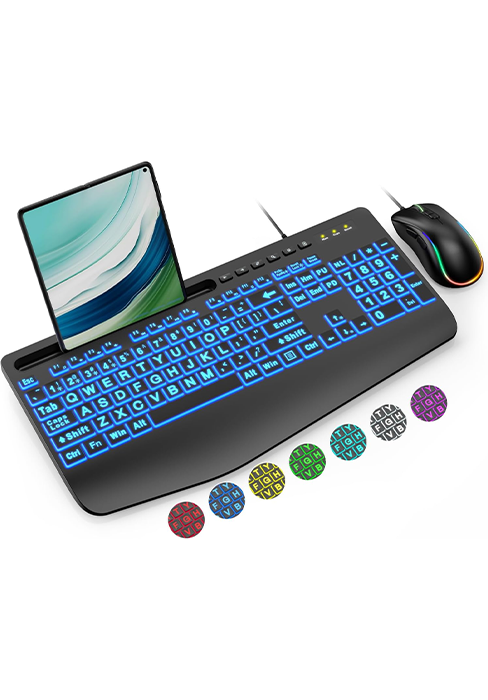
Figure 8.1: SABLUTE customer support details for assistance.


