1. Producte acabatview
The Fortdows Car Stereo Radio is a 9-inch IPS touchscreen unit designed as an upgrade for Mazda 3 models from 2010 to 2013. It features an Android 12 operating system with a quad-core processor, 2GB RAM, and 32GB ROM, providing a responsive user experience. Key functionalities include Wireless CarPlay, Android Auto, GPS navigation, Wi-Fi, Bluetooth 5.0, FM radio, and support for a backup camera.
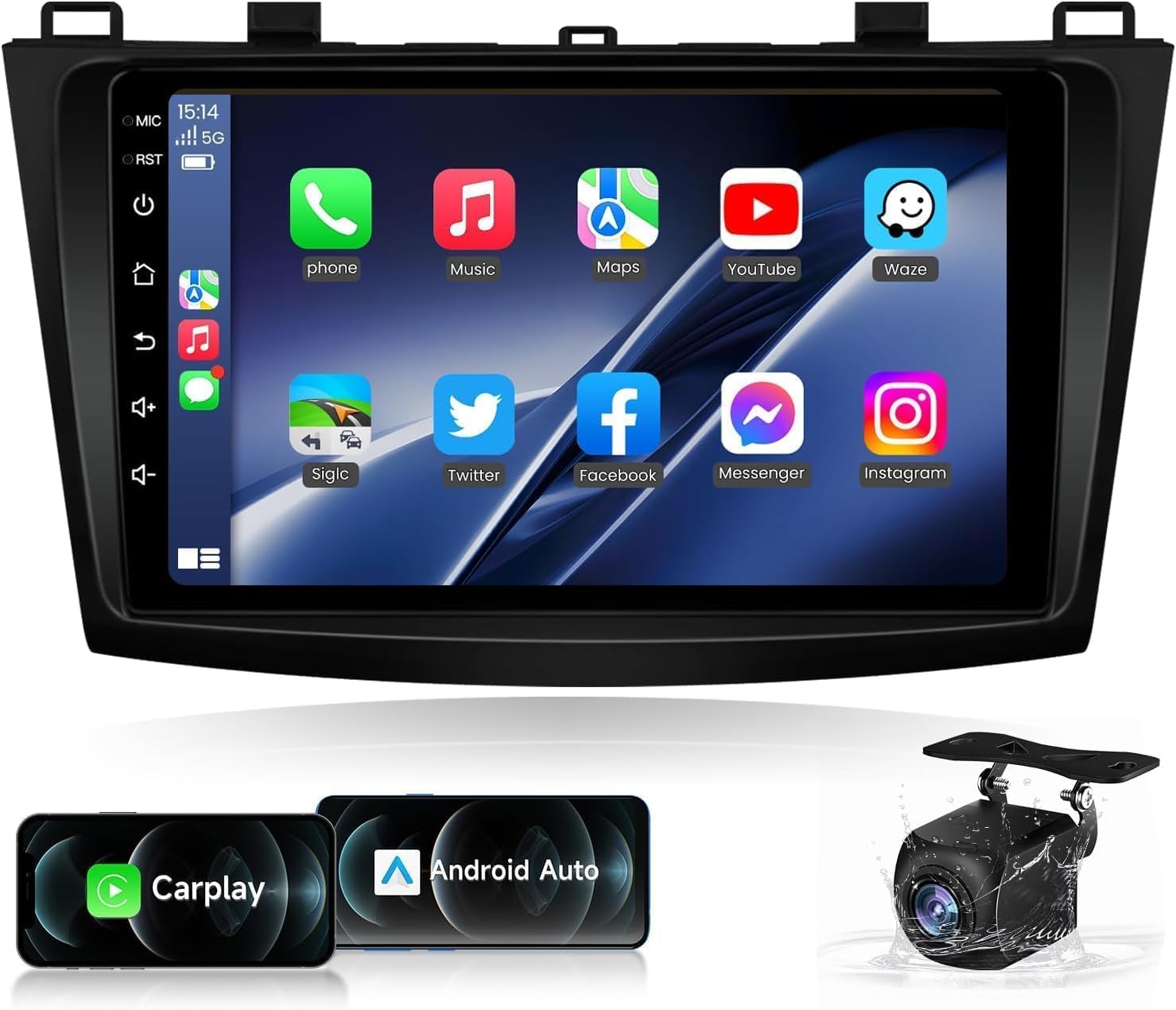
Figure 1: Fortdows 9-inch Car Stereo Radio with included backup camera and CarPlay/Android Auto icons.
This unit is compatible with original steering wheel controls, JBL amplifier, reversing camera, radar parking sensors, and displays air conditioning and TPMS information. It comes with a plug-and-play cable for simplified installation.

Figure 2: The Fortdows car stereo seamlessly integrated into a Mazda 3 dashboard, showcasing la seva gran pantalla.
2. Configuració i instal·lació
2.1 Desembalatge i components
Abans de començar la instal·lació, assegureu-vos que hi hagi tots els components:
- Fortdows 9-inch Head Unit
- Power Cable (Plug-and-Play)
- Joc de cables RCA
- Micròfon
- 6-Pin USB Cable
- 4-Pin USB Cable
- Antena GPS
- Càmera de seguretat
- CANBUS Decoder
- Cables d'extensió de càmera
- Crowbar (for trim removal)

Figura 3: Mésview of the Fortdows car stereo unit dimensions and a visual list of included accessories such as cables, GPS module, and backup camera.
2.2 Cablejat i connexions
The unit is designed for plug-and-play installation. Connect the main power cable harness to the vehicle's existing wiring. Connect the RCA cables, microphone, USB cables, GPS antenna, and backup camera as indicated in the diagram below and the installation video.
Video 1: A detailed demonstration of connecting the various cables and components to the Fortdows car stereo unit, including the power cable, RCA cables, USB cables, GPS antenna, and CANBUS decoder.
Important: Ensure the CANBUS decoder is correctly connected to enable original vehicle features like steering wheel controls and amplifier integration. The blue wire on the main harness is typically for the amplifier trigger. The purple/white wire is for the reverse signal for the backup camera.
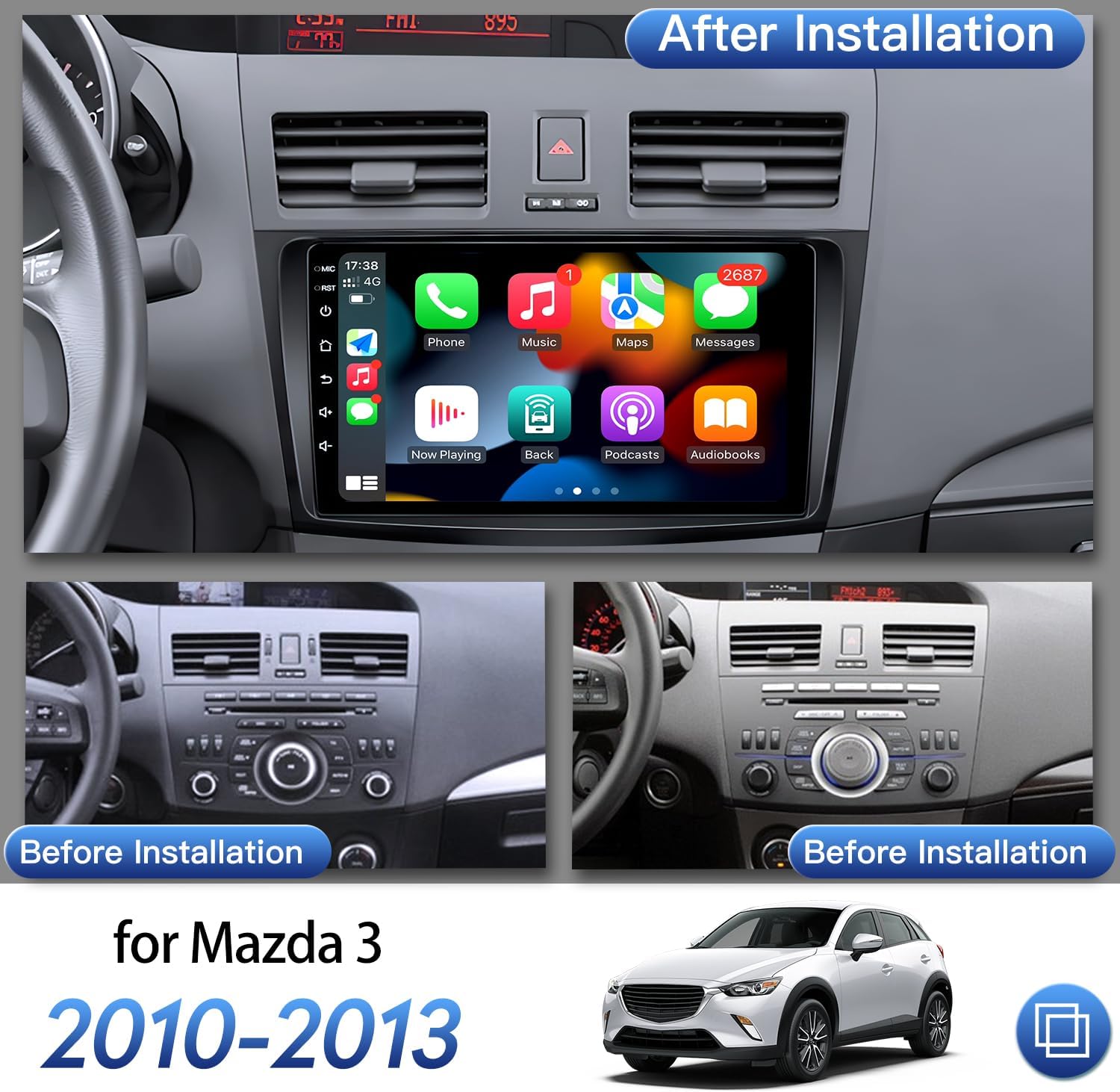
Figure 4: Comparison showing the original Mazda 3 dashboard and the dashboard after the Fortdows car stereo has been installed, highlighting the integrated appearance.
2.3 Engegada inicial
After all connections are secure, power on the vehicle. The unit should boot up automatically. Follow any on-screen prompts for initial setup.
3. Instruccions de funcionament
3.1 Navegació bàsica
The unit features a responsive 9-inch IPS capacitive touchscreen. Navigate through applications and settings by tapping and swiping. The side buttons provide quick access to common functions like power, reset, home, back, and volume controls.
3.2 Wireless Connectivity (Wi-Fi & Hotspot)
To connect to Wi-Fi or a mobile hotspot:
- Accediu al menú de configuració.
- Select 'Wi-Fi' and turn it on.
- Trieu la xarxa desitjada i introduïu la contrasenya si se us demana.

Figure 5: The car stereo displaying the Wi-Fi settings interface, showing available networks and the option to connect to a mobile hotspot.
3.3 Connexió Bluetooth
To pair your phone via Bluetooth 5.0 for hands-free calls and music streaming:
- Go to the 'Bluetooth' application on the head unit.
- Ensure Bluetooth is enabled on your phone and the head unit.
- Cerca available devices on your phone and select the head unit (e.g., "BCB-Android845").
- Confirm the pairing code (default PIN is 0000).

Figure 6: The car stereo displaying Bluetooth connectivity for hands-free calls and music, alongside the FM radio interface.
3.4 CarPlay sense fil i Android Auto
This unit supports both Wireless Apple CarPlay and Android Auto for seamless smartphone integration.
- Assegureu-vos que el Wi-Fi i el Bluetooth del telèfon estiguin activats.
- Open the 'ZLINK5' app on the head unit.
- Follow the on-screen instructions to connect your device. This typically involves pairing via Bluetooth first, then confirming the CarPlay/Android Auto connection.
Video 2: A demonstration of the Fortdows car stereo's Wireless CarPlay functionality, showing navigation, music playback, and phone calls through the integrated system.
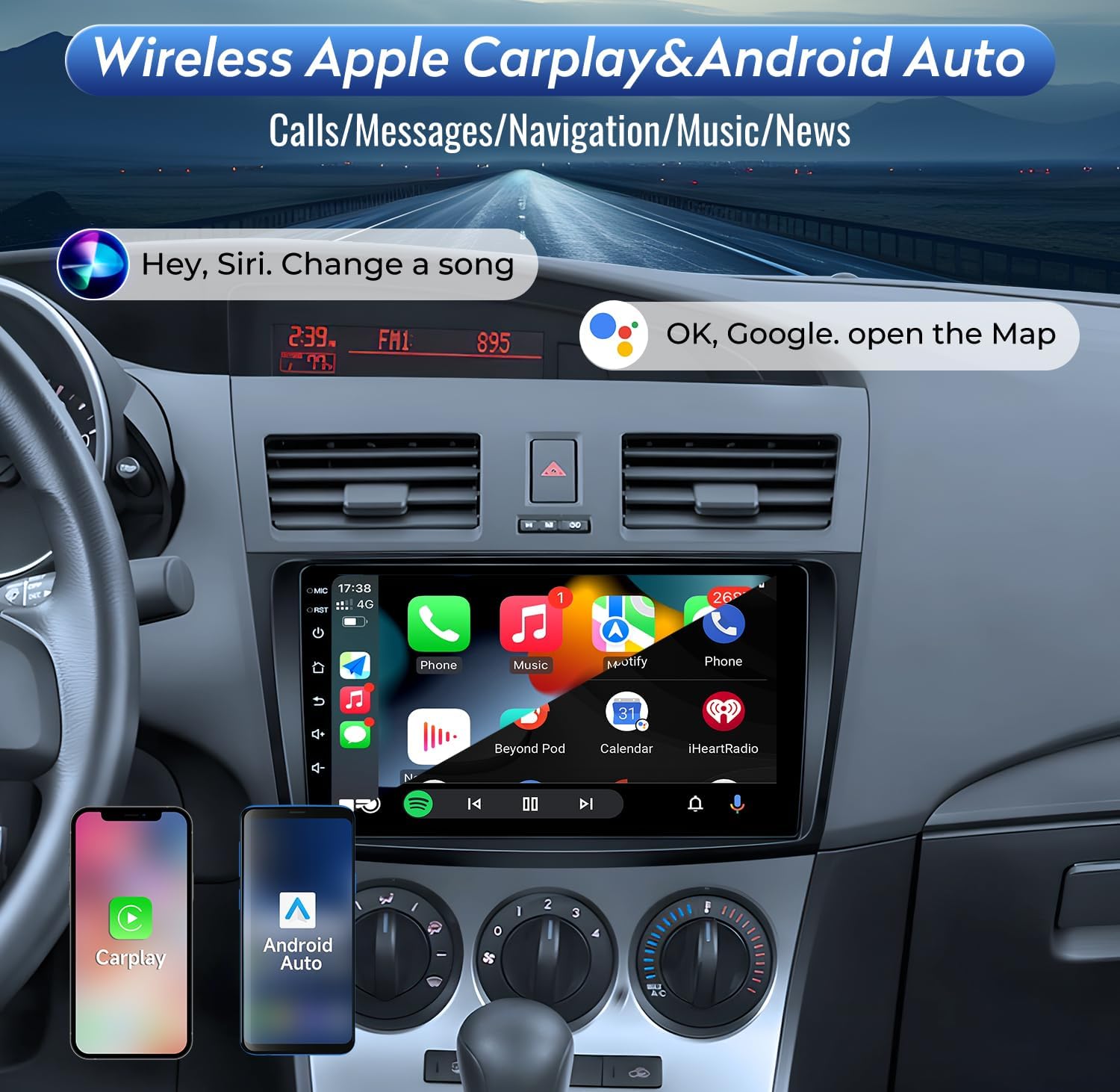
Figure 7: The car stereo displaying the Wireless Apple CarPlay interface, showing access to phone features like music, navigation, and messages.
3.5 Navegació GPS
The unit supports both online and offline navigation. Connect to Wi-Fi to download maps or use online mapping services like Google Maps.

Figure 8: The car stereo displaying GPS navigation with a map of North America, showing both online and offline application support.
3.6 Ràdio FM
Access the 'Radio' application to tune into FM stations. You can manually scan or use the preset buttons to save your favorite frequencies.

Figure 9: The car stereo displaying the FM radio interface with frequency selection and station presets.
3.7 Sound Settings (DSP & EQ)
The unit includes a built-in DSP processing chip for enhanced audio. Access the 'EQ' application to adjust sound settings, including equalization, sound field, and subwoofer levels.

Figure 10: The car stereo displaying the Professional DSP settings, allowing users to adjust sound field and equalization for optimal audio experience.
3.8 System Updates (OTA)
The unit supports Online Over-The-Air (OTA) system upgrades. To check for updates:
- Connect the radio to Wi-Fi.
- Navigate to 'Settings' > 'System Update'.
- Tap 'Check for Updates'.
- If a new version is available, tap 'Download Update'. The system will automatically unzip and reboot to complete the upgrade.
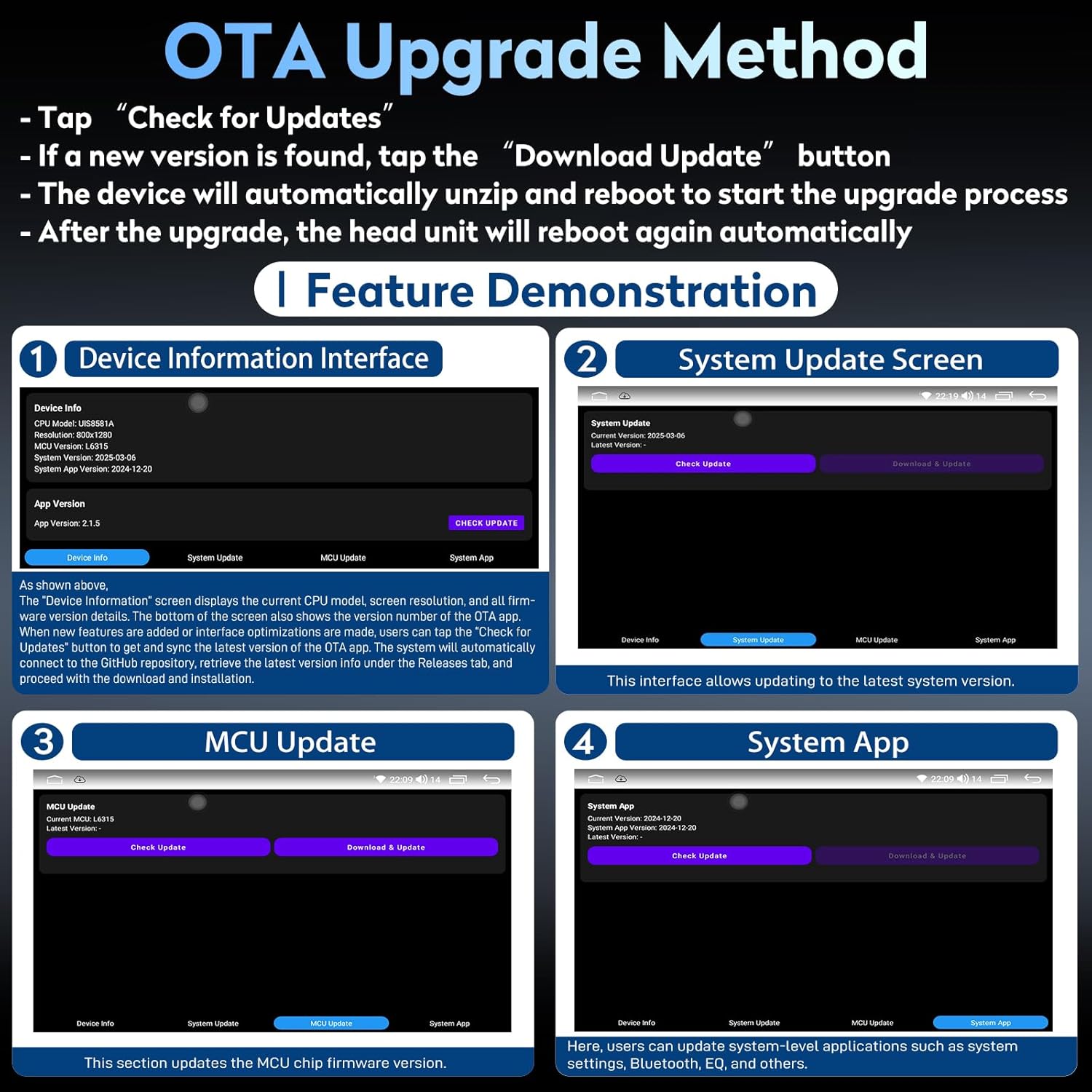
Figure 11: The car stereo displaying the OTA Upgrade Method interface, showing options for checking and downloading system updates.
4. Manteniment
4.1 Neteja
To clean the touchscreen, use a soft, lint-free cloth. For stubborn smudges, lightly dampNetegeu el drap amb aigua o un netejador de pantalles. Eviteu materials abrasius o productes químics agressius.
4.2 Actualitzacions de programari
Regularly check for and install OTA system updates to ensure optimal performance, security, and access to new features. Refer to Section 3.8 for the update process.
5. Solució De Problemes
This section addresses common issues you might encounter with your Fortdows car stereo.
| Problema | Causa possible | Solució |
|---|---|---|
| La unitat no s'encén | Cablejat incorrecte, fusible fundit, problema amb la font d'alimentació. | Check all power connections. Verify vehicle fuses. Consult a professional installer if necessary. |
| No hi ha so o mala qualitat d'àudio | Incorrect speaker wiring, DSP/EQ settings, ampqüestió de lifier. | Verify speaker connections. Adjust DSP/EQ settings. Ensure external amplifier (if applicable) is powered and connected correctly. |
| El CarPlay/Android Auto sense fil no es connecta | Bluetooth/Wi-Fi issues, app settings. | Ensure phone's Bluetooth and Wi-Fi are on. Clear previous Bluetooth connections. Update 'Carlink 2.0' and 'Canbus-Service' apps. Restart the radio. |
| La càmera de marxa enrere no es mostra | Incorrect wiring, camera fault, reverse signal issue. | Check camera power and video signal connections. Ensure the reverse signal wire (purple/white) is correctly connected to the vehicle's reverse light circuit. |
| Els comandaments del volant no funcionen | CANBUS decoder not connected or configured. | Verify CANBUS decoder connection. Access 'SW Learning' in settings to configure controls if not automatically detected. |
| Unit randomly powers on/off | Loose power connection, internal fault. | Check power harness connections. If the issue persists, contact customer support. |
6. Especificacions
| Característica | Especificació |
|---|---|
| Mida de la pantalla | 9 polzades |
| Resolució de visualització | 1280 x 800 IPS |
| Sistema operatiu | Android 12 |
| Processador | Quad-Core |
| RAM | 2 GB |
| ROM | 32 GB |
| Connectivitat | Bluetooth 5.0, Wi-Fi (5G supported), USB |
| Característiques especials | Wireless CarPlay & Android Auto, Built-in DSP, GPS Navigation, OTA System Upgrade, Supports Bose System |
| Mode de sortida d'àudio | Stereo (4*48W Ampmés viu) |
| Pes de l'article | 3.52 lliures |
| Dimensions del paquet | 12.87 x 8.86 x 5.2 polzades |
7. Garantia i Suport
Fortdows provides the following support for this product:
- 1 any de garantia: Cobertura de defectes de fabricació durant un any a partir de la data de compra.
- Política de devolució de 7 dies: Eligible for returns within 7 days of receipt.
- Retorn de defectes: Products with confirmed defects are eligible for return or replacement.
Atenció al client
For technical assistance, warranty claims, or any product-related inquiries, please contact:
- Correu electrònic: fortdows.cam@gmail.com
- Weblloc: www.fancygod.com

Figure 12: Icons representing 1-Year Warranty, 7-Day Return Policy, and Return on Defects.

Figure 13: Contact details for customer support, including email and weblloc.


