1. Introducció
Thank you for choosing the DELTACO Gaming PM80 Wireless Optical Gaming Mouse. This manual provides essential information for setting up, operating, and maintaining your new gaming mouse. Please read these instructions carefully before use to ensure optimal performance and longevity of your device.
2. Contingut del paquet
- DELTACO Gaming PM80 Wireless Optical Gaming Mouse
- Receptor sense fil USB
- Cable de càrrega USB
- Manual d'usuari
3. Producte acabatview
The DELTACO Gaming PM80 is a high-performance wireless optical gaming mouse designed for precision and comfort. It features 7 programmable buttons, adjustable DPI up to 4800, and customizable illumination. The mouse is rechargeable, ensuring uninterrupted gaming sessions.
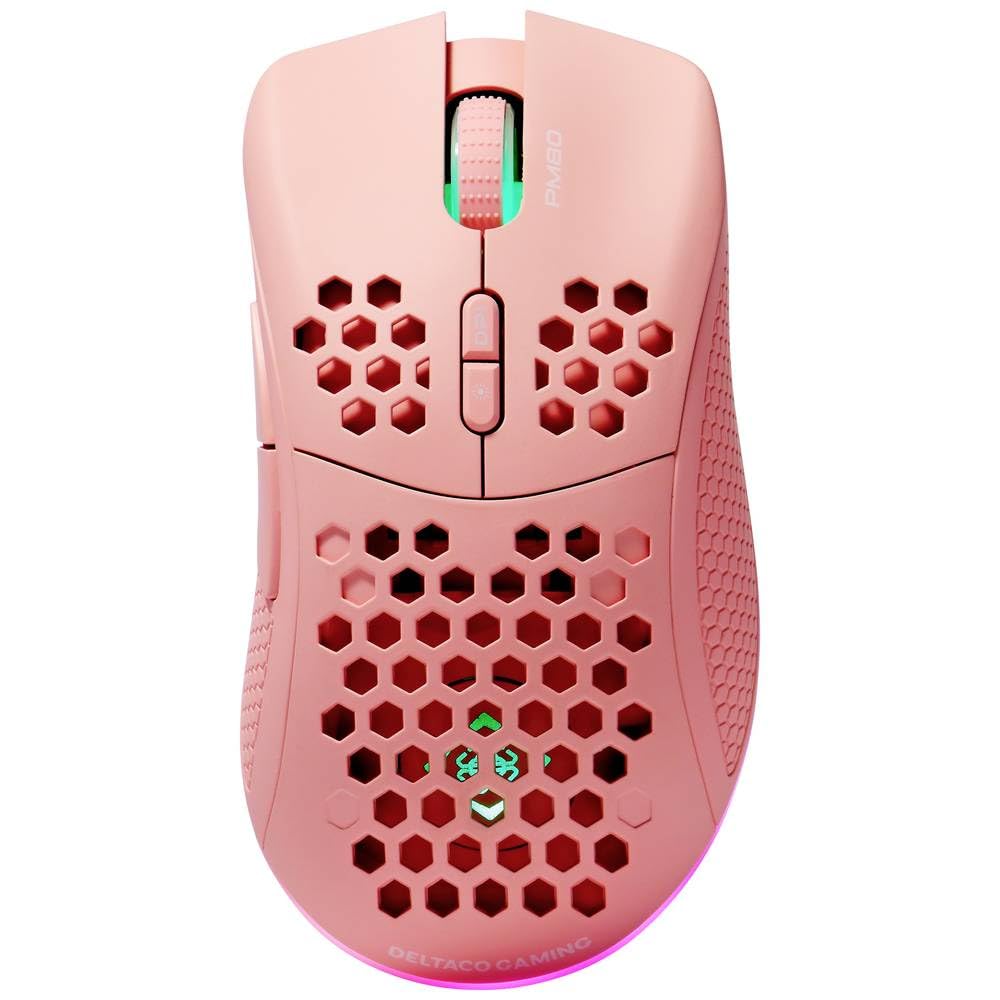
Image: DELTACO Gaming PM80 Wireless Optical Gaming Mouse. This image displays the mouse from a top-down perspective, highlighting its ergonomic design, the central scroll wheel, and the arrangement of its seven buttons.
Funcions del botó:
- Botó esquerre de clic: Funció de clic principal estàndard.
- Botó dret: Funció de clic secundari estàndard.
- Roda de desplaçament: Scrolls up/down, and acts as a middle click button.
- Botó de cicle de DPI: Changes the mouse's sensitivity (DPI).
- Botó Endavant: Navega cap endavant web navegadors o file exploradors.
- Botó enrere: Navega cap enrere web navegadors o file exploradors.
- Illumination Mode Button: Cycles through different lighting effects or turns illumination on/off.
4. Configuració
4.1. Càrrega del ratolí
- Connecteu l'extrem petit del cable de càrrega USB al port de càrrega de la part frontal del ratolí.
- Connect the larger end of the USB charging cable to an available USB port on your computer or a USB wall adapter.
- The mouse's illumination will indicate charging status (e.g., breathing effect, specific color). A full charge typically takes 2-3 hours.
- Once fully charged, the illumination may change or turn off. Disconnect the charging cable.
4.2. Connexió del receptor sense fil USB
- Locate the USB wireless receiver, usually stored in a compartment on the underside of the mouse.
- Traieu el receptor de la seva ranura d'emmagatzematge.
- Connecteu el receptor sense fil USB a un port USB disponible de l'ordinador.
- L'ordinador hauria de detectar i instal·lar automàticament els controladors necessaris. Això pot trigar uns instants.
4.3. Encès / apagat
- Localitzeu l'interruptor d'alimentació a la part inferior del ratolí.
- Slide the switch to the 'ON' position to power on the mouse. The illumination will light up.
- To conserve battery life, slide the switch to the 'OFF' position when the mouse is not in use for extended periods.
5. Instruccions de funcionament
5.1. Ús bàsic
Once connected and powered on, the mouse is ready for use. Move the mouse on a flat surface to control the cursor on your screen. Use the left and right click buttons for primary and secondary actions, and the scroll wheel for navigation.
5.2. Ajust de DPI
The DPI (Dots Per Inch) setting determines the sensitivity of your mouse. The DELTACO Gaming PM80 offers multiple DPI levels up to 4800 DPI. To adjust the DPI:
- Premeu el botó Botó de cicle DPI (typically located behind the scroll wheel).
- Each press will cycle through the available DPI settings. The mouse's illumination may change color or flash to indicate the current DPI level.
- Select the DPI setting that best suits your preference for gaming or general use.
5.3. Control de la il·luminació
The DELTACO Gaming PM80 features customizable illumination. To change the lighting effects:
- Premeu el botó Illumination Mode Button (refer to Product Overview per a la ubicació).
- Each press will cycle through different lighting modes, such as static colors, breathing effects, or off.
6. Manteniment
6.1. Neteja
- Assegureu-vos que el ratolí estigui apagat abans de netejar-lo.
- Feu servir un drap suau, sec i sense borrissol per netejar la superfície del ratolí.
- Per a la brutícia persistent, lleugerament dampNetegeu el drap amb aigua o un netejador suau i no abrasiu. Eviteu la humitat excessiva.
- No utilitzeu productes químics agressius, dissolvents ni materials abrasius, ja que poden danyar l'acabat del ratolí.
- Feu servir un bastonet de cotó o aire comprimit per netejar al voltant de la roda de desplaçament i les esquerdes dels botons.
6.2. Emmagatzematge
When not in use for extended periods, store the mouse in a cool, dry place away from direct sunlight and extreme temperatures. Ensure the power switch is in the 'OFF' position to preserve battery life.
7. Solució De Problemes
- El ratolí no respon:
- Assegureu-vos que el ratolí estigui encès.
- Check if the USB wireless receiver is securely plugged into a working USB port.
- Verify the mouse battery is charged. Connect the charging cable and try again.
- Prova de connectar el receptor a un port USB diferent.
- Reinicieu l'ordinador.
- Connexió amb retard o intermitent:
- Ensure the mouse is within close proximity to the USB receiver (ideally within 10 meters).
- Avoid placing the receiver near other wireless devices or sources of interference (e.g., Wi-Fi routers, cordless phones).
- Assegureu-vos que el ratolí estigui completament carregat.
- El moviment del cursor és erràtic o imprecís:
- Netegeu el sensor òptic de la part inferior del ratolí amb un drap suau i sec.
- Assegureu-vos que feu servir el ratolí sobre una superfície adequada (per exemple, una estora de ratolí). Eviteu superfícies molt reflectants o transparents.
- Adjust the DPI setting to a lower sensitivity if the cursor is too fast.
- Illumination not working:
- Assegureu-vos que el ratolí estigui encès.
- Press the Illumination Mode Button to cycle through modes, ensuring it's not set to 'off'.
- Check battery level; low battery might disable illumination.
8. Especificacions
| Característica | Detall |
|---|---|
| Marca | DELTACO GAMING |
| Número de model | GAM-120-P |
| Connectivitat | Sense fil (receptor USB) |
| Tipus de sensor | Òptic |
| DPI | Fins a 4800 DPI (ajustable) |
| Nombre de botons | 7 |
| Orientació de la mà | D'acord |
| Il·luminació | Sí |
| Recarregable | Sí |
| Piles necessàries | No (Internal Rechargeable) |
9. Garantia i Suport
For warranty information and technical support, please refer to the warranty card included with your product or visit the official DELTACO Gaming weblloc web. Conserveu el comprovant de compra per a qualsevol reclamació de garantia.