1. Introducció
This manual provides essential information for the LILYGO T-Display-S3 ESP32-S3 LCD Display TTGO Development Board. It covers the product's features, components, setup procedures, operational guidelines, maintenance, troubleshooting, and detailed technical specifications. The T-Display-S3 is a versatile development board designed for various embedded projects, featuring an ESP32-S3 microcontroller and an integrated LCD display.
2. Producte acabatview
2.1 Característiques clau
- MCU: ESP32-S3R8 Dual-core LX7 microprocessor
- Visualització: 170x320 Resolution 1.9 inch ST7789 LCD Display
- Memòria: 16MB Flash, 8MB PSRAM
- Connectivitat: Wi-Fi, Bluetooth (BLE + BT mesh)
- Potència: USB-C and Li-Po Battery Dual Power Supply (JST GH 1.25mm connector)
- Botons: Onboard Boot and Reset buttons, plus I/O 14 button for battery voltage detecció
- Shell: Assembled with a black protective shell and an acrylic plate for display fixation.
2.2 Contingut del paquet
The LILYGO T-Display-S3 package typically includes the following items:
- 1 x T-Display-S3 Development Board with black shell
- 2 x 12-pin headers (for external connections)
- 1 x JST 1.25mm battery cable (battery not included)
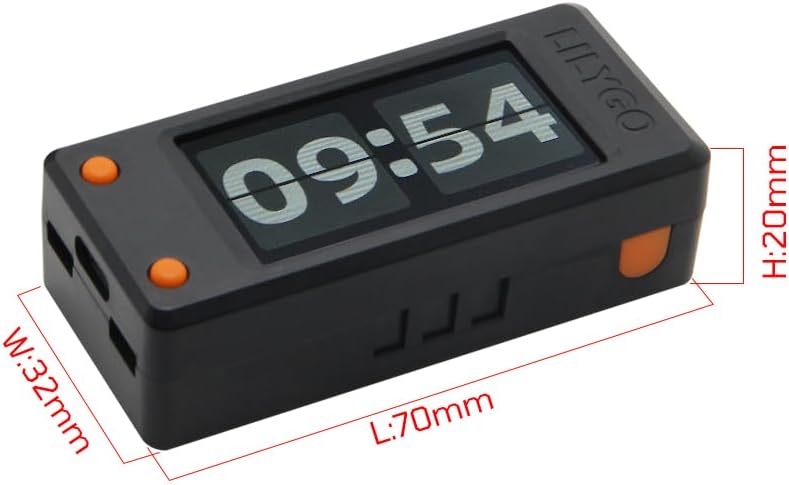
Figure 2.2.1: Contents of the LILYGO T-Display-S3 package, including the main board with shell, pin headers, and battery cable.
2.3 Producte Views i Dimensions
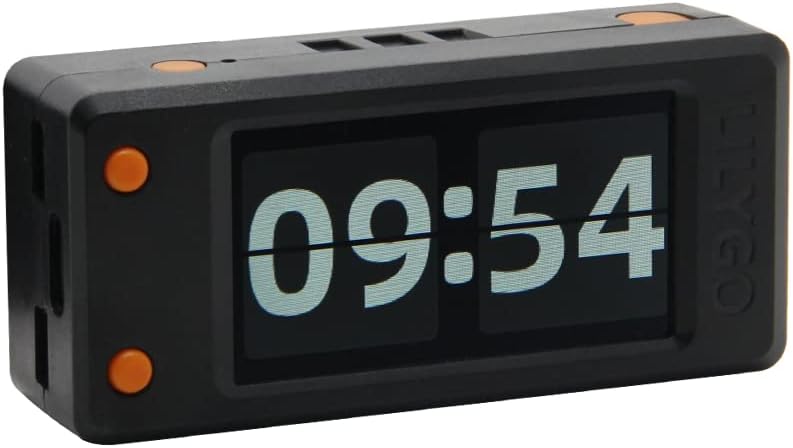
Figura 2.3.1: Frontal view of the LILYGO T-Display-S3, showcasing its integrated 1.9-inch LCD display.
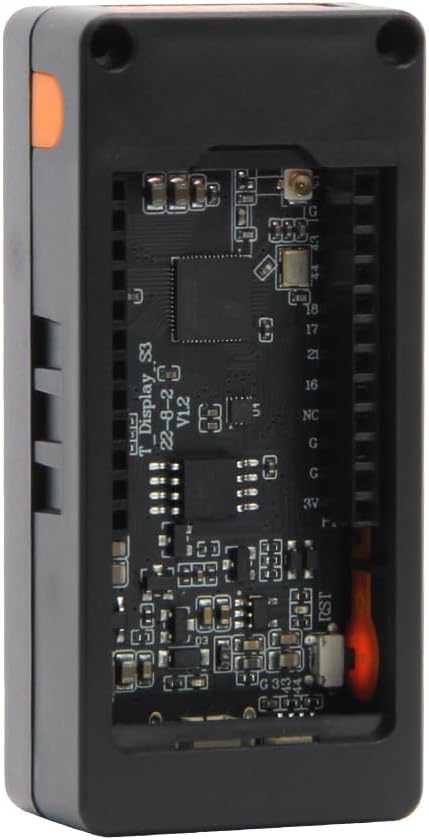
Figura 2.3.2: Esquena view of the LILYGO T-Display-S3, with the shell removed to show the underlying circuit board and components.
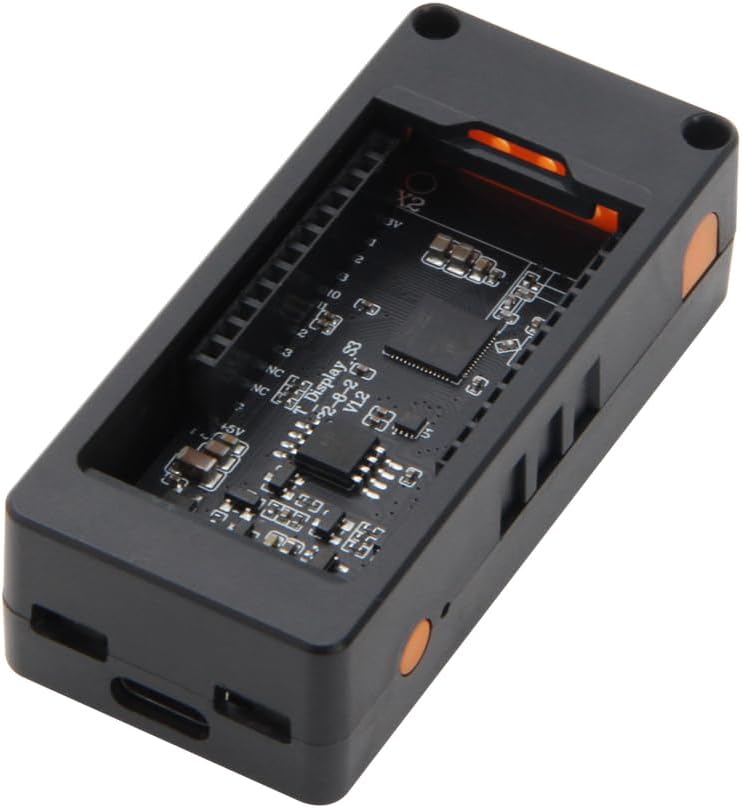
Figure 2.3.3: Physical dimensions of the LILYGO T-Display-S3: Length (L) 70mm, Width (W) 32mm, Height (H) 20mm.
3. Guia de configuració
To begin using your LILYGO T-Display-S3, follow these steps:
- Connexió a l'ordinador: Use a USB-C cable to connect the T-Display-S3 to your computer. The board will draw power from the USB connection.
- Instal·leu els controladors: Depending on your operating system, you may need to install USB-to-serial drivers (e.g., CP210x or CH340 drivers) to enable communication with the ESP32-S3.
- Prepare Development Environment: The T-Display-S3 supports various programming platforms, including Arduino IDE and MicroPython.
- For Arduino IDE, install the ESP32 board package and necessary libraries (e.g., TFT_eSPI for the display).
- For MicroPython, flash the MicroPython firmware to the board.
- Access Documentation: For detailed programming guides, pinout diagrams, and example code, refer to the official LILYGO GitHub repository: github.com/Xinyuan-LilyGO/T-Display-S3. This resource is crucial for development.

Figure 3.1: Pinout diagram for the LILYGO T-Display-S3 ESP32-S3, showing GPIOs, power pins, and LCD connections.
4. Funcionament
The LILYGO T-Display-S3 is primarily a development board, meaning its operation is defined by the firmware you upload to it. However, some general operational aspects include:
- Encès: Connect the board via USB-C or a compatible Li-Po battery to power it on.
- Funcionalitat de visualització: The 1.9-inch ST7789 LCD display will show content as programmed. Ensure your code initializes the display correctly.
- Botons programables: The board features two user-programmable buttons (in addition to Boot and Reset). These can be configured in your code to trigger specific actions or navigate menus on the display.
- Comunicació sense fils: Utilize the integrated Wi-Fi and Bluetooth capabilities for network connectivity, data transfer, and IoT applications as per your programmed logic.
5. Manteniment
Proper care ensures the longevity of your T-Display-S3 development board:
- Neteja: Use a soft, dry cloth to clean the display and the board. Avoid abrasive materials or harsh chemicals.
- Emmagatzematge: Store the board in a dry, cool environment, away from direct sunlight and extreme temperatures. The included black shell provides good protection.
- Manipulació: Handle the board by its edges to avoid touching sensitive electronic components. Static electricity can damage the board, so use anti-static precautions if possible.
- Font d'alimentació: Always use a stable 5V power supply via the USB-C port or a compatible 3.7V Li-Po battery.
6. Solució De Problemes
If you encounter issues with your LILYGO T-Display-S3, consider the following:
- Placa no detectada: Ensure USB-C cable is fully inserted and functional. Verify that the correct USB-to-serial drivers are installed on your computer. Try a different USB port or cable.
- La pantalla no funciona: Check your code for proper display initialization (ST7789 driver) and pin assignments. Ensure the display ribbon cable is securely connected if it was detached. Verify power supply.
- Errors de càrrega: Confirm you have selected the correct board (ESP32-S3 Dev Module) and COM port in your IDE. Press and hold the 'Boot' button while pressing and releasing 'Reset' before uploading if automatic upload fails.
- Problemes amb el Wi-Fi/Bluetooth: Double-check your network credentials in the code. Ensure antennas (if external) are properly connected. Verify power supply is sufficient.
- General Programming Issues: Consult the LILYGO GitHub repository (github.com/Xinyuan-LilyGO/T-Display-S3) for common issues, examples, and community support. Online forums and communities for ESP32 development are also valuable resources.
7. Especificacions
Detailed technical specifications for the LILYGO T-Display-S3 ESP32-S3 Development Board:

Figure 7.1: Official specifications diagram for the LILYGO T-Display-S3.
| Característica | Detall |
|---|---|
| MCU | ESP32-S3R8 Dual-core LX7 microprocessor (240 MHz) |
| Memòria Flash | 16 MB |
| PSRAM | 8 MB |
| Tipus de visualització | 1.9 inch ST7789 LCD Display, Full color TFT |
| Resolució de visualització | 170(H) x 320(V) píxels |
| Interfície de visualització | 8-Bit Parallel Interface |
| Connectivitat sense fil | Wi-Fi (802.11), Bluetooth 5 (BLE + BT mesh) |
| Programming Platform | Arduino-IDE, MicroPython |
| Font d'alimentació | USB-C (5V) / Li-Po Battery (JST GH 1.25mm, 3.7V) |
| Sistema operatiu | FreeRTOS (common for ESP32) |
| Pes de l'article | 1.76 unces (aprox. 50 g) |
| Dimensions del paquet | 4.61 x 4.45 x 1.69 polzades (aprox. 11.7 x 11.3 x 4.3 cm) |
8. Assistència i garantia
8.1 Suport tècnic
For technical support, detailed documentation, and community assistance, please refer to the official LILYGO GitHub repository:
github.com/Xinyuan-LilyGO/T-Display-S3
This repository contains schematics, example code, and guides that are essential for developing with the T-Display-S3. You may also find assistance through online forums and communities dedicated to ESP32 development.
8.2 Informació de la garantia
Specific warranty details for the LILYGO T-Display-S3 are not provided in this manual. Please refer to the seller's return and warranty policy at the point of purchase for information regarding product guarantees and support.


