1. Introducció
This manual provides comprehensive instructions for the safe and efficient use of your ZTE Axon 40 SE smartphone. Please read this manual thoroughly before operating your device to ensure optimal performance and longevity.
Característiques principals:
- Sistema operatiu: Android 12
- Visualització: 6.67-inch FHD+ AMOLED Punch-hole Display
- Sistema de càmera: Triple Rear Camera (50Mpx main + 5Mpx + 2Mpx), 8Mpx Front Camera
- Memòria i emmagatzematge: Up to 6 GB RAM, 128 GB Internal Memory
- Bateria: 4,500 mAh amb càrrega ràpida de 22.5 W
- Connectivitat: 4.5G Unlocked, Bluetooth, USB, Wi-Fi

Figura 1.1: Davant i darrere view of the ZTE Axon 40 SE smartphone, showcasinel seu disseny elegant i el mòdul de càmera.
2. Configuració
2.1 Inserció de la targeta SIM
- Localitza la safata de la targeta SIM al lateral del dispositiu.
- Insert the provided SIM ejector tool into the small hole next to the tray.
- Empenyeu suaument fins que la safata surti.
- Col·loqueu la targeta o targetes nano-SIM i/o la targeta microSD a la safata amb els contactes daurats cap avall.
- Empenyeu amb cura la safata cap a dins de la ranura fins que quedi alineada amb el dispositiu.

Figura 2.1: Pro lateralfile of the ZTE Axon 40 SE, highlighting the SIM card tray location.
2.2 Engegada/apagada
- Per encendre: Press and hold the Power button (located on the right side) until the ZTE logo appears.
- Per apagar: Mantingueu premut el botó d'engegada i, a continuació, seleccioneu "Apagar" de les opcions que apareixen a la pantalla.
- Per reiniciar: Mantingueu premut el botó d'engegada i, a continuació, seleccioneu "Reiniciar" de les opcions.
2.3 Configuració inicial
En engegar-lo per primera vegada, segueix les instruccions que apareixen a la pantalla per configurar el dispositiu. Això inclou seleccionar l'idioma, connectar-se a la Wi-Fi, configurar el compte de Google i configurar les funcions de seguretat.
2.4 Càrrega del dispositiu
Connect the USB Type-C cable to the charging port at the bottom of the phone and the other end to the provided 22.5W fast charger. The battery icon on the screen will indicate charging status.

Figure 2.2: Illustration of the ZTE Axon 40 SE's 4500mAh battery and fast charging capability.
3. Funcionament del vostre dispositiu
3.1 Navegació bàsica
- Gestos de la pantalla tàctil: Tap, swipe, pinch-to-zoom are standard gestures for interacting with the display.
- Botons de volum: Located on the right side, control media volume and ringtone volume.
- Pantalla d'inici: Swipe left or right to navigate between home screens. Swipe down from the top for notifications and quick settings.

Figura 3.1: Frontal view of the ZTE Axon 40 SE, showing the display and punch-hole camera.
3.2 Ús de la càmera
The ZTE Axon 40 SE features a versatile triple camera system on the rear and an 8Mpx front camera for selfies and video calls.
- Obre l'aplicació Càmera des de la pantalla d'inici o des del calaix d'aplicacions.
- Seleccioneu el mode desitjat (Foto, Vídeo, Retrat, etc.).
- Toqueu el botó de l'obturador per capturar fotos o iniciar/aturar la gravació de vídeo.
- Feu servir els controls de zoom de la pantalla per ajustar l'ampliació.
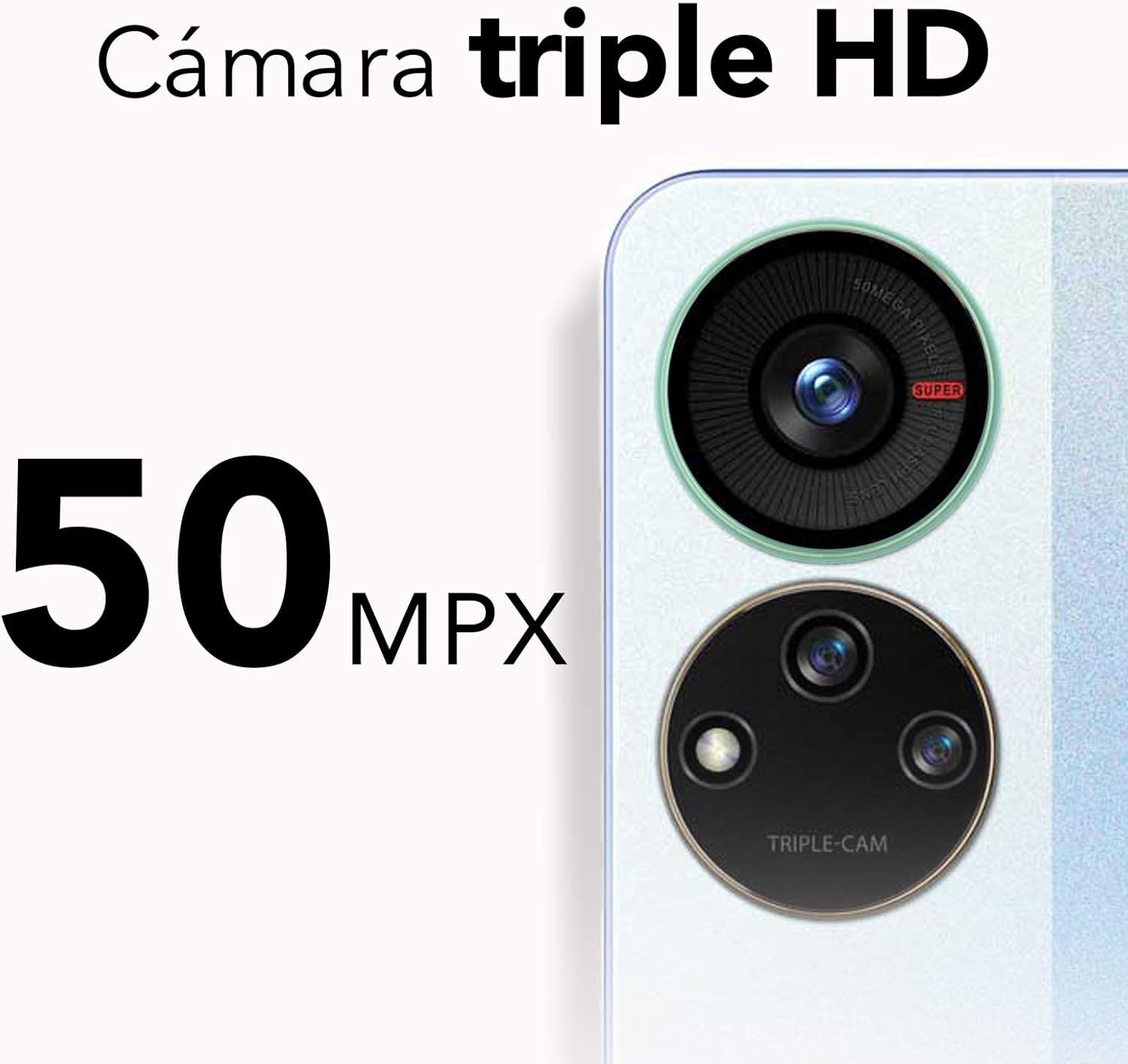
Figure 3.2: Close-up of the ZTE Axon 40 SE's 50Mpx triple camera system.
3.3 Connectivitat
- Wi-Fi: Ves a Configuració > Xarxa i internet > Wi-Fi per connectar-te a les xarxes disponibles.
- Bluetooth: Go to Settings > Connected devices > Connection preferences > Bluetooth to pair with other Bluetooth devices.
- Dades mòbils (4.5G): Assegureu-vos que la targeta SIM estigui activa i que les dades mòbils estiguin habilitades a Configuració > Xarxa i Internet > Xarxa mòbil.
4. Manteniment
4.1 Neteja del vostre dispositiu
To clean your ZTE Axon 40 SE, use a soft, lint-free cloth. Avoid using abrasive cleaners, solvents, or aerosol sprays directly on the device. For stubborn smudges, slightly dampNetegeu el drap amb aigua o un netejador de pantalles dissenyat per a electrònica.
4.2 Actualitzacions de programari
Regularly check for software updates to ensure your device has the latest features, security patches, and performance improvements. Go to Settings > System > System update to check for and install updates.
4.3 Gestió d'emmagatzematge
To optimize performance, periodically manage your device's storage. Delete unnecessary files, esborreu les memòries cau de les aplicacions i considereu la possibilitat de moure suports multimèdia grans files to cloud storage or an external microSD card (if applicable). Go to Settings > Storage to view ús d'emmagatzematge i alliberar espai.

Figure 4.1: Illustration of the ZTE Axon 40 SE's dynamic RAM feature, allowing up to 6GB RAM.
5. Solució De Problemes
| Problema | Possible solució |
|---|---|
| El dispositiu no s'encén | Assegureu-vos que la bateria estigui carregada. Premeu i manteniu premut el botó d'engegada durant almenys 10 segons per forçar un reinici. |
| Les aplicacions es bloquegen o es bloquegen | Clear the app's cache (Settings > Apps > [App Name] > Storage & cache > Clear cache). Restart the device. Update the app. |
| Senyal de xarxa pobre | Check if mobile data is enabled. Restart the device. Try re-inserting the SIM card. Contact your service provider. |
| La bateria s'esgota ràpidament | Reduce screen brightness. Close unused apps. Disable Wi-Fi/Bluetooth when not in use. Check battery usage in Settings > Battery. |
6. Especificacions
| Característica | Detall |
|---|---|
| Nom del model | ZTE Axon 40 SE |
| Número de model | P618F08 |
| Sistema operatiu | Android 12.0 |
| Mida de la pantalla | 6.67 polzades |
| Resolució de visualització | 1080 x 2400 píxels (FHD+) |
| RAM | 6 GB (Dynamic RAM) |
| Emmagatzematge intern | 128 GB |
| Càmera posterior | 50Mpx + 5Mpx + 2Mpx Triple Camera |
| Càmera frontal | 8 Mpx |
| Capacitat de la bateria | 4500 mAh |
| Carregant | Càrrega ràpida de 22.5 W |
| Tecnologia cel·lular | 4.5G |
| Connectivitat | Bluetooth, USB, Wi-Fi |
| Dimensions | 16 x 8 x 0.1 cm (6.3 x 3.15 x 0.04 polzades) |
| Pes | 143 g (5.04 unces) |

Figure 6.1: Visual representation of the ZTE Axon 40 SE's 6.67-inch AMOLED display.
7. Garantia i Suport
7.1 Informació de la garantia
Your ZTE Axon 40 SE comes with a standard manufacturer's warranty. Please refer to the warranty card included in your product packaging for specific terms, conditions, and duration. Keep your proof of purchase for warranty claims.
7.2 Atenció al client
For technical assistance, troubleshooting beyond this manual, or warranty service, please contact ZTE customer support. You can find contact information on the official ZTE weblloc web o a la documentació del producte.
Recursos en línia: Visita la pàgina oficial de ZTE website for FAQs, software downloads, and additional support resources.


