1. Introducció
This manual provides essential information for the safe and effective use of your DJI FPV Goggles V2. It covers product overview, setup, operation, maintenance, troubleshooting, and safety guidelines. Please read this manual thoroughly before operating the device.
2. Producte acabatview
2.1 Components
The DJI FPV Goggles V2 package includes the goggles unit. Additional accessories may be sold separately.
2.2 Goggles Layout
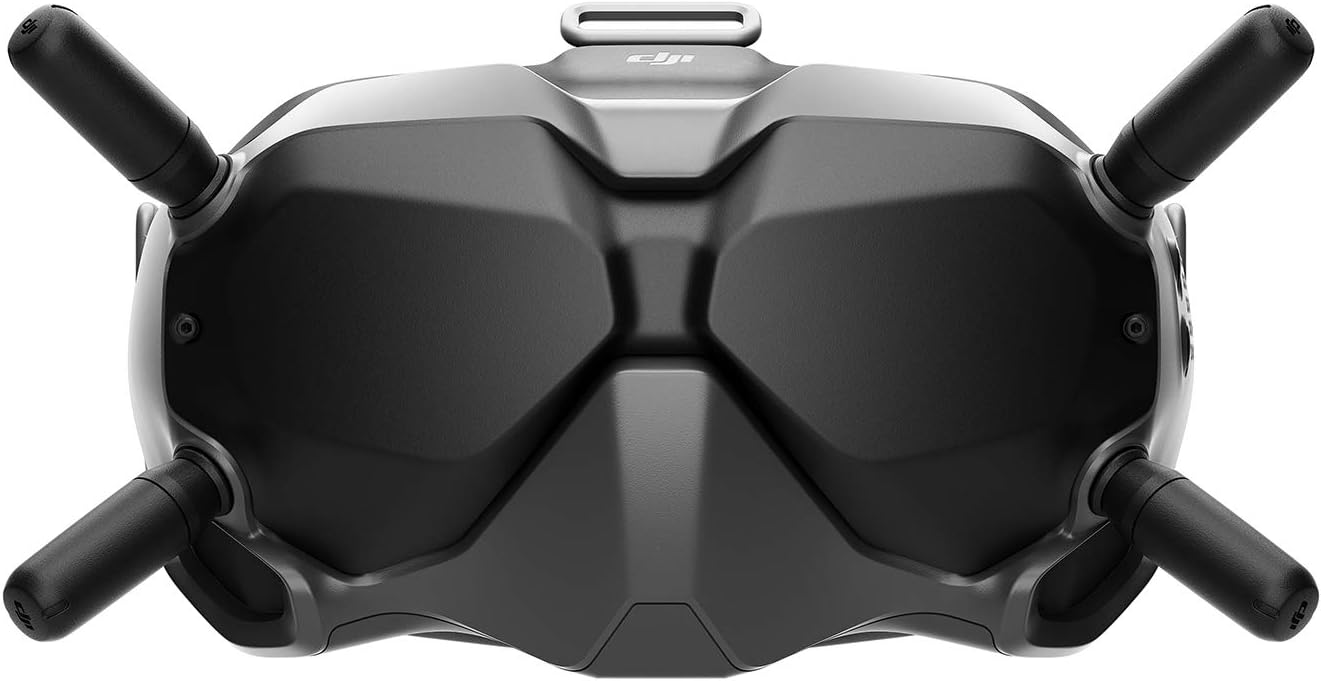
Figura 1: Davant view of the DJI FPV Goggles V2. This image displays the front of the DJI FPV Goggles V2, featuring its ergonomic design and four external antennas for signal reception. The main body is black with a textured finish, and the DJI logo is visible on the top center.
The goggles feature an ergonomic design for comfortable wear and are equipped with four antennas for robust signal reception. The main body is black with a textured finish, and the DJI logo is located on the top center.
3. Configuració
3.1 Càrrega inicial
Before first use, ensure the goggles' battery is fully charged using the provided USB-C cable and a compatible power adapter. The battery capacity is 1800 mAh.
3.2 Instal·lació de l'antena
Attach the four antennas to their respective ports on the goggles. Ensure they are securely fastened to optimize signal reception.
3.3 Engegada/apagada
To power on, press and hold the power button until the indicators light up. To power off, press and hold the power button until the indicators turn off.
3.4 Pairing with Aircraft
Follow the specific pairing instructions provided with your DJI FPV aircraft or DJI FPV Air Unit to establish a connection with the goggles. Refer to your aircraft's manual for detailed pairing procedures.
4. Instruccions de funcionament
4.1 Selecció de la banda de freqüència
The DJI FPV Goggles V2 support dual frequency operation (2.4 GHz and 5.8 GHz) when used with the DJI FPV aircraft. If used with the DJI FPV Air Unit, only the 5.8 GHz frequency band is supported.
Nota important:
- Due to local policies and regulations, the 5.8 GHz frequency band may be unavailable in certain countries (e.g., Japan, Russia, Israel, Ukraine, Kazakhstan). Always use the 2.4 GHz frequency band in these locations.
- Always verify local rules and regulations before operation, as they are subject to change.
4.2 Visual Line of Sight (VLOS)
Always adhere to local laws and regulations when operating the goggles and associated drone. In some regions, maintaining Visual Line of Sight (VLOS) with the aircraft is legally required. It is recommended to use a spotter if maintaining VLOS independently is not possible.
5. Manteniment
5.1 Cura de les lents
Warning: Avoid exposing the lenses of the goggles to direct sunlight. Direct sunlight can cause irreversible damage to the internal display components.
Clean the lenses with a soft, lint-free cloth specifically designed for optical surfaces. Do not use abrasive materials or harsh chemicals.
5.2 Neteja general
Wipe the exterior of the goggles with a clean, damp cloth. Do not immerse the goggles in water or expose them to excessive moisture.
5.3 Emmagatzematge
Store the goggles in a cool, dry place, away from direct sunlight and extreme temperatures. Use a protective case when transporting the goggles.
6. Solució De Problemes
6.1 Sense canal de vídeo
- Ensure the goggles are properly paired with the drone/air unit.
- Check that the drone/air unit is powered on and transmitting.
- Verify that the correct frequency band is selected and permitted in your region.
- Confirm all antenna connections are secure.
6.2 Poor Signal Quality
- Ensure antennas are correctly oriented and not obstructed.
- Reduce the distance between the goggles and the drone.
- Avoid areas with high electromagnetic interference.
- Switch to the 2.4 GHz frequency band if operating in regions where 5.8 GHz is restricted.
6.3 Les ulleres no s'encenen
- Assegureu-vos que la bateria estigui completament carregada.
- Check the USB-C charging cable and power adapter for damage.
7. Especificacions
| Característica | Detall |
|---|---|
| Marca | DJI |
| Nom del model | CRTDJIGOGV2X2 |
| Color | Negre |
| Resolució de captura de vídeo | 1080p |
| Tecnologia de connectivitat | USB-C |
| Components inclosos | Ulleres de protecció |
| Pes de l'article | 0.93 lliures (aproximadament 14.9 unces) |
| Capacitat de la bateria | 1800 mAh |
| Format de captura de vídeo | MP4 |
| Tecnologia de control remot | Bluetooth |
| Tipus de control | Control remot |
| Material | Fibra de vidre |
| Tecnologia de comunicació sense fils | Freqüència de ràdio |
| Composició de les cèl·lules de la bateria | Ió de liti |
| S'inclouen les piles | Sí |
| Temperatura de funcionament | Fins a 40 °C (104 °F) |
| Format d'imatge compatible | Digital video (e.g. MP4) |
| Resolució de sortida de vídeo | 1080p |
| Bateria recarregable inclosa | Sí |
| Dimensions del producte | 8 cm de llargada x 3 cm d'amplada x 5 cm d'alçada |
| UPC | 656942431770 |
| Interval d'edat (descripció) | Adult |
8. Informació de seguretat
- Aquest producte està pensat per a ús adult.
- Always operate the goggles and associated drone in compliance with local laws and regulations.
- Maintain Visual Line of Sight (VLOS) with your drone where legally required. Consider using a spotter if VLOS cannot be maintained independently.
- Avoid exposing the goggles' lenses to direct sunlight to prevent display damage.
- Do not operate the goggles in extreme weather conditions or environments that could compromise safety.
9. Garantia i Suport
Per obtenir informació sobre la garantia, assistència tècnica o consultes de servei, consulteu la pàgina oficial de DJI. weblloc web o contacteu directament amb el servei d'atenció al client de DJI. Conserveu el comprovant de compra per a reclamacions de garantia.
Per obtenir més ajuda, visiteu el lloc web oficial Pàgina d'assistència de DJI.


