Introducció
This manual provides detailed instructions for the JBL BAR 500 PRO 5.1 Soundbar System. This system includes the JBL BAR 500 PRO Soundbar, a 10-inch wireless subwoofer, and a Sanus SAC-21HDMI2 2.0 meter 8K Ultra High Speed HDMI Cable. It is designed to enhance your audio experience with MultiBeam and Dolby Atmos 3D surround sound, clear voice optimization, and robust bass. Please read this manual thoroughly before operating your device to ensure proper setup and usage.
Què hi ha a la caixa
Desembaleu amb cura tots els components i assegureu-vos que hi hagi els elements següents:
- JBL BAR 500 PRO Soundbar
- 10-inch Wireless Subwoofer
- Sanus SAC-21HDMI2 2.0 meter/6.56 ft. 8K Ultra High Speed HDMI Cable
- Comandament a distància (amb piles)
- Cables d'alimentació
- Wall-mount bracket kit (if applicable, check packaging)
- Guia d'inici ràpid
- Full de seguretat

Image: All components of the JBL BAR 500 PRO Soundbar System, including the soundbar, wireless subwoofer, remote control, and HDMI cable.

Image: Close-up of the Sanus 8K Ultra High Speed HDMI Cable, highlighting its specifications.

Image: Cable ties included for managing and securing cables, useful for neat installation.
Configuració
1. Col·locació
- Barra de so: Place the soundbar on a flat, stable surface directly in front of your television, centered for optimal audio dispersion. Ensure no objects obstruct the front or sides of the soundbar.
- Subwoofer sense fil: Position the wireless subwoofer anywhere in the room. For best bass performance, experiment with different locations, typically near a wall or in a corner. Ensure it is within wireless range of the soundbar.
2. Connexions
Connect the soundbar to your television and power source using the following steps:
- HDMI ARC/eARC Connection (Recommended):
Using the provided 8K Ultra High Speed HDMI cable, connect the HDMI OUT (TV ARC/eARC) port on the soundbar to the HDMI ARC/eARC port on your television. This connection allows for high-quality audio transmission and control of the soundbar volume with your TV remote.
- Connexió òptica (alternativa):
If your TV does not have an HDMI ARC/eARC port, connect an optical cable (not included) from the OPTICAL port on the soundbar to the optical output on your television.
- Connexió d'alimentació:
Connect the power cords to the soundbar and the wireless subwoofer, then plug them into a wall outlet. The soundbar and subwoofer will automatically power on.

Imatge: Part posterior view of the JBL BAR 500 PRO Soundbar, showing the various input and output ports for connection.
3. Subwoofer Pairing
The wireless subwoofer should automatically pair with the soundbar upon powering on. If the connection is not established:
- Assegureu-vos que tant la barra de so com el subwoofer estiguin encesos.
- Press and hold the PAIRING button on the back of the subwoofer until the LED indicator flashes rapidly.
- On the soundbar, press and hold the BLUETOOTH button for 5 seconds. The soundbar display will show "PAIRING".
- Once successfully paired, the LED indicator on the subwoofer will turn solid, and the soundbar display will confirm the connection.
Instruccions de funcionament
Controls bàsics
Use the included remote control or the buttons on the top panel of the soundbar to operate the system.
- Potència: Premeu el botó d'engegada per encendre o apagar la barra de so.
- Volum: Use the '+' and '-' buttons to adjust the volume level.
- Font: Press the source button to cycle through input sources (HDMI, Optical, Bluetooth, Wi-Fi).
- Silenciar: Press the mute button to temporarily silence the audio.
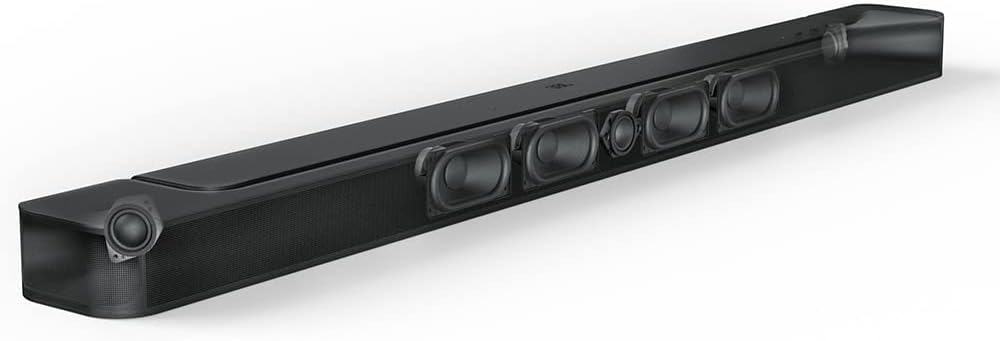
Image: Top panel of the JBL BAR 500 PRO Soundbar, showing integrated control buttons.
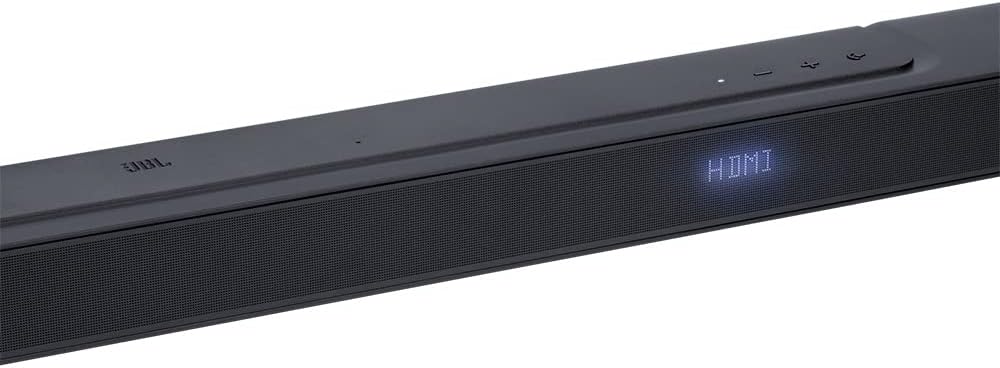
Image: Close-up of the JBL BAR 500 PRO Soundbar's front display, indicating the currently selected input source, such as HDMI.
Modes i funcions de so
- MultiBeam Technology: Provides an immersive surround sound experience without additional rear speakers.
- Dolby Atmos 3D Surround Sound: Delivers a three-dimensional audio experience, placing sounds precisely in your environment.
- PureVoice Technology: Optimizes dialogue clarity, ensuring voices are distinct and easy to understand.
- Intensificació dels sons més greus: Adjust the subwoofer level using the remote control to enhance bass output.
Opcions de streaming
- AirPlay: Reprodueix àudio en streaming sense fil des de dispositius Apple.
- Alexa Multi-Room Music (MRM): Integrate the soundbar into your Alexa multi-room audio setup.
- Chromecast integrat: Cast music, podcasts, and more from compatible apps to your soundbar.
- Bluetooth: Connect and stream audio from any Bluetooth-enabled device.
Control de veu
The JBL BAR 500 PRO supports voice control. Follow the instructions in the Quick Start Guide or the JBL One app to set up your preferred voice assistant (e.g., Alexa, Google Assistant).
Manteniment
- Neteja: Feu servir un drap suau i sec per netejar les superfícies de la barra de so i el subwoofer. No utilitzeu netejadors líquids ni materials abrasius.
- Ventilació: Assegureu-vos que hi hagi una ventilació adequada al voltant de la barra de so i el subwoofer per evitar el sobreescalfament. No bloquegeu cap obertura de ventilació.
- Emmagatzematge: Si guardeu el sistema durant un període prolongat, desconnecteu-lo de l'alimentació i guardeu-lo en un lloc fresc i sec, allunyat de la llum solar directa i de temperatures extremes.
Resolució de problemes
If you encounter issues with your JBL BAR 500 PRO system, refer to the following common problems and solutions:
| Problema | Possible solució |
|---|---|
| Sense poder | Assegureu-vos que els cables d'alimentació estiguin connectats correctament a la barra de so, al subwoofer i a una presa de corrent que funcioni. |
| Sense so |
|
| El subwoofer no es connecta |
|
| El comandament a distància no funciona |
|
| Mala qualitat del so |
|
If the problem persists after trying these solutions, please contact JBL customer support.
Especificacions
| Característica | Detall |
|---|---|
| Nom del model | BAR 500 PRO |
| Configuració del canal de so envoltant | 5.1 |
| Característiques especials | Bass Boost, Dolby Enabled, Stereo Pairing, Subwoofer |
| Diàmetre del subwoofer | 10 polzades |
| Connectivitat del subwoofer | Sense fil |
| Tecnologia de connectivitat | HDMI, Bluetooth, Wi-Fi (AirPlay, Chromecast, Alexa MRM) |
| Mode de sortida d'àudio | Envoltant |
| Mètode de control | Voice, Remote |
| Dimensions del producte (barra de so) | Aprox. 40.06 x 4.69 x 2.25 polzades (llargada x amplada x alçada) |
| Pes de l'article | 35.5 lliures (sistema total) |
| Material | Plastic, Metal, Polypropylene, Aluminum |
| Font d'alimentació | Alimentació CA |
| Requereix piles (comandament a distància) | 2 piles AAA |
Informació de la garantia
The JBL BAR 500 PRO 5.1 Soundbar System comes with a Garantia limitada. For detailed terms and conditions, including warranty duration and coverage, please refer to the warranty card included in your product packaging or visit the official JBL support weblloc.
Suport
Per obtenir més ajuda, assistència tècnica o per descarregar el manual d'usuari complet, visiteu el lloc web oficial de suport de JBL. weblloc:
You can also find additional resources and FAQs on the JBL brand store page on Amazon: Botiga JBL a Amazon


