Introducció
Thank you for choosing the Viper ProScore Electronic Scoreboard. This device is designed to enhance your dart game experience by providing automatic scoring for up to 8 players across 40 different games and 655 game options. This manual will guide you through the installation, operation, and maintenance of your new scoreboard.
Característiques del producte
- Compatible with steel-tip dartboards, bringing electronic dart game features to traditional play.
- Large, backlit LCD screen for clear visibility from the throw line.
- Supports up to 8 players with 40 distinct games and 655 game variations, including customizable handicaps.
- Features an automatic shut-off and sleep mode to conserve battery power.
- Soft-touch keypad for intuitive and easy operation.
- Compact dimensions: 12.7 cm (L) x 3.8 cm (W) x 26 cm (H).
- Battery operated: Requires 3 AA batteries (not included).
Contingut del paquet
Assegureu-vos que hi hagi tots els elements abans de continuar amb la instal·lació:
- Viper ProScore Electronic Scoreboard
- Mounting hardware (screws and wall anchors or wood screws)
Instruccions de configuració
1. Instal·lació de la bateria
- Locate the battery compartment on the back of the scoreboard.
- Obriu la tapa del compartiment de la bateria.
- Introduïu 3 piles AA (no incloses), assegurant-vos de la polaritat correcta (+/-).
- Tanqueu bé la tapa del compartiment de la bateria.
2. Mounting the Scoreboard
The Viper ProScore Electronic Scoreboard can be mounted on a wall next to your dartboard for optimal viewing.

Imatge: Primer pla view of the black mounting bracket with three screw holes, designed to secure the scoreboard to a wall.
- Choose a suitable location on the wall, typically to the side of your dartboard, at a comfortable viewalçada.
- Use the provided mounting hardware (screws and anchors or wood screws) to securely attach the scoreboard to the wall. Ensure the scoreboard is level.

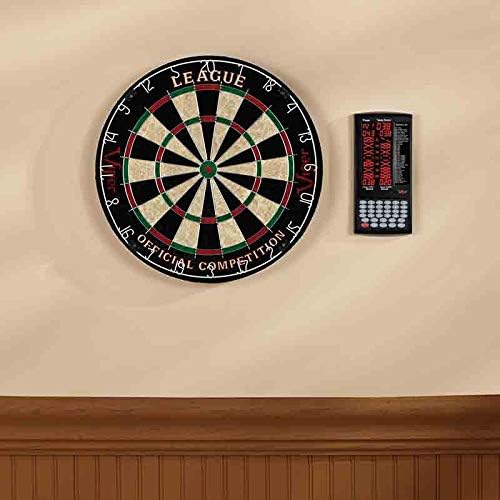
Image: The Viper ProScore Electronic Scoreboard is shown mounted on a wall to the right of a traditional dartboard, illustrating a typical installation setup.
Instruccions de funcionament

Image: The Viper ProScore Electronic Scoreboard displaying scores for two players and a list of available games. The keypad with number buttons and function keys is visible at the bottom.
1. Encendre/apagar
- To turn on the scoreboard, press the On/Off botó.
- To turn off the scoreboard, press and hold the On/Off botó fins que la pantalla s'apagui.
- The scoreboard features an automatic shut-off and sleep mode to conserve battery life when not in use.
2. Game Selection
- Després d'encendre, utilitzeu el Up i Avall buttons to scroll through the list of 40 available games displayed on the screen.
- Once your desired game is highlighted, press the Entra botó per seleccionar-lo.
3. Player Setup
- The scoreboard supports up to 8 players. Follow the on-screen prompts to select the number of players for your game.
- Some games allow for custom handicaps. Refer to the specific game rules for details.
4. Puntuació
After each player's turn, manually enter the score using the numeric keypad (buttons 1-20, 25, 50). Special buttons are available for common dart scores:
- X2: Multiplies the last entered score by 2 (Double).
- X3: Multiplies the last entered score by 3 (Triple).
- 25: For scoring a single bullseye.
- 50: For scoring a double bullseye.
- senyoreta: To register a missed throw.
- Next Player: Advances to the next player's turn after scores are entered.
5. Correcting Scores
- If an incorrect score is entered, press the Correcte button to adjust the last entry.
6. Control de volum
- Utilitza el Volum button to adjust the sound level of the scoreboard's voice announcements and effects.
Llista de jocs
The Viper ProScore Electronic Scoreboard includes the following 40 games:
Imatge: Una imatge detallada view of the game list section on the scoreboard's display, showing game codes and names.
- G01 Criquet
- G02 No Score Cricket
- G03 Criquet de gola tallada
- G04 Killer Cricket
- G05 Low Ball Cricket
- G06 Low Pitch Cricket
- G07 English Cricket
- G08 Doubles Only Cricket
- G09 Double only Cricket
- G10 Single only Cricket
- G11 Futbol
- G12 Bowling
- G13 Golf
- G14 Rally
- G15 301
- G16 401
- G17 501
- G18 601
- G19 701
- Lliga G20 301
- Lliga G21 401
- Lliga G22 501
- Lliga G23 601
- Lliga G24 801
- G25 Round the Clock
- G26 Compte amunt
- G27 Shoot-Out
- G28 Xangai
- G29 Half-It
- G30 Killer
- G31 Shoot-Out
- G32 9 Lives
- G33 acabat
- G34 Unders
- G35 High Score
- G36 Big-6
- G37 Forty-One
- G38 Bingo
- G39 Doble Down
- G40 21 Points
Manteniment
- Neteja: Wipe the scoreboard surface with a soft, dry cloth. Do not use abrasive cleaners or solvents.
- Substitució de la bateria: Replace batteries when the display dims or the scoreboard functions erratically. Always replace all batteries at the same time with new ones of the same type.
- Emmagatzematge: Si l'emmagatzemeu durant un període prolongat, traieu les piles per evitar fuites.
Resolució de problemes
- Scoreboard does not turn on:
- Comproveu si les piles estan inserides correctament amb la polaritat correcta.
- Substituïu les piles velles per unes de noves.
- La pantalla és tènue o parpelleja:
- Pot ser que les piles estiguin baixes. Substitueix-les.
- Incorrect scores are registered:
- Ensure you are pressing the correct numeric buttons for the score.
- Utilitza el Correcte button to rectify recent entries.
- Els botons no responen:
- Try turning the scoreboard off and on again.
- Ensure the buttons are clean and free from debris.
Especificacions
- Número de model: 37-0116
- Dimensions (L x A x A): 12.07 x 12.07 x 25.4 cm (4.75 x 4.75 x 10 polzades)
- Pes: 318 grams (0.7 lliures)
- Font d'alimentació: 3 piles AA (no incloses)
- Material: Sisal (Note: This specification seems to refer to a dartboard material, not the scoreboard itself. The scoreboard is typically plastic/electronic components.)
- Color: Negre
- Player Capacity: Fins a 8 jugadors
- Jocs: 40 games, 655 options
Garantia i Suport
For specific warranty information and customer support, please refer to the documentation included with your product or visit the official Viper weblloc. Conserveu el rebut de compra per a reclamacions de garantia.


