Introducció
This manual provides comprehensive instructions for the AT&T EL50019 Accessory Handset. This handset is designed to expand your existing AT&T EL52219 series phone system, offering enhanced communication features such as a full-duplex speakerphone, Caller ID, and a backlit keypad and display for improved visibility. Please read this manual thoroughly to ensure proper setup, operation, and maintenance of your accessory handset.
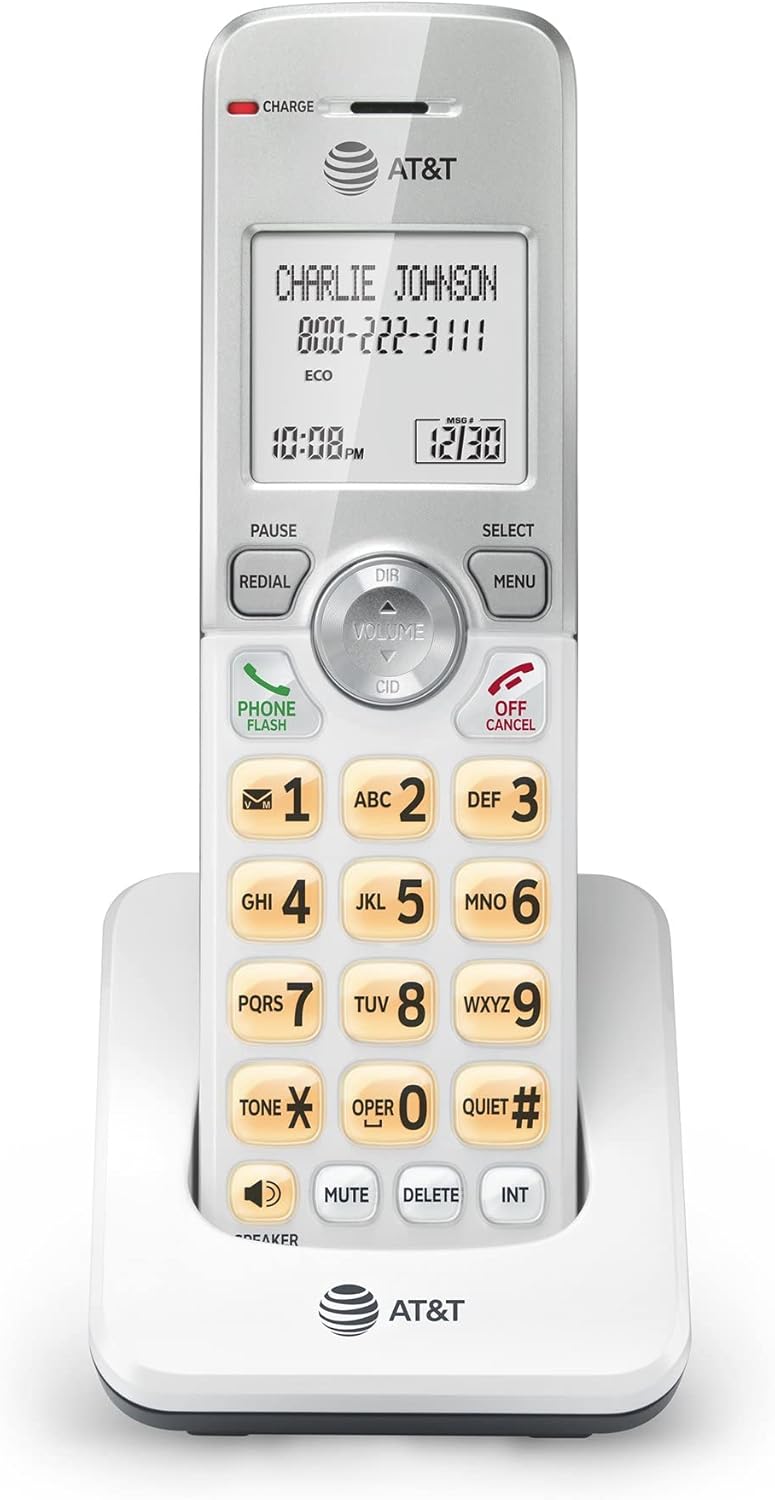
Figura 1: Frontal view of the AT&T EL50019 Accessory Handset, showing the display, keypad, and navigation buttons.
Instruccions importants de seguretat
Quan utilitzeu el vostre equip telefònic, sempre s'han de seguir les precaucions bàsiques de seguretat per reduir el risc d'incendi, descàrrega elèctrica i lesions a les persones, incloses les següents:
- No utilitzeu aquest producte prop de l'aigua, per exempleample, a prop d'una banyera, rentadora, pica de cuina o rentadora, en un soterrani humit o prop d'una piscina.
- Eviteu utilitzar un telèfon (que no sigui el sense fil) durant una tempesta elèctrica. Pot haver-hi un risc remot de descàrrega elèctrica per llamps.
- No utilitzeu el telèfon per informar d'una fuita de gas a les proximitats de la fuita.
- Use only the power cord and batteries indicated in this manual. Do not dispose of batteries in a fire. They may explode. Check with local codes for special disposal instructions.
- Do not disassemble the product. Refer to the "Troubleshooting" section for common issues. If the product requires service, contact AT&T customer support.
Contingut del paquet
Assegureu-vos que tots els elements estiguin presents al vostre paquet:
- AT&T EL50019 Accessory Handset
- Bateria de l'auricular
- Handset Charger Cradle
- Adaptador de corrent per a la base del carregador
- Manual d'usuari (aquest document)
Note: This is an accessory handset and requires an AT&T EL52219 series phone system to operate.
Configuració
1. Instal·lació de la bateria
- Localitzeu el compartiment de la bateria a la part posterior del telèfon.
- Obriu la tapa del compartiment de la bateria.
- Connect the battery pack plug into the jack inside the compartment, ensuring correct polarity.
- Col·loqueu el paquet de bateries al compartiment.
- Tanqueu bé la tapa del compartiment de la bateria.
2. Càrrega del telèfon
Before initial use, charge the handset for at least 16 hours. A full charge ensures optimal battery performance.
- Plug the small end of the power adapter into the power jack on the back of the charger cradle.
- Plug the large end of the power adapter into a standard electrical outlet not controlled by a wall switch.
- Place the handset face forward in the charger cradle. The "CHARGE" indicator light on the handset will illuminate, confirming it is charging.

Figure 2: The AT&T EL50019 Accessory Handset placed in its charging cradle.
3. Registre del telèfon
This accessory handset must be registered to your AT&T EL52219 series base unit before use. Refer to your main EL52219 series phone system manual for detailed registration instructions. Typically, this involves placing the handset in the base unit's charger and pressing a registration button on the base unit.
4. Configuració inicial (data/hora)
Once registered, the handset may prompt you to set the date and time. Follow the on-screen instructions using the navigation keys and the MENU/SELECT button. Correct date and time settings are crucial for Caller ID and call log accuracy.
Instruccions de funcionament
Fer i rebre trucades
- Per fer una trucada: Premeu TELÈFON / FLASH or any dialing key, then dial the number.
- Per respondre una trucada: Quan soni el telèfon, premeu TELÈFON / FLASH o qualsevol tecla de marcatge.
- Per finalitzar una trucada: Premeu OFF/CANCEL·LAR or place the handset back in the charger cradle.
Funció altaveu
The EL50019 features a simulated full-duplex speakerphone, allowing both parties to speak and be heard simultaneously for more natural conversations.
- To Activate Speakerphone: Durant una trucada, premeu el botó PONENT botó.
- To Switch Back to Handset: Premeu TELÈFON / FLASH.
Identificador de trucades/Trucada en espera
The handset displays the caller's name and number (if available) for incoming calls. It also supports Call Waiting, allowing you to answer a second call while on the phone.
- Review Historial d'identificació de trucades: Premeu CID to scroll through the 50-name and number caller ID history.
- To Answer a Waiting Call: Premeu TELÈFON / FLASH quan sentiu el to de trucada en espera.
Phonebook Directory
Emmagatzemeu fins a 50 noms i números a la llibreta telefònica per marcar ràpidament.
- Accés a l'agenda telefònica: Premeu DIR.
- Add/Edit Entries: Follow on-screen prompts after pressing MENÚ/SELECT and navigating to the Phonebook option.
Redial and Mute
- Torna a marcar: Premeu RECOMANTA a view the last 10 dialed numbers. Press TELÈFON / FLASH per marcar un número seleccionat.
- Silenciar: Durant una trucada, premeu MUT to temporarily silence your microphone. Press again to unmute.
Mode silenciós
Activate Quiet Mode to silence all ringers on the handset for a set period, useful for undisturbed sleep or meetings.
- Activar/Desactivar: Manteniu premut el botó TRANQUIL# button. Follow the prompts to set the duration.
Correu de veu
The handset features a voicemail waiting indicator and quick access key.
- Access Voicemail: When the voicemail indicator is on, press and hold 1 (or the designated voicemail access key) to dial your voicemail service.
Intercom and Conference Calls
If you have multiple registered handsets, you can use the intercom feature or conduct conference calls.
- Intercomunicador: Premeu INT, then dial the number of the handset you wish to call.
- Conferència trucada: Durant una trucada externa, premeu MENÚ/SELECT, select "Conference," then dial the internal handset or external line you wish to add.
Control de volum
Adjust the listening volume during a call or the ringer volume when idle.
- Volum de trucades: Premeu VOLUM up or down during a call.
- Volum del timbre: Premeu VOLUM up or down when the handset is idle.
Manteniment
Neteja de l'auricular
Clean the handset and charger cradle with a soft, slightly damp drap. No utilitzeu esprais de neteja ni productes químics agressius, ja que poden danyar l'acabat o els components elèctrics.
Cura de la bateria
- To preserve battery life, avoid overcharging by leaving the handset off the charger for short periods after it is fully charged.
- If the handset will not be used for an extended period, remove the battery to prevent leakage.
- Replace the battery when the handset consistently shows a low battery indicator or experiences significantly reduced talk/standby time.
Resolució de problemes
If you experience difficulty with your phone, please try the following suggestions. For customer service, visit the AT&T website or refer to the contact information provided with your main EL52219 series phone system.
| Problema | Solució |
|---|---|
| Sense to de marcatge. |
|
| El telèfon no es carrega. |
|
| Mala qualitat de so. |
|
| La pantalla està en blanc o tènue. |
|
Especificacions
| Característica | Detall |
|---|---|
| Model | EL50019 (Accessory Handset) |
| Tecnologia | Tecnologia digital DECT 6.0 |
| Identificació de trucades | Yes (50 name/number history) |
| Capacitat de l'agenda | 50 noms i números |
| Altaveu | Simulated Full-Duplex Handset Speakerphone |
| Mostra | Extra-large LCD, Backlit |
| Teclat | Backlit, Enlarged Font |
| Mode silenciós | Sí |
| Mode ECO | Power-conserving technology |
| Memòria de remarcació | Last 10 numbers |
| Intercomunicador | Yes (between handsets) |
| Conferència trucada | Yes (between outside line and up to 2 cordless handsets) |
| Font d'alimentació | Corded Electric (for charger cradle) |
| Bateries | 1 bateria desconeguda (inclosa) |
| Dimensions (paquet) | 9 x 6 x 4 polzades |
| Pes (article) | 3 lliures |
Garantia i Suport
For warranty information and technical support, please refer to the documentation included with your original AT&T EL52219 series phone system. You may also visit the official AT&T website for cordless phones or contact their customer service directly. Keep your purchase receipt as proof of purchase for warranty claims.
Assistència en línia: www.att.com/support


