1. Producte acabatview
The PUTORSEN Universal VESA Pole Mount is designed to securely attach monitors or TVs ranging from 17 to 32 inches to a pole. It supports VESA mounting patterns of 75x75 mm and 100x100 mm, with a maximum weight capacity of 8kg (17.6 lbs). This full-motion mount offers versatile adjustment options for optimal viewing.

Imatge 1: acabatview of the PUTORSEN Universal VESA Pole Mount and accessories.
2. What's in the Box (Parts List)
Verifiqueu que tots els components siguin presents abans de començar la instal·lació.
- Single Fully Adjustable Arm (1)
- Mounting Hardware Kit (1) - Includes various screws and tools
- VESA Plate (1)
- Brides de cable (4)
Note: The pole for mounting is not included.
3. Especificacions
- Marca: PUTORS
- Model: B0BTBJLDW4
- Material: Acer d'aliatge
- Color: Negre
- Mides de pantalla compatibles: De 17 a 32 polzades
- Capacitat de pes: Fins a 8 kg (17.6 lliures)
- Compatibilitat VESA: 75x75 mm, 100x100 mm
- Pole Diameter Compatibility: 1.1" a 2.4"
- Ajust d'inclinació: +30° a -30°
- Ajust de gir: +90° a -90°
- Rotació de pantalla: +180° a -180°
- Extensió del braç: Fins a 10.6 polzades (269 mm)
4. Informació de seguretat
- Ensure the mounting pole is stable and capable of supporting the combined weight of the mount and your monitor/TV.
- Do not exceed the maximum weight capacity of 8kg (17.6 lbs).
- Verify that your monitor/TV has VESA 75x75 mm or 100x100 mm mounting holes.
- Use appropriate tools and follow all installation steps carefully to prevent injury or damage.
- Mantingueu les peces petites allunyades dels nens.
5. Configuració i instal·lació
Follow these steps for proper installation of your PUTORSEN Universal VESA Pole Mount.
5.1. Attach VESA Plate to Monitor/TV
- Carefully place your monitor or TV face down on a soft, clean surface to prevent scratches.
- Align the VESA plate with the mounting holes on the back of your monitor/TV.
- Secure the VESA plate using the appropriate screws from the mounting hardware kit and a screwdriver. Ensure screws are tightened firmly but do not overtighten.
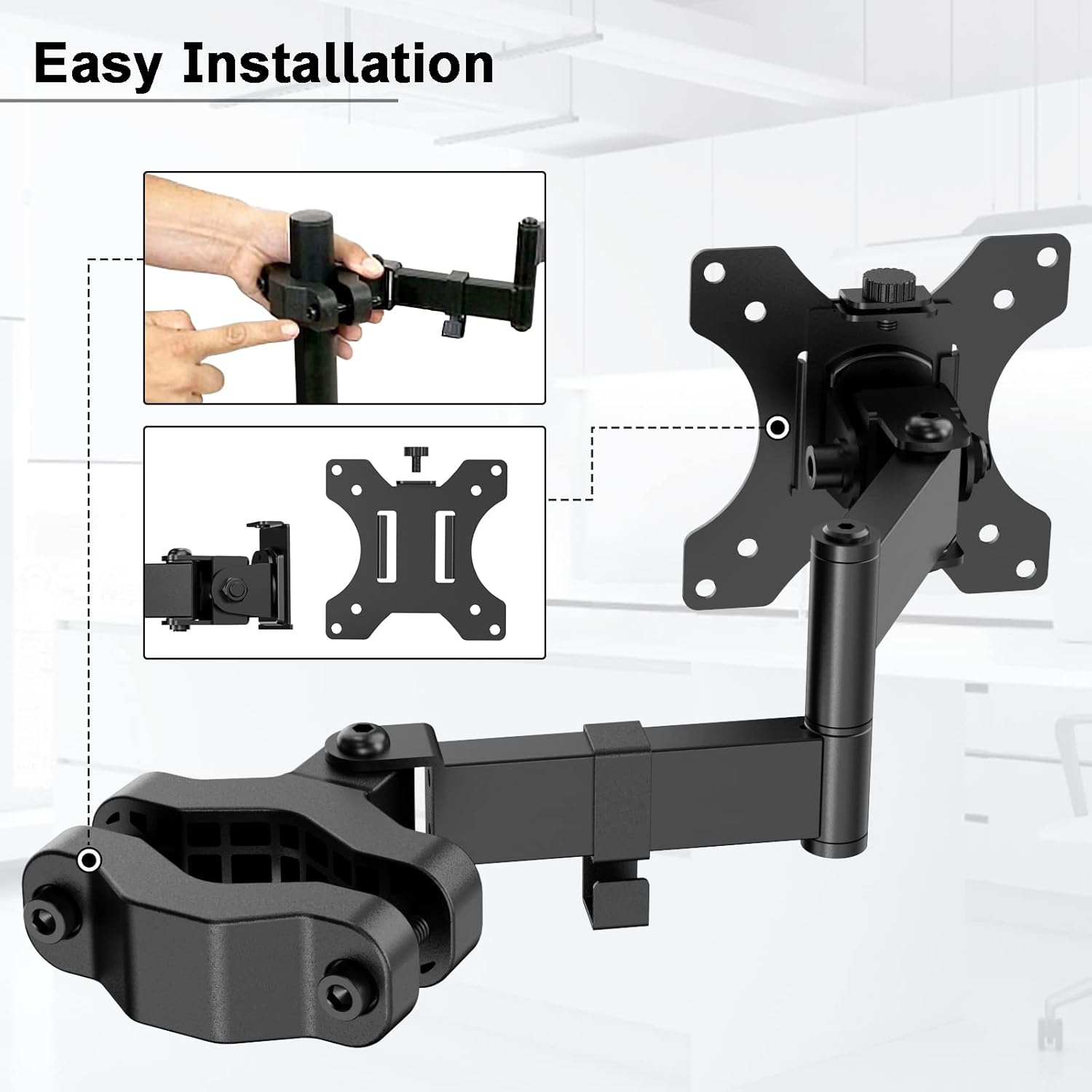
Image 2: Attaching the VESA plate to the monitor.
5.2. Mount Arm to Pole
- Identify a suitable pole with a diameter between 1.1" and 2.4".
- Separate the two halves of the pole clamp on the monitor arm.
- Col·loca el clamp around the pole at the desired height.
- Re-attach the two halves of the clamp and tighten the screws securely using the provided wrench. Ensure the clamp is firm and does not slide.

Image 3: Pole diameter compatibility for the mount.
5.3. Attach Monitor/TV to Arm
- Carefully lift the monitor/TV with the attached VESA plate.
- Slide the VESA plate onto the mounting head of the arm until it clicks into place or is secured by the locking mechanism.
- Ensure the monitor is securely attached before releasing això.

Image 4: Monitor attached to the pole mount, illustrating compatibility.
5.4. Gestió de cables
Use the provided cable management clips to route cables along the arm and pole for a tidy setup.

Imatge 5: Ex.ample of cable management using the integrated clips.
5.5. Vídeo d'instal·lació
Per obtenir una guia visual, consulteu el vídeo oficial d'instal·lació:
Video 1: Official installation guide for the PUTORSEN Pole Mount. This video demonstrates the assembly process and attachment to a pole.
6. Instruccions de funcionament
The PUTORSEN Universal VESA Pole Mount offers full motion capabilities for ergonomic viewing.
- Inclinació: Adjust the screen vertically from +30° to -30° to reduce glare and find the ideal viewangle de ing.
- Girar: Rotate the screen horizontally from +90° to -90° for easy screen sharing or viewing from different positions.
- Rotació de pantalla: Rotate the screen +180° to -180° to switch between landscape and portrait orientations.
- Extensió del braç: Extend the arm up to 10.6 inches (269mm) to bring the screen closer or push it further away.
- Ajust d'alçada: The arm can be adjusted vertically along the pole to set the screen at a comfortable height.

Image 6: Visual representation of the mount's full motion capabilities.

Image 7: Arm extension details and measurements.
7. Manteniment
To ensure the longevity and proper function of your pole mount, follow these maintenance guidelines:
- Neteja: Netegeu la muntura amb un drap suauamp drap. Eviteu productes de neteja abrasius o dissolvents que puguin danyar l'acabat.
- Comprovació d'estanquitat: Reviseu periòdicament tots els cargols i perns per assegurar-vos que romanen ajustats. Torneu a apretar-los si cal, però no els apreteu massa.
- Lubricació: Si alguna junta es torna rígida amb el temps, es pot aplicar una petita quantitat de lubricant a base de silicona a les peces mòbils.
8. Solució De Problemes
If you encounter issues with your PUTORSEN Universal VESA Pole Mount, refer to the following common solutions:
- Mount is unstable or slides down the pole:
- Ensure the pole clamp screws are fully tightened.
- Verify that the pole diameter is within the specified range of 1.1" to 2.4".
- Confirm the monitor weight does not exceed 8kg (17.6 lbs).
- Monitor is not level:
- Check the VESA plate attachment to the monitor and the arm. Adjust as needed.
- Some mounts allow for minor leveling adjustments at the VESA plate connection point.
- Difficulty adjusting arm movement:
- The joints may be stiff. Apply a small amount of silicone lubricant if necessary.
- Ensure no cables are snagged or obstructing movement.
9. Garantia i Suport
PUTORSEN stands behind the quality of its products. This package includes the PUTORSEN Single Fully Adjustable Arm, Mounting Hardware Kit, VESA Plate, and 4 additional cable ties.
For any assistance or inquiries, please contact our professional service team, available 7 days a week, 24 hours a day. Refer to your purchase documentation or the PUTORSEN official weblloc web per obtenir dades de contacte específiques.
We are committed to providing customer service to all customers who have purchased products from us.