1. Introducció
This manual provides detailed instructions for the setup, operation, and maintenance of your Adler AD 1196B Digital Alarm Clock. Please read this manual thoroughly before using the device to ensure proper function and longevity.
2. Producte acabatview
2.1 Característiques clau
- Digital time display with 12/24 hour format.
- Pantalla retroil·luminada per facilitar-ho viewing, automatically turns off after 4 seconds.
- Three independent alarm time settings.
- Three alarm activation settings: 5 days (weekday), 6 days (weekday + Saturday), 7 days (every day).
- Displays current time, date, indoor temperature, and humidity.
- Battery-powered for portability and backup during power outages.
2.2 Contingut del paquet
- Adler AD 1196B Digital Alarm Clock Unit
- Manual d'usuari
Note: 2x AA batteries are required and not included in the package.

Figura 1: Frontal view of the Adler AD 1196B Digital Alarm Clock, displaying 12:00, 26°C, 56% humidity, and the current date.
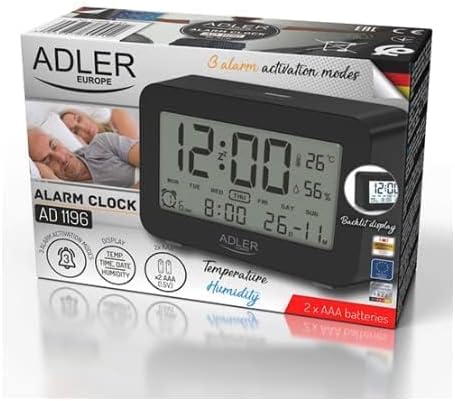
Figure 2: The Adler AD 1196B Digital Alarm Clock shown in its retail packaging, highlighting key features.
3. Configuració
3.1 Instal·lació de la bateria
- Localitza la tapa del compartiment de les piles a la part posterior del despertador.
- Feu lliscar o aixequeu la tapa per obrir el compartiment.
- Insert two (2) AA batteries, ensuring the correct polarity (+ and -) as indicated inside the compartment.
- Col·loqueu la coberta del compartiment de la bateria amb seguretat.
The clock will power on automatically once batteries are inserted. The display will show default settings or begin flashing.
3.2 Encès inicial
Upon successful battery installation, the display will illuminate. You may need to press a button (e.g., "MODE" or "SET") to activate the display if it remains blank after battery insertion. The backlight will activate briefly and then turn off.
4. Instruccions de funcionament
Familiarize yourself with the control buttons, typically located on the back or top of the device. Common buttons include: MODE, SET, UP/+, DOWN/-, ALARM.
4.1 Configuració de l'hora
- Manteniu premut el botó SET botó (o MODE button, depending on model) until the hour digits begin to flash.
- Utilitza el UP/+ or BAIX/- botons per ajustar l'hora.
- Premeu SET (o MODE) again to move to the minute setting.
- Utilitza el UP/+ or BAIX/- botons per ajustar els minuts.
- Continueu prement SET (o MODE) to cycle through 12/24 hour format, and then to exit time setting mode.
4.2 Configuració de la data
- Des de la visualització normal de l'hora, premeu la tecla MODE button repeatedly until the date display starts flashing or you enter date setting mode.
- The year digits may flash first. Use UP/+ or BAIX/- per ajustar l'any.
- Premeu MODE to move to the month setting, then adjust with UP/+ or BAIX/-.
- Premeu MODE to move to the day setting, then adjust with UP/+ or BAIX/-.
- Premeu MODE again to confirm and exit date setting.
4.3 Setting Alarms (Alarm 1, Alarm 2, Alarm 3)
The AD 1196B features three independent alarms. The process is similar for each.
- Premeu el botó ALARMA botó una vegada per view Alarm 1. Press again for Alarm 2, and a third time for Alarm 3.
- Mentre viewing the desired alarm (e.g., AL1), press and hold the SET fins que els dígits de l'hora de l'alarma parpellegin.
- Ús UP/+ or BAIX/- per configurar l'hora de l'alarma.
- Premeu SET per passar a la configuració dels minuts de l'alarma.
- Ús UP/+ or BAIX/- per configurar els minuts de l'alarma.
- Premeu SET again to confirm the alarm time.
- Per activar/desactivar una alarma, premeu la tecla ALARMA button repeatedly until the alarm icon (e.g., bell symbol) appears or disappears next to the corresponding alarm number (AL1, AL2, AL3).
4.4 Alarm Activation Modes (5, 6, 7 Days)
After setting an alarm time, you can choose its activation frequency:
- While in alarm setting mode (after setting minutes for an alarm), press SET one more time. The display will show a day indicator (e.g., "5 DAY", "6 DAY", "7 DAY").
- Ús UP/+ or BAIX/- to cycle through the options:
- 5 DIA: L'alarma sona de dilluns a divendres.
- 6 DIA: Alarm sounds Monday to Saturday.
- 7 DIA: L'alarma sona cada dia de la setmana.
- Premeu SET to confirm your selection and exit alarm setting for that specific alarm.
4.5 Funció de retroiluminació
The display features a backlight for improved visibility in low light conditions. The backlight automatically activates when a button is pressed and turns off after approximately 4 seconds to conserve battery power.
4.6 Visualització de temperatura i humitat
The alarm clock continuously displays the current indoor temperature (in Celsius) and relative humidity percentage. No specific action is required to view these readings; they are shown on the main display.
5. Manteniment
5.1 Neteja
To clean the alarm clock, gently wipe the surface with a soft, dry cloth. Do not use abrasive cleaners, solvents, or chemical sprays, as these may damage the display or casing.
5.2 Substitució de la bateria
When the display becomes dim or the clock functions erratically, it is time to replace the batteries. Follow the battery installation steps in Section 3.1. Always replace both batteries with new AA batteries of the same type. Dispose of old batteries responsibly according to local regulations.
6. Solució De Problemes
| Problema | Causa possible | Solució |
|---|---|---|
| La pantalla està en blanc o tènue. | Les piles estan baixes o instal·lades incorrectament. | Substituïu les piles per piles AA noves, assegurant-vos de la polaritat correcta. |
| L'alarma no sona. | L'alarma no està activada o està configurada incorrectament. | Ensure the alarm icon is visible on the display. Verify the alarm time and activation mode (5, 6, or 7 days) are set correctly. |
| L'hora/data és incorrecta. | Time/Date was not set or reset after battery change. | Follow instructions in Section 4.1 and 4.2 to set the correct time and date. |
| Les lectures de temperatura/humitat semblen inexactes. | Clock is placed near a heat source, vent, or in direct sunlight. | Relocate the clock to a stable environment away from extreme temperature or humidity fluctuations. Allow time for readings to stabilize. |
7. Especificacions
- Model: AD 1196B
- Font d'alimentació: 2 piles AA (no incloses)
- Tipus de visualització: LCD digital amb retroiluminació
- Funcions: Time, Date, Day of Week, Temperature (°C), Humidity (%), 3 Alarms with 3 Activation Modes
- Durada de la retroiluminació: Uns 4 segons
- Material: Plàstic
- Dimensions (L x P x A): 11 cm x 3.81 cm x 5 cm
- Pes: 1.6 kg
8. Garantia i Suport
For warranty information or technical support, please refer to the warranty card included with your product or contact the manufacturer directly. Keep your purchase receipt as proof of purchase.
Manufacturer: Adler


