Producte acabatview
The Portronics Toad Ergo Vertical Advanced Wireless Ergonomic Mouse is designed to provide a comfortable and natural hand posture, reducing strain during extended use. Its vertical design supports the wrist and palm, making it suitable for long work hours. This mouse features a 2.4 GHz wireless connection, adjustable DPI settings, and a multi-button layout for enhanced productivity.

Figure 1: Portronics Toad Ergo Vertical Advanced Wireless Ergonomic Mouse (Black)
Característiques clau
- Disseny vertical ergonòmic: Reduces strain on palms and wrists by promoting a natural handshake grip.
- Adjustable DPI (up to 3200): Customize cursor speed for precision, suitable for various tasks from casual use to professional work.
- 6D Buttons: Includes Left, Right, Scroll Wheel, DPI adjustment, and two side buttons for forward/backward navigation.
- Connectivitat sense fil de 2.4 GHz: Ensures stable, fast, and reliable wireless connection via a nano USB dongle.
- Power Saving Design: Automatically hibernates when not in use to conserve battery life.
- Àmplia compatibilitat: Compatible amb els sistemes operatius Windows i Mac.

Figure 2: Comparison of Ergonomic Vertical Mouse vs. Traditional Mouse posture.

Figure 3: The 57-degree vertical ergonomic design supports natural hand posture.
Guia de configuració
1. Instal·lació de la bateria
- Localitzeu el compartiment de la bateria a la part inferior del ratolí.
- Obriu la tapa del compartiment de la bateria.
- Insert two AAA batteries (not included) into the compartment, ensuring correct polarity (+/-).
- Tanqueu bé la tapa del compartiment de la bateria.
2. Connexió del receptor sense fil
- Locate the 2.4 GHz nano USB dongle, typically stored in a small compartment at the bottom of the mouse.
- Remove the USB dongle from its storage slot.
- Plug the USB dongle into an available USB port on your computer (Laptop or Personal Computer).
- The mouse should automatically connect to your computer. No additional drivers are typically required for Windows 10, Windows 8, or Mac operating systems.

Figure 4: Connecting the 2.4 GHz wireless USB dongle to a laptop.
Instruccions de funcionament
Funcions del botó
The Portronics Toad Ergo mouse features 6 buttons for versatile control:
- Botó esquerre: Funció estàndard del clic esquerre.
- Botó dret: Funció estàndard del clic dret.
- Roda de desplaçament: Per a desplaçament vertical. També es pot prémer per a la funcionalitat de clic central.
- Botó DPI: Adjusts the cursor sensitivity (DPI).
- Botó Endavant (lateral): Navega cap endavant web navegadors o file exploradors.
- Botó enrere (lateral): Navega cap enrere web navegadors o file exploradors.

Figure 5: Labeled diagram of the mouse buttons.
Ajust de DPI (velocitat del cursor)
Press the DPI button located near the scroll wheel to cycle through the available DPI settings. The mouse supports adjustable DPI up to 3200, with common settings including 1200, 1600, 2400, and 3200 DPI. Select the sensitivity that best suits your task and preference.
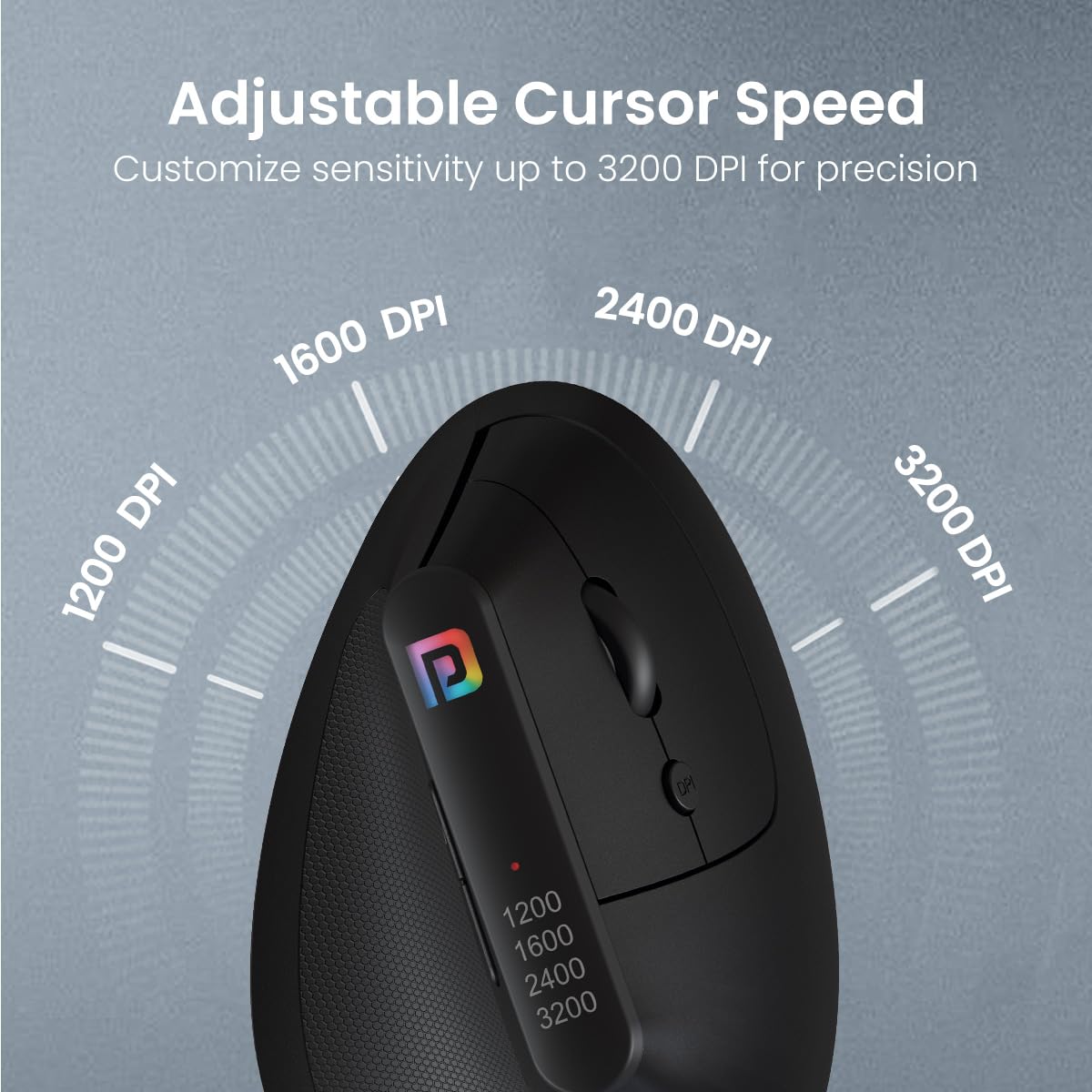
Figura 6: Representació visual dels nivells d'ajust de DPI.
Mode d'estalvi d'energia
The mouse is equipped with an intelligent power-saving feature. If the mouse is not used for a period, it will automatically enter hibernation mode to conserve battery power. To wake the mouse, simply move it or click any button.
Manteniment
Neteja
To maintain optimal performance and appearance, regularly clean your mouse. Use a soft, dry cloth to wipe the surface. For stubborn dirt, a slightly damp cloth with mild soap can be used, ensuring no liquid enters the internal components. Avoid using harsh chemicals or abrasive cleaners.
Canvi de bateria
When the mouse's performance degrades or it stops responding, it may be time to replace the batteries. Follow the battery installation steps outlined in the "Setup Guide" section to replace the two AAA batteries.
Resolució de problemes
| Problema | Causa possible | Solució |
|---|---|---|
| El ratolí no respon/no es connecta. | Low or dead batteries; USB dongle not properly connected; interference. | Replace batteries. Ensure USB dongle is fully inserted into a working USB port. Try a different USB port. Move the mouse closer to the dongle. |
| Cursor movement is erratic or jumps. | Sensor òptic brut; superfície inadequada; bateria baixa. | Clean the optical sensor on the underside of the mouse. Use a mouse pad or a smooth, non-reflective surface. Replace batteries. |
| Els botons o la roda de desplaçament no funcionen. | Software issue; physical damage; low battery. | Restart your computer. Check for physical obstructions. Replace batteries. If the issue persists, contact customer support. |
| Mouse enters sleep mode too quickly. | Normal power-saving function. | This is by design to conserve battery. Simply move the mouse or click a button to wake it. |
Especificacions
| Característica | Detall |
|---|---|
| Marca | Portronics |
| Nom del model | Toad Ergo |
| Número de model | POR-1808 |
| Tecnologia de connectivitat | 2.4 GHz Wireless (USB Dongle) |
| Detecció de moviment | Òptic |
| DPI ajustable | Up to 3200 (e.g., 1200, 1600, 2400, 3200) |
| Nombre de botons | 6 (Left, Right, Scroll, DPI, Forward, Backward) |
| Font d'alimentació | Battery Powered (2 x AAA batteries, not included) |
| Durada estimada de la bateria | 12 mesos |
| Dimensions del producte (LxWxH) | 10 x 8 x 5 cm |
| Pes de l'article | 140 g |
| Material | Plàstic ABS |
| Orientació de la mà | Ambidextre |
| Sistemes operatius compatibles | Windows 10, Windows 8, Mac OS |
Garantia i Suport
For warranty information, technical support, or any product-related inquiries, please contact Portronics customer service.
- Fabricant: Portronics Digital Pvt Ltd
- Adreça: FLOOR-1st and 2nd, B-76, Wazirpur Industrial area, Wazirpur, New Delhi, Delhi, 110052, India
- Número de contacte: 9555-245-245
- Per a més informació, visiteu l'oficial Portronics Store on Amazon.


