Introducció
The ThermoPro TempSpike is a truly wireless meat thermometer designed to provide accurate temperature readings for various cooking methods. It features advanced Bluetooth 5.2 technology for extended remote range, dual temperature sensors for internal and ambient monitoring, and a user-friendly app for intelligent cooking control. This manual provides essential information for setting up, operating, and maintaining your TempSpike thermometer.
Contingut del paquet
Assegureu-vos que hi hagi tots els articles presents en desempaquetar:
- 1 × Meat Probe
- 1 × Booster (Charging Dock)
- 2 × piles AAA
- 1 × Manual d'usuari

Image: The TempSpike meat probe, booster, and a smartphone showing the accompanying application.
Configuració
- Insereix les piles: Open the battery compartment on the Booster and insert the two AAA batteries, ensuring correct polarity.
- Charge Probe: Place the meat probe into the Booster. The probe will begin charging automatically. Ensure the probe is fully charged before first use for optimal battery life.
- Descarregar l'aplicació: Cerca the "TempSpike" app on your smartphone's app store (iOS or Android) and install it.
- Vincula amb l'aplicació:
- Activa el Bluetooth al teu telèfon intel·ligent.
- Open the TempSpike app.
- The app will automatically search for and connect to your TempSpike Booster and probe. No manual pairing code is typically required.
Instruccions de funcionament
Col·locació de la sonda
Insert the meat probe into the thickest part of the meat, avoiding bone or gristle. The probe features two sensors:
- Sensor de temperatura interna: Measures the internal temperature of the food.
- Sensor de temperatura ambient: Measures the surrounding cooking temperature (e.g., oven, grill, smoker). Ensure the safety notch on the probe is fully inserted into the meat, leaving the ambient sensor exposed to the cooking environment.

Imatge: Detallada view of the TempSpike probe illustrating the internal and ambient temperature sensors and the safety notch for correct insertion.
Using the TempSpike App
The TempSpike app serves as your primary interface for monitoring and controlling your cooking process.
- Monitorització en temps real: View both internal meat temperature and ambient cooking temperature on your smartphone.
- Temperatures predeterminades: Select from a variety of USDA-recommended preset temperatures for different types of meat and doneness levels. You can also customize target temperatures.
- Cook Alerts: Receive notifications when your meat reaches the target temperature or when the ambient temperature goes outside a set range.
- Estimated Cooking Time: The app provides an estimated time remaining for your cook based on real-time data.
- Gràfic de temperatura: Track temperature progression over time with a visual graph.
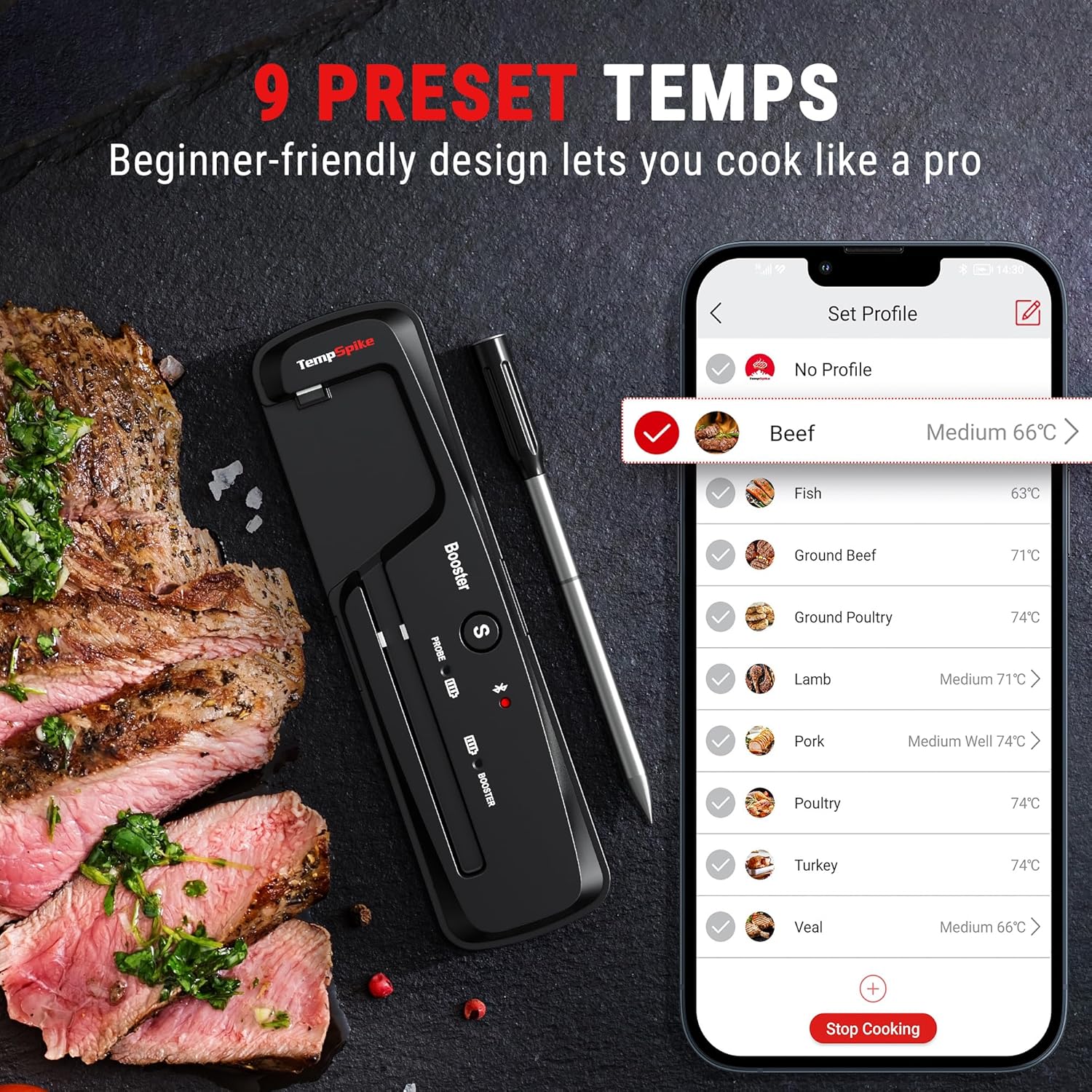
Image: The TempSpike app displaying a list of preset temperatures for different meat types, allowing users to select their desired doneness.
abast sense fils
The TempSpike utilizes Bluetooth 5.2 technology, offering a remote range of up to 500 feet (150 meters) in open areas. Environmental factors such as walls, appliances, and other electronic devices can affect the signal range.

Image: An individual monitoring their grill from a distance using the TempSpike app on their phone, demonstrating the 500ft remote range capability.
Aplicacions versàtils
The TempSpike is suitable for a wide range of cooking environments:
- Forn
- Grill
- Fumador
- Rotisseria
- Sos Vide
- Fregidora d'aire

Image: Collage demonstrating the TempSpike's versatility across various cooking methods including oven, air fryer, BBQ, and rotisserie.
Manteniment
- Neteja de la sonda: After each use, allow the probe to cool down. Wash the stainless steel portion of the probe with soap and water, or place it in a dishwasher. The probe is dishwasher-safe and deep-fryer proof. Avoid submerging the entire probe, especially the black handle, in water.
- Cleaning the Booster: Wipe the Booster with a damp cloth. Do not submerge the Booster in water.
- Emmagatzematge: Store the probe in its Booster when not in use to keep it charged and protected. Store in a dry place.
- Cura de la bateria: Replace AAA batteries in the Booster as needed. The probe's internal battery is rechargeable via the Booster.
Resolució de problemes
- Sense connexió Bluetooth:
- Assegureu-vos que el Bluetooth estigui habilitat al vostre telèfon intel·ligent.
- Make sure the TempSpike Booster and probe are powered on and within range.
- Reinicieu l'aplicació i/o el telèfon intel·ligent.
- Check if the probe is properly seated in the Booster for charging and activation.
- Lectures de temperatura inexactes:
- Ensure the probe is inserted into the thickest part of the meat, avoiding bone.
- Verify the ambient sensor is exposed to the cooking environment and not covered by food.
- Calibrate the thermometer if an option is available in the app (refer to app settings).
- Durada de la bateria curta:
- Ensure the probe is fully charged before each use.
- Replace the AAA batteries in the Booster if they are low.
- La sonda no es carrega:
- Ensure the probe is correctly seated in the Booster.
- Check if the Booster has working batteries.
- Clean the charging contacts on both the probe and Booster.
Especificacions
| Pes de l'article | 127 grams |
| Material exterior | Plàstic, acer inoxidable |
| Tipus de visualització | Digital (via App) |
| Tecnologia de connectivitat | Bluetooth 5.2 |
| Interval Bluetooth | Fins a 500 peus (150 metres) |
| Internal Temperature Sensor Range | Fins a 212 °F (100 °C) |
| Ambient Temperature Sensor Range | Fins a 572 °F (300 °C) |
| Precisió de la temperatura | ± 1.8 ° F (± 1 ° C) |
| Durada de la bateria de la sonda | 36+ hours (fully charged) |
| Booster Batteries | 2 × AAA (incloses) |
| Classificació impermeable | IP67 (Sonda) |
Informació de la garantia
ThermoPro products typically come with a limited warranty. For specific warranty terms and conditions, please refer to the warranty card included with your product or visit the official ThermoPro weblloc web. Conserveu el comprovant de compra per a reclamacions de garantia.
Suport
For further assistance, product registration, or to access FAQs and additional resources, please visit the official ThermoPro weblloc:
You may also find contact information for customer service on the weblloc.


