1. Producte acabatview
The EKSA StarEngine Pro is a versatile USB gaming headset designed to deliver immersive 7.1 surround sound and clear communication across multiple platforms. Featuring a detachable noise-cancelling microphone, dual-chamber drivers, and convenient controls, it enhances your gaming and audio experience.
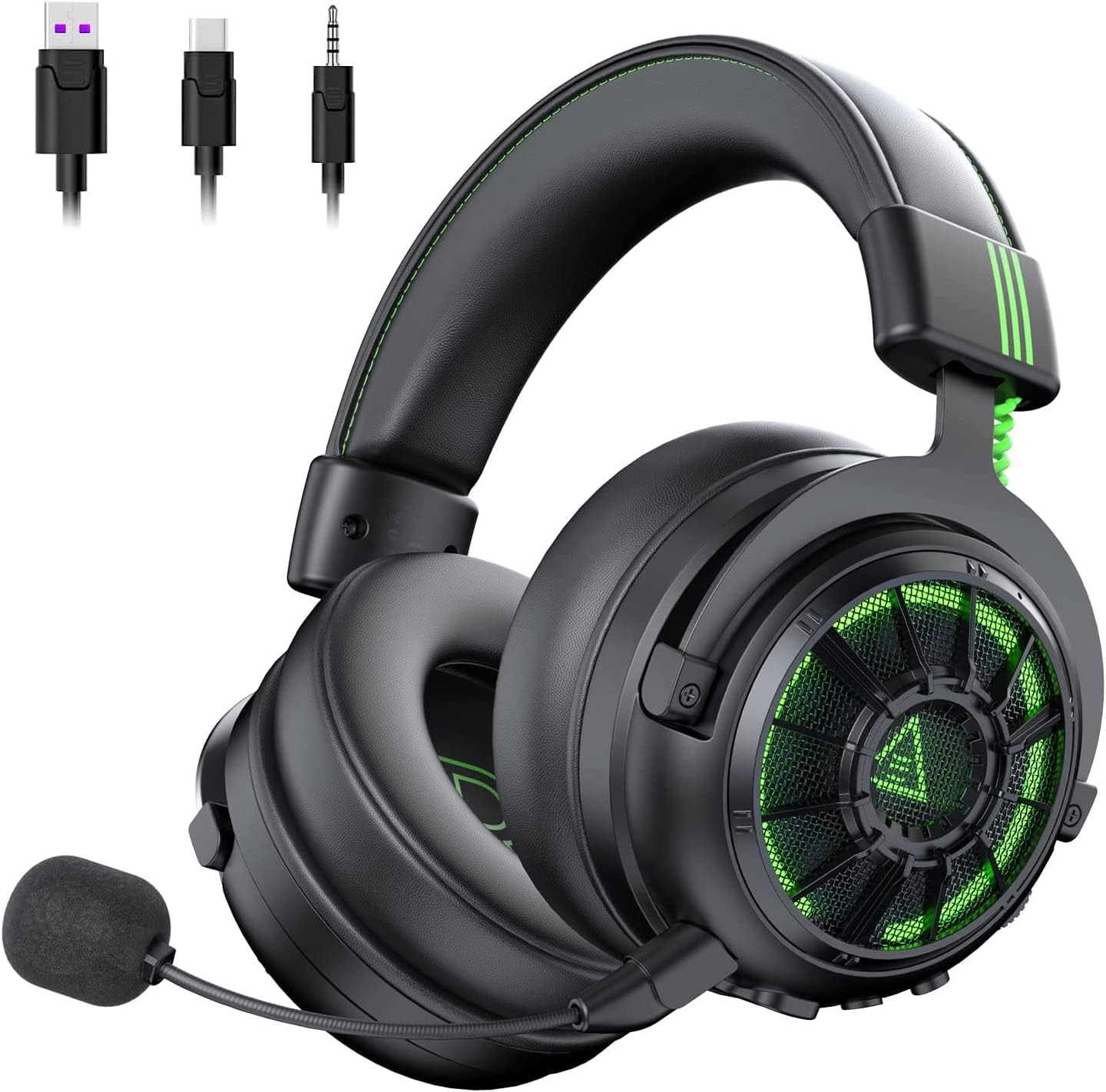
Image 1.1: EKSA StarEngine Pro USB Gaming Headset with detachable microphone and various connectivity options.
2. Què hi ha a la caixa
Upon opening your EKSA StarEngine Pro package, you should find the following components:
- Gaming Headset (1 unit)
- Detachable Microphone with Protective Cotton (1 unit)
- Detachable Type-C to USB/Type-C/3.5mm Cable (1 unit)
- Bossa de transport (1 unitat)
- Manual d'usuari (1 unitat)

Image 2.1: All items included in the EKSA StarEngine Pro retail package.
Video 2.1: An unboxing video demonstrating the contents of the EKSA StarEngine Pro package.
3. Configuració
3.1 Connectar el micròfon
- Locate the detachable microphone.
- Align the microphone's 3.5mm jack with the microphone port on the left earcup of the headset.
- Gently push until it clicks securely into place.
3.2 Connexió al dispositiu
The EKSA StarEngine Pro offers multiple connectivity options for broad compatibility:
- Connexió USB-C: For devices with a USB-C port (e.g., some PCs, laptops, Switch, mobile phones), connect the headset directly using the provided Type-C to Type-C cable.
- Connexió USB-A: For devices with a standard USB-A port (e.g., PC, PS4, PS5), use the provided Type-C to USB-A adapter cable. Connect the headset's Type-C cable to the adapter, then plug the adapter into your device's USB-A port.
- Conector d'àudio de 3.5 mm: For devices with a 3.5mm audio jack (e.g., Xbox One controllers, some mobile phones), connect the headset using the provided Type-C to 3.5mm audio cable.

Image 3.1: The headset's multi-platform compatibility via 3.5mm, USB-A, and USB-C connections.
Video 3.2: A user manual video demonstrating the setup and features of the EKSA StarEngine Pro.
4. Instruccions de funcionament
4.1 Controls dels auriculars
The left earcup houses all primary controls for easy access during use:
- Roda de control de volum: Scroll up or down to adjust the audio volume.
- Botó de silenci del micròfon: Press to mute or unmute the microphone. An indicator light may show the microphone status.
- 7.1 Surround Sound Switch: Press to toggle between 7.1 surround sound and stereo sound modes.
- Green Breathing Light: The headset features an LED light on the earcups.

Imatge 4.1: Detallada view of the control buttons and ports on the left earcup.
4.2 Característiques clau
- Driver-Free 7.1 Surround Sound: Experience immersive audio without needing additional software. This feature helps in auditory positioning for games.
- Dual Mic Intelligent Noise Cancelling (EKSA ClearMax): An advanced dual-mic system (call mic & noise-identifying mic) dynamically suppresses up to 99.8% of background noise, ensuring clear voice communication.
- Dual Chamber Driver: The headset's drivers feature separate bass and mid-high cavities, tuned via EKSA SoundPro technology to reduce distortion and provide balanced audio.
- One Key Switch Game/Music Mode: Easily switch between 7.1 surround sound for gaming and stereo sound for music listening.

Image 4.2: Visual representation of the 7.1 surround sound capability.

Image 4.3: Illustration of the EKSA Dual-Mic System's noise cancelling function.

Image 4.4: Diagram explaining the dual-chamber driver system.
Video 4.5: A concept video showcasing the EKSA StarEngine Pro's design and features.
5. Manteniment
To ensure the longevity and optimal performance of your EKSA StarEngine Pro headset, follow these maintenance guidelines:
- Neteja: Use a soft, dry cloth to wipe down the earcups and headband. For the microphone foam cover, gently remove and clean if necessary. Avoid using harsh chemicals or abrasive materials.
- Emmagatzematge: When not in use, store the headset in the provided carrying bag to protect it from dust and scratches. Avoid placing heavy objects on top of the headset.
- Cura del cable: Handle cables gently. Avoid sharp bends or excessive pulling, which can damage the internal wiring.
- Temperatura: Do not expose the headset to extreme temperatures or humidity.
6. Solució De Problemes
If you encounter issues with your EKSA StarEngine Pro headset, refer to the following common solutions:
- Sense so/Volum baix:
- Ensure the headset is securely connected to your device.
- Check the volume control wheel on the headset and your device's system volume.
- Verifiqueu que el dispositiu de sortida d'àudio correcte estigui seleccionat a la configuració de so del dispositiu.
- El micròfon no funciona:
- Ensure the microphone is securely attached and not muted via the headset button or your device's settings.
- Check that the correct microphone input device is selected in your device's sound settings.
- If using a 3.5mm connection, ensure your device supports a combined audio/mic jack or use an appropriate splitter if needed.
- 7.1 Surround Sound Issues:
- Ensure the 7.1 surround sound mode is activated via the headset's switch.
- Note that 7.1 surround sound is primarily supported via USB connections (USB-C or USB-A adapter) on compatible platforms like PC, PS4, and PS5.
- Some users report an 'echo' effect with 7.1 surround sound; this can sometimes be mitigated by adjusting in-game audio settings or using your operating system's built-in surround sound features if preferred.
- Problemes de connectivitat:
- Try connecting the headset to a different port or device to isolate the issue.
- Ensure all cables are fully inserted and undamaged.
7. Especificacions
| Característica | Detall |
|---|---|
| Nom del model | E5000 Pro |
| Tecnologia de connectivitat | Amb cable |
| Conector d'auriculars | 3.5 mm Jack |
| Dispositius compatibles | PC, PS4, PS5, Xbox One, Switch, Computer, Laptop, Phone |
| Tipus de controlador d'àudio | Conductor dinàmic |
| Forma de l'auricular | Sobre l'orella |
| Control de soroll | Cancel·lació de soroll ambiental (ENC) |
| Característica del cable | Desmuntable |
| Pes de l'article | 1.48 lliures |
8. Garantia i Suport
For warranty information and technical support, please refer to the official EKSA website or contact their customer service directly. Details are typically provided in the product packaging or on the manufacturer's support pages.


