1. Introducció
This user manual provides comprehensive instructions for the installation, operation, and maintenance of the Axis Communications AXIS Q6225-LE PTZ Camera. Please read this manual thoroughly before using the product to ensure proper functionality and safety. This camera is designed for robust outdoor surveillance in challenging conditions.
2. Informació de seguretat
Observe the following safety precautions to prevent damage to the product or injury to personnel:
- Instal·lació: Installation must be performed by qualified personnel in accordance with all local and national electrical and building codes.
- Font d'alimentació: Use only the specified power supply (60 watts) for this device. Ensure the power source is stable and meets the camera's requirements.
- Medi ambient: The camera is designed for outdoor use. However, avoid exposing it to extreme conditions beyond its specified operating range.
- Neteja: Desconnecteu l'alimentació abans de netejar. Feu servir un drap suau i sec. No utilitzeu netejadors líquids ni en aerosol.
- Modificacions: Do not attempt to modify or disassemble the camera. This may void the warranty and pose safety risks.
3. Contingut del paquet
Verifiqueu que tots els elements siguin presents al paquet:
- Càmera PTZ AXIS Q6225-LE
- Guia d'instal·lació
- Suport de muntatge i maquinari
- Network Cable Connector
- Documentation and Software CD (if applicable)
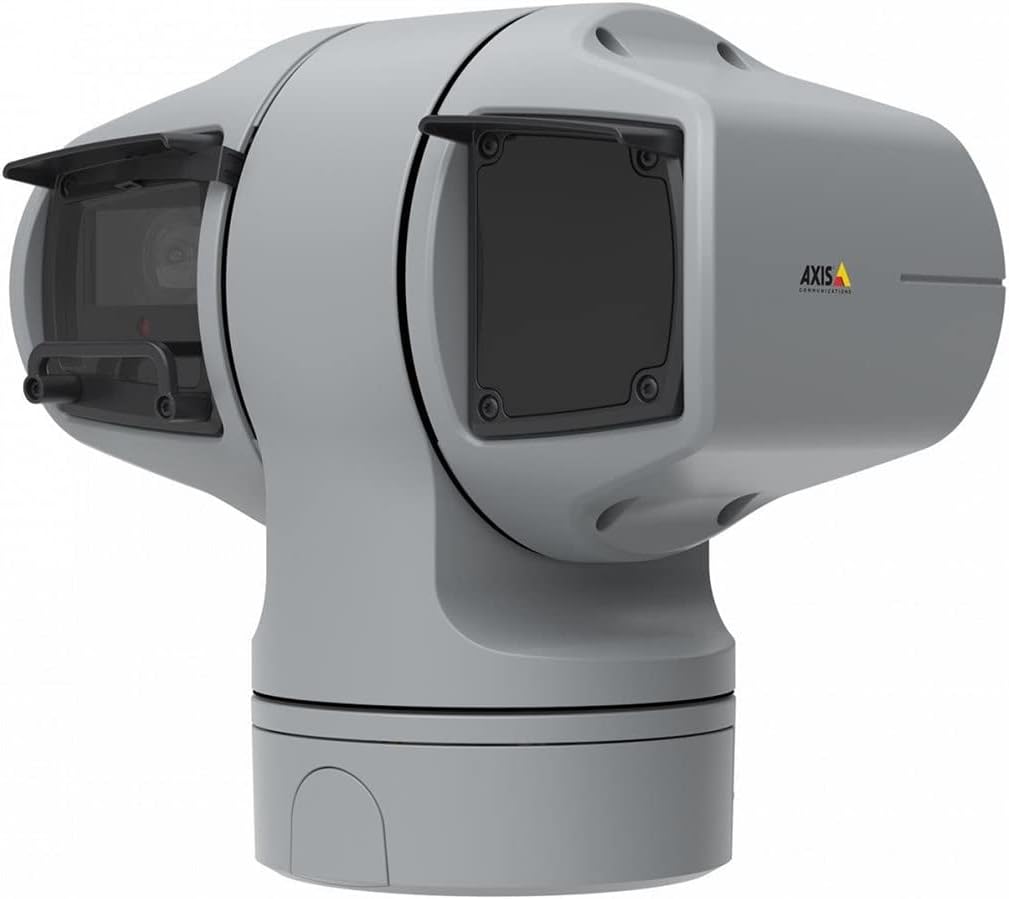
Figura 1: AXIS Q6225-LE PTZ Camera. This image displays the grey-colored PTZ camera unit, highlighting its robust housing and integrated lens system, designed for outdoor surveillance.
4. Configuració i instal·lació
4.1 Muntatge de la càmera
The AXIS Q6225-LE is designed for wall mount installation. Ensure the mounting surface is strong enough to support the camera's weight and withstand environmental conditions.
- Seleccioneu una ubicació de muntatge adequada que proporcioni el camp de view i està a l'abast de connexions elèctriques i de xarxa.
- Feu servir la plantilla de muntatge proporcionada per marcar els forats a la paret.
- Drill pilot holes and secure the mounting bracket using appropriate screws and anchors.
- Fixeu la càmera al suport de muntatge, assegurant-vos que estigui ben fixada al seu lloc.
4.2 Connexió d'alimentació i xarxa
Connect the camera to power and network as follows:
- Potència: Connect the power cable to a 60-watt power source. Ensure the connection is secure and weatherproof.
- Xarxa: Connect an Ethernet cable from your network switch or router to the camera's network port. The camera supports Wi-Fi for wireless communication. Refer to the network configuration section for wireless setup.
4.3 Configuració inicial
Després de la instal·lació física i la connexió, accediu a la càmera web interfície per a la configuració inicial:
- Obre a web navegador en un ordinador connectat a la mateixa xarxa que la càmera.
- Enter the camera's IP address in the browser's address bar. If the IP address is unknown, use the AXIS IP Utility tool to discover it.
- Follow the on-screen prompts to set up a new password for the administrator account.
- Configure basic network settings, date/time, and video stream settings.
5. Funcionament de la càmera
5.1 Control de panoràmica, inclinació i zoom (PTZ)
The AXIS Q6225-LE camera features full PTZ capabilities, allowing remote adjustment of its viewing angle and zoom level. Control is typically performed via the camera's web interfície o programari de gestió de vídeo (VMS) compatible.
- pa: Rotate the camera horizontally to cover a wider area.
- Inclinació: Adjust the camera vertically to view objects at different heights.
- Zoom òptic: Use the optical zoom feature to magnify distant objects without loss of image quality.
5.2 Detecció de moviment i alertes
The camera supports motion-only alerts. Configure motion detection zones and sensitivity settings in the web interface to trigger recordings or notifications when movement is detected.
5.3 Infrared (IR) Illumination
Equipped with infrared light sources, the camera provides clear video surveillance in low-light or complete darkness. IR illumination activates automatically or can be manually controlled.
6. Manteniment
6.1 Neteja
Regular cleaning of the camera lens and housing is recommended to ensure optimal performance, especially in dusty or harsh environments.
- Gently wipe the lens with a soft, lint-free cloth. For stubborn dirt, use a lens cleaning solution specifically designed for optical surfaces.
- Netegeu la carcassa de la càmera amb anuncisamp drap. Eviteu productes de neteja o dissolvents abrasius.
6.2 actualitzacions de microprogramari
Reviseu periòdicament les comunicacions d'Axis website for firmware updates. Keeping the camera's firmware up-to-date ensures access to the latest features, security enhancements, and bug fixes.
7. Solució De Problemes
This section addresses common issues you might encounter with your AXIS Q6225-LE camera.
| Problema | Causa possible | Solució |
|---|---|---|
| Sense canal de vídeo | Power disconnected, network issue, incorrect IP address. | Check power connection. Verify network cable or Wi-Fi connection. Confirm camera's IP address. |
| Mala qualitat d'imatge | Dirty lens, improper focus, low light conditions. | Clean the lens. Adjust focus via web interface. Ensure adequate lighting or verify IR functionality. |
| Els controls PTZ no responen | Network latency, software glitch, motor issue. | Check network connection. Restart the camera. If problem persists, contact support. |
8. Especificacions
| Característica | Detall |
|---|---|
| Número de model | 02316-002 |
| Marca | Comunicacions de l'eix |
| Tipus de muntatge | Muntatge de paret |
| Color | Blanc |
| Material | Metall |
| Wattage | 60 watts |
| Tecnologia de connectivitat | Sense fil, Wi-Fi |
| Ús interior/exterior | A l'aire lliure |
| Mètode de control | Remot |
| Tecnologia del sensor fotogràfic | CMOS |
| Format de captura de vídeo | MPEG-4 |
| Tipus de font de llum | infrarojos |
| Tipus d'alerta | Només moviment |
| Tipus de zoom | Zoom òptic |
| Pes de l'article | 0.01 quilograms (0.352 unces) |
| Components inclosos | Càmera/Accessoris |
9. Garantia i Suport
For warranty information and technical support, please refer to the official Axis Communications weblloc web o poseu-vos en contacte amb el vostre distribuïdor autoritzat. Conserveu el rebut de compra com a comprovant de compra.
Recursos en línia: www.axis.com


