This manual provides comprehensive instructions for the installation, operation, and maintenance of the Axis F9114 Main Unit. Please read this manual carefully before using the product to ensure proper functionality and safety.
Producte acabatview
The AXIS F9114 is a main unit designed for the F-Series surveillance system. It supports up to four F21 or F7 sensor units, providing a flexible and discreet surveillance solution. This unit acts as the central processing hub for connected camera sensors.
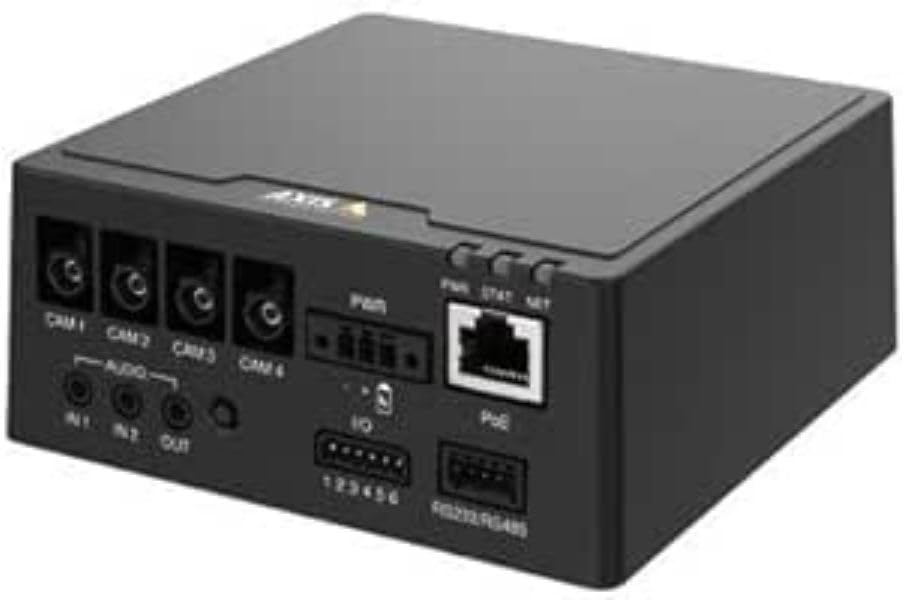
Figura 1: Davant view of the AXIS F9114 Main Unit, showing camera input ports (CAM 1-4), audio input/output, power input, I/O ports, and an Ethernet port with PoE support.
Característiques principals:
Supports up to 4 Axis F-Series sensor units (e.g., F21, F7).
Central processing unit for video and audio streams.
Disseny compacte per a una instal·lació flexible.
Integrated Power over Ethernet (PoE) for simplified power and data connectivity.
Multiple I/O ports for external device integration.
Audio input/output capabilities.
Configuració i instal·lació
Contingut del paquet:
Unitat principal AXIS F9114
Guia d'instal·lació
(Power supply and sensor units sold separately, unless specified)
Connecting Sensor Units:
Ensure the main unit is powered off before connecting any sensor units.
Connect the cables from your AXIS F-Series sensor units (e.g., F21, F7) to the designated "CAM 1", "CAM 2", "CAM 3", and "CAM 4" ports on the rear of the F9114 Main Unit. Ensure a secure connection.
Each sensor unit requires a dedicated port.
Alimentació de la unitat:
Alimentació per Ethernet (PoE): Connect an Ethernet cable from a PoE-enabled switch or injector to the "PoE" port on the F9114. This will provide both power and network connectivity.
Font d'alimentació externa: If PoE is not used, connect a compatible DC power adapter (not included) to the "PWR" input terminal. Refer to specifications for voltage requisits.
Connexió de xarxa:
Connect an Ethernet cable from your network to the "PoE" port on the F9114. This provides network access for configuration and video streaming.
Connexions d'àudio i E/S:
Àudio: Connect external microphones to "IN 1" or "IN 2" and speakers to "OUT" if audio functionality is required.
E/S: Use the "IO" terminal block for connecting external devices such as alarm sensors or relays. Refer to the detailed wiring diagram in the full technical documentation for specific connections.
Funcionament
Engegada inicial:
Once all connections are secure and power is supplied, the unit will begin its startup sequence. Observe the LED indicators for status.
Indicadors LED:
PWR (potència): Indicates power status. (e.g., Solid green for normal operation).
ESTAT (Estat): Indicates operational status. (e.g., Flashing for network activity, solid for ready).
XARXA (NET): Indicates network connection and activity.
Accés al dispositiu:
Use the AXIS IP Utility or a network scanner to discover the IP address of the F9114 on your network.
Obre a web browser and enter the IP address to access the device's web interfície.
Log in using the default credentials (refer to the installation guide or Axis website for current defaults).
Follow the on-screen instructions to configure network settings, video streams, and other system parameters.
Gestió de vídeos:
The F9114 integrates with various video management software (VMS) solutions. Refer to your VMS documentation for adding and managing the device.
Manteniment
Neteja: Feu servir un drap suau i sec per netejar l'exterior de la unitat. No utilitzeu productes químics agressius ni netejadors abrasius.
Actualitzacions de firmware: Reviseu regularment les comunicacions d'Axis weblloc web per a actualitzacions de firmware. Mantenir el firmware actualitzat garanteix un rendiment òptim, seguretat i accés a noves funcions.
Condicions ambientals: Ensure the unit is operated within its specified temperature and humidity ranges to prevent damage.
Resolució de problemes
Problemes comuns i solucions:
Sense energia:
Verify power cable connection (if using external power).
Ensure PoE switch/injector is active and providing power (if using PoE).
Comproveu la font d'alimentació.
Sense connexió de xarxa:
Comproveu la connexió del cable Ethernet.
Verificar la funcionalitat del commutador/encaminador de xarxa.
Confirm IP address settings are correct or DHCP is functioning.
No Video from Sensor Unit:
Ensure sensor unit cables are securely connected to the F9114.
Verify the sensor unit is compatible with the F9114.
Check the sensor unit's status indicators (if available).
Access the F9114 web interface to confirm sensor unit detection and configuration.
Has oblidat la contrasenya:
Refer to the Axis Communications support documentation for password reset procedures, which typically involve a factory reset button or specific software tools.
For more detailed troubleshooting, refer to the comprehensive support resources available on the Axis Communications weblloc.
Especificacions
Característica
Detall
Marca
Comunicacions de l'eix
Número de model
01991-001
Pes de l'article
1.87 lliures
Dimensions del producte (LxWxH)
19.69 x 19.69 x 11.02 polzades
Fabricant
AXIS - CÀMERA
ASIN
B0BWNS49VS
Data de primera disponibilitat
23 de febrer de 2023
Note: Specifications are subject to change without notice. For the most current information, please refer to the official Axis Communications weblloc.
Garantia i Suport
Informació de la garantia:
For detailed warranty information, please refer to the warranty statement provided with your product or visit the official Axis Communications weblloc web. Conserveu el comprovant de compra per a reclamacions de garantia.
Suport tècnic:
If you encounter issues that cannot be resolved using this manual or the troubleshooting section, please contact Axis Communications technical support. Support resources, including FAQs, documentation, and contact information, are available on their official weblloc.
Taules comparatives de productes AXIS, tercer trimestre del 2025: vídeo en xarxa, àudio, control d'accés i intercomunicadors Aquest document del tercer trimestre del 2025 d'Axis Communications proporciona taules comparatives completes de productes per a la seva àmplia gamma de solucions de vídeo en xarxa, àudio, control d'accés i intercomunicació. Detalla les especificacions, les característiques i la informació del model de diverses línies de productes, com ara càmeres, gravadors, programari i sistemes d'intercomunicació.
Guia d'instal·lació de la sèrie de càmeres panoràmiques AXIS M43 Aquesta guia d'instal·lació proporciona informació essencial per configurar la sèrie de càmeres panoràmiques AXIS M43, inclosos els models AXIS M4327-P i AXIS M4328-P. Cobreix els procediments d'instal·lació, la seguretat i el compliment normatiu.
AXIS High PoE Midspan and Splitters Installation Guide Installation guide for AXIS T8123 High PoE Midspan and AXIS T8126/T8128 High PoE Splitters, covering setup, specifications, and troubleshooting for Power over Ethernet solutions.
AXIS Camera Station S20 Appliance Series Installation Guide This installation guide provides essential instructions for setting up and installing the AXIS Camera Station S20 Appliance Series, including models S2008, S2016, and S2024. It covers hardware overview, cable connections, software setup, and network configuration for professional video surveillance systems.