1. Introducció
This manual provides detailed instructions for the ENDORFY Thock Wireless Mechanical Keyboard, model EY5A078. It covers setup, operation, maintenance, and troubleshooting to ensure optimal performance and longevity of your device. Please read this manual thoroughly before using the keyboard.

Image 1.1: The ENDORFY Thock Wireless Mechanical Keyboard EY5A078. This image displays the full QWERTY layout with illuminated keys, showcasing the keyboard's design and RGB capabilities.
2. Contingut del paquet
Verifiqueu que tots els elements siguin presents al paquet:
- ENDORFY Thock Wireless Mechanical Keyboard EY5A078
- USB-C to USB-A Cable (detachable)
- Receptor USB de 2.4 GHz
- Extractor de tecles
- Tirador de commutació
- Manual d'usuari (aquest document)
3. Configuració i connexió
The ENDORFY Thock Wireless Mechanical Keyboard offers three connection modes: wired, 2.4 GHz wireless, and Bluetooth.
3.1. Connexió per cable
- Locate the USB-C port on the keyboard (typically on the back or top edge).
- Connect the provided USB-C to USB-A cable to the keyboard.
- Connecteu l'extrem USB-A del cable a un port USB disponible de l'ordinador.
- El teclat es detectarà automàticament i estarà llest per al seu ús.
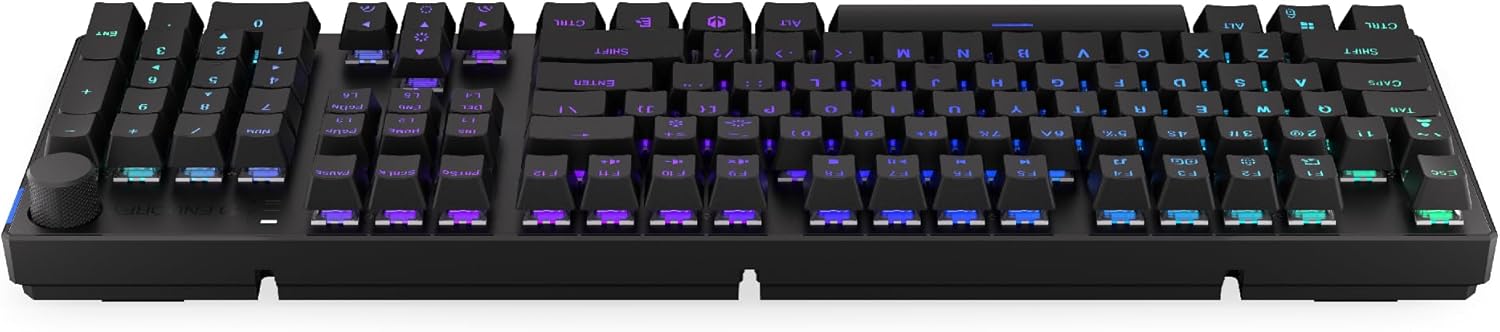
Imatge 3.1: Lateral view of the keyboard, highlighting the USB-C port for wired connection and charging.
3.2. Connexió sense fil de 2.4 GHz
- Locate the 2.4 GHz USB receiver. It may be stored in a compartment on the underside of the keyboard.
- Plug the 2.4 GHz USB receiver into an available USB port on your computer.
- On the keyboard, locate the mode switch (usually on the back or side) and set it to the 2.4 GHz wireless mode (often indicated by a specific icon or "2.4G").
- The keyboard should automatically connect. An indicator light may confirm the connection.

Image 3.2: Underside of the keyboard, showing the compartment for storing the 2.4 GHz USB receiver and adjustable feet.
3.3. Connexió Bluetooth
- On the keyboard, set the mode switch to Bluetooth mode (often indicated by a Bluetooth icon or "BT").
- The keyboard may have multiple Bluetooth profiles (e.g., BT1, BT2, BT3). Select one by pressing Fn + 1, Fn + 2, or Fn + 3. The corresponding indicator light will flash.
- A l'ordinador o dispositiu, obriu la configuració de Bluetooth i cerqueu dispositius nous.
- Select "ENDORFY Thock Wireless" (or similar name) from the list of available devices.
- Seguiu les indicacions de la pantalla per completar el procés de vinculació.
- Un cop emparellat, l'indicador lluminós del teclat deixarà de parpellejar i romandrà fix.
4. Funcionament
4.1. Key Functions and Shortcuts
The keyboard features various function key combinations (Fn + Key) for multimedia control, lighting adjustments, and other settings.
- Fn + F1-F12: Multimedia and system functions (e.g., volume control, media playback, calculator). Refer to the keycap legends for specific functions.
- Fn + Tecles de fletxa: Adjust RGB lighting effects (e.g., brightness, speed, direction).
- Fn + 1/2/3: Canvia entre Bluetooth profiles.
- Fn + 4: Switch to 2.4 GHz wireless mode.
- Fn + 5: Canvia al mode amb cable.
4.2. Control de la il·luminació RGB
The ENDORFY Thock keyboard features programmable RGB backlighting. Use the following combinations to customize the lighting:
- Fn + Fletxa dreta: Change lighting effect.
- Fn + Fletxa esquerra: Change lighting effect direction.
- Fn + Fletxa amunt: Augmenta la brillantor.
- Fn + Fletxa avall: Disminueix la brillantor.
- Fn + Ins: Canvia de color.
- Fn + Supr: Adjust effect speed.
4.3. Pom de volum
The dedicated volume knob located on the top right of the keyboard allows for quick audio adjustments.
- Girar en sentit horari: Augmenta el volum.
- Girar en sentit antihorari: Disminuir el volum.
- Prémer: Silencia/activa el so de l'àudio.

Image 4.1: Detail of the volume knob and status indicator lights, located on the upper right side of the keyboard.
4.4. Commutadors intercanviables en calent
The ENDORFY Thock keyboard features hot-swappable switches, allowing you to change mechanical switches without soldering. This enables customization of typing feel.
- Treure la tapa de les tecles: Feu servir l'extractor de tecles proporcionat per treure suaument la tecla desitjada.
- Treure l'interruptor: Feu servir l'extractor d'interruptors proporcionat per subjectar amb cura els clips superior i inferior de l'interruptor i estireu-lo cap amunt.
- Insereix un nou interruptor: Align the pins of the new switch with the holes on the PCB. Press the switch firmly until it clicks into place. Ensure pins are not bent.
- Substitueix la tapa de les tecles: Torneu a col·locar la tapa de la tecla a la nova tija de l'interruptor.

Imatge 4.2: Un primer pla view of the Kailh Box Brown mechanical switches, demonstrating the hot-swappable design.
5. Manteniment
5.1. Neteja del teclat
Una neteja regular ajuda a mantenir el rendiment i l'aspecte del teclat.
- Desconnecteu el teclat de l'ordinador abans de netejar-lo.
- Use a keycap puller to remove keycaps for thorough cleaning.
- Feu servir aire comprimit per eliminar la pols i les restes que hi ha entre les tecles.
- Netegeu les tecles i la superfície del teclat amb un drap suau iamp tela. Eviteu els productes químics durs.
- Ensure the keyboard is completely dry before reconnecting.
5.2. Substitució de la tapa de les tecles i l'interruptor
Refer to Section 4.4 for detailed instructions on replacing keycaps and switches. Use only compatible keycaps and switches to avoid damage.
6. Solució De Problemes
| Problema | Causa possible | Solució |
|---|---|---|
| El teclat no respon (amb cable) | Connexió del cable fluixa, port USB defectuós. | Assegureu-vos que el cable USB-C estigui connectat correctament. Proveu un altre port USB o cable. |
| El teclat no respon (sense fil) | Low battery, incorrect mode, receiver not plugged in, pairing issue. | Charge the keyboard. Ensure mode switch is set correctly (2.4G or BT). Re-pair Bluetooth or re-insert 2.4 GHz receiver. |
| La il·luminació RGB no funciona | Lighting turned off, low battery, software issue. | Check lighting controls (Fn + Arrow keys). Charge the keyboard. Restart computer. |
| Claus que s'escriuen dues vegades o no es registren | Dust/debris under switch, faulty switch. | Clean under keycaps with compressed air. If issue persists, replace the switch (refer to Section 4.4). |
7. Especificacions
- Model: EY5A078
- Marca: ENDORFAR
- Connectivitat: Wired (USB-C), 2.4 GHz Wireless, Bluetooth
- Tipus d'interruptor: Kailh Box Brown (Hot-swappable)
- Tecles de tecles: Doble tir PBT
- Disseny: Full-size QWERTY
- Il·luminació de fons: RGB programable
- Sistemes operatius: Linux, Mac OS X 10.12 Sierra, Windows 10
- Color: Negre
- Material: Tereftalat de polibutilè (PBT)
- Característiques especials: Detachable cable, Volume knob with mute, Hot-swappable switches
- Bateria: Ió de liti (inclòs)
8. Garantia i Suport
ENDORFY products are covered by a manufacturer's warranty. For detailed warranty information, please refer to the warranty card included with your product or visit the official ENDORFY website. For technical support, product inquiries, or service requests, please contact ENDORFY customer support through their official channels.
Oficial Weblloc: www.endorfy.com
9. Informació de seguretat
- Mantingueu el teclat allunyat de líquids i d'humitat excessiva.
- Eviteu exposar el teclat a temperatures extremes.
- Do not attempt to disassemble or modify the keyboard beyond hot-swapping switches and keycaps, as this may void the warranty and cause damage.
- Feu servir només el cable de càrrega proporcionat o recomanat.
- Dispose of the battery and electronic components responsibly according to local regulations.


