Introducció
The Jebao ELW Smart Wave Maker Circulation Pump is designed to create natural wave patterns and circulation within your aquarium or water garden. Featuring advanced SINE wave technology, this pump operates quietly and efficiently. It offers versatile control options, including a manual controller and Wi-Fi connectivity via the Jebao App for both iOS and Android devices. Its compact design and magnetic base allow for flexible placement and easy adjustment of water flow direction.

Image: The Jecod ELW-30M Smart Wave Maker pump shown next to its product packaging, highlighting its compact size and branding.
Informació de seguretat
- Desconnecteu sempre l'alimentació abans de realitzar qualsevol manteniment o neteja.
- Assegureu-vos que la bomba estigui completament submergida a l'aigua durant el funcionament per evitar danys.
- No feu funcionar la bomba si el cable d'alimentació o l'endoll estan danyats.
- This product is designed for indoor use in aquariums or water gardens only.
- Mantenir fora de l'abast dels nens.
- The pump is suitable for both marine and fresh water environments.
Contingut del paquet
Si us plau, verifiqueu que tots els components siguin presents al paquet:
- 1 x Jecod ELW Smart Wave Maker Pump
- 1 x LCD Display Controller
- 1 x AC Adapter (US Plug)
- 1 x Manual d'usuari (aquest document)

Image: All included components of the Jecod ELW Smart Wave Maker, neatly laid out, including the pump, controller, AC adapter, and the printed user manual.
Instruccions de configuració
- Col·locació de la bomba: Position the wave maker pump inside your aquarium or water garden. The magnetic base allows for flexible and secure attachment to the tank wall. Ensure the pump is fully submerged and positioned to achieve desired water flow patterns.
- Connexió del controlador: Connect the pump cable to the designated port on the LCD display controller.
- Connexió d'alimentació: Plug the AC adapter into the controller, then plug the AC adapter into a standard US electrical outlet (DC 24V).
- Configuració de Wi-Fi (opcional): For advanced control, download the Jebao App from the App Store (iOS) or Google Play Store (Android). Follow the in-app instructions to connect your ELW wave maker to your home Wi-Fi network. This enables remote control and programming features.
Instruccions de funcionament
Control manual
The LCD display controller allows for direct adjustment of the pump's settings. Use the buttons on the controller to cycle through different modes (e.g., constant flow, wave mode) and adjust flow intensity. Refer to the controller's display for current settings.
Wi-Fi Control (Jebao App)
Once connected to Wi-Fi, the Jebao App provides comprehensive control over your wave maker.
- Select various wave patterns and modes.
- Adjust flow rate and intensity precisely.
- Set schedules for different operating modes throughout the day.
- Monitor pump status.
Adjusting Water Direction
The ELW wave maker features a 3D big rotation angle, allowing you to manually adjust the output water direction. Gently pivot the pump head to direct the flow as needed for optimal circulation in your tank.

Imatge: Un costat view of the Jecod ELW Smart Wave Maker pump, illustrating its design that allows for adjustment of the water output direction.
Manteniment
Regular maintenance ensures optimal performance and longevity of your wave maker.
- Neteja: Periodically remove the pump from the tank and gently clean any algae or debris that may have accumulated on the impeller or housing. Use a soft brush and clean water. Do not use harsh chemicals.
- Inspecció de l'impel·lent: Check the impeller for any signs of wear or damage. A damaged impeller can reduce performance or cause noise.
- Inspecció del cable: Regularly inspect the power cord and connections for any signs of damage or fraying.
- Qualitat de l'aigua: Ensure your tank's water quality is maintained, as excessive debris can impact pump performance.
Resolució de problemes
| Problema | Causa possible | Solució |
|---|---|---|
| La bomba no funciona | No power; loose connection; damaged adapter. | Check power outlet; ensure all connections are secure; test with another outlet; inspect adapter for damage. |
| Reduced flow or weak waves | Impeller clogged with debris; pump housing dirty. | Disconnect power and clean the impeller and pump housing thoroughly. |
| Soroll excessiu durant el funcionament | Debris in impeller; impeller worn or damaged; improper placement. | Clean impeller; inspect impeller for damage and replace if necessary; ensure pump is securely mounted and fully submerged. |
| Problemes de connexió Wi-Fi | Incorrect Wi-Fi password; router too far; app issues. | Verify Wi-Fi password; move router closer or use a Wi-Fi extender; restart app and controller; ensure app is updated. |
Specifications (ELW-30M)
| Marca | Jebao |
| Número de model | ELW |
| Estil | ELW-30M, 3434GPH |
| Caudal màxim | 3434 galons per hora (GPH) |
| Font d'alimentació | AC (via included adapter) |
| Voltage | DC 24V |
| Consum d'energia | 30W |
| Material | Polipropilè (PP) |
| Pes de l'article | 2 lliures |
| Dimensions del paquet | 6.6 x 6 x 3 polzades |
| País d'origen | Xina |
| Mida recomanada del dipòsit | 100-150 galons |
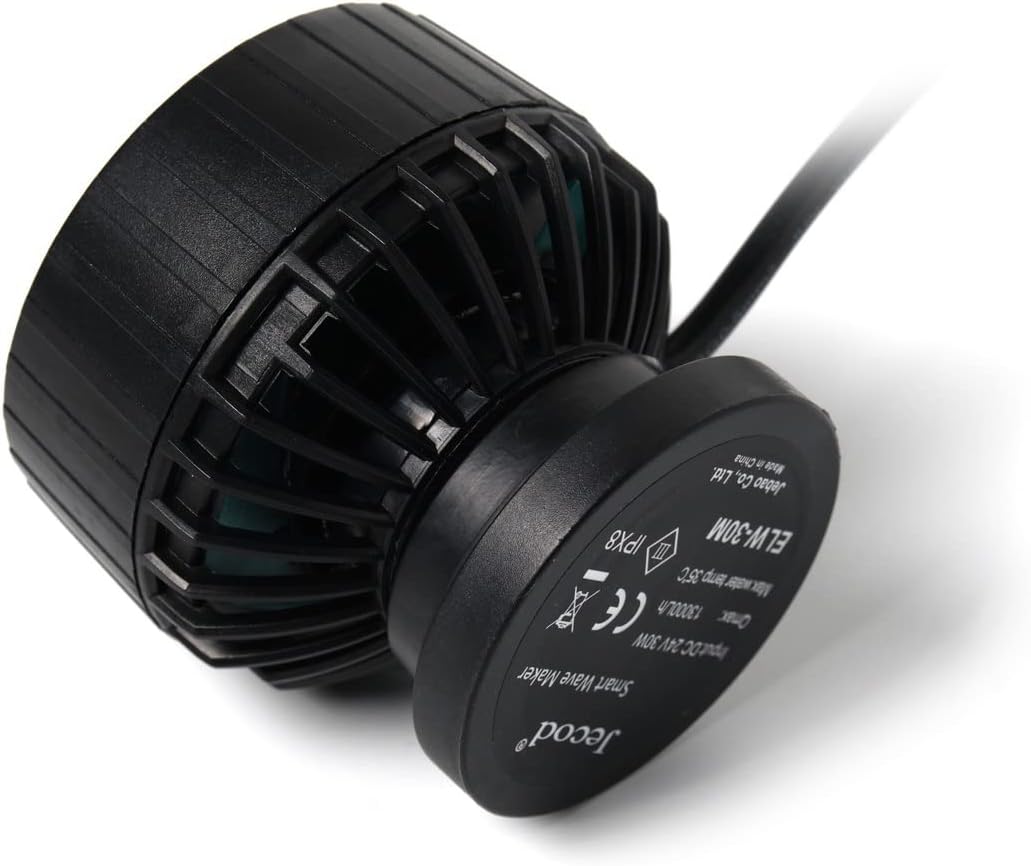
Image: The back of the Jecod ELW-30M pump, displaying its model number, input voltage, maximum flow rate, and various certifications.
Garantia i Suport
For detailed warranty information and technical support, please refer to the official Jebao weblloc web o contacteu directament amb el seu servei d'atenció al client. Conserveu el rebut de compra com a comprovant de compra.
Nota: Les especificacions i les característiques del producte estan subjectes a canvis sense previ avís.


