Introducció
Thank you for choosing the UXD Bluetooth Wireless Earphones. This manual provides essential information for setting up, operating, maintaining, and troubleshooting your new earphones. Please read it carefully to ensure optimal performance and longevity of your device. These earphones feature Bluetooth 5.0 connectivity, IPX7 waterproofing, CVC 8.0 noise cancellation for clear calls, and up to 20 hours of playtime.

Image: UXD Bluetooth Wireless Earphones, a general view del producte.
Contingut del paquet
Abans de començar, comproveu el contingut del paquet per assegurar-vos que hi ha tots els elements:
- UXD Bluetooth Wireless Earphones
- Cable de càrrega micro-USB
- Tres (3) parells de taps per a les orelles (petits, mitjans, grans)
- Three (3) Pairs of Cable Management Clips
- Manual d'usuari

Image: All items included in the UXD Bluetooth Wireless Earphones package, including the earphones, charging cable, various eartips, and clips.
Configuració
1. Càrrega dels auriculars
Before first use, fully charge the earphones. A full charge takes approximately 2 hours and provides up to 20 hours of playtime.
- Connect the micro-USB charging cable to the charging port on the earphone's control unit.
- Connecteu l'altre extrem del cable a un adaptador de corrent USB (no inclòs) o al port USB d'un ordinador.
- The LED indicator on the control unit will show the charging status (e.g., red for charging, blue for fully charged).

Image: A man exercising while wearing the UXD Bluetooth Wireless Earphones, highlighting the 20-hour playtime feature.
2. Emparellament Bluetooth
Pair your earphones with your Bluetooth-enabled device to begin listening.
- Assegureu-vos que els auriculars estiguin completament carregats i apagats.
- Press and hold the Multi-function button (usually the center button on the control unit) for approximately 5-7 seconds until the LED indicator flashes red and blue alternately, indicating pairing mode.
- Al dispositiu (telèfon intel·ligent, tauleta, etc.), activeu el Bluetooth i cerqueu els dispositius disponibles.
- Select "UXD Earphones" (or similar name) from the list of found devices.
- Once connected, the LED indicator on the earphones will flash blue slowly or turn solid blue. You will also hear an audible confirmation.
- The earphones support Bluetooth 5.0 for a stable connection up to 10 meters (30 feet).

Imatge: Una imatge detallada view of the earphone's control unit, emphasizing the stable Bluetooth 5.0 technology.
Instruccions de funcionament
1. Encendre/apagar
- Encès: Press and hold the Multi-function button for 3 seconds until the LED flashes blue and you hear a power-on prompt.
- Apagar: Press and hold the Multi-function button for 3 seconds until the LED flashes red and you hear a power-off prompt.
2. Reproducció de música
- Reproduir/pausa: Premeu el botó multifunció una vegada.
- Pista següent: Premeu i manteniu premut el botó de pujar el volum (+).
- Pista anterior: Premeu i manteniu premut el botó per baixar el volum (-).
3. Gestió de trucades
The earphones feature CVC 8.0 noise cancellation for clear voice calls.
- Respondre/Finalitzar la trucada: Premeu el botó multifunció una vegada.
- Rebutja la trucada: Manteniu premut el botó multifunció durant 2 segons.
- Torna a marcar l'últim número: Premeu dues vegades el botó multifunció.
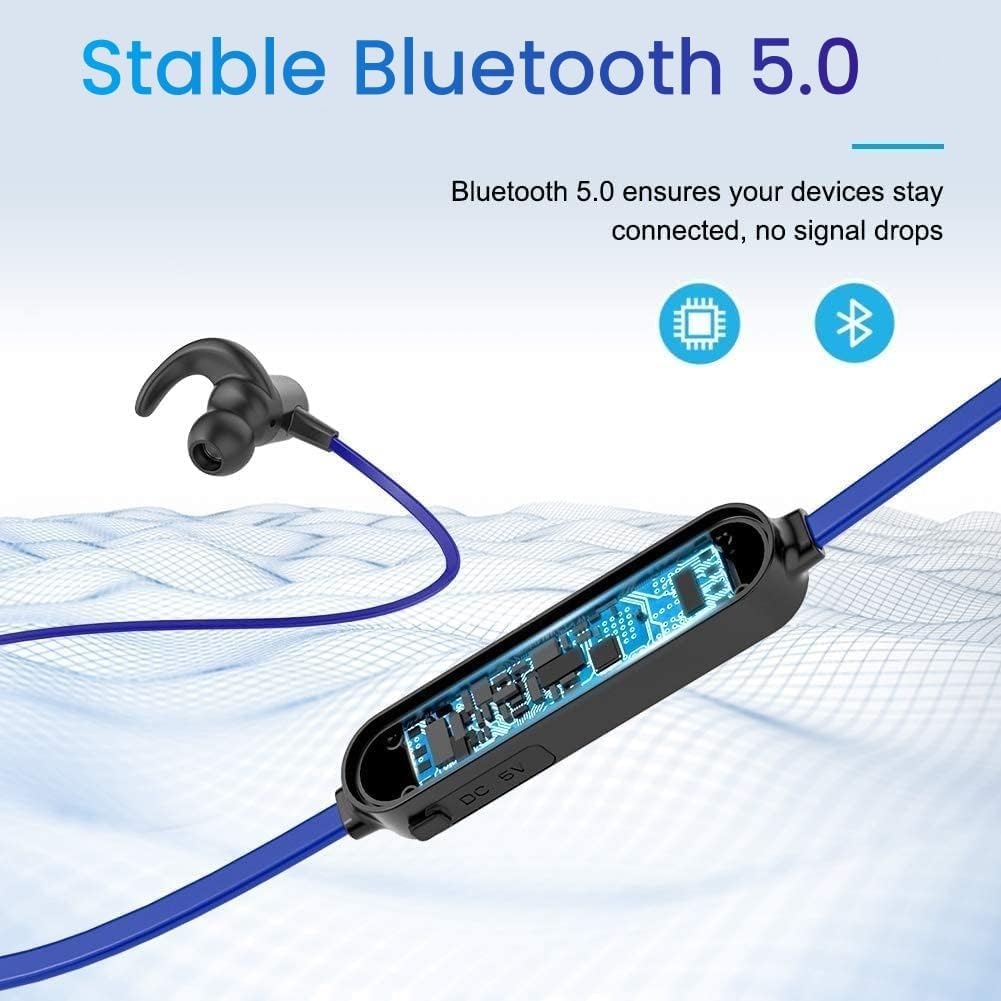
Image: A woman using the UXD Bluetooth Wireless Earphones, demonstrating the clear voice call feature powered by CVC 8.0 technology.
4. Control de volum
- Augmenta el volum: Premeu el botó Pujar volum (+).
- Disminueix el volum: Premeu el botó per baixar el volum (-).
Manteniment
Un manteniment adequat garanteix la longevitat i el rendiment dels teus auriculars.
- Neteja: Feu servir un drap suau i sec per netejar els auriculars. No utilitzeu productes químics agressius ni materials abrasius.
- Puntes d'orelles: Regularly remove and clean the eartips with mild soap and water. Ensure they are completely dry before reattaching.
- Emmagatzematge: Quan no els utilitzeu, guardeu els auriculars en un lloc fresc i sec, allunyats de la llum solar directa i de temperatures extremes.
- Resistència a l'aigua: The earphones are IPX7 waterproof, meaning they can withstand submersion in up to 1 meter of water for 30 minutes. However, they are not designed for swimming or prolonged underwater use. Always ensure the charging port cover is securely closed to maintain water resistance.

Image: The UXD Bluetooth Wireless Earphones shown with water droplets, emphasizing their IPX7 waterproof capability.
Resolució de problemes
Si teniu problemes amb els auriculars, consulteu les solucions habituals següents:
- Earphones will not turn on: Assegureu-vos que els auriculars estiguin completament carregats.
- No es pot emparellar amb el dispositiu:
- Ensure the earphones are in pairing mode (LED flashing red and blue).
- Assegureu-vos que el Bluetooth estigui habilitat al vostre dispositiu.
- Acosta els auriculars al dispositiu (a menys de 10 metres).
- Apaga i encén els auriculars i el dispositiu i, a continuació, torna a intentar emparellar-los.
- Esborra les connexions Bluetooth anteriors del dispositiu.
- Sense so o volum baix:
- Comproveu el nivell de volum tant dels auriculars com del dispositiu connectat.
- Assegureu-vos que els auriculars estiguin connectats correctament al dispositiu.
- Prova de reproduir diferents fonts d'àudio.
- Connexió intermitent:
- Assegureu-vos que no hi hagi obstacles entre els auriculars i el dispositiu.
- Allunyeu-vos d'altres dispositius sense fil que puguin causar interferències.
- Keep the earphones within the 10-meter Bluetooth range.
Especificacions
| Característica | Detall |
|---|---|
| Número de model | erfver |
| Marca | UXD |
| Connectivitat | Bluetooth sense fil 5.0 |
| Tipus de bateria | Polímer de liti |
| Hora de joc | Fins a 20 hores |
| Temps de càrrega | Aproximadament 2 hores |
| Resistència a l'aigua | IPX7 |
| Micròfon | Integrated with CVC 8.0 |
| Factor de forma | In-orella |
| Impedance (Sensitivity) | 15 ohms |
| Material | Silicona |
| Mètode de control | Comandament a distància |
Garantia i Suport
Your UXD Bluetooth Wireless Earphones come with the following:
- Garantia de devolució de 30 dies.
- 3-month product replacement warranty.
For any product inquiries, technical support, or warranty claims, please contact UXD customer service through the platform where you purchased the product. Please have your model number (erfver) and purchase details ready.