1. Introducció
Thank you for choosing the Browning Dark Ops Full HD Extreme Trail Camera. This camera is designed for capturing high-quality images and videos of wildlife with its advanced motion-activated system and invisible infrared illumination. This manual provides detailed instructions for setting up, operating, and maintaining your camera to ensure optimal performance.
2. Contingut del paquet
Si us plau, verifiqueu que tots els elements siguin presents al vostre paquet:
- Browning Dark Ops Full HD Extreme Trail Camera (Main camera unit)
- Corretja de muntatge
- Manual d'instruccions (aquest document)
Note: Batteries and SD card are sold separately.
3. Càmera acabadaview
Familiarize yourself with the key components of your Browning Dark Ops Full HD Extreme Trail Camera.
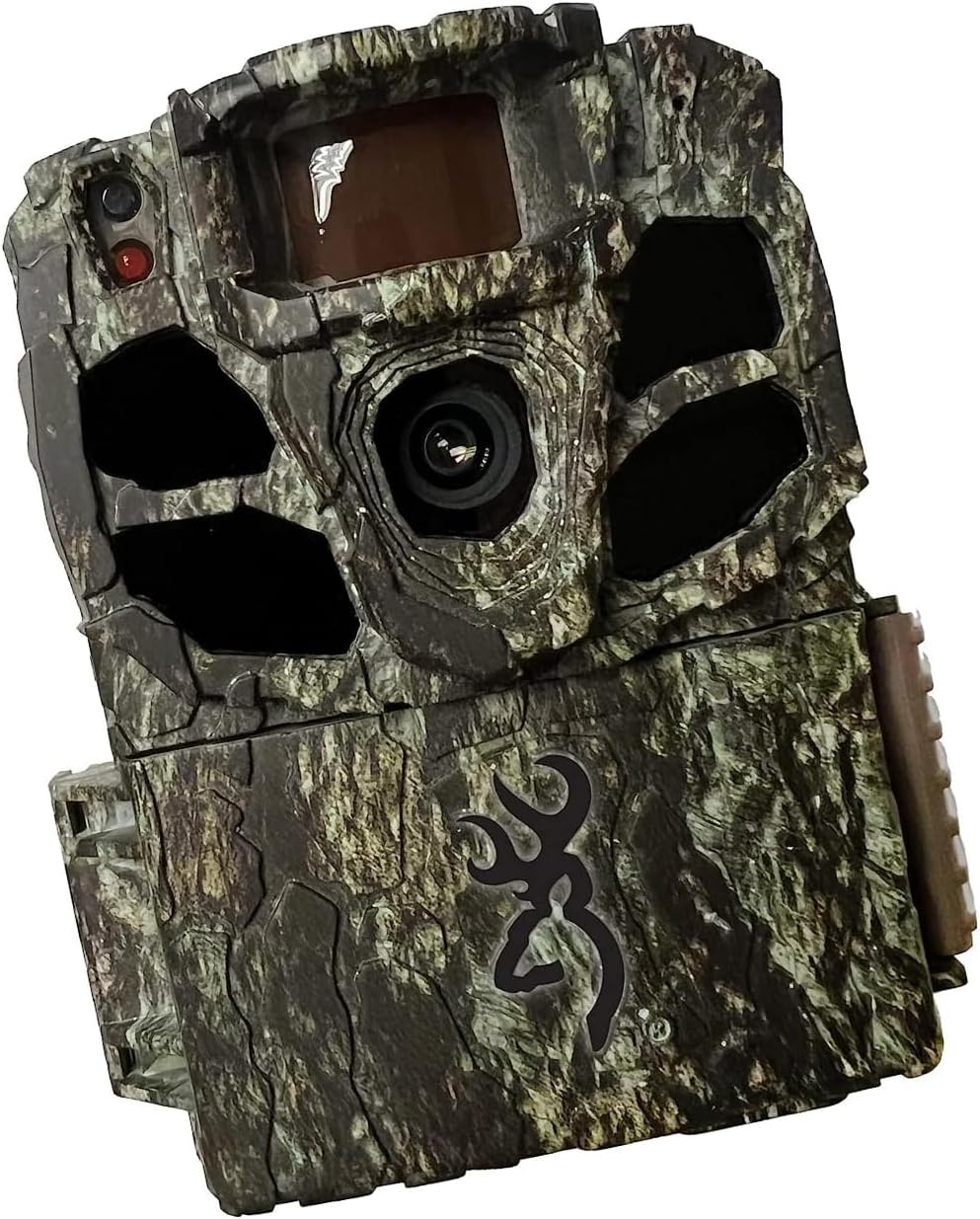
Figura 3.1: Davant view of the Browning Dark Ops Full HD Extreme Trail Camera, showcasing its camouflage design and primary lens.

Figura 3.2: Interna view of the camera with the front cover open, displaying the LCD screen, navigation buttons (E, arrows), ON/OFF switch, MODE button, SD card slot, and Eject button.
Els components clau inclouen:
- Lent principal: Captura imatges i vídeos.
- LED infrarojos: Provide invisible illumination for night vision.
- Sensor de moviment (PIR): Detecta moviment per activar l'enregistrament.
- Pantalla LCD: Displays menu options and settings.
- Botons de control: For navigating menus and adjusting settings.
- Interruptor ON / OFF: Powers the camera on or off.
- Botó MODE: Switches between setup, photo, and video modes.
- Ranura per a targeta SD: For inserting your memory card.
- Compartiment de la bateria: Holds the required batteries.
4. Configuració
4.1 Instal·lació de la bateria
- Obriu la carcassa de la càmera desenganxant els clips laterals.
- Localitzeu el compartiment de la bateria.
- Introduïu 8 piles AA, assegurant-vos de la polaritat correcta (+/-) tal com s'indica a l'interior del compartiment.
- Tanqueu el compartiment de la bateria de manera segura.
4.2 Instal·lació de la targeta SD
- Amb la càmera apagada, localitzeu la ranura per a la targeta SD.
- Insert a compatible SD card (up to 512GB, not included) into the slot until it clicks into place.
- It is recommended to format the SD card using the camera's menu system before first use and periodically thereafter. To format, navigate to the 'Format SD Card' option in the camera's setup menu and confirm.
4.3 Muntatge de la càmera
- Select a sturdy tree or post at the desired location.
- Passeu la corretja de muntatge proporcionada per les ranures de la part posterior de la càmera.
- Securely fasten the camera to the tree or post, ensuring it is stable and pointed in the desired direction.
- Adjust the camera's angle to cover the intended area. Ensure no obstructions are directly in front of the lens or motion sensor.
5. Instruccions de funcionament
5.1 Engegada/apagada
- To power on: Slide the ON/OFF switch to the 'ON' position. The LCD screen will illuminate.
- To power off: Slide the ON/OFF switch to the 'OFF' position.
5.2 Navegació de menús
Use the control buttons (up, down, left, right arrows, and 'E' for Enter) to navigate through the camera's menu options. The 'MODE' button switches between different operational modes.
5.3 Selecció del mode
Press the 'MODE' button to cycle through the following operational modes:
- Mode de configuració: Access camera settings and configurations.
- Mode de fotografia: Camera captures still images when triggered.
- Mode de vídeo: Camera records video clips when triggered.
- Timelapse Plus Mode: Captures images at set intervals and also triggers on motion.
5.4 Ajustar la configuració
In Setup Mode, you can customize various camera settings:
- Resolució d'imatge: Select from various resolutions up to 24 Megapixels for still photos.
- Resolució de vídeo: Choose 1080p Full HD for video recording.
- Velocitat d'activació: Adjust the trigger speed from 0.135 to 0.7 seconds to capture fast-moving subjects.
- Interval de flaix: Set the infrared flash range up to 90 feet for night captures.
- Interval de detecció: Configure the motion detection range up to 80 feet.
- Il·luminació IR: Utilize the Radiant 4 LED system for optimal night-time visibility.
- Timelapse Plus: Configure intervals for timelapse photography.
- Smart IR Video: Optimizes infrared recording for efficient storage.
5.5 Gestió de targetes SD
The camera features an SD Card Management system to optimize storage. This system helps overwrite older files when the card is full, ensuring continuous operation. Refer to the camera's menu for specific settings related to SD card management.
6. Característiques clau
- Invisible Flash: The Dark Ops Full HD Extreme camera features an invisible flash with the innovative Radiant 4 LED system, capturing high-quality night-time images and videos without disturbing wildlife.
- Camp Ampli de View: Amb un camp de 55 graus de view, this camera allows for a broader coverage area, ensuring you capture more of the action.
- HDR Night Photos: The addition of HDR night photos enhances the camera's ability to capture clear and detailed images in low-light conditions.
- Adjustable Trigger Speeds: Users can customize their experience by adjusting the trigger speed to match their specific preferences, ensuring precise and timely capture of wildlife activity.
- Emmagatzematge i organització: The camera includes a unique SD Card Management system and Smart IR Video setting to enhance storage efficiency and optimize infrared recording.
7. Especificacions
| Especificació | Detall |
|---|---|
| Resolució de fixes efectius | 24 MP |
| Resolució de captura de vídeo | 1080p Full HD |
| Max Shutter Speed (Trigger Speed) | 0.135 to 0.7 seconds (adjustable) |
| Interval de flaix | 90 feet (Infrared IR illumination) |
| Interval de detecció | 80 feet (adjustable) |
| IR LED | Radiant 4 LED System |
| Font d'alimentació | Alimentat per piles (8 piles AA, no incloses) |
| Tecnologia de connectivitat | Wireless (Wi-Fi for certain features/connectivity, though direct remote viewing is not specified) |
| Ús interior/exterior | A l'aire lliure |
| Nivell de resistència a l'aigua | IP65 (protegit contra la pols i els dolls d'aigua) |
| Dimensions (L x A x A) | 3.13 x 9.13 x 4.75 polzades |
| Pes de l'article | 1.06 lliures |
| Número de model | BTC-6FHDX |
8. Solució De Problemes
Si teniu problemes amb la càmera, consulteu els problemes i solucions més comuns següents:
- La càmera no s'encén:
- Assegureu-vos que les piles estiguin inserides correctament amb la polaritat adequada.
- Comproveu si les piles estan completament carregades o substituïu-les per unes de noves.
- Verifiqueu que l'interruptor ON/OFF estigui en la posició 'ON'.
- No Images/Videos Captured:
- Confirm the SD card is properly inserted and formatted.
- Check if the SD card has sufficient free space.
- Ensure the camera is in an active recording mode (Photo, Video, or Timelapse Plus).
- Verify that the motion sensor is not obstructed and the detection range is set appropriately.
- Test the camera's motion detection by walking in front of it.
- Mala qualitat d'imatge/vídeo:
- Netegeu la lent de la càmera amb un drap suau i sec.
- Adjust image/video resolution settings to a higher quality.
- Ensure the camera is stable and not subject to movement from wind or animals.
- For night images, ensure subjects are within the effective flash range.
- Durada de la bateria curta:
- Feu servir piles alcalines o de liti d'alta qualitat.
- Reduce the frequency of captures or video length in settings.
- In cold weather, battery performance can decrease; consider using lithium batteries for better cold-weather performance.
9. Manteniment
- Neteja: Regularly clean the camera lens and the PIR sensor window with a soft, lint-free cloth. Avoid abrasive materials or harsh chemicals.
- Cura de la bateria: Traieu les piles si no heu d'utilitzar la càmera durant un període prolongat per evitar fuites.
- Emmagatzematge: Guardeu la càmera en un lloc fresc i sec, allunyat de la llum solar directa i de temperatures extremes.
- Targeta SD: Periodically format your SD card to maintain optimal performance and prevent data corruption.
10. Garantia i Suport
Browning Trail Cameras are covered by a limited warranty. For detailed warranty information, product registration, or technical support, please visit the official Browning Trail Cameras weblloc web o poseu-vos en contacte amb el seu departament d'atenció al client. Conserveu el rebut de compra com a comprovant de compra per a reclamacions de garantia.
For further assistance, please refer to the contact information provided on the official Browning weblloc: www.browningtrailcameras.com


