Introducció
Thank you for choosing the Genai True Wireless Earphones. This manual provides detailed instructions on how to set up, operate, maintain, and troubleshoot your new earphones. Please read this manual carefully before use to ensure optimal performance and longevity of your device.
Producte acabatview
The Genai True Wireless Earphones feature a digital intelligence LED display on the charging case, tap control for easy operation, and Bluetooth 5.0 for stable connectivity. They are designed for comfortable in-ear wear and deliver clear stereo sound.
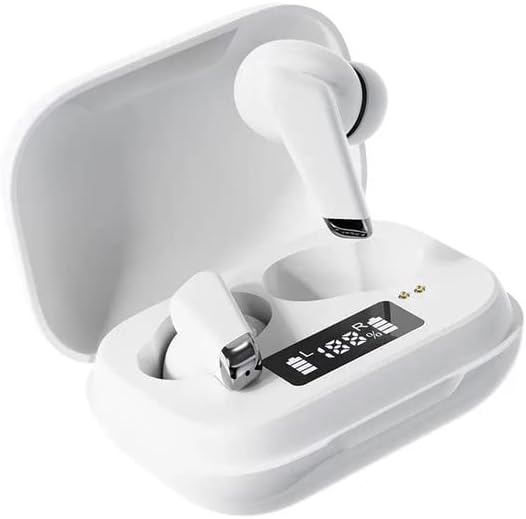
Image: Genai True Wireless Earphones in their charging case, showcasing the digital LED display indicating battery levels.
Característiques principals:
- True Wireless Stereo (TWS): Seamless audio experience without cables.
- Toqueu Control: Intuitive touch-sensitive controls for music and calls.
- Digital Intelligence LED Display: Shows real-time battery status of earbuds and charging case.
- Bluetooth 5.0: Garanteix una connexió sense fil estable i eficient.
- Disseny ergonòmic intraauricular: Comfortable and secure fit.
Guia de configuració
1. Càrrega dels auriculars i l'estoig
- Càrrec inicial: Abans del primer ús, carregueu completament l'estoig de càrrega i els auriculars. Col·loqueu els auriculars a l'estoig de càrrega.
- Connecta el carregador: Connecteu la funda de càrrega a una font d'alimentació amb un cable USB compatible.
- Pantalla LED del monitor: The digital LED display on the case will show the charging status and battery percentage. Ensure both earbuds and the case are fully charged before proceeding.

Image: The charging case with its digital LED display, indicating the charge level of both the case and the individual earbuds.
2. Emparellament amb el dispositiu
- Encès: Open the charging case. The earbuds will automatically power on and enter pairing mode. You may hear an audible prompt.
- Activa el Bluetooth: Al telèfon intel·ligent o a un altre dispositiu amb Bluetooth, aneu a la configuració de Bluetooth i activeu Bluetooth.
- Seleccioneu el dispositiu: Look for "Genai Earphones" (or similar name) in the list of available devices and select it to connect.
- Confirmació: Once successfully paired, you will hear a confirmation sound, and the earbuds will be ready for use.

Image: A visual representation of the Bluetooth 5.0 chipset, highlighting the stable wireless connection technology.
Instruccions de funcionament
The Genai True Wireless Earphones feature intuitive tap controls. The specific functions may vary slightly, but common controls are listed below:
Encès/Apagat
- Encès: Obre l'estoig de càrrega o mantén premut la zona tàctil dels dos auriculars durant uns segons.
- Apagar: Place the earbuds back into the charging case and close the lid, or long-press the touch area on both earbuds for several seconds until they power off.
Reproducció de música
- Reproduir/pausa: Un sol toc a qualsevol dels auriculars.
- Pista següent: Toqueu dues vegades l'auricular dret.
- Pista anterior: Toqueu dues vegades l'auricular esquerre.
Gestió de trucades
- Respondre/Finalitzar la trucada: Toqueu un sol cop a qualsevol dels auriculars durant una trucada entrant o activa.
- Rebutja la trucada: Premeu llargament qualsevol dels auriculars durant una trucada entrant.
Assistent de veu
- Activa l'Assistent de veu: Toqueu tres vegades qualsevol dels auriculars (la funcionalitat pot variar segons el dispositiu).

Image: An illustration showing an earbud comfortably and ergonomically fitted within the ear canal.
Manteniment
Neteja
- Feu servir un drap suau, sec i sense borrissol per netejar els auriculars i l'estoig de càrrega.
- No utilitzeu netejadors abrasius, dissolvents ni aerosols.
- Gently clean the ear tips and speaker mesh to remove any earwax or debris.
Emmagatzematge
- Guarda els auriculars a la seva funda de càrrega quan no els facis servir per protegir-los i mantenir-los carregats.
- Eviteu emmagatzemar-lo en temperatures extremes, llum solar directa o humitat elevada.
Resolució de problemes
- Auriculars que no s'aparellen entre si ni amb el dispositiu:
- Assegureu-vos que els dos auriculars estiguin carregats.
- Torneu a col·locar els dos auriculars a l'estoig de càrrega, tanqueu la tapa, espereu uns segons i torneu a obrir la tapa.
- On your device, forget/delete the "Genai Earphones" from the Bluetooth list and try pairing again.
- Sense so o volum baix:
- Comprova el nivell de volum tant del dispositiu com dels auriculars.
- Assegureu-vos que els auriculars estiguin connectats correctament al dispositiu.
- Netegeu qualsevol residu de la malla de l'altaveu dels auriculars.
- Problemes de càrrega:
- Assegureu-vos que el cable de càrrega estigui connectat correctament tant a la carcassa com a la font d'alimentació.
- Verifiqueu que la font d'alimentació estigui activa.
- Netegeu els contactes de càrrega tant dels auriculars com de la funda.
Especificacions
| Característica | Detall |
|---|---|
| Model | B0BX5G53VT |
| Tecnologia de connectivitat | Sense fil (Bluetooth 5.0) |
| Tipus d'auriculars | Semiobert |
| Nombre de conductors | 2 |
| Mètode de càrrega | Estoig de càrrega |
| Material de les coixinetes dels auriculars | Silicona |
| Diàmetre del conductor | 10 mm |
| Distorsió harmònica total | 0.02% |
| Interval d'impedància | Fins a 32 Ω |
| Material | Silicona |
| Col·locació de l'orella | A l'orella |
| Factor de forma | True Wireless |
Garantia i Suport
The Genai True Wireless Earphones come with a 12 mesos de garantia from the date of purchase, covering manufacturing defects. For any quality problems or support inquiries, please contact the seller directly through your purchase platform.
We are committed to ensuring 100% customer satisfaction. If you encounter any issues, please do not hesitate to reach out for assistance, including full refunds or replacements as applicable.


