1. Introducció
This manual provides essential information for the safe and efficient operation of your NJOY Aten Pro 2000 Uninterruptible Power Supply (UPS). Please read this manual thoroughly before installation and use, and retain it for future reference. The NJOY Aten Pro 2000 is designed to provide reliable, high-quality power protection for your critical electronic equipment.

Figura 1.1: Angle frontal view of the NJOY Aten Pro 2000 UPS, showcasing its compact tower design and front panel display.
2. Producte acabatview
The NJOY Aten Pro 2000 is an On-Line Double Conversion UPS, offering superior power quality and protection. It features a pure sine wave output, ensuring compatibility with sensitive electronics. With a capacity of 2000VA and 1800 Watts, it is equipped with four 12V-9Ah sealed lead-acid batteries for extended backup time.
2.1 Característiques clau
- Double Conversion On-Line Technology: Provides continuous, clean power by converting incoming AC to DC and then back to AC, isolating connected equipment from utility power fluctuations.
- Sortida d'ona sinusoïdal pura: Ensures maximum compatibility and optimal performance for all connected electronic devices, preventing harmonic distortion and electrical noise.
- Gestió de programari: Includes software for monitoring, control, safe operating system shutdown, and advanced energy management via serial, USB, or Ethernet (SNMP slot).
- Mode Eco: An energy-saving mode that bypasses the inverter when input voltage is within acceptable limits, reducing operational costs and optimizing energy consumption.
- Integrated Batteries: Comes with four 12V-9Ah batteries for immediate backup power.
2.2 Tauler frontal
The front panel features an LCD display and control buttons for monitoring UPS status and configuring settings.

Figura 2.1: Frontal view of the NJOY Aten Pro 2000 UPS, highlighting its On-Line operation, 2000VA/1800W capacity, and integrated 4x 12V@9.0Ah batteries.
2.3 Connexions del panell posterior
The rear panel provides various ports for connectivity and power output.

Figure 2.2: Rear panel of the NJOY Aten Pro 2000 UPS, showing (1) RS232 Interface, (2) Schuko Outputs (3 total), (3) Circuit Breaker, (4) SNMP Slot, (5) USB Interface, and (6) AC Input.
3. Configuració
3.1 Desembalatge i inspecció
- Carefully unpack the UPS and inspect it for any shipping damage. If damage is found, do not install and contact your dealer.
- Verify that all components are included: UPS unit, user manual, USB cable, and software CD (if applicable).
3.2 Col·locació
- Place the UPS in a clean, dry environment, away from direct sunlight, heat sources, and excessive dust.
- Assegureu-vos que hi hagi una ventilació adequada al voltant de la unitat. No bloquegeu les obertures de ventilació.
- The ambient temperature should be between 0°C and 40°C (32°F and 104°F).
3.3 Connexió a l'alimentació i als dispositius
- Connect the UPS to a grounded AC power outlet using the provided power cord.
- Connect your critical equipment (e.g., computers, monitors, network devices) to the Schuko output receptacles on the rear panel. Ensure the total load does not exceed the UPS's capacity (1800W).
- For communication with a computer, connect the USB cable from the UPS to your computer's USB port, or an RS232 cable if preferred.
3.4 Càrrega inicial
Before initial use, allow the UPS to charge for at least 8 hours to ensure optimal battery performance. The UPS will charge automatically when connected to AC power, even if the unit is turned off.
4. Instruccions de funcionament
4.1 Encendre/apagar el SAI
- Encendre: Press and hold the 'ON/MUTE' button on the front panel for approximately 3 seconds. The UPS will perform a self-test, and the LCD display will illuminate.
- Apagar: Press and hold the 'OFF/ENTER' button for approximately 3 seconds. The UPS will shut down, and the display will turn off.
Pantalla LCD 4.2 i botons de control
The LCD display provides real-time information about the UPS status, input/output voltage, battery level, and load capacity. Use the 'SELECT' button to cycle through different display parameters and the 'OFF/ENTER' button to confirm selections in menu mode.
4.3 Modes de funcionament bàsics
- Mode normal: The UPS operates in double conversion mode, providing continuous, regulated power to connected devices.
- Mode de bateria: When AC input power fails, the UPS automatically switches to battery power, providing uninterrupted power to connected devices. An audible alarm will sound.
- Mode bypass: In case of an internal fault or manual selection, the UPS can transfer the load directly to utility power, bypassing the inverter.

Figure 4.1: Visual representation of key features: Pure Sine Wave output for clean power, Zero Transfer Time for seamless power transition, and Eco Mode for energy efficiency.
5. Gestió de programari
The NJOY Aten Pro 2000 UPS includes management software (e.g., ViewPower) that allows for comprehensive monitoring and control. This software is compatible with various operating systems, including Mac OS, Linux, and Windows.
5.1 Software Capabilities
- Operational Status Visualization: View real-time data on input/output voltage, frequency, load level, battery status, and temperature.
- Operacions programades: Configure automatic UPS power-on, shutdown, and battery tests.
- Tancament del sistema: Safely shut down connected operating systems during extended power outages to prevent data loss.
- Gestió energètica: Access innovative power management functionalities to optimize energy usage.
5.2 Connectivitat
The UPS can be managed via:
- USB: Direct connection to a computer for local monitoring.
- RS232: Serial communication for local monitoring.
- SNMP Slot: For network management via an optional SNMP card (not included), allowing remote monitoring and control over an Ethernet network.
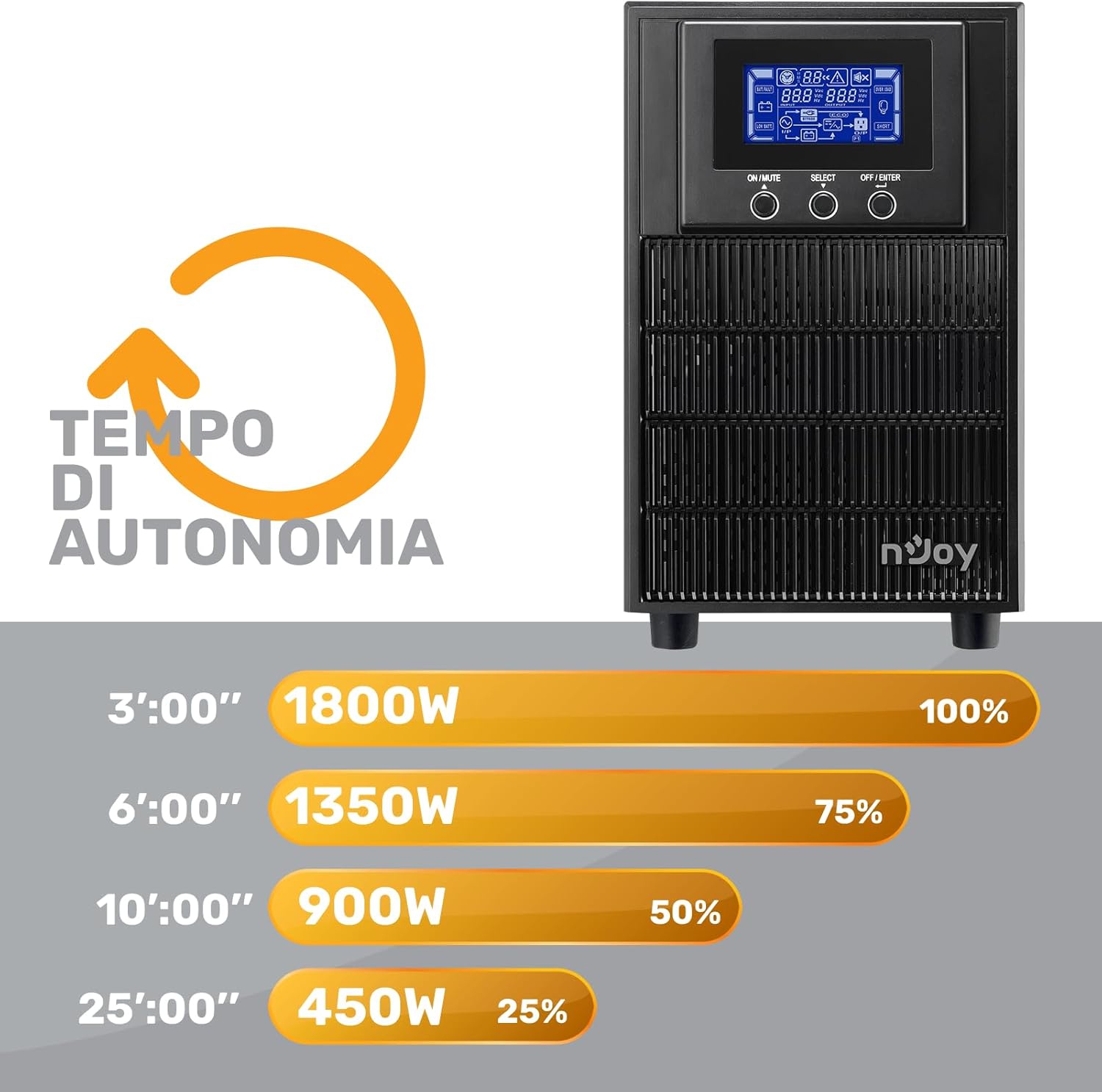
Figura 5.1: Captura de pantalla de ViewPower software interface, displaying UPS information such as power flow, input/output details, and battery status.
6. Mode Eco
The Eco Mode feature is designed to enhance energy efficiency and reduce operational costs. When activated, if the input voltage remains within a predefined acceptable range, the UPS will bypass the double conversion process and directly supply utility power to the output. This reduces internal power consumption and heat generation, leading to energy savings. The UPS will automatically switch back to On-Line mode if the input power deviates from the acceptable range, ensuring continuous protection.
7. Manteniment
7.1 Cura de la bateria
- The UPS batteries are sealed lead-acid and require no maintenance. However, regular charging is essential for their lifespan.
- To maximize battery life, keep the UPS connected to AC power at all times.
- Batteries typically last 3-5 years under normal conditions. If the runtime significantly decreases, consider battery replacement. Battery replacement should only be performed by qualified personnel.
7.2 Neteja
Netegeu periòdicament l'exterior del SAI amb un drap suau i sec. No utilitzeu netejadors líquids ni en aerosol. Assegureu-vos que les obertures de ventilació estiguin lliures de pols i obstruccions.
8. Solució De Problemes
This section provides solutions to common issues you might encounter with your NJOY Aten Pro 2000 UPS.
| Problema | Causa possible | Solució |
|---|---|---|
| El SAI no s'encén | No AC input power; Battery discharged; UPS fault. | Check AC power connection and wall outlet. Allow UPS to charge for several hours. If problem persists, contact support. |
| UPS is on but no output power | Output circuit breaker tripped; Overload; UPS in bypass mode. | Check and reset the circuit breaker on the rear panel. Reduce connected load. Check LCD for bypass status. |
| Durada curta de la bateria | Batteries not fully charged; Batteries nearing end of life; Excessive load. | Allow UPS to charge for 8+ hours. Consider battery replacement if old. Reduce connected load. |
| El SAI emet un so continu | UPS operating on battery power; Overload; Battery low. | Restore AC power. Reduce connected load. Allow batteries to charge. |
9. Especificacions
Detailed technical specifications for the NJOY Aten Pro 2000 UPS.
| Característica | Especificació |
|---|---|
| Nom del model | ATEN PRO 2000 |
| Número de model | PWUP-OL200AP-AZ01B-NEW |
| Capacitat | 2000VA / 1800 Watt |
| Entrada Voltage | 230 volts (CA) |
| Forma d'ona de sortida | Onda senyal pura |
| Bateries | 4 x 12V-9Ah (Sealed Lead-Acid, included) |
| Dimensions (L x A x A) | 39.7 x 14.5 x 22 cm |
| Pes | 18.1 quilos |
| Interfícies | USB, RS232, SNMP Slot |
| Sortides de sortida | 3 x Schuko |
| Perifèrics compatibles | Gaming Computers, DVRs, Video Surveillance Systems, WiFi Modems, Monitors, Printers, TVs, Office PCs |

Figure 9.1: Battery runtime chart illustrating the approximate backup duration at various load percentages. Per example, 100% load (1800W) provides approximately 3 minutes of runtime, while 25% load (450W) provides approximately 25 minutes.
10. Garantia i Suport
10.1 Informació de la garantia
The NJOY Aten Pro series UPS comes with a 3 any de garantia a la unitat i un 1 any de garantia on the included batteries. This warranty covers defects in materials and workmanship under normal use.
10.2 Atenció al client
For technical assistance, troubleshooting, or warranty claims, please contact NJOY customer service. Refer to your purchase documentation or the NJOY official website for specific contact details. Our professional customer support team is dedicated to providing prompt and quality service.


