1. Introducció
The HOLOMARQ Sequra H2 Fingerprint Door Knob is an advanced 3-in-1 smart lock designed to provide secure and convenient access to your interior spaces. It offers multiple unlocking methods including biometric fingerprint recognition, a numerical keypad, and traditional backup keys. This manual provides detailed instructions for installation, operation, maintenance, and troubleshooting to ensure optimal performance and security.
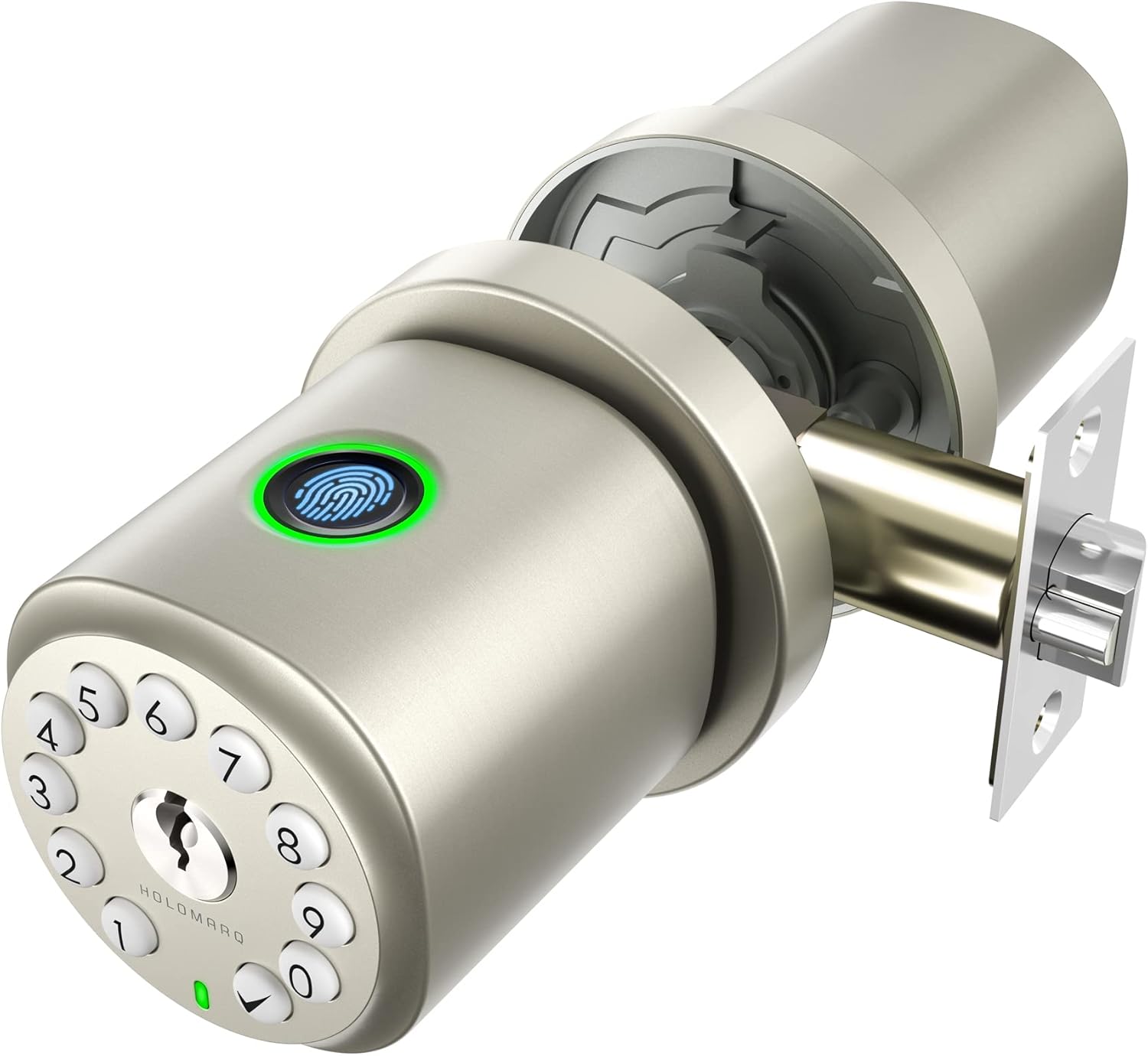
Figure 1.1: The HOLOMARQ Sequra H2 Fingerprint Door Knob, showcasing its sleek design and integrated keypad and fingerprint sensor.
2. Configuració i instal·lació
The Sequra H2 is designed for simple, 4-step installation, typically completed within 5 minutes by one person using a Philips screwdriver. Ensure your door meets the compatibility requirements before beginning.
2.1 Compatibilitat de portes
The lock fits most interior doors with standard backsets from 2⅜ inches (60mm) up to 2¾ inches (70mm), and door thicknesses of up to 2.5 inches (65mm).

Figure 2.1: Diagram illustrating compatible door dimensions and common door types that work with the Sequra H2.
2.2 Components inclosos
Before starting installation, verify all components are present:
- 1 x Sequra H2 fingerprint door knob set
- 1 x Mounting hardware kit (screws, spindle)
- 2 x Backup keys
- 1 x Functions guide and User manual
- 1 x Door marking template

Figure 2.2: All parts included in the Sequra H2 package, ready for installation.
2.3 Passos d'instal·lació (més enllà)view)
Refer to the included Functions Guide and User Manual for detailed, step-by-step instructions with diagrams. A general overview inclou:
- Prepare the door using the provided template.
- Instal·leu el mecanisme de tancament a la vora de la porta.
- Assemble the exterior and interior knob units, connecting the spindle and securing with screws.
- Insert 4 x AA alkaline batteries (not included) and test the lock.

Figura 2.3: Detallada view of the exterior and interior knob assemblies, showing dimensions and latch mechanism.

Figure 2.4: Visual representation of the quick and easy installation process for the Sequra H2.
3. Instruccions de funcionament
The Sequra H2 offers multiple convenient ways to unlock your door.
3.1 Mètodes de desbloqueig

Figura 3.1: Mésview of the three primary unlocking methods: Fingerprint, Keypad, and Traditional Key.
3.1.1 Accés amb empremtes digitals
The advanced fingerprint sensor allows for quick 0.25-second biometric access. It features intelligent learning capabilities to continuously improve recognition over time. Up to 100 fingerprints can be stored.
- To unlock: Place your registered finger on the sensor. The lock will disengage upon successful recognition.

Figure 3.2: Close-up of the fingerprint sensor and its rapid access capability.

Figure 3.3: Illustrates the AI self-learning feature of the fingerprint sensor, improving recognition over time.
3.1.2 Accés amb el teclat
The keypad supports up to 49 user codes. There is one admin code that manages all functions.
- To unlock: Enter your registered user code or admin code on the keypad.
- Anti-Peep Function: You can disguise your passcode by entering up to 20 random digits before or after your actual code to deter snoopers.
3.1.3 Key Access
Two backup keys are included for traditional mechanical unlocking in case of battery depletion or other issues.

Figure 3.4: Visual representation of the keypad, key, and emergency Type-C power options.
3.2 Funcions avançades
3.2.1 Bloqueig automàtic
The lock can be set to automatically lock after 5 seconds for added security. To manually lock immediately, press the '✔' button on the keypad.
3.2.2 Passage Mode (Unlock Mode)
This mode keeps the door unlocked for continuous access, useful for high-traffic periods. To activate/deactivate, use the admin passcode followed by specific commands (refer to the Functions Guide for exact sequence).

Figure 3.5: Instructions for enabling and disabling the Unlock Mode (Passage Mode).
3.2.3 Mode silenciós
Turn on 'Silent Mode' to disable audible feedback (buzzer) from the lock, useful for quiet environments. To activate/deactivate, use the admin passcode followed by specific commands (refer to the Functions Guide for exact sequence).

Figure 3.6: Instructions for enabling and disabling Silent Mode to control audible feedback.
4. Manteniment
4.1 Substitució de la bateria
The Sequra H2 requires 4 x AA alkaline batteries (not included). Using top-quality batteries from a single brand can provide up to 2 years of battery life. The lock will indicate low battery status. Replace all four batteries simultaneously when indicated.
4.2 Energia d'emergència
In the event of complete battery outage, you can gain immediate emergency power by connecting a power bank to the USB-C port located on the underside of the exterior knob. This allows you to operate the lock and replace the batteries.
4.3 Neteja
Netegeu l'exterior del pany amb un drap suau iamp cloth. Avoid abrasive cleaners or solvents that could damage the metallic finish or electronic components.
5. Solució De Problemes
If you encounter issues with your HOLOMARQ Sequra H2, refer to the following common problems and solutions:
| Problema | Causa possible | Solució |
|---|---|---|
| No es reconeix l'empremta digital | Dit no col·locat correctament; sensor brut; empremta digital no registrada. | Ensure finger covers the sensor completely. Clean the sensor. Re-register fingerprint or use keypad/key. |
| El teclat no respon | Low batteries; incorrect code entered. | Replace batteries. Re-enter code carefully. Use emergency power via USB-C. |
| Lock does not engage/disengage | Latch obstruction; mechanical issue; low batteries. | Check for obstructions in the door frame. Replace batteries. If issue persists, contact customer support. |
| No sound in Silent Mode | Silent Mode is activated. | This is normal. Deactivate Silent Mode if audible feedback is desired. |
6. Especificacions
| Característica | Detall |
|---|---|
| Marca | HOLOMARQ |
| Nom del model | Sequra |
| Número de part | H2 |
| Tipus de bloqueig | Biomètric |
| Material | Aliatge de zinc |
| Color | Or metàl·lic |
| Pes de l'article | 2.47 lliures |
| Dimensions del producte | 3 x 2.5 x 2.5 polzades |
| Font d'alimentació | 4 piles alcalines AA (no incloses) |
| Potència d'emergència | Port USB-C |
| Capacitat d'empremta digital | Fins a 100 |
| Capacitat del codi d'usuari | Fins a 49 |
| Compatibilitat del gruix de la porta | Fins a 2.5 polzades |
| Compatibilitat de backset | 2⅜ inches (60mm) or 2¾ inches (70mm) |
| Característiques especials | Auto-Lock, Silent Mode, Passage Mode, Anti-Peep Function |
7. Garantia i Suport
HOLOMARQ stands behind the quality of the Sequra H2 Fingerprint Door Knob. Your purchase includes:
- Garantia de devolució de 30 dies: If you are not satisfied with your product, you may return it within 30 days for a full refund.
- Substitució gratuïta durant 1 any: The product is covered by a 1-year free replacement warranty for manufacturing defects or malfunctions.
- Lifetime 24/7 Customer Service: HOLOMARQ provides lifetime customer support via email, online chat, and phone to assist with any questions or issues you may encounter.
For support, please refer to the contact information provided in your product packaging or visit the official HOLOMARQ weblloc.