1. Introducció
This manual provides essential information for the safe and correct use of your Hisense 32E4KT 32-inch HD Smart TV. Please read all instructions carefully before operating the television and retain this manual for future reference.
2. Què hi ha a la caixa
En desembalar, assegureu-vos que tots els elements que s'enumeren a continuació hi siguin presents i no estiguin danyats:
- Hisense 32E4KT Television
- Control remot
- Piles (per al comandament a distància)
- TV Base (Stand)
- Cargols (per al muntatge del suport)
- Manual d'usuari (aquest document)

Imatge 2.1: The Hisense 32E4KT television with its dimensions and a list of components included in the package. Dimensions with stand: 726mm (width) x 186mm (depth) x 479mm (height). Dimensions without stand: 726mm (width) x 85mm (depth) x 430mm (height). Stand width: 688mm. Weight: 3.8 kg.
3. Configuració
3.1. Assembling the Stand or Wall Mounting
Muntatge de l'estand: Carefully place the TV screen-down on a soft, flat surface. Attach the two stand feet to the designated slots at the bottom of the TV using the provided screws. Ensure they are securely fastened.
Muntatge a la paret: For wall mounting, remove the stand feet. This TV supports VESA Standard (100x200mm) wall mounts. Use appropriate wall mounting hardware (not included) and follow the instructions provided with your wall mount. It is recommended to seek professional installation for wall mounting.

Imatge 3.1: posterior view of the Hisense TV indicating the VESA wall mount standard of 100mm x 200mm.
3.2. Connexió de perifèrics
Connect your external devices to the appropriate ports on the back or side of the TV. Refer to the diagram below for port locations and types:
- ENTRADA AV: For older devices using composite video and stereo audio cables.
- HEADPHONE: Jack de 3.5 mm per connectar auriculars.
- CI CARD: Common Interface slot for conditional access modules (CAMs).
- HDMI: High-Definition Multimedia Interface for connecting devices like Blu-ray players, game consoles, or set-top boxes. This model includes HDMI 2.0.
- ANT (ANT 1 / ANT 2): For connecting terrestrial (DVB-T2) and satellite (DVB-S2) antennas.
- SORTIDA D'ÀUDIO DIGITAL: Optical audio output for connecting to soundbars or home theater systems.
- ETHERNET: Port RJ45 per a connexió de xarxa amb cable.
- USB: Per connectar dispositius d'emmagatzematge USB per reproduir contingut multimèdia files.
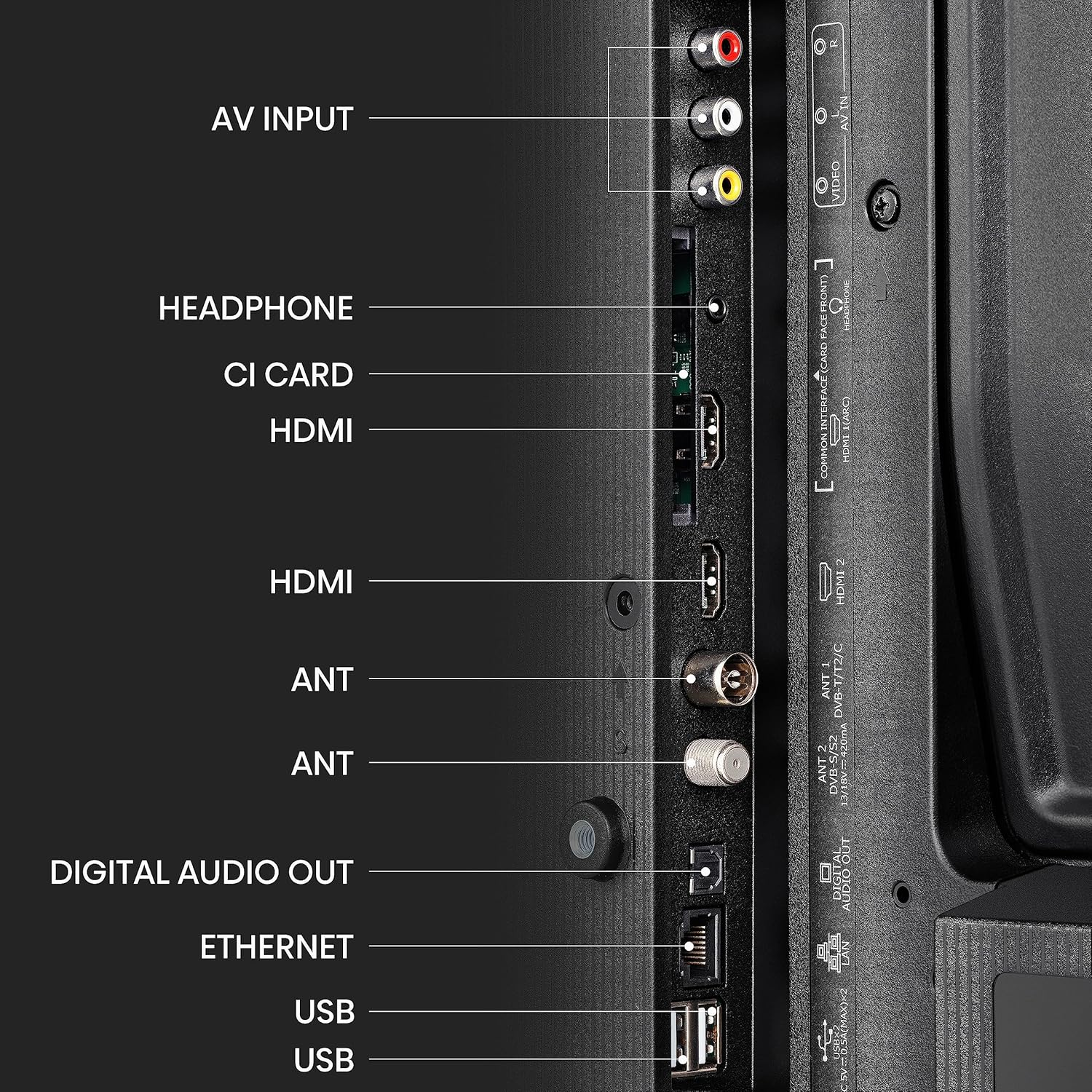
Imatge 3.2: Detallada view dels ports de connectivitat del televisor.
3.3. Engegada i configuració inicials
- Connecteu el cable d'alimentació al televisor i després a una presa de corrent.
- Premeu el botó d'engegada del comandament a distància o del televisor mateix.
- Seguiu les instruccions que apareixen a la pantalla per seleccionar l'idioma i el país i realitzar l'escaneig inicial de canals.
- Connect to your Wi-Fi network or use an Ethernet cable for internet access to enable Smart TV features.
4. Instruccions de funcionament
4.1. Control remot
The provided remote control allows you to navigate the TV's functions. Insert the included batteries into the remote control, observing the correct polarity.

Imatge 4.1: The Hisense Smart TV remote control, featuring quick access buttons for popular streaming platforms.
4.2. Smart TV Features (VIDAA U6)
Your Hisense TV runs on the VIDAA U6 operating system, providing access to a variety of streaming applications and smart features. The interface is designed for quick navigation and content discovery.
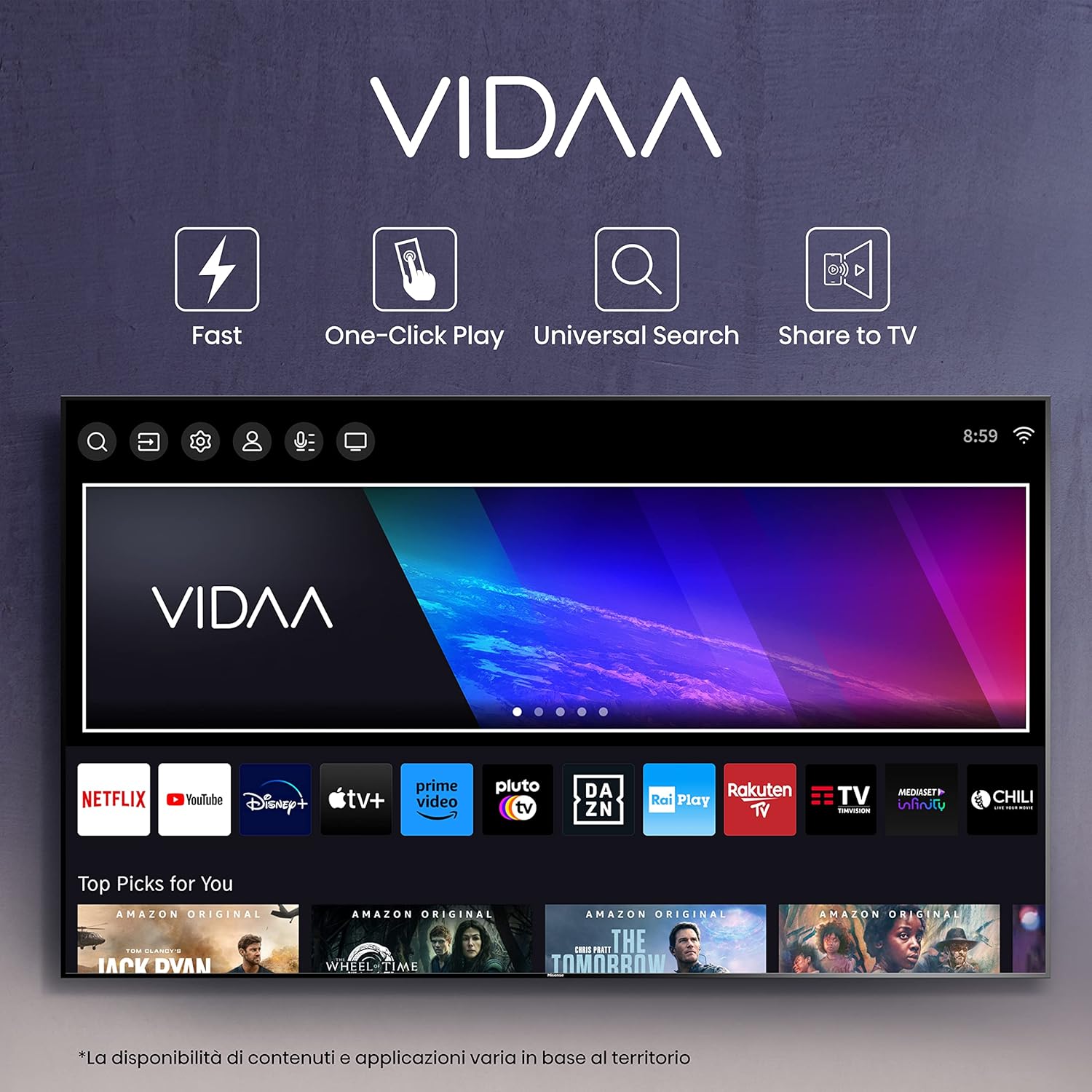
Imatge 4.2: The VIDAA U6 Smart TV interface, offering quick access to numerous streaming services and applications.
4.3. Voice Control (Alexa)
The TV supports Alexa voice control. To use this feature, ensure your TV is connected to the internet and linked to your Amazon account. Press the dedicated voice control button on your remote (if available) or activate Alexa through the TV's menu to issue commands such as changing channels, adjusting volume, or searching for content.
4.4. Mode de joc
The Game Mode feature optimizes the TV's settings for gaming, reducing input lag to approximately 20ms. This provides a more responsive gaming experience. Game Mode can be activated through the TV's picture settings menu.
4.5. Tuner and Channels
The TV is equipped with a DVB-T2/S2 HEVC 10 tuner, allowing you to receive digital terrestrial and satellite broadcasts. After connecting your antenna(s), perform a channel scan through the TV's settings menu to find available channels.
5. Manteniment
Neteja: Disconnect the TV from the power outlet before cleaning. Use a soft, dry cloth to wipe the screen and cabinet. Do not use liquid cleaners or aerosol sprays directly on the TV. For stubborn marks, lightly dampNetegeu el drap amb aigua o un netejador de pantalles suau i no abrasiu.
Actualitzacions de programari: Periodically check for software updates through the TV's settings menu to ensure optimal performance and access to the latest features. Updates can be performed via internet connection.
6. Solució De Problemes
- Sense energia: Ensure the power cord is securely connected to both the TV and the power outlet. Check if the outlet is working.
- Sense imatge/so: Verifiqueu que s'ha seleccionat la font d'entrada correcta. Comproveu totes les connexions de cable a dispositius externs.
- El control remot no funciona: Comproveu les piles i assegureu-vos que estiguin inserides correctament. Apunteu el comandament a distància directament al sensor d'infrarojos del televisor.
- Sense connexió a Internet: Check your Wi-Fi router and network settings. For wired connections, ensure the Ethernet cable is properly connected.
- Mala qualitat d'imatge: Ajusteu la configuració de la imatge (brillantor, contrast, nitidesa). Assegureu-vos que la font d'entrada proporciona un senyal d'alta qualitat.
For further assistance, refer to the full electronic manual available through the TV's help menu or contact Hisense customer support.
7. Especificacions
| Característica | Especificació |
|---|---|
| Número de model | 32E4KT |
| Mida de la pantalla | 32 polzades |
| Tecnologia de visualització | LED |
| Resolució | HD Ready (1366 x 768 píxels) |
| Freqüència d'actualització | 60 Hz |
| Sistema operatiu | VIDA U6 |
| Característiques especials | Smart TV, Voice Control (Alexa), Game Mode |
| Connectivitat | HDMI, USB, Wi-Fi, Ethernet |
| Sintonitzador | DVB-T2/S2 HEVC 10 |
| Tecnologia d'àudio | DTS X |
| Dimensions del producte (amb suport) | 72.6 x 18.6 x 47.9 cm |
| Dimensions del producte (sense suport) | 72.6 x 8.5 x 43 cm |
| Pes | 3.8 kg |
| Classe d'eficiència energètica | F |
| Consum d'energia | 27 kWh/1000h |


Imatge 7.1: Energy Label and Product Information Sheet for the Hisense 32E4KT TV. For detailed information, refer to the official EU product database: eprel.ec.europa.eu/qr/1418570
8. Garantia i Suport
Your Hisense 32E4KT Smart TV comes with a standard manufacturer's warranty of 2 anys from the date of purchase. This warranty covers manufacturing defects and ensures repair or replacement of faulty components under normal use conditions.
For warranty claims, technical support, or service inquiries, please contact Hisense customer service. Keep your proof of purchase readily available.


