1. Introducció
The Hohem iSteady M6 is a professional-grade 3-axis gimbal stabilizer designed for smartphones, enabling users to capture incredibly smooth and stable video footage. With its advanced stabilization algorithms, versatile control options, and intelligent features, the iSteady M6 transforms your smartphone into a powerful filmmaking tool, perfect for content creators, travelers, and anyone looking to elevate their mobile videography.
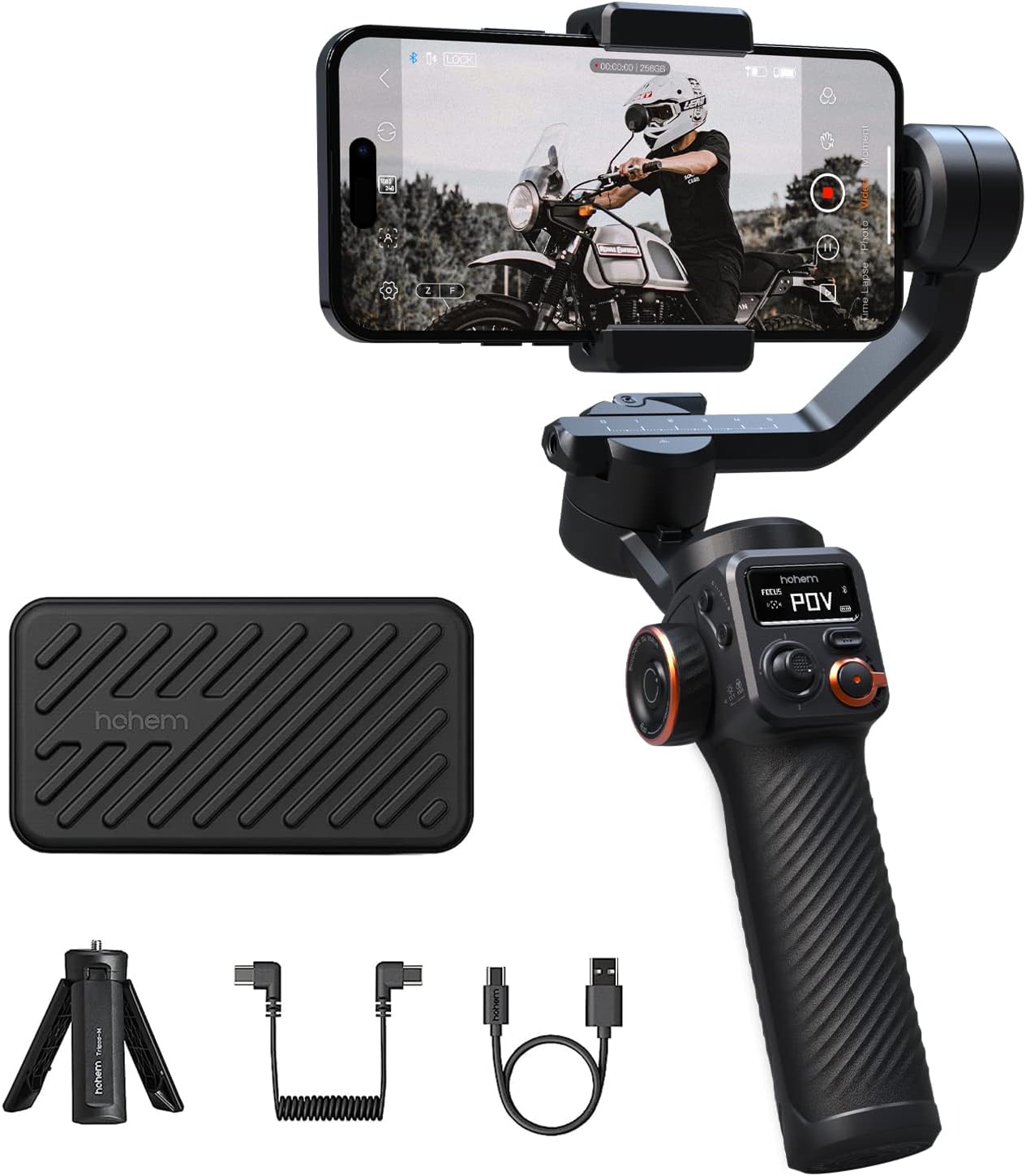
Figure 1.1: Hohem iSteady M6 Gimbal Stabilizer with included accessories.
2. Què hi ha a la caixa
Upon opening your Hohem iSteady M6 package, please ensure all the following items are present:
- iSteady M6 Gimbal
- Trípode
- Maleta de transport
- Cable de càrrega USB-C
- Cable USB-C a USB-C
- Manual d'usuari

Figure 2.1: All items included in the Hohem iSteady M6 package.
3. Producte acabatview
Familiarize yourself with the various components and controls of your iSteady M6 gimbal:
- Pantalla OLED: The 0.91-inch OLED display provides real-time information on gimbal status, battery level, Bluetooth connection, and current operating mode.

Figure 3.1: The OLED display showing gimbal status.
- High Payload Capacity: Equipped with 3 powerful motors, the iSteady M6 supports a payload of up to 400g, accommodating a wide range of smartphones and accessories.

Figure 3.2: Demonstrating the 400g payload capacity with accessories.
- Versatile Control Wheel: The multi-functional control wheel allows for precise roll axis rotation, focus control, and adjustment of cold/warm and RGB fill lights.

Figure 3.3: The versatile control wheel and A-B motion buttons.
- Càrrega inversa: The gimbal features a power-out port, allowing you to charge your smartphone directly from the gimbal's battery during recording.

Figure 3.4: Reverse charging feature in action.
4. Configuració
- Unfolding the Gimbal: Gently unfold the gimbal arms until they lock into place. Refer to the quick start guide for visual instructions on unfolding.
- Mounting Your Smartphone: Securely place your smartphone into the phone clamp. Ensure the phone is centered and balanced.
- Balancing the Gimbal: Proper balancing is crucial for optimal performance and battery life.
- Unlock the roll, tilt, and pan axes.
- Adjust the phone's position in the clamp and slide the arms until the phone remains level in all directions when released.
- Lock the axes once balanced.
- Encès: Press and hold the power button until the OLED display illuminates.
- Connecting to the Hohem Joy App:
- Download the "Hohem Joy" app from your smartphone's app store.
- Activa el Bluetooth al teu telèfon intel·ligent.
- Open the Hohem Joy app and follow the on-screen prompts to connect to your iSteady M6.
5. Modes de funcionament
The iSteady M6 offers several operating modes to suit various shooting scenarios. Use the Mode button (M) to cycle through them:
- Seguiment panoràmic (PF): The camera pans left/right following your hand movements, while the tilt and roll axes remain locked.
- Seguiment de panoràmica i inclinació (PTF): The camera follows your pan and tilt movements, with the roll axis remaining locked.
- All Lock (AL): All three axes are locked, keeping the camera pointing in a fixed direction regardless of gimbal movement.
- POV (Roll Follow): All three axes follow your movements, providing a dynamic first-person perspective.
- Mode inicial: Allows for a 360-degree rotation along the roll axis, creating a spinning shot effect. This can be activated directly from the gimbal without the app.
Vídeo 5.1: Un overview of the Hohem iSteady M6's features and various operating modes.
6. Funcions avançades
- iSteady 7.0 Stabilization: Experience unparalleled stability with the advanced iSteady 7.0 algorithms, ensuring smooth footage even during dynamic movements.
- Magnetic AI Vision Sensor (Optional Accessory): For intelligent tracking, attach the magnetic AI Vision Sensor. This allows the gimbal to automatically follow subjects without needing the app.
- Integrated Fill Light (Optional Accessory): The gimbal supports an attachable fill light for improved illumination in low-light conditions. This light can be controlled via the versatile control wheel.
- A-B Motion Timelapse: Create captivating motion timelapses by setting two key positions (A and B) using the dedicated buttons. The gimbal will smoothly transition between these points over a set duration, no app required.
7. Manteniment
- Neteja: Feu servir un drap suau i sec per netejar el cardan. Eviteu utilitzar netejadors líquids o dissolvents.
- Emmagatzematge: When not in use, store the gimbal in its dedicated carrying case to protect it from dust and damage. Ensure the gimbal arms are locked to prevent accidental movement.
- Cura de la bateria: For optimal battery longevity, fully charge the gimbal before long-term storage and recharge it every three months.
8. Solució De Problemes
| Problema | Causa possible | Solució |
|---|---|---|
| Gimbal vibrates or motors are hot. | Improper balancing. | Ensure your smartphone is perfectly balanced on all three axes before powering on the gimbal. |
| Cannot connect to Hohem Joy App. | Bluetooth no habilitat, aplicació no actualitzada o emparellament incorrecte. | Check Bluetooth settings, update the app, restart both phone and gimbal, then try pairing again. |
| Gimbal does not power on. | Bateria baixa o botó d'engegada no premut prou estona. | Charge the gimbal fully. Press and hold the power button for at least 3 seconds. |
| AI tracking is not working. | AI Vision Sensor not properly attached or gesture not recognized. | Ensure the AI Vision Sensor is securely magnetized to the phone clamp. Use clear, distinct gestures. |
9. Especificacions
| Característica | Detall |
|---|---|
| Dimensions del producte | 11.42 x 4.72 x 4.72 polzades (2.05" de profunditat x 6.61" d'amplada x 12.24" d'alçada) |
| Pes de l'article | 1.21 lliures (551 grams) |
| Recomanació de pes màxim | 400 grams |
| Pantalla OLED | 0.91 polzades |
| Durada de la bateria | Up to 18 hours (continuous usage) |
| Port de càrrega | USB-C (supports reverse charging) |
| Estabilització | iSteady 7.0 algorithms |
| Connectivitat | Bluetooth (for Hohem Joy App) |
| Color | Negre |
10. Garantia i Suport
For detailed warranty information and technical support, please refer to the official Hohem website or contact their customer service directly. You may also find additional resources and FAQs within the Hohem Joy application.
A digital version of this user manual is available for download at: Hohem iSteady M6 User Manual (PDF)


