Introducció
Gràcies per la compraasing the Dolphin LX-220 Boombox Bluetooth Speaker. This manual provides essential information for setting up, operating, and maintaining your speaker. Please read it thoroughly before use to ensure optimal performance and safety.
Informació important de seguretat
- No exposeu l'altaveu a temperatures extremes ni a la llum solar directa durant períodes prolongats.
- Keep the speaker away from heat sources, dust, and corrosive materials.
- Do not disassemble, repair, or modify the speaker yourself. Contact qualified service personnel for assistance.
- Ensure all port covers are securely closed when using the speaker near water to maintain its IPX5 waterproof rating.
- Feu servir només el cable de càrrega proporcionat o un cable USB-C certificat per carregar.
- Eviteu col·locar objectes pesats sobre l'altaveu.
Contingut del paquet
- Dolphin LX-220 Boombox Bluetooth Speaker
- Cable de càrrega USB-C
- Comandament a distància de mida completa
- Manual d'usuari (aquest document)
Producte acabatview
The Dolphin LX-220 is a portable Bluetooth speaker designed for robust audio performance and versatility. It features dual bass radiators and dual 3-inch full-range drivers for powerful sound. Its IPX5 waterproof rating makes it suitable for various environments, and the sound-activated ring lights add a dynamic visual element.
Components i controls de l'altaveu


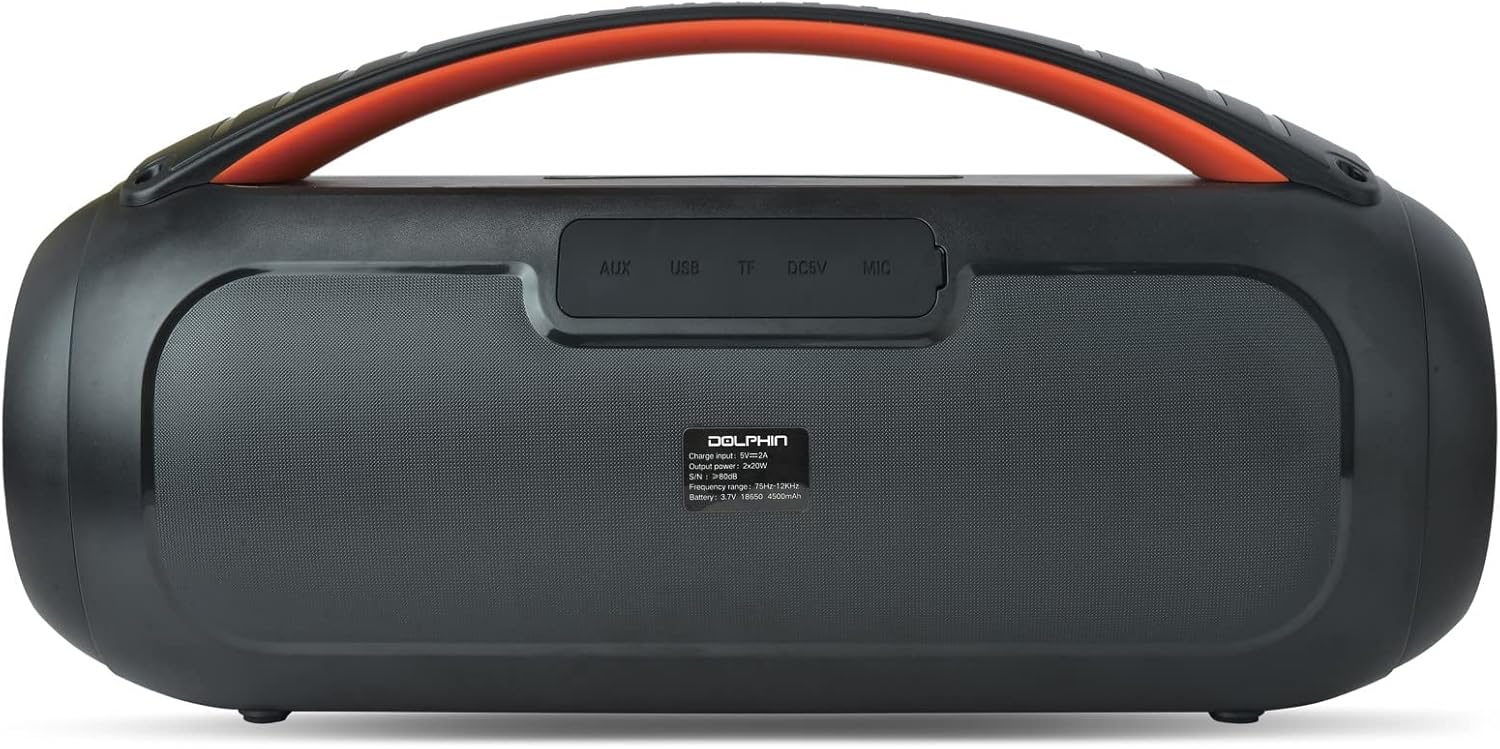
Disseny del tauler de control
- Botó d'encesa: Manteniu premut per encendre/apagar l'altaveu.
- Botó Bluetooth: Premeu per entrar al mode de vinculació Bluetooth.
- Baixar el volum (-): Disminuir el volum.
- Botó Reproduir/Pausa: Reprodueix o pausa la reproducció d'àudio.
- Puja el volum (+): Augmenta el volum.
- Botó del mode de llum: Cycle through 10 different sound-activated lighting modes.
- Botó de reforç dels baixos: Activate or deactivate enhanced bass.
Rear Port Panel (Under Protective Cover)
- Entrada AUX: Jack de 3.5 mm per connectar dispositius d'àudio externs.
- Port USB: For USB drive playback or charging external devices (power bank function).
- Ranura per a targetes TF: For TF (microSD) card playback.
- DC 5V (USB-C) Port: Per carregar l'altaveu.
Configuració
Carregant l'altaveu
- Open the protective rubber cover on the rear panel to access the charging port.
- Connect the provided USB-C charging cable to the DC 5V port on the speaker.
- Connecteu l'altre extrem del cable USB-C a un adaptador de corrent USB compatible (no inclòs).
- The battery level indicator will show the charging status. Charge until the indicator shows a full charge.
- Once fully charged, disconnect the cable and securely close the protective rubber cover to maintain waterproofing.
Encès/Apagat
- Per encendre: Press and hold the Power button on the top panel for approximately 2-3 seconds until the speaker powers on and the lights activate.
- Per apagar: Press and hold the Power button again for approximately 2-3 seconds until the speaker powers off.
Emparellament Bluetooth
- Ensure the speaker is powered on and in Bluetooth mode (indicated by a flashing blue light). If not, press the Bluetooth button to enter pairing mode.
- Al dispositiu mòbil (telèfon intel·ligent, tauleta, etc.), activeu el Bluetooth i cerqueu els dispositius disponibles.
- Select "Dolphin LX-220" from the list of devices.
- Once paired, the speaker will emit an audible confirmation, and the Bluetooth indicator light will become solid blue.
WaveSync Technology (True Wireless Stereo Pairing)
To achieve a stereo sound experience, you can pair two Dolphin LX-220 speakers using WaveSync technology.
- Ensure both LX-220 speakers are powered on and in Bluetooth pairing mode.
- On one of the speakers, press and hold the WaveSync button (often indicated by a chain-link icon).
- The speakers will automatically search for and connect to each other. An audible prompt will confirm successful pairing.
- Once paired, connect your mobile device to one of the speakers via Bluetooth as described above. Audio will now play in stereo across both speakers.
Modes de funcionament
Mode Bluetooth
After successful Bluetooth pairing, you can control playback (Play/Pause, Volume Up/Down) directly from your connected device or using the speaker's control panel/remote control.
Reproducció USB
- Inseriu una unitat flash USB que contingui àudio MP3 files into the USB port on the rear panel (under the protective cover).
- The speaker will automatically switch to USB mode and begin playing audio.
- Use the Play/Pause and Volume buttons on the speaker or remote to control playback.
Reproducció de targetes TF
- Inseriu una targeta TF (microSD) que contingui àudio MP3 files into the TF card slot on the rear panel.
- The speaker will automatically switch to TF card mode and begin playing audio.
- Use the Play/Pause and Volume buttons on the speaker or remote to control playback.
Mode de ràdio FM
- Press the Mode button (often labeled 'M') on the speaker or remote to cycle through modes until FM Radio is selected.
- L'altaveu escanejarà i desarà automàticament les emissores de FM disponibles.
- Use the Previous/Next track buttons (often combined with Volume +/-) to navigate between saved stations.
Mode d'entrada AUX
- Connect an external audio device (e.g., MP3 player, laptop) to the AUX input port on the rear panel using a 3.5mm audio cable (not included).
- L'altaveu canviarà automàticament al mode AUX.
- Control audio playback and volume directly from your connected external device.
Llums activades per so
The Dolphin LX-220 features sound-activated speaker ring lights and side lights with 10 different lighting modes.
- Press the Light Mode button on the speaker or remote to cycle through the available lighting patterns.
- The lights will react to the rhythm and intensity of the music being played.
Especificacions
| Característica | Detall |
|---|---|
| Nom del model | LX-220 |
| Tipus d'altaveu | Altaveu Bluetooth portàtil |
| Potència de sortida | 30 RMS Watts |
| Mida de l'altaveu | Dual 3" Full Range Drivers |
| Classificació impermeable | IPX5 |
| Bateria | Built-In 4500mAh 3.7V Lithium-ion Battery |
| Carregant | USB-C Chargeable with Battery Level Indicator |
| Connectivitat | Bluetooth, USB, TF, FM, AUX (3.5mm Jack) |
| Característiques especials | Dual Bass Radiator, WaveSync Technology, Sound Activated Speaker Ring Lights & Side Lights (10 modes), Remote Control |
| Dimensions del producte | 7.3"H x 14.3"W x 5.5"D (Unit Information) |
| Pes de l'article | 4.5 lliures |
Resolució de problemes
- Sense energia: Assegureu-vos que la bateria estigui carregada. Connecteu l'altaveu a una font d'alimentació amb el cable USB-C.
- No es pot emparellar Bluetooth: Make sure the speaker is in Bluetooth pairing mode (flashing blue light). Ensure your device's Bluetooth is enabled and within range. Try restarting both the speaker and your device.
- Sense so: Check the volume levels on both the speaker and your connected device. Ensure the correct input mode (Bluetooth, USB, TF, AUX, FM) is selected.
- Qualitat de so baixa: Ensure the speaker is not too far from the connected Bluetooth device. Check for interference from other wireless devices. For AUX mode, ensure the cable is fully inserted and not damaged.
- Els llums no funcionen: Press the Light Mode button to ensure lights are enabled and to cycle through modes.
- El control remot no funciona: Check the remote control's battery. Ensure there are no obstructions between the remote and the speaker.
Manteniment
- Netegeu l'altaveu amb un suau, damp tela. No utilitzeu netejadors abrasius ni dissolvents.
- Ensure all port covers are sealed when not in use or when exposed to water.
- Guardeu l'altaveu en un lloc fresc i sec, allunyat de la llum solar directa i de temperatures extremes.
- If the speaker will not be used for an extended period, charge it periodically to maintain battery health.
Garantia i Suport
The Dolphin LX-220 Boombox Bluetooth Speaker comes with a limited warranty. For detailed warranty information, please refer to the warranty card included in your package or visit the official Dolphin website. For technical support, troubleshooting assistance, or service inquiries, please contact Dolphin customer service through the contact information provided on our weblloc web o a la documentació del producte.
També podeu visitar el Dolphin Store on Amazon per obtenir informació addicional sobre el producte i recursos d'assistència.





