1. Producte acabatview
The XZENT X-107 is a versatile 2 DIN car radio and multimedia system designed for vehicles and camper vans. It features a 6.75-inch (17.1 cm) capacitive real glass touchscreen, complemented by four touch keys and a rotary volume knob for intuitive control.
This system integrates a DAB+ tuner for high-quality digital radio reception, an RDS FM tuner, and a USB 2.0 port for media playback and smartphone connectivity. WebLink 2.0 functionality allows seamless access to various smartphone applications. Bluetooth 4.2 ensures clear hands-free communication and audio streaming.
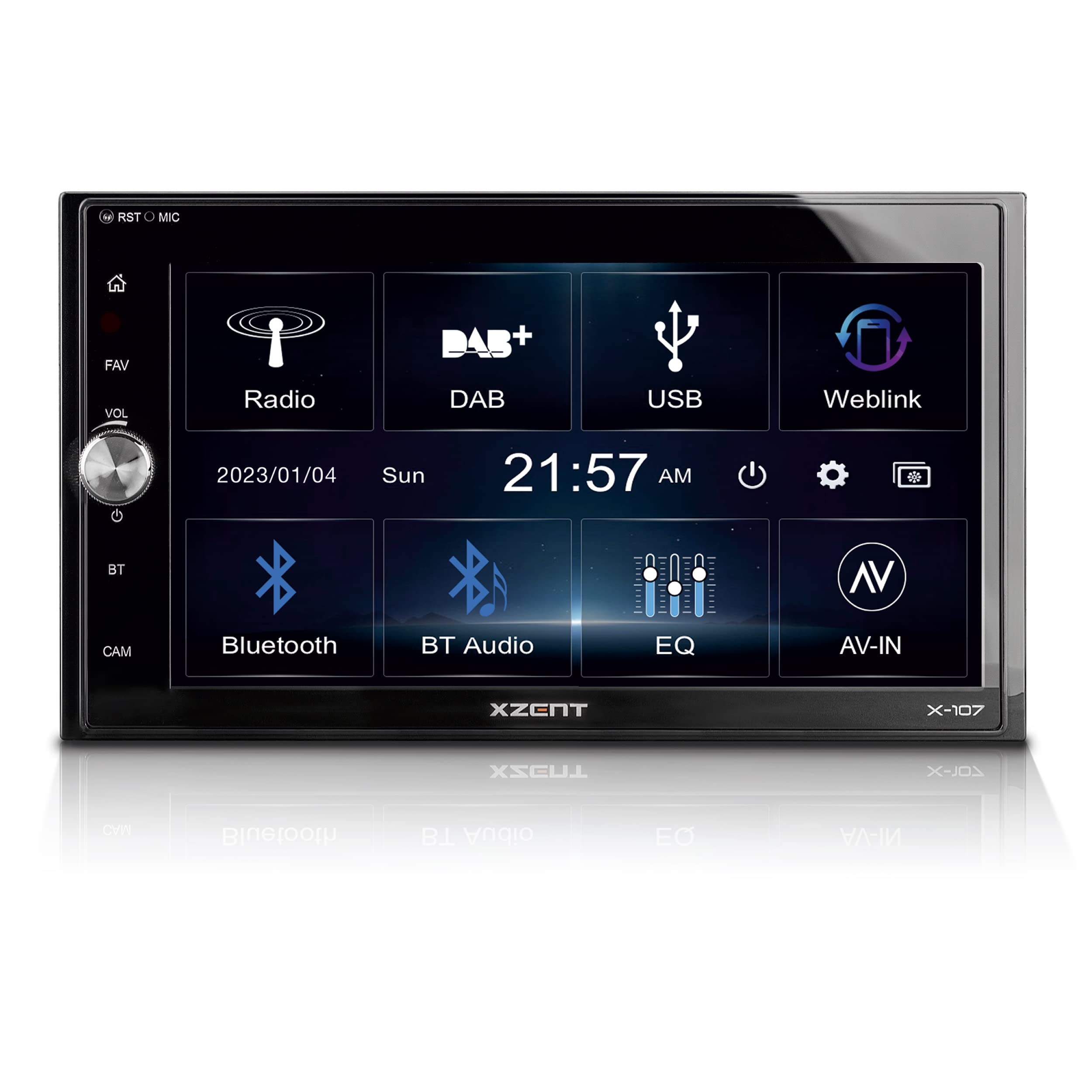
Imatge: Frontal view of the XZENT X-107 Autoradio Multimedia System, showing the main interface with options for FM/AM, DAB, USB, WebLink, BT Phones, BT Audio, EQ, and AV-IN.
2. Configuració i instal·lació
The X-107 is designed for a standard 2 DIN mounting bay. Installation requires connecting various cables and adapters included in the package. It is recommended to consult a professional for installation to ensure proper wiring and functionality.
2.1 Contingut del paquet
- XZENT X-107 Multimedia System
- External Bluetooth Microphone
- Cable USB
- Various Connection Cables and Adapters
- 2 DIN Mounting Frame
- 2 DIN Decorative Frame
- Eina de desbloqueig
2.2 Muntatge
Insert the 2 DIN mounting frame into the vehicle's dashboard opening. Secure it according to your vehicle's specifications. Connect all necessary power, speaker, antenna, and accessory cables to the X-107 unit. Slide the X-107 into the mounting frame until it clicks into place. Attach the decorative frame if desired.

Image: The XZENT X-107 unit seamlessly integrated into a car dashboard, showing the DAB+ radio interface.
3. Instruccions de funcionament
3.1 Engegada/Apagada i control de volum
- To power on the device, press the power button (usually integrated with the volume knob or a dedicated touch key).
- Gireu el botó de volum per ajustar el nivell d'àudio.
- Manteniu premut el botó d'engegada per apagar el dispositiu.
3.2 Touchscreen and Interface Navigation
The 6.75-inch touchscreen allows for direct interaction with the system's functions. Tap icons to select modes or options. Swipe gestures may be supported for navigating menus or lists.

Image: A close-up of the XZENT X-107 touchscreen interface, displaying icons for FM/DAB, USB, WebLink, Bluetooth, and other functions.
3.3 Radio Functions (DAB+ and FM)
- DAB+ Tuner: Select the DAB+ icon from the main menu. The system will scan for available digital radio stations. Use the on-screen controls to navigate stations, view DLS text (Dynamic Label Segment), and utilize DAB/DAB-FM service following.
- Sintonitzador FM: Select the FM/AM icon. The RDS FM tuner provides station information. Use the on-screen controls to manually tune or auto-scan for FM stations.

Image: A screenshot of the XZENT X-107 displaying the FM radio tuning interface.
3.4 Reproducció multimèdia USB
Connect a USB storage device to the USB 2.0 port. Select the USB icon from the main menu. The system supports playback of various audio and video file formats. Use the on-screen controls for playback, pause, skip, and folder navigation.
3.5 WebEnllaç 2.0
El WebLink 2.0 function allows you to mirror and control compatible applications from your Android or iOS smartphone on the X-107's screen. Connect your smartphone via USB. Select the WebLink icon and follow the on-screen instructions to establish the connection. Supported applications include audio/video players, YouTube, Waze, and Genius Maps.

Image: A screenshot of the XZENT X-107 WebLink 2.0 interface, displaying icons for Music Player, Video Player, YouTube, Cast, Genius Map, and Waze.
3.6 Connectivitat Bluetooth
The Bluetooth 4.2 module enables hands-free calling and audio streaming.
- Maridatge: Go to the Bluetooth settings on the X-107 and your smartphone. Cerca available devices and select "XZENT X-107" to pair.
- Trucades mans lliures: Once paired, you can import up to 1000 phonebook contacts. Use the on-screen dial pad or contact list to make calls. The external microphone ensures clear voice transmission.
- Transmissió d'àudio (A2DP): Play music from your smartphone via Bluetooth. Use the X-107's controls (AVRCP) to manage playback.

Image: A screenshot of the XZENT X-107 Bluetooth phone interface, showing a dial pad and contact options.
3.7 Entrada de càmera
The X-107 supports a rearview camera input. The camera view can be activated manually by pressing the dedicated CAM selection button on the front panel, or automatically when the vehicle is put into reverse (if properly wired).

Image: A screenshot of the XZENT X-107 displaying the rearview Imatge de la càmera amb pautes d'aparcament.
4. Manteniment
4.1 Neteja de la pantalla
To clean the touchscreen, gently wipe it with a soft, lint-free cloth. For stubborn smudges, slightly dampen the cloth with water or a screen-safe cleaning solution. Avoid using harsh chemicals or abrasive materials, as these can damage the screen surface.
4.2 Actualitzacions de programari
Software updates for the X-107 system are periodically released to improve performance and add new features. Please visit the official XZENT homepage for information on available updates and instructions on how to install them.
5. Solució De Problemes
If you encounter issues with your XZENT X-107, please refer to the following general troubleshooting steps:
- Sense energia: Comproveu totes les connexions d'alimentació i la caixa de fusibles del vehicle. Assegureu-vos que el contacte estigui posat.
- Sense àudio: Verify speaker connections. Check volume levels on both the X-107 and any connected smartphone. Ensure the correct audio source is selected.
- Problemes de connexió Bluetooth: Ensure Bluetooth is enabled on both the X-107 and your smartphone. Try unpairing and re-pairing the devices.
- Pantalla tàctil que no respon: Try restarting the unit. If the issue persists, a factory reset might be necessary (consult the full manual for specific instructions).
- Mala recepció de ràdio: Check the antenna connection. For DAB+, ensure you are in an area with good digital radio coverage.
For more detailed troubleshooting or persistent problems, please contact XZENT customer support or refer to the comprehensive manual available on the XZENT weblloc.
6. Especificacions
| Característica | Especificació |
|---|---|
| Marca | XZENT |
| Número de model | X-107 |
| Color | Multicolor |
| Mostra | 6.75" / 17.1 cm Capacitive Touchscreen |
| Sintonitzador de ràdio | DAB+, RDS FM |
| Tecnologia de connectivitat | Bluetooth 4.2, USB tipus A |
| Característiques especials | DAB+ Tuner, WebLink 2.0, Camera Input |
| Dispositius compatibles | Android Smartphone, iPhone |
| Mode de sortida d'àudio | estèreo |
| Configuració del canal de so envoltant | 5.1 |
| Codificació de vídeo | H.264, H.265/HEVC |
| Ports HDMI totals | 1 |
7. Garantia i Suport
7.1 Informació de la garantia
Specific warranty details for the XZENT X-107 are typically provided with the product packaging or can be found on the official XZENT weblloc web. Si us plau, conserveu el comprovant de compra per a reclamacions de garantia.
7.2 Atenció al client
For technical assistance, product inquiries, or to access the full user manual, please visit the official XZENT website. Information regarding spare parts availability is currently not provided.


