1. Introducció
This manual provides detailed instructions for the installation, operation, and maintenance of your Aqua Control FullVision 2 Digital Irrigation Timer. This device is designed to automate garden watering with two independent outlets, ensuring efficient and precise irrigation.
2. Producte acabatview
The Aqua Control FullVision 2 features a panoramic LCD screen for clear visibility of all programming information. It includes intuitive buttons for easy setup and control.
2.1. Components
- Main Timer Unit with LCD Display
- Control Buttons (NOW, A/B, ESC/OFF, OK, +, -, DELAY)
- Water Inlet (with 1/2" and 3/4" double thread)
- Two Independent Water Outlets (A and B)
- Battery Compartment (located on the back)
2.2. Pantalla i controls
The large LCD screen displays the current time, start time, watering duration, frequency, and next watering event. Buttons allow for navigation and setting adjustments.

Figura 1: Davant view of the Aqua Control FullVision 2 Digital Irrigation Timer, showing the panoramic LCD display and control buttons. The timer has a black body with blue connectors.
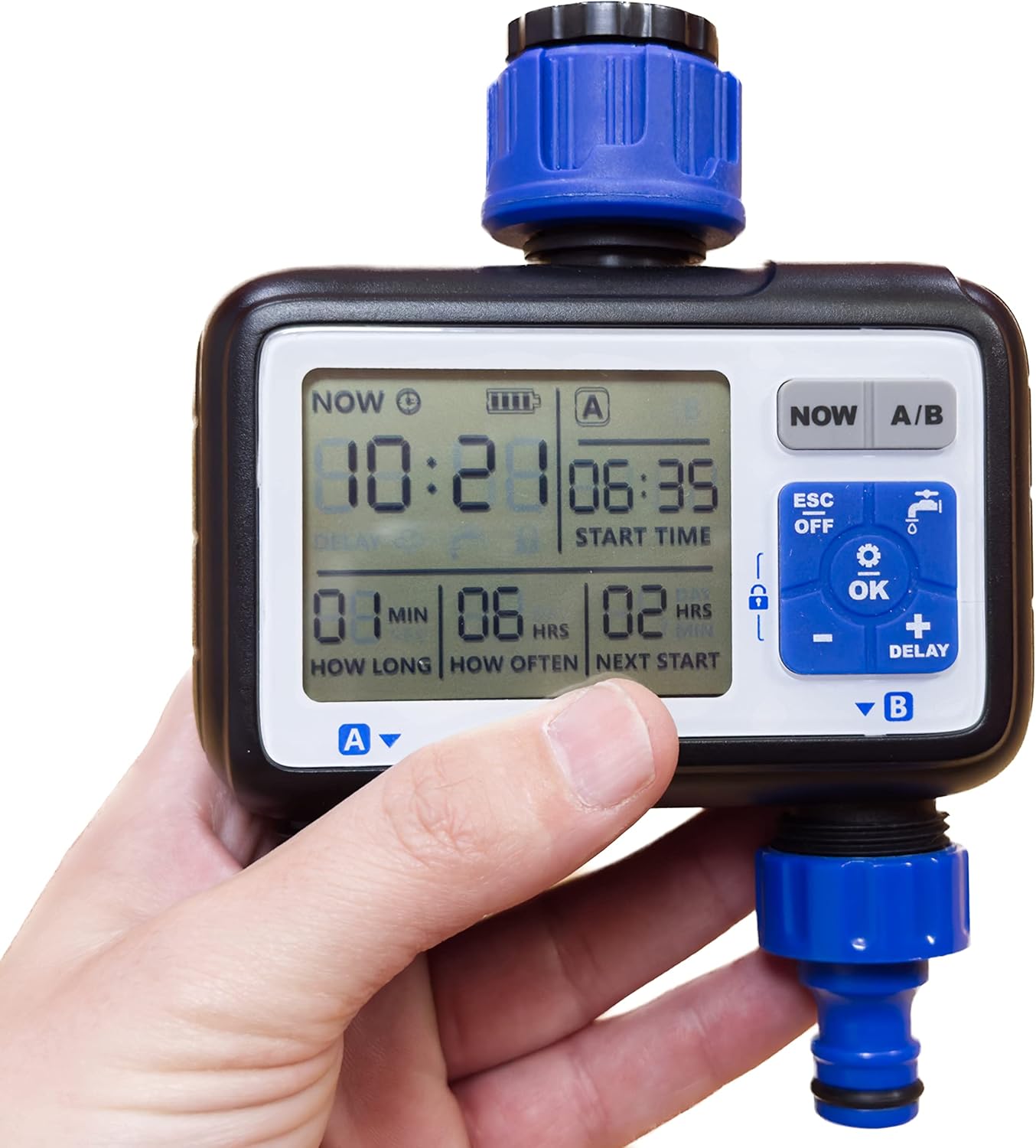
Figura 2: A hand holding the Aqua Control FullVision 2 timer, illustrating the size and the clear visibility of the digital display. The display shows current time, start time, duration, frequency, and next start time. A QR code is visible on the packaging in the background, linking to http://qr.altadex.com/C4115 per obtenir informació addicional.
3. Configuració
3.1. Instal·lació de la bateria
- Localitza el compartiment de les piles a la part posterior del temporitzador.
- Obriu la coberta del compartiment.
- Insert two 1.5V AA alkaline batteries (not included), ensuring correct polarity.
- Tanqueu bé la tapa del compartiment de la bateria.
3.2. Connecting to the Faucet
- Assegureu-vos que l'aixeta estigui tancada.
- The timer includes a double thread (1/2" and 3/4") for compatibility with most garden taps. Screw the timer onto your garden faucet securely by hand. Do not overtighten.
- Connect your irrigation hoses to the two independent outlets (A and B) at the bottom of the timer.

Figura 3: A dalt view of the Aqua Control FullVision 2 timer, highlighting the water inlet with its universal thread connector.
4. Instruccions de funcionament
The FullVision 2 timer is designed for straightforward programming in just four steps.
4.1. Basic 4-Step Programming
After installing batteries, follow these steps to set up your watering schedule:
- Estableix l'hora actual: Press the 'NOW' button. Use the '+' and '-' buttons to adjust the current hour and minute. Press 'OK' to confirm.
- Establir hora d'inici: Press 'OK' to move to 'START TIME'. Use '+' and '-' to set the desired time for watering to begin. Press 'OK' to confirm.
- Durada establerta: Press 'OK' to move to 'HOW LONG' (watering duration). Use '+' and '-' to set the length of each watering cycle (e.g., 15 minutes). Press 'OK' to confirm.
- Establir freqüència: Press 'OK' to move to 'HOW OFTEN' (watering frequency). Use '+' and '-' to set how often the watering cycle repeats (e.g., every 6 hours). Press 'OK' to confirm.
The timer will now display the next scheduled watering event. You can switch between programming for outlet A and outlet B using the 'A/B' button.
4.2. Funcions especials
- Bloqueig de pantalla: To prevent accidental changes, press and hold the 'OK' button until a lock icon appears on the screen. Repeat to unlock.
- Retard per la pluja: Press the 'DELAY' button to pause the watering schedule for a set period (e.g., 24, 48, 72 hours) in case of rain. Press 'DELAY' repeatedly to cycle through options.
- Reg manual: To initiate watering outside of the programmed schedule, press and hold the 'OK' button (without screen lock) until manual watering begins. This will not alter your existing program.
- Mode d'estalvi de bateria: The timer automatically enters a low-power mode when inactive to conserve battery life.
- Apagat: Press the 'ESC/OFF' button to turn off the timer. Press it again to turn it back on.
5. Manteniment
- Neteja: Periodically clean the exterior of the timer with a soft, damp drap. No utilitzeu productes de neteja abrasius ni submergiu la unitat en aigua.
- Substitució de la bateria: Replace batteries when the low battery indicator appears on the screen to ensure continuous operation.
- Hivernització: Before freezing temperatures, disconnect the timer from the faucet, remove batteries, and store the unit indoors in a dry, frost-free location.
6. Solució De Problemes
- Sense flux d'aigua:
- Ensure the faucet is fully open.
- Check if the timer is programmed correctly and not in 'OFF' mode or 'Rain Delay'.
- Verify that batteries are installed correctly and have sufficient charge.
- La pantalla no funciona:
- Substituïu les piles per unes de noves.
- Ensure battery polarity is correct.
- Horaris de reg incorrectes:
- Re-check your programming settings for current time, start time, duration, and frequency.
- Ensure the screen is not locked, preventing changes.
7. Especificacions
| Característica | Especificació |
|---|---|
| Número de model | C4115 |
| Dimensions | 14 x 15 x 6 cm |
| Pes | 418 g |
| Material | Resina, plàstic |
| Tipus de pantalla | LCD |
| Font d'alimentació | 2 piles AA d'1.5 V (no incloses) |
| Sortides d'aigua | 2 Independents |
| Connexió de l'aixeta | 1/2" and 3/4" Double Thread |
8. Garantia i Suport
For warranty information, please refer to the documentation included with your product or contact Aqua Control customer support. Additional product information and support may be available via the manufacturer's website or by scanning the QR code found on the product packaging: http://qr.altadex.com/C4115.


