1. Introducció
This manual provides detailed instructions for the assembly, operation, and maintenance of your BONTEC Mobile TV Stand, Model A08. Please read this manual thoroughly before installation and use to ensure safe and correct operation. Keep this manual for future reference.

Image 1.1: Fully assembled BONTEC Mobile TV Stand.
2. Informació de seguretat
- Assegureu-vos que tots els components siguin presents i no estiguin danyats abans del muntatge. No utilitzeu el producte si hi falta alguna peça o si és defectuosa.
- Do not exceed the maximum weight capacity of 40 kg (88 lbs) for the TV mount and 60 kg (132 lbs) for the bottom glass shelf, 10 kg (22 lbs) for the upper glass shelf.
- This stand is designed for TVs between 30 and 70 inches. Verify your TV's VESA pattern is compatible (75x75mm to 600x400mm).
- Munta el suport sobre una superfície suau i neta per evitar ratllades.
- Always use two people for lifting and mounting the TV onto the stand.
- Ensure the locking wheels are engaged when the stand is in a stationary position to prevent accidental movement.
- Mantingueu els nens i les mascotes allunyats durant el muntatge. Les peces petites poden ser un perill d'asfíxia.
3. Contingut del paquet
Please check the package contents against the list below. If any parts are missing or damaged, contact customer support.
- Main support column
- Base plate with pre-installed wheels
- TV mounting bracket and arms
- Two tempered glass shelves (one large, one small)
- Clips de gestió de cables
- All necessary screws, washers, and spacers for assembly and TV mounting
- Assembly tools (e.g., Allen key)

Image 3.1: Assortment of TV mounting hardware.
4. Instruccions de muntatge i instal·lació
Follow these steps carefully for proper assembly. It is recommended to have a second person assist with TV mounting.
- Assemble the Base and Main Column: Attach the main support column to the base plate. Ensure all screws are tightened securely. The base features four 360° swivel wheels, two of which are lockable.
- Install Glass Shelves: Secure the two tempered glass shelves to the main column at your desired heights. The larger shelf (550x350 mm) typically goes at the bottom, and the smaller one (380x250 mm) above it. Ensure they are level and firmly attached.
- Fixeu el suport de muntatge del televisor: Secure the TV mounting bracket to the main column. This bracket allows for height adjustment and swivel.
- Attach Mounting Arms to TV: Identify the correct screws and spacers for your TV's VESA mounting holes. Attach the vertical mounting arms to the back of your TV. Ensure the arms are centered and securely fastened.
- Mount TV onto Stand: With assistance, carefully lift your TV and hook the mounting arms onto the TV mounting bracket on the stand. Secure the TV in place using the safety lock mechanism.
- Adjust Height (Post-Mounting): The TV mounting plate offers two-stage height adjustment (50mm increments). The central column also allows for three-stage height adjustment (40mm increments). Adjust to your preferred viewalçada.

Image 4.1: Height adjustment options for the TV mount and central column.

Image 4.2: Key features including safety lock and cable management system.
5. Instruccions de funcionament
5.1 Ajust de l'alçada del televisor
The TV mount allows for vertical height adjustments. Loosen the securing bolts on the mounting arms, adjust the TV to the desired height, and then re-tighten the bolts firmly. The main column also offers additional height adjustments.
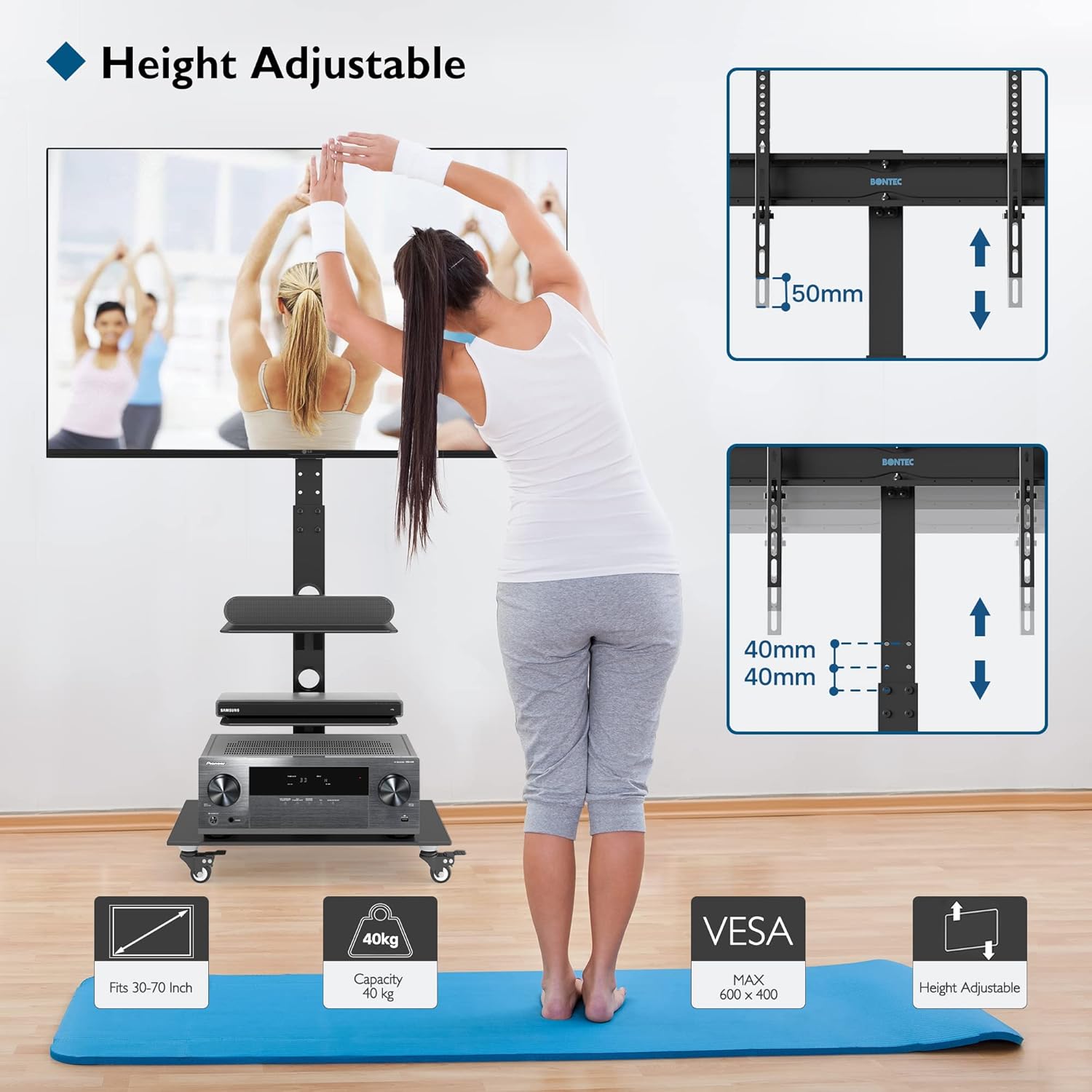
Image 5.1: Visual representation of height adjustment capabilities.
5.2 Swiveling the TV
The TV mounting bracket can swivel up to ±37° (left and right). Gently rotate the TV to achieve your optimal viewing angle. Ensure the stand's base remains stable during rotation.

Image 5.2: Illustration of the TV's swivel function.
5.3 Moure el suport
To move the TV stand, unlock the two locking wheels by flipping their levers. Carefully push the stand to its new location. Once positioned, engage the locking wheels to secure the stand and prevent unintended movement.
5.4 Gestió de cables
Utilize the integrated cable management system by routing your TV and device cables through the clips or openings along the main column. This helps maintain a tidy appearance and prevents cable tangles.
6. Manteniment
- Neteja: Wipe the stand and glass shelves with a soft, damp drap. Eviteu productes de neteja abrasius o dissolvents que puguin danyar l'acabat.
- Inspeccions: Reviseu periòdicament tots els cargols i connexions per assegurar-vos que romanen ajustats. Torneu a apretar-los si cal.
- Cura de les rodes: Mantingueu les rodes lliures de deixalles per garantir un moviment suau.
7. Solució De Problemes
- El suport està inestable: Ensure all assembly screws are fully tightened. Verify the TV weight does not exceed the maximum capacity. Ensure the stand is on a flat, level surface.
- Televisor no anivellat: Check that the mounting arms are attached evenly to the TV and the TV mounting bracket is level on the main column. Adjust as needed.
- Difficulty moving stand: Ensure the locking wheels are disengaged. Check for any obstructions or debris around the wheels.
- El televisor no encaixa: Verify your TV's size (30-70 inches) and VESA pattern (75x75mm to 600x400mm) are compatible with the stand.
8. Especificacions
| Característica | Especificació |
|---|---|
| Número de model | A08 |
| Marca | BONTEC |
| Material | Acer d'aliatge, vidre temperat |
| Color | Negre |
| Tipus de muntatge | Muntatge independent |
| Mides de TV compatibles | 30 - 70 polzades |
| Capacitat màxima de pes del televisor | 40 kg (88 lliures) |
| Compatibilitat VESA | 75x75mm a 600x400mm |
| Angle de gir | ±37° |
| Angle d'inclinació màxim | 20° |
| Ajust d'alçada | Up to 1385 mm (from floor to center of TV) |
| Upper Glass Shelf Dimensions | 380x250 mm |
| Upper Glass Shelf Capacity | 10 kg (22 lliures) |
| Bottom Glass Shelf Dimensions | 550x350 mm |
| Bottom Glass Shelf Capacity | 60 kg (132 lliures) |
| Rodes | 4 x 360° Swivel Rubber Wheels (2 lockable) |

Image 8.1: Detailed dimensions and weight capacities.
9. Garantia i Suport
BONTEC products are manufactured to high-quality standards. For warranty information or technical support, please refer to the documentation provided with your purchase or contact BONTEC customer service through their official channels. Please have your model number (A08) and purchase details ready when contacting support.


