Introducció
This user manual provides comprehensive instructions for the Logitech Silent Wireless Mouse, Model 910-006611. It covers setup, operation, maintenance, and troubleshooting to ensure optimal performance and longevity of your device. This mouse is designed for quiet operation and reliable wireless connectivity, making it ideal for various computing environments.
Producte acabatview
The Logitech Silent Wireless Mouse offers a comfortable and quiet computing experience. Key features include:
- Funcionament silenciós: Enjoy over 90 percent noise reduction in click sounds for a quiet environment.
- Reliable Wireless Connection: Utilizes a 2.4 GHz USB nano receiver for a strong connection up to 33 feet.
- Llarga vida útil de la bateria: Up to 18 months of battery life with energy-efficient engineering and automatic sleep mode.
- Disseny ambidextre: Ergonomically designed for comfort and precision, suitable for both left and right-handed users.
- Àmplia compatibilitat: Works seamlessly with Windows, macOS, Chrome OS, and Linux.
- Seguiment òptic: 1000 DPI optical tracking for precise cursor control on various surfaces.
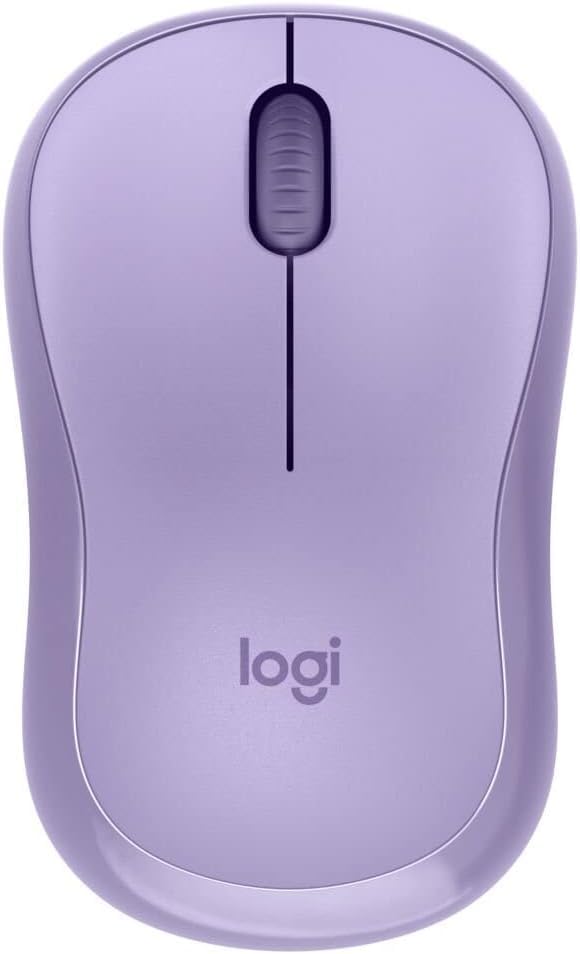
Figura 1: superior view of the Logitech Silent Wireless Mouse, showcasing its lavender color and central scroll wheel.

Figure 2: Angled front-right view of the mouse, highlighting its ergonomic shape and smooth finish.

Figure 3: Angled front-left view of the mouse, showing the design from another perspective.

Figura 4: Pro lateralfile of the mouse, illustrating its comfortable contour for hand placement.
Guia de configuració
1. Unboxing
Carefully remove the mouse and its components from the packaging. Ensure you have the Logitech Silent Wireless Mouse, the USB nano receiver, and one AA battery (typically pre-installed or included).
2. Instal·lació de la bateria
- Localitzeu el compartiment de la bateria a la part inferior del ratolí.
- Obriu la tapa del compartiment de la bateria.
- Inseriu una pila AA, assegurant-vos que els terminals positiu (+) i negatiu (-) s'alineïn correctament amb els indicadors de l'interior del compartiment.
- Tanqueu la tapa del compartiment de la bateria fins que encaixi correctament al seu lloc.
3. Connecteu el nanoreceptor USB
- Locate an available USB port on your computer (PC, Mac, Laptop).
- Insert the USB nano receiver firmly into the USB port.
- El vostre sistema operatiu hauria de detectar i instal·lar automàticament els controladors necessaris. Això pot trigar uns instants.
4. Engegueu el ratolí
Flip the power switch located on the underside of the mouse to the "ON" position. The mouse should now be ready for use. If the cursor does not move, ensure the receiver is properly inserted and the mouse is powered on.
Instruccions de funcionament
Funcions bàsiques del ratolí
- Clic esquerre: Premeu el botó esquerre per seleccionar elements, obrir enllaços o activar funcions.
- Clic dret: Premeu el botó dret per obrir menús contextuals o accedir a opcions addicionals.
- Roda de desplaçament: Gireu la roda de desplaçament amunt o avall per navegar pels documents i web pages. Press the scroll wheel to activate middle-click functions (if supported by your application).
- Moviment: Move the mouse across a flat surface to control the cursor on your screen. The 1000 DPI optical sensor provides precise tracking.
The ambidextrous design ensures comfortable use for both left-handed and right-handed individuals without requiring any special configuration.
Manteniment
Neteja del ratolí
Per mantenir un rendiment i una higiene òptims, netegeu el ratolí regularment:
- Turn off the mouse using the power switch on the underside.
- Utilitzeu un drap suau i sense pelusa dampened with water or a mild, non-abrasive cleaner to wipe the surface of the mouse.
- Avoid getting moisture into any openings. Do not use harsh chemicals or abrasive materials.
- Per al sensor òptic, feu servir un bastonet de cotó sec per netejar suaument la pols o les restes.
Canvi de bateria
When the mouse performance degrades or it stops responding, it's likely time to replace the battery. Follow the battery installation steps in the "Setup Guide" section to replace the AA battery.
Emmagatzematge
When not in use for extended periods, turn off the mouse to conserve battery life. Store the USB nano receiver in the designated slot within the battery compartment (if available) or in a safe place to prevent loss.
Resolució de problemes
| Problema | Causa possible | Solució |
|---|---|---|
| El ratolí no respon |
|
|
| Moviment erràtic del cursor |
|
|
| Durada de la bateria curta |
|
|
Especificacions
| Característica | Detall |
|---|---|
| Número de model | 910-006611 |
| Connectivitat | 2.4 GHz Wireless (USB Nano Receiver) |
| Tecnologia de seguiment | Òptic |
| DPI (per defecte) | 1000 DPI |
| Tipus de bateria | 1 x bateria AA |
| Durada de la bateria | Fins a 18 mesos |
| abast sense fils | Fins a 33 peus (10 metres) |
| Dimensions (L x A x A) | Aproximadament 4.96 x 3.58 x 1.85 polzades (dimensions del paquet) |
| Pes | Aproximadament 3.84 unces (pes de l'article) |
| Color | Lavanda |
| Compatibilitat | Windows, macOS, Chrome OS, Linux |
Garantia i Suport
This Logitech product is covered by a limited hardware warranty. For detailed warranty information, please refer to the warranty card included with your product or visit the official Logitech support website. For technical assistance, troubleshooting, or to download the latest software, please visit support.logi.com.
Please have your product model number (910-006611) and serial number ready when contacting support.


