1. Introducció
The Habotest HT651D is a versatile digital instrument designed for non-contact temperature measurement using infrared technology and contact-based moisture content measurement. This device provides quick and accurate readings, making it suitable for various applications in industrial, HVAC, and home inspection fields. Please read this manual thoroughly before operating the device to ensure safe and correct usage.
2. Informació de seguretat
ADVERTÈNCIA: Radiació làser
- Do not stare into the laser beam. Direct eye exposure to the laser can cause permanent eye damage.
- Avoid pointing the laser at people or animals.
- Do not aim the laser at reflective surfaces, as the reflected beam can also cause eye injury.
- Use caution when operating the device around others to prevent accidental exposure.
Precaucions generals de seguretat:
- No intenteu desmuntar ni modificar el dispositiu. Això pot causar danys i anul·lar la garantia.
- Keep the device away from water, dust, and extreme temperatures.
- Traieu les piles si no heu d'utilitzar el dispositiu durant un període prolongat per evitar fuites.
- Desfeu-vos de les piles i del dispositiu d'acord amb la normativa local.
3. Producte acabatview
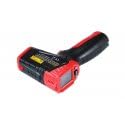
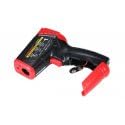
The Habotest HT651D features an ergonomic design for comfortable handling and a clear LCD display for easy reading of measurements.

Components clau:
- Sensor d'infrarojos: For non-contact temperature measurement.
- Punter làser: Assists in targeting the measurement area.
- Pins d'humitat: (If applicable) For contact-based moisture measurement.
- Pantalla LCD: Shows temperature, moisture, mode, and battery status.
- Disparador de mesura: Activates measurement.
- Botó de mode: Cycles through measurement modes and settings.
- Compartiment de la bateria: Houses the power source.
4. Configuració
4.1 Instal·lació de la bateria
- Locate the battery compartment cover on the handle of the device.
- Feu lliscar o desenganxeu la tapa per obrir el compartiment.
- Insert the required batteries (e.g., 2 x AAA or 9V, refer to the compartment label) ensuring correct polarity (+/-).
- Tanqueu bé la tapa del compartiment de la bateria.
4.2 Encès/Apagat
- To power on the device, press the Measurement Trigger. The LCD display will illuminate.
- The device will automatically power off after a period of inactivity (typically 10-15 seconds) to conserve battery life.
5. Instruccions de funcionament
5.1 Non-Contact Temperature Measurement
- Point the infrared sensor towards the target surface.
- Press and hold the Measurement Trigger. The laser pointer will activate to help aim.
- The temperature reading will be displayed on the LCD. Release the trigger to hold the reading.
- Ensure the distance-to-spot ratio (D:S) is appropriate for accurate measurement. For example, a 12:1 D:S means that at 12 inches from the target, the measurement spot diameter is 1 inch.
5.2 Moisture Measurement
The HT651D can measure moisture content in various materials.
- Contact Moisture Measurement (if applicable): Carefully press the moisture pins into the material to be tested. The moisture percentage es mostrarà a la pantalla LCD.
- Non-Contact Moisture Measurement (if applicable): If the device features a non-contact moisture sensor, place the sensor near the surface. The relative moisture level will be displayed.
5.3 Mode Selection and Settings
Utilitza el MODE button to cycle through different functions and settings:
- Temperature Unit (°C/°F): Premeu el botó MODE per canviar entre Celsius i Fahrenheit.
- Ajust d'emissivitat: In temperature mode, press the MODE button multiple times until the emissivity setting appears. Use the up/down buttons (if available) to adjust the emissivity value (typically 0.10 to 1.00) to match the target material for accurate readings.
- MÀX/MÍN/MITJANA: Some modes allow viewing maximum, minimum, or average temperature readings during a measurement session.
- Conservació de dades: Readings are typically held automatically after releasinprement el gallet.
6. Manteniment
6.1 Neteja
- Netegeu el dispositiu casing amb un suau, damp tela. No utilitzeu netejadors abrasius ni dissolvents.
- For the infrared lens, use a clean, soft cloth or cotton swab with a small amount of isopropyl alcohol. Gently wipe the lens to avoid scratching.
- Keep the moisture pins (if applicable) clean and free of debris.
6.2 Emmagatzematge
- Guardeu el dispositiu en un lloc fresc i sec, allunyat de la llum solar directa i de temperatures extremes.
- Si l'emmagatzemeu durant un període prolongat, traieu les piles per evitar fuites.
7. Solució De Problemes
- El dispositiu no s'encén: Comproveu la instal·lació de les piles i assegureu-vos que no estiguin esgotades. Substituïu-les si cal.
- Lectures de temperatura inexactes: Ensure the infrared lens is clean. Verify the emissivity setting matches the target material. Ensure the target is within the device's measurement range.
- Lectures d'humitat inexactes: Ensure moisture pins (if applicable) are making good contact with the material and are clean.
- El làser no funciona: Check if the laser function is enabled in the settings.
8. Especificacions
| Paràmetre | Valor |
|---|---|
| Número de model | HT651D |
| Fabricant | Habotest |
| Pes de l'article | 2.2 lliures |
| Interval de temperatura | Typical: -50°C to 550°C (-58°F to 1022°F) (Specific range may vary, refer to product packaging) |
| Gamma d’humitat | Typical: 0% to 100% RH (Specific range may vary, refer to product packaging) |
| Distance Spot Ratio (D:S) | Typical: 12:1 (Specific ratio may vary, refer to product packaging) |
| Emissivitat | Adjustable: 0.10 to 1.00 |
9. Garantia i Suport
Habotest products are designed for reliability and performance. This device typically comes with a limited warranty against defects in materials and workmanship. For specific warranty terms, duration, and support inquiries, please refer to the warranty card included with your product or contact Habotest customer service directly through their official weblloc o distribuïdors autoritzats.


