1. Introducció
This manual provides detailed instructions for the installation, operation, and maintenance of your Comelit IP Surveillance Kit. This kit includes an IP Network Video Recorder (NVR) and two IP cameras, designed to provide reliable video surveillance for your property. Please read this manual thoroughly before operating the system to ensure proper functionality and safety.
2. Informació de seguretat
Always adhere to the following safety guidelines to prevent damage to the product or injury to yourself and others:
- Font d'alimentació: Use only the power adapters supplied with the kit. Ensure the power source matches the specified voltage.
- Entorn d'instal·lació: Install the NVR and cameras in a dry, well-ventilated area, away from direct sunlight, heat sources, and excessive dust or moisture.
- Muntatge: Ensure cameras are securely mounted to a stable surface to prevent falling.
- Cablejat: Route cables carefully to avoid tripping hazards and damage. Do not pinch or cut cables.
- Manteniment: No intenteu desmuntar ni reparar la unitat vosaltres mateixos. Encarregueu tot el manteniment a personal qualificat.
- Neteja: Desconnecteu l'alimentació abans de netejar. Feu servir un drap suau i sec. No utilitzeu netejadors líquids ni en aerosol.
3. Contingut del paquet
Verifiqueu que tots els elements siguin presents al vostre paquet:
- 1 x Comelit IP Network Video Recorder (NVR)
- 2 x Comelit IP Cameras (IPBCA model)
- 2 x adaptadors d'alimentació per a càmeres
- 1 x adaptador de corrent per a NVR
- 1 x ratolí USB
- 1 x cable Ethernet
- Cargols i taps de muntatge per a càmeres
- Aquest manual d'usuari
4. Configuració
4.1 Instal·lació física
Follow these steps for the physical setup of your surveillance system:
- Col·locació de la càmera: Choose suitable locations for your IP cameras, ensuring optimal viewing angles and coverage. Mount them securely using the provided screws and plugs.
- Connectar càmeres: Connect each IP camera to the NVR's PoE (Power over Ethernet) ports using Ethernet cables. If your NVR does not have PoE, connect cameras to a PoE switch, and then connect the switch to the NVR's LAN port.
- Connecteu el NVR al monitor: Connecteu un monitor al port de sortida HDMI o VGA de l'NVR.
- Connecteu el NVR a la xarxa: Connect the NVR's LAN port to your router or network switch using an Ethernet cable for network access and remote viewcapacitats d'ingrés.
- Connectar l'alimentació: Connect the power adapters to the cameras and the NVR, then plug them into a power outlet. The system will power on automatically or require a press of the power button.
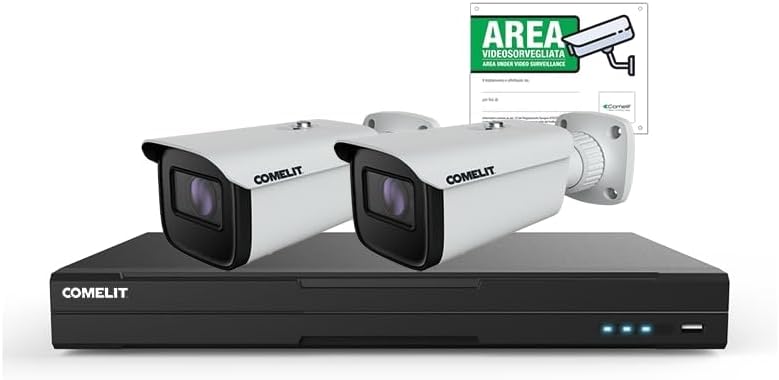
Image: The Comelit IP Surveillance Kit, featuring the central Network Video Recorder (NVR) unit and two white IP bullet cameras. A 'Video Surveillance Area' sign is also visible in the background, indicating the system's purpose.
4.2 Configuració inicial
Upon first boot, the NVR will guide you through an initial setup wizard:
- Selecció d'idioma: Trieu el vostre idioma preferit.
- Configuració de la contrasenya: Create a strong password for the administrator account. This is crucial for security.
- Configuració de la xarxa: Configure network settings (DHCP is usually sufficient for most home networks; static IP can be set for advanced users).
- Hora i data: Set the correct time zone, date, and time.
- Inicialització del disc dur: If a hard drive is installed, the system may prompt you to initialize or format it for recording.
- Cerca de càmera: The NVR will automatically search for and add connected IP cameras. Verify that both cameras are detected and display live video.
5. Instruccions de funcionament
5.1 Viu View
Després de la configuració inicial, l'NVR mostrarà la imatge en directe view de totes les càmeres connectades. Podeu canviar entre una sola càmera view, graella multicàmera view, and sequence display.
5.2 Gestió d'enregistraments
L'NVR admet diversos modes d'enregistrament:
- Gravació contínua: Registres 24/7.
- Gravació de detecció de moviment: Records only when motion is detected in the camera's field of view. Configure motion detection zones and sensitivity in the camera settings.
- Enregistrament programat: Records according to a predefined schedule (e.g., specific hours of the day).
- Enregistrament manual: Start and stop recording manually from the live view interfície.
Access recording settings via the NVR's main menu under 'Record' or 'Storage'.
5.3 Reproducció
Per tornarview foo gravattage:
- From the main menu, select 'Playback'.
- Choose the camera(s) and the date/time range you wish to review.
- Use the timeline to navigate through recordings. You can fast-forward, rewind, pause, and zoom.
5.4 Accés remot
A view your surveillance system remotely via a smartphone app or web navegador:
- Assegureu-vos que l'NVR estigui connectat a Internet.
- Download the official Comelit surveillance app (if available) from your device's app store or access the NVR via its IP address in a web navegador.
- Follow the app/web interface instructions to add your NVR using its serial number or QR code.
- Enter your NVR's administrator credentials to log in.
6. Manteniment
Regular maintenance ensures the longevity and optimal performance of your surveillance system:
- Neteja: Periodically clean the camera lenses and NVR casing with a soft, dry cloth. Do not use harsh chemicals.
- Actualitzacions de firmware: Check the Comelit website for firmware updates for your NVR and cameras. Updates can improve performance, add features, and enhance security. Follow the update instructions carefully.
- Còpia de seguretat de dades: Feu còpies de seguretat regularment dels vídeos importantstage to an external USB drive or network storage.
- Seguretat de contrasenya: Change your system passwords periodically and use strong, unique passwords.
7. Solució De Problemes
Si teniu problemes, consulteu els següents problemes i solucions habituals:
| Problema | Causa possible | Solució |
|---|---|---|
| No es mostra vídeo al monitor | Loose HDMI/VGA cable; Monitor off; NVR not powered on. | Check cable connections; Ensure monitor is on and set to correct input; Verify NVR power. |
| Cameras not showing live view | Camera not powered; Network cable disconnected; IP address conflict; Camera not added to NVR. | Check camera power and Ethernet connections; Restart NVR and cameras; Verify camera IP addresses; Manually add cameras if necessary. |
| No es pot accedir al NVR de forma remota | NVR not connected to internet; Router firewall blocking ports; Incorrect network settings; App/software issues. | Verify NVR internet connection; Check router settings for port forwarding or UPnP; Ensure NVR network settings are correct; Reinstall app/software. |
| Sense enregistrament | Hard drive not initialized/full; Recording schedule not set; Motion detection not configured. | Initialize/format hard drive; Check recording schedule; Configure motion detection settings. |
If the problem persists, contact Comelit technical support.
8. Especificacions
| Característica | Detall |
|---|---|
| Marca | Comelit |
| Número de model | IPKIT008N05PA |
| Fabricant | COMELIT |
| Nombre de canals | 2 (as per product specifications) |
| Interfície del maquinari | 802.11 ac/b/g/n |
| ASIN | B0BY7C7K7Y |
9. Garantia i Suport
For warranty information, please refer to the warranty card included with your product or visit the official Comelit website. For technical support, product registration, or service inquiries, please contact Comelit customer service through their official channels.


