1. Introducció
The MAONO GamerWave DGM20 is a high-performance USB condenser microphone designed for gaming, streaming, recording, podcasting, and online communication. It features advanced noise cancellation, customizable RGB lighting, intuitive controls, and plug-and-play compatibility for a seamless user experience.

Figure 1.1: MAONO GamerWave DGM20 USB Gaming Microphone.
2. Contingut del paquet
Verifiqueu que tots els elements que s'enumeren a continuació s'inclouen al vostre paquet:
- USB Gaming Microphone (GamerWave DGM20) x1
- Sturdy Desktop Stand x1
- Filtre pop x1
- Shock Mount x1
- USB-C to USB-A/USB-C 2-in-1 Cable x1
- Boom Arm Adapter x1
- Manual d'usuari x1
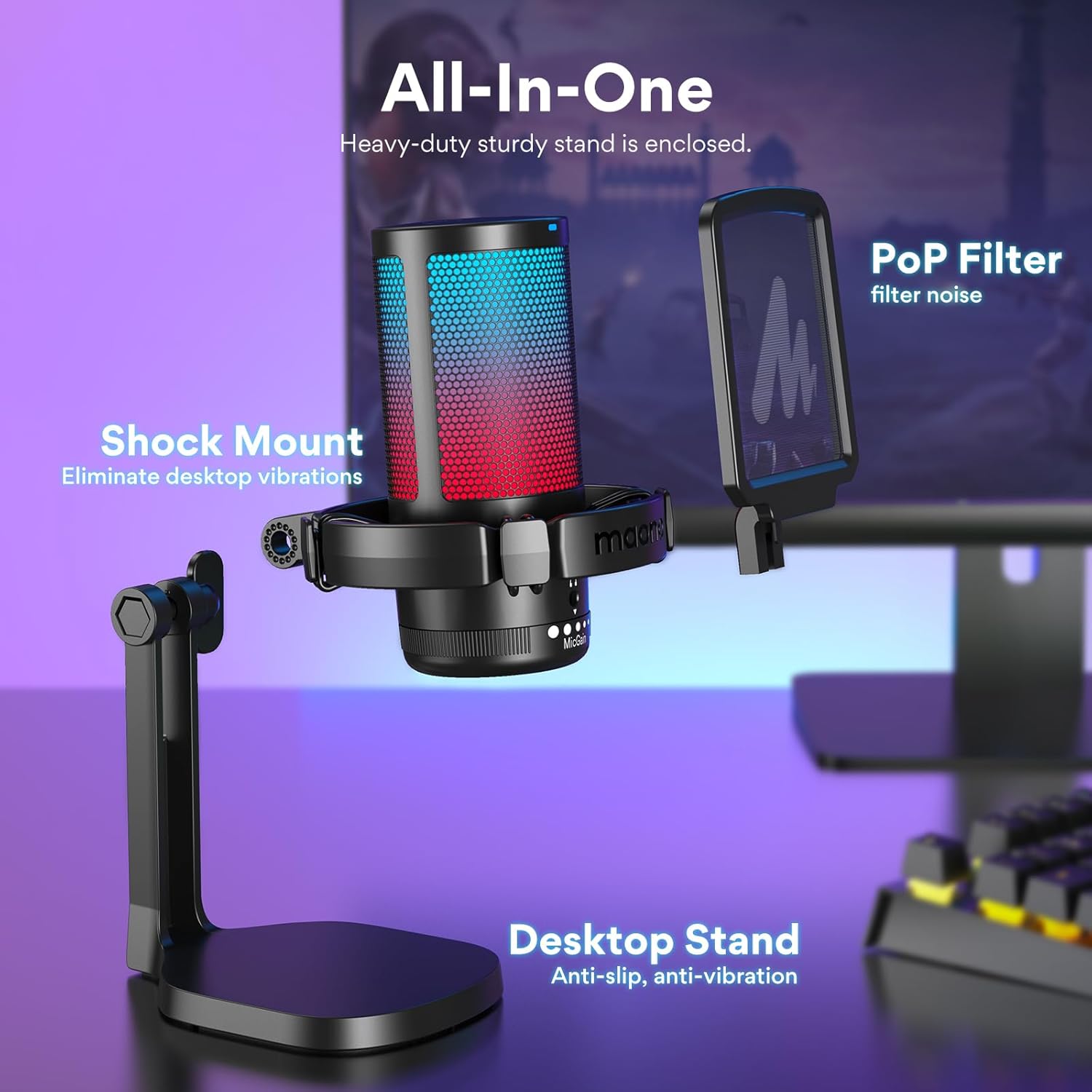
Figure 2.1: Included components of the GamerWave DGM20 kit.
3. Característiques acabadesview
- Voice Clarity with Noise Cancellation: Equipped with a one-key noise cancellation function (long press for 3 seconds to turn on/off) to suppress background noises. The cardioid polar pattern focuses on sound directly in front of the mic.
- Stunning RGB Lighting: Dynamic multicolor, breathing light, or static solid color modes to enhance your gaming setup.
- One-Click Mute with LED Indicator: Instantly mute the mic with a single click. Red LED indicates mute, green indicates active.
- Mic Gain Control and Monitoring: Adjust microphone sensitivity with the gain control knob. Real-time audio monitoring available via the 3.5mm headphone jack.
- Plug and Play: Simple connection via USB-C to USB/USB-C 2-in-1 cable to PC, computer, laptop, desktop, Mac, and Android phones. (Note: Not compatible with XBOX).
- Kit tot en un: Includes microphone, sturdy stand, pop filter, shock mount, and cables for immediate use.
4. Guia de configuració
- Desempaquetar components: Traieu amb cura tots els articles de l'embalatge.
- Muntar el suport: Attach the microphone to the sturdy desktop stand. Ensure the shock mount is securely in place to eliminate desktop vibrations.
- Connecteu el filtre anti-pop: Secure the pop filter to the microphone assembly. The pop filter helps to reduce plosive sounds (like 'p' and 'b') for clearer audio.
- Connecta't al dispositiu: Use the provided USB-C to USB-A/USB-C 2-in-1 cable. Plug the USB-C end into the microphone and the appropriate USB-A or USB-C end into your computer, laptop, desktop, Mac, PS4, PS5, or Android phone. The microphone is plug-and-play and does not require additional drivers.

Figure 4.1: Simple plug-and-play connection for the microphone.
5. Instruccions de funcionament
5.1 Cancel·lació de soroll
The microphone features a one-key noise cancellation function to minimize background noise. This is particularly useful in noisy environments to ensure your voice comes through clearly.
- Activar/Desactivar: Long press the noise cancellation button (usually integrated with the mute button) for 3 seconds to toggle the feature on or off.

Figure 5.1: Visual representation of noise cancellation.
Video 5.1: Demonstration of MAONO's noise cancellation feature.
Il·luminació RGB 5.2
Customize the microphone's appearance with various RGB lighting modes.
- Canvi de modes: Short press the RGB lighting button (usually on top) to cycle through static solid colors, dynamic breathing light, and dynamic multi-color gradient modes.
- Apagar: Long press the RGB lighting button for 3 seconds to turn off the lights.

Figure 5.2: Various RGB lighting options for personalization.
Video 5.2: Demonstration of MAONO Gaming Mic RGB Light features.
5.3 Funció de silenci
Quickly mute or unmute your microphone during use.
- Toggle Mute: Press the mute button once to mute the microphone. The LED indicator will turn red. Press again to unmute, and the LED will turn green.

Figure 5.3: Mute button and LED indicators.
5.4 Mic Gain Control & Monitoring
Adjust the microphone's sensitivity and monitor your audio in real-time.
- Ajust de guany: Rotate the 'Mic Gain' knob located at the base of the microphone to increase or decrease sensitivity.
- Monitorització en temps real: Plug headphones into the 3.5mm jack on the microphone for zero-latency monitoring of your voice.

Figure 5.4: Mic gain control and headphone monitoring.
6. Manteniment
To ensure the longevity and optimal performance of your MAONO USB Gaming Microphone, follow these maintenance guidelines:
- Neteja: Use a soft, dry cloth to wipe down the microphone's exterior. Avoid using harsh chemicals or abrasive materials.
- Emmagatzematge: Quan no l'utilitzeu, emmagatzemeu el micròfon en un lloc fresc i sec, lluny de la llum solar directa i de temperatures extremes.
- Manejar amb cura: Eviteu deixar caure el micròfon ni sotmetre'l a impactes forts, ja que això pot danyar els components interns.
- Gestió de cables: Do not excessively bend or pull the USB cable. Store it neatly to prevent tangles and damage.
7. Solució De Problemes
If you encounter issues with your microphone, refer to the following common troubleshooting steps:
- Sense sortida de so:
- Assegureu-vos que el cable USB estigui connectat correctament tant al micròfon com al dispositiu.
- Check your device's sound settings to confirm the MAONO GamerWave DGM20 is selected as the input device.
- Verify the mic gain knob is not set to minimum.
- Ensure the microphone is not muted (red LED indicator).
- Background Noise/Echo:
- Activate the noise cancellation feature by long-pressing the button for 3 seconds.
- Adjust the mic gain to an appropriate level; too high gain can pick up more ambient noise.
- Ensure you are speaking directly into the front of the microphone (where the logo is visible) due to its cardioid polar pattern.
- Les llums RGB no funcionen:
- Comproveu la connexió USB.
- Short press the RGB button to cycle through modes. If off, long press for 3 seconds to turn on.
- Distorsió d'àudio:
- Reduce the mic gain if your audio sounds distorted or
Documents relacionats - GamerWave DGM20 Gaming Microphone

Manual d'usuari del micròfon USB per a jocs Maono DM20
Manual d'usuari del micròfon USB per a jocs Maono DM20 amb cancel·lació de soroll, llums RGB i guany ajustable. Inclou guies de configuració per a Windows i macOS.
Manual d'usuari del micròfon USB MAONO PM461TR | Configuració, resolució de problemes i assistència
Guia d'usuari i informació d'assistència per al micròfon USB MAONO PM461TR. Aquest document proporciona detalls sobre com connectar, utilitzar i resoldre problemes del micròfon per a diverses aplicacions, com ara podcasts, gravacions, jocs, transmissió en temps real i veu en off a PC, Mac i consoles. Inclou informació de contacte per al servei d'atenció al client de MAONO.
Manual d'usuari del micròfon per a jocs USB Maono DM20
Comprehensive user manual for the Maono DM20 USB Gaming Microphone, detailing its features, specifications, setup for Windows and macOS, and button functions including noise cancellation and RGB lighting.
Manual d'instruccions del programari Maono Link per a micròfons DM30 i PD400X
Detailed instruction manual for the Maono Link software, covering setup, basic and advanced functions, EQ modes, limiter, compressor, RGB customization, firmware updates, and factory reset for Maono DM30 and PD400X microphones.
Manual d'usuari i guia de configuració del micròfon de condensador USB Maono DM20
Manual d'usuari complet per al micròfon de condensador USB Maono DM20, que cobreix tot el producte.view, features, specifications, connections, button functions, microphone placement, and setup guides for Windows and macOS. Includes company contact information and product disclaimers.
Manual d'usuari del micròfon USB Maono DGM20 GamerWave
Manual d'usuari complet per al paquet de micròfons USB Maono DGM20 GamerWave, amb cancel·lació de soroll, il·luminació RGB ajustable i un braç de braç. Aprèn sobre la configuració, les característiques, les especificacions i l'ús per a jocs, transmissió en temps real i trucades en línia.
- Reduce the mic gain if your audio sounds distorted or