Introducció
This manual provides essential information for the proper setup, operation, and maintenance of your ONN 55-Inch Series 1 Class 4K Smart TV. Please read this manual thoroughly before using your television and retain it for future reference. This television offers a 4K (2160p) resolution display, smart TV functionalities with access to various streaming services, and compatibility with Alexa and Google Assistant.
Informació de seguretat
Instruccions importants de seguretat:
- No bloquegeu cap obertura de ventilació. Instal·leu-ho d'acord amb les instruccions del fabricant.
- No instal·leu a prop de cap font de calor com ara radiadors, registres de calor, estufes o altres aparells (inclosos amplificadors) que produeixen calor.
- Eviteu que el cable d'alimentació sigui trepitjat o pessigat, especialment als endolls, els endolls i el punt on surten de l'aparell.
- Utilitzeu només accessoris/accessoris especificats pel fabricant.
- Desendolleu aquest aparell durant les tempestes amb llamps o quan no l'utilitzeu durant llargs períodes de temps.
- Demaneu tot el servei a personal de servei qualificat. El manteniment és necessari quan l'aparell s'ha fet malbé d'alguna manera, com ara el cable d'alimentació o l'endoll està danyat, s'ha vessat líquid o han caigut objectes a l'aparell, l'aparell ha estat exposat a la pluja o la humitat, no funciona amb normalitat. , o s'ha deixat caure.
Què hi ha a la caixa
Upon unpacking, ensure all items are present:
- ONN 55-Inch Series 1 Class 4K Smart TV
- Comandament a distància (amb piles)
- Suports de televisió (2)
- Cargols per a suports de TV
- Cable d'alimentació
- Guia d'inici ràpid
Note: Speakers are integrated into the television unit.
Configuració
1. Fixació dels suports de TV
Carefully place the TV screen-down on a soft, clean surface to prevent damage. Align each stand with the corresponding screw holes on the bottom of the TV. Secure the stands using the provided screws.

Imatge: Frontal view of the ONN 55-Inch 4K Smart TV with its stands properly attached, displaying a vibrant screen. This illustrates the TV's appearance after stand installation.
2. Muntatge a la paret (opcional)
If you choose to wall mount your TV, ensure you use a VESA-compatible wall mount kit (sold separately) that supports the TV's weight and size. Follow the instructions provided with your wall mount kit. Do not attempt to wall mount the TV with the stands attached.
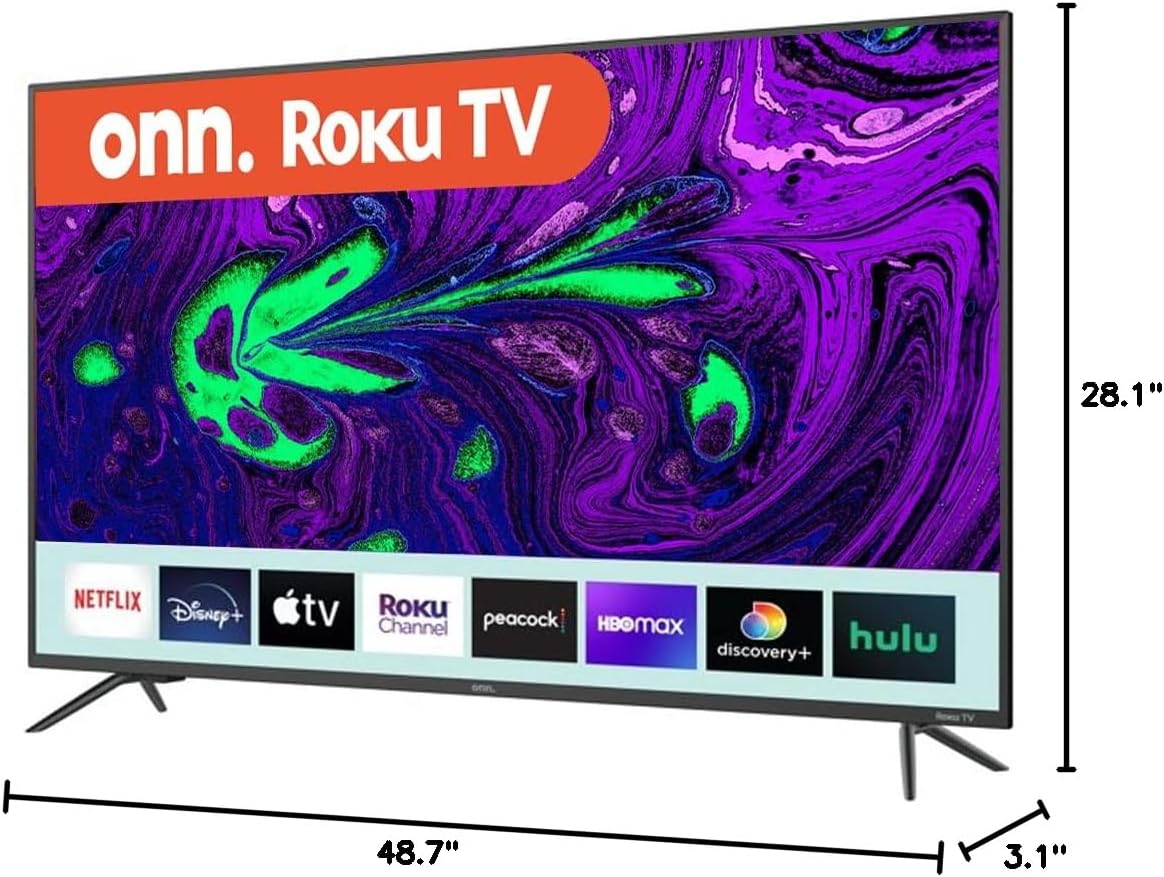
Image: Diagram showing the dimensions of the ONN 55-Inch 4K Smart TV, including width (48.7 inches), height (28.1 inches), and depth (3.1 inches). This is crucial for planning installation space or selecting a compatible wall mount.
3. Connexió de perifèrics
Connect your external devices (e.g., cable box, Blu-ray player, gaming console) to the appropriate ports on the back or side of the TV. Refer to the 'Connections' section for port details.
4. Engegada i configuració inicial
- Connecteu el cable d'alimentació al televisor i després a una presa de corrent.
- Premeu el botó d'engegada del comandament a distància o del televisor mateix.
- Follow the on-screen instructions to select your language, connect to your Wi-Fi network, and complete the initial setup process. This includes channel scanning (if using an antenna) and linking your smart TV account.
Funcionament del televisor
Controls bàsics
- Potència: Press the power button on the remote or TV to turn the TV on or off.
- Volum: Use the 'Volume Up' and 'Volume Down' buttons on the remote.
- Canals: Use the 'Channel Up' and 'Channel Down' buttons for broadcast TV.
- Entrada: Press the 'Input' button to switch between connected devices (HDMI 1, HDMI 2, USB, etc.).
Funcions de Smart TV
Your ONN Smart TV provides instant access to a selection of apps from top streaming services. Navigate through the smart TV interface using your remote control. You can customize your home screen by adding or removing apps.
Compatibilitat de l'Assistent de veu
This TV is compatible with Alexa and Google Assistant. Once configured, you can use voice commands to control various TV functions such as power, volume, channel changes, and app launching. Refer to the respective voice assistant's setup guide for integration instructions.
Control d'aplicacions mòbils
A mobile app is available for controlling your ONN Smart TV. This app can be used as an alternative remote control, offering features like channel browsing and voice control directly from your smartphone.
Connexions
The ONN 55-Inch Smart TV offers a variety of connection ports for your entertainment needs:

Imatge: Part posterior view of the ONN 55-Inch 4K Smart TV, highlighting the arrangement of various input and output ports. This image helps users identify where to connect their external devices.
| Tipus de port | Quantitat | Descripció |
|---|---|---|
| HDMI | 3 | Connecteu dispositius d'alta definició com ara reproductors de Blu-ray, consoles de jocs o descodificadors de cable. |
| USB | 1 | Connecteu dispositius d'emmagatzematge USB per a la reproducció de contingut multimèdia. |
| Composit (AV) | 1 | Connect older devices using RCA cables (red, white, yellow). |
| Optical (Digital Audio Out) | 1 | Connecteu-lo a una barra de so o a un sistema de cinema a casa per a àudio digital. |
| Coaxial/Cable (RF) | 1 | Connecteu una antena o una presa de televisió per cable. |
| LAN (Ethernet) | 1 | Connecteu-vos a una xarxa amb cable per accedir a Internet. |
| Auriculars | 1 | Connecteu els auriculars per a una escolta privada. |
Manteniment
Neteja del televisor
- Desendolla sempre el televisor abans de netejar-lo.
- Feu servir un drap suau i sec per netejar la pantalla i la carcassa.
- Per a marques difícils, esbandiu lleugeramentampNetegeu el drap amb aigua o un netejador de pantalles suau i no abrasiu. No ruixeu mai el netejador directament sobre la pantalla.
- Eviteu utilitzar netejadors abrasius, ceres o dissolvents, ja que poden danyar l'acabat del televisor.
Actualitzacions de programari
Your Smart TV may receive periodic software updates to improve performance and add new features. Ensure your TV is connected to the internet to receive these updates automatically. You can also manually check for updates through the TV's settings menu.
Resolució de problemes
Si teniu problemes amb el televisor, consulteu els problemes i solucions més comuns següents:
| Problema | Possible solució |
|---|---|
| Sense poder | Check if the power cord is securely plugged into both the TV and the wall outlet. Test the outlet with another device. |
| No hi ha imatge, però hi ha so | Assegureu-vos que heu seleccionat la font d'entrada correcta. Comproveu totes les connexions de cable a dispositius externs. |
| No hi ha so, però hi ha imatge | Check the volume level and mute settings. Verify audio cable connections if using external speakers. |
| El comandament a distància no funciona | Substitueix les piles del comandament a distància. Assegura't que no hi hagi cap obstacle entre el comandament a distància i el sensor d'infrarojos del televisor. |
| No es pot connectar a la Wi-Fi | Verifiqueu la contrasenya del Wi-Fi. Reinicieu el router i el televisor. Assegureu-vos que el televisor estigui dins de l'abast del senyal Wi-Fi. |
| Les funcions intel·ligents són lentes o no responen | Check your internet connection speed. Try restarting the TV. Clear app caches if available in settings. |
Especificacions
Key technical specifications for the ONN 55-Inch Series 1 Class 4K Smart TV:
| Característica | Especificació |
|---|---|
| Número de model | ONN551E018 |
| Mida de la pantalla | 55 polzades (140 cm diagonal visible) |
| Tecnologia de visualització | LED |
| Resolució | 4K (2160p) |
| Freqüència d'actualització | 60 Hz |
| Relació d'aspecte | 16:9 |
| Connectivitat | 3 HDMI, 1 USB, 1 Composite, 1 Optical, 1 Coaxial/Cable, 1 LAN, 1 Headphone, Wi-Fi |
| Funcions intel·ligents | Smart Home Ready - Works with Apple Home, Amazon Alexa, and Google Home |
| Dimensions del producte (W x D x H) | 54 x 6 x 33 inches (approximate, with stands) |
| Pes de l'article | 33.2 lliures |
| Color | Negre |
| Voltage | 1.1E+2 volts (CA) |
Informació de la garantia
This ONN television is covered by a limited warranty. For specific details regarding warranty coverage, duration, and terms, please refer to the warranty card included with your product or visit the official ONN support weblloc web. Conserveu el comprovant de compra per a reclamacions de garantia.
Suport
If you require further assistance or have questions not covered in this manual, please contact ONN customer support. Support contact information can typically be found on the manufacturer's weblloc web o a l'embalatge del producte.
For online resources, visit the official ONN support page.


