1. Introducció
This manual provides instructions for the VINABTY replacement remote control, designed for use with SANSUI LED TV model ES24Z1. This remote control offers direct functionality without the need for programming, ensuring a straightforward user experience.
2. Producte acabatview
The VINABTY replacement remote control is a dedicated device for controlling your SANSUI LED TV ES24Z1. It features an ergonomic design for comfortable handling and clearly labeled buttons for intuitive operation.
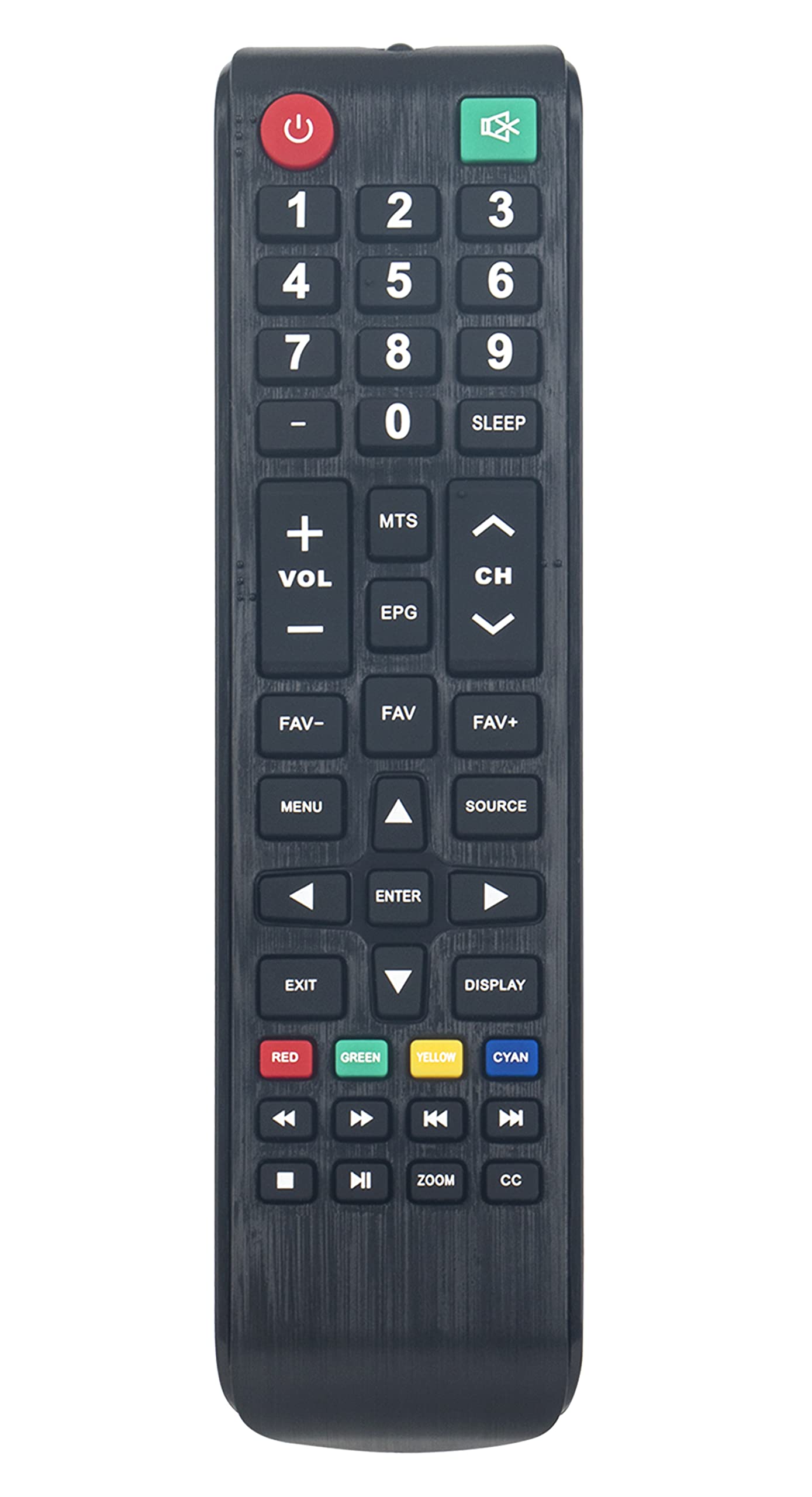
Imatge 2.1: Frontal view of the VINABTY remote control, highlighting its button layout.
3. Configuració
3.1. Instal·lació de la bateria
To begin using your remote control, you must install two AAA batteries. Follow these steps:
- Localitzeu la tapa del compartiment de la bateria a la part posterior del comandament a distància.
- Premeu la pestanya i feu lliscar la tapa cap avall per obrir el compartiment.
- Introduïu dues piles AAA noves, assegurant-vos que els terminals positiu (+) i negatiu (-) s'alineïn correctament amb les marques de l'interior del compartiment.
- Feu lliscar la tapa del compartiment de la bateria fins que faci clic de manera segura.

Imatge 3.1: Darrere view of the remote control, indicating the battery compartment.
3.2. Ús inicial
This remote control requires no programming. Once batteries are installed, it is ready for immediate use with your SANSUI LED TV ES24Z1. Point the remote control directly at your television and press the desired function button.
4. Instruccions de funcionament
Familiarize yourself with the primary functions of the remote control:
- Botó d'encendre (⏻): Encén o apaga el televisor.
- Botons numèrics (0-9): Selecciona directament els canals de televisió.
- VOL +/-: Ajusta el nivell de volum.
- CH +/-: Canvia el canal de televisió amunt o avall.
- MUT: Silencia o activa l'àudio del televisor.
- MENÚ: Accedeix al menú principal del televisor.
- FONT: Selects input sources (e.g., HDMI, AV).
- EPG: Mostra la Guia electrònica de programes.
- DORMIR: Sets a timer for the TV to turn off automatically.
- Botons de navegació (amunt, avall, esquerra, dreta, ENTER): Navegueu pels menús i confirmeu les seleccions.
- SORTIDA: Surt del menú o funció actual.
- MOSTRA: Shows current channel information.
- Color Buttons (RED, GREEN, YELLOW, CYAN): Access specific functions within certain TV menus or applications, as indicated on your TV screen.
- Media Control Buttons (Play, Pause, Stop, Rewind, Fast Forward, Previous, Next): Control media playback if supported by your TV and content.
- ZOOM: Ajusta el nivell de zoom de la pantalla.
- CC: Activa o desactiva els subtítols.
5. Manteniment
5.1. Neteja
To maintain the remote control's appearance and functionality, clean it regularly:
- Utilitzeu un drap suau i sec per netejar la superfície.
- Per a la brutícia persistent, lleugerament dampal drap amb aigua o un netejador suau i no abrasiu.
- Avoid using harsh chemicals, solvents, or abrasive materials, as these can damage the remote's finish or internal components.
5.2. Substitució de la bateria
Canvieu les piles quan la resposta del comandament a distància es torni lenta o deixi de funcionar. Canvieu sempre les dues piles alhora per piles AAA noves. No barregeu piles velles i noves, ni piles de diferents tipus.
5.3. Emmagatzematge
If the remote control will not be used for an extended period, remove the batteries to prevent leakage and potential damage to the device. Store the remote in a cool, dry place away from direct sunlight and extreme temperatures.
6. Solució De Problemes
Si teniu problemes amb el comandament a distància, consulteu les solucions habituals següents:
- El comandament a distància no respon:
- Check if the batteries are correctly installed with the correct polarity (+/-).
- Substituïu les piles per unes de noves.
- Assegureu-vos que no hi hagi obstacles entre el comandament a distància i el sensor d'infrarojos del televisor.
- Confirm you are pointing the remote directly at the TV.
- Els botons no funcionen:
- Clean the remote control surface and buttons to remove any dirt or debris that might be obstructing button presses.
- If only specific buttons are not working, it might indicate internal damage; consider replacing the remote.
- TV Not Responding to All Commands:
- Verify that the remote control is indeed compatible with your specific SANSUI LED TV model ES24Z1.
- Some advanced TV functions might require the original TV remote or specific TV menu navigation.
7. Especificacions
| Marca | VINABITAT |
| Número de model | ES24Z1 |
| Dispositius compatibles | SANSUI LED TV ES24Z1 |
| Tecnologia de connectivitat | Infrarojos (IR) |
| Font d'alimentació | 2 piles AAA (no incloses) |
| Dimensions del producte | 7.5 x 2 x 0.7 polzades |
| Pes de l'article | 2.3 unces |
| Característica especial | Ergonòmic |
8. Garantia i Suport
For information regarding warranty coverage or technical support, please refer to the documentation provided with your purchase or contact the retailer. Keep your purchase receipt as proof of purchase.
