Introducció
The energeeks Guardian outdoor fixed WiFi IP camera is designed to provide reliable and effective surveillance for your home, garden, or business. Featuring high-resolution imaging, advanced detection capabilities, and robust weather protection, this manual will guide you through its setup, operation, and maintenance to ensure optimal performance.
Producte acabatview
The energeeks Guardian camera is a compact and durable device built for outdoor environments. Below are key visual components and their descriptions.
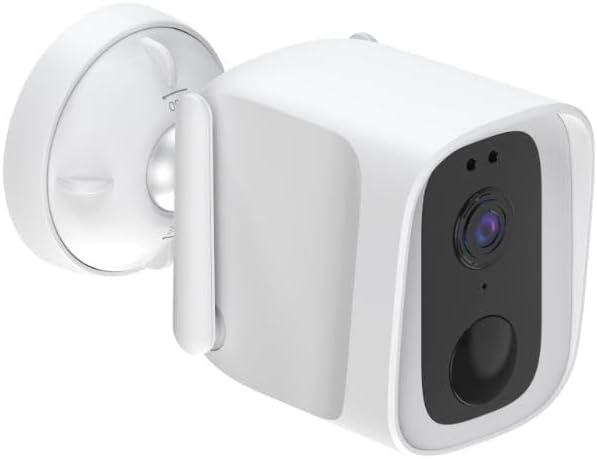
En general View: This image shows the energeeks Guardian camera from an angled perspective, highlighting its compact design and the integrated mounting bracket. The camera features a white casing with a black front panel containing the lens and sensors.

Panell frontal: Un front directe view of the camera, detailing the central lens, the light sensor, and the infrared LEDs for night vision. The lower circular element is likely the microphone or a motion sensor.

Side Profile: This image displays the side of the camera, showing the integrated antenna for WiFi connectivity and the robust mounting arm that allows for flexible positioning.

En angle View with Mount: Un altre angle view, providing a clearer look at the adjustable mounting base, which facilitates easy installation on various surfaces.
Característiques clau
- IP65 Weather Protection: Designed to withstand dust and powerful water jets, ensuring reliable performance in various weather conditions (rain, snow, sun).
- Resolució de 4 megapíxels: Captures clear and detailed high-definition images for precise surveillance.
- Visió nocturna avançada: Provides clear monitoring up to 10 meters in total darkness, ensuring 24/7 security.
- Detecció de moviment i so: Equipped with advanced technology to detect both motion and sound, sending instant alerts to your mobile device for proactive surveillance.
- Àudio bidireccional: Features a built-in microphone and speaker for real-time communication through the camera.
- Integrated LED Lights and Siren: Activates upon motion detection to deter potential intruders, adding an extra layer of security.
- Opcions d'emmagatzematge flexibles: Supports recording to a micro SD card (not included) or cloud storage for convenient access to your footage.
- Wi-Fi and ONVIF Compatibility: Easily integrates with 2.4 GHz Wi-Fi networks and other security devices via ONVIF protocol.
- Aplicació mòbil: Control and monitor your camera from anywhere using the free mobile app available for iOS and Android, compatible with SMARTLIFE by Tuya.
Guia de configuració
1. Desempaquetatge i preparació
- Traieu amb cura tots els components de l'embalatge.
- Verify that all listed components are present (camera, power adapter, mounting screws, user manual).
- Choose a suitable outdoor location for installation, ensuring good Wi-Fi signal strength and a clear view de la zona a controlar.
2. Encès
- Connect the camera to the provided power adapter.
- Plug the power adapter into a suitable outdoor power outlet. Ensure the outlet is protected from weather elements.
- Wait for the camera's indicator light to show it is ready for pairing (refer to the camera's LED indicator guide in the full manual for specific light patterns).
3. Instal·lació i emparellament de l'aplicació
- Download the "SMARTLIFE" or "Tuya Smart" app from your mobile device's app store (iOS App Store or Google Play Store).
- Registra't per obtenir un compte nou o inicia la sessió si ja en tens un.
- A l'aplicació, toca "Afegeix dispositiu" o la icona "+".
- Seleccioneu "Seguretat i videovigilància" i després "Càmera intel·ligent (Wi-Fi)".
- Follow the on-screen instructions to connect the camera to your 2.4 GHz Wi-Fi network. This usually involves scanning a QR code displayed on your phone with the camera's lens.
- Once successfully paired, you can rename your camera and begin live viewing.
4. Instal·lació física
- Using the provided mounting screws and template (if included), securely attach the camera's base to your chosen surface (wall, eaves, etc.).
- Ajusteu l'angle de la càmera per cobrir l'àrea de vigilància desitjada.
- Assegureu-vos que totes les connexions siguin segures i impermeables si cal.
Instruccions de funcionament
Viu View i Enregistrament
- Open the SMARTLIFE/Tuya Smart app and select your energeeks Guardian camera.
- The live video feed will appear. You can switch between SD and HD resolution.
- To manually record video or capture screenshots, use the respective buttons on the live view interfície.
- If a micro SD card is inserted, recordings will be saved locally. Cloud storage options are also available via the app.
Detecció de moviment i so
- Navegueu fins a la configuració de la càmera dins de l'aplicació.
- Enable "Motion Detection" and "Sound Detection".
- Adjust sensitivity levels as needed to minimize false alarms.
- Configure notification settings to receive alerts on your mobile device when an event is detected.
Àudio bidireccional
- En directe view screen, tap the microphone icon to speak through the camera's speaker.
- Toca la icona de l'altaveu per escoltar l'àudio del micròfon de la càmera.
LED Lights and Siren
- These features can be configured to activate automatically upon motion detection via the app settings.
- You may also be able to manually activate the siren or LED lights from the live view interfície.
Manteniment
- Neteja: Periodically clean the camera lens and casing amb un suau, damp tela. No utilitzeu productes químics o materials abrasius.
- Actualitzacions de firmware: Check the app regularly for available firmware updates. Keeping your camera's firmware up-to-date ensures optimal performance, security, and access to new features.
- Font d'alimentació: Ensure the power connection remains secure and free from damage.
- Connexió Wi-Fi: Monitor your Wi-Fi signal strength in the app to ensure a stable connection for continuous surveillance.
Resolució de problemes
| Problema | Causa possible | Solució |
|---|---|---|
| Càmera fora de línia/No es pot connectar a la Wi-Fi | Weak Wi-Fi signal, incorrect Wi-Fi password, camera too far from router, router issues. |
|
| Mala qualitat d'imatge | Lent bruta, condicions de poca llum, problemes d'amplada de banda de xarxa. |
|
| No motion/sound alerts | Detection settings disabled, sensitivity too low, app notifications blocked. |
|
| L'àudio bidireccional no funciona | Micròfon/altaveu desactivat a l'aplicació, volum massa baix, latència de xarxa. |
|
Especificacions
| Característica | Detall |
|---|---|
| Nom del model | Guardian 1080p outdoor fixed IP camera |
| Número de model | EG-CIPEXT003 |
| Resolució | 4 Megapixels (1080p video recording) |
| Gamma de visió nocturna | Fins a 10 metres |
| Connectivitat | Wi-Fi (2.4 GHz), Wired |
| Nivell de resistència a l'aigua | IP65 (impermeable) |
| Àudio | Àudio bidireccional (micròfon i altaveu) |
| Característiques especials | Motion Detector, Sound Detection, LED Lights, Siren |
| Opcions d'emmagatzematge | Micro SD card, Cloud storage |
| Poder | 5 volts, 10 watts |
| Dimensions (L x A x A) | 12 x 6 x 9 cm |
| Pes | 500 grams |
| Material | Plàstic |
| Ús recomanat | Seguretat exterior |
Garantia i Suport
Informació de la garantia
Specific warranty details for the energeeks Guardian camera are typically provided with your purchase documentation or on the manufacturer's official weblloc web. Consulteu aquests recursos per obtenir informació sobre el període de garantia, la cobertura i el procés de reclamacions.
Atenció al client
For technical assistance, troubleshooting beyond this manual, or any product-related inquiries, please contact energeeks customer support. Contact information can usually be found on the product packaging, the official energeeks website, or within the SMARTLIFE/Tuya Smart application.
Note: ENERGEEKS aims to make home automation accessible and provides detailed manuals and personalized support in Spanish. For English support, please check their official channels.


