Producte acabatview
The JOYACCESS Wireless Mouse offers a stable 2.4 GHz connection with a tiny USB Nano receiver, providing plug-and-play functionality up to 10 meters. Designed for silent operation, its ergonomic form factor ensures comfortable and quiet clicking. With 5 adjustable DPI levels (1000/1600/2000/2400/3200), you can customize sensitivity for various activities. This slim and portable mouse (4.3 x 2.3 x 0.9 inches) is perfect for travel and easily fits into laptop bags. It is widely compatible with Windows 7/8/10/XP, Vista 7/8, Linux, desktop PCs, laptops, and Macbooks. The mouse features an auto-sleep function after 8 minutes of inactivity for power saving, waking up with any button click. Requires 1 AA battery (not included).

This manual provides detailed instructions for setting up, operating, and maintaining your JOYACCESS Wireless Mouse.
Primers passos
Contingut del paquet
Abans de començar, assegureu-vos que hi hagi tots els elements presents:
- JOYACCESS Wireless Mouse
- Nano receptor USB
- Manual d'usuari (aquest document)
Instal·lació de la bateria
The JOYACCESS Wireless Mouse requires one AA battery (not included). Follow these steps to install the battery:
- Localitzeu la tapa del compartiment de la bateria a la part inferior del ratolí.
- Feu lliscar o aixequeu suaument la tapa per obrir el compartiment.
- Inseriu una pila AA, assegurant-vos que els terminals positiu (+) i negatiu (-) s'alineïn correctament amb els indicadors de l'interior del compartiment.
- Torneu a col·locar la tapa del compartiment de la bateria fins que sentiu un clic i quedi ben fixada al seu lloc.
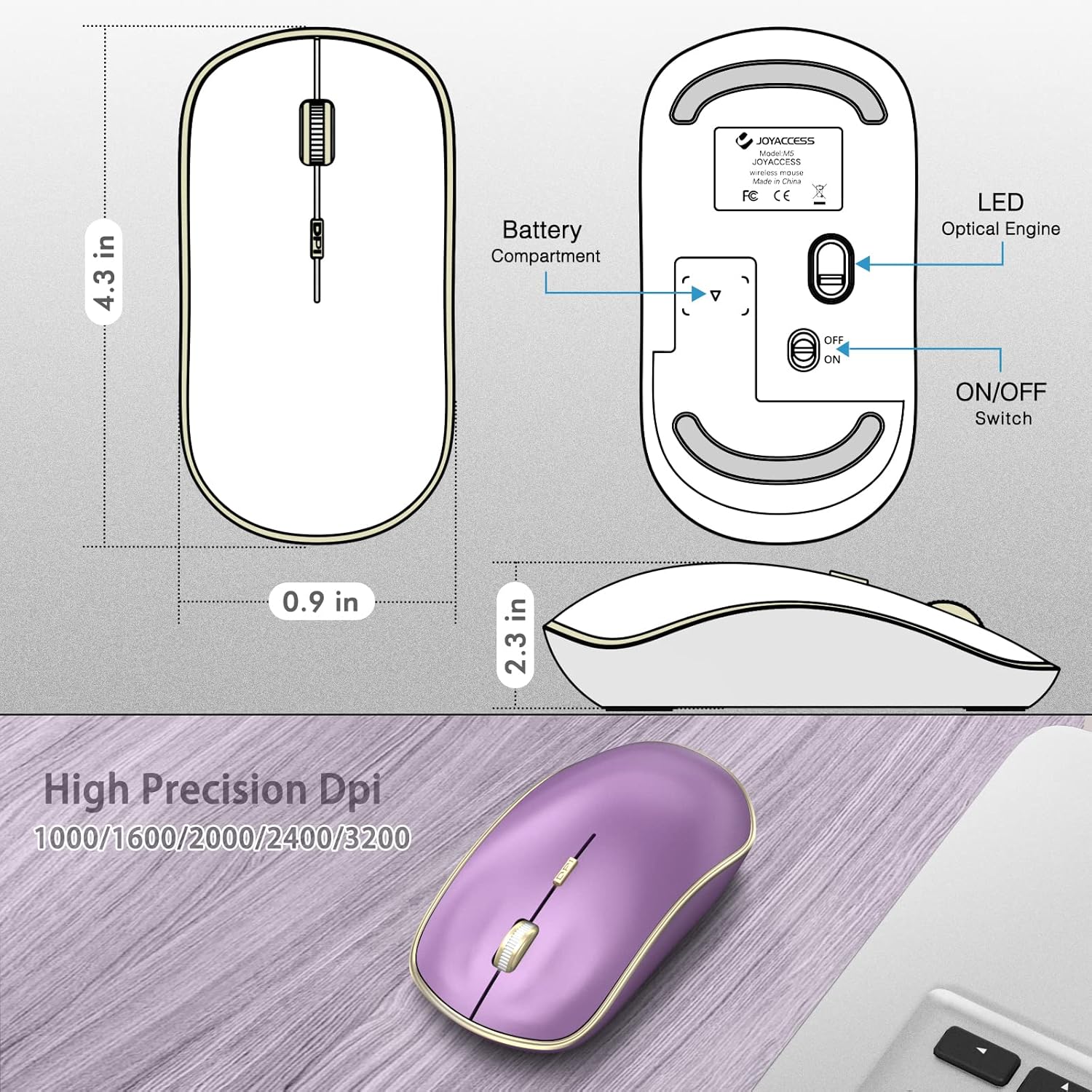
Description: This image displays the bottom of the mouse, highlighting the battery compartment, the ON/OFF switch, and the optical sensor.
Connexió del ratolí
The mouse connects wirelessly via a 2.4 GHz USB Nano receiver. No drivers are typically required for most operating systems.
- Remove the USB Nano receiver from its storage slot within the battery compartment of the mouse.
- Plug the USB Nano receiver into an available USB port on your computer (desktop, laptop, PC, or Macbook).
- Turn on the mouse using the ON/OFF switch located on the underside of the mouse.
- Your computer should automatically detect and install the necessary drivers. The mouse will be ready for use within a few seconds.

Description: This image shows the purple wireless mouse on a desk with its USB receiver plugged into the side of a laptop, illustrating the connection process.

Description: This image features the purple wireless mouse positioned next to a laptop, emphasizing its 'Plug and Play' functionality for easy setup.
Instruccions de funcionament
Ajust de la sensibilitat dels DPI
The mouse features 5 adjustable DPI levels to suit your precision needs. DPI (Dots Per Inch) determines how sensitive the mouse is to movement.
To change the DPI setting, press the DPI button located on the top of the mouse, just below the scroll wheel. Each press will cycle through the available DPI levels: 1000, 1600, 2000, 2400, and 3200.
Description: This image shows the underside of the mouse, detailing the LED Optical Engine and the various DPI settings (1000/1600/2000/2400/3200) available for adjustment.
Silent Click Feature
This mouse is designed with silent click buttons for both left and right clicks, allowing you to work without disturbing others.
Mode d'estalvi d'energia
To conserve battery life, the mouse will automatically enter a sleep mode after 8 minutes of inactivity. To wake it up, simply click any button on the mouse.
Cura i Manteniment
Canvi de bateria
When the mouse performance degrades or it stops responding, it's likely time to replace the AA battery. Follow the 'Battery Installation' steps in the 'Getting Started' section.
Neteja
Per netejar el ratolí, feu servir un drap suau i sec. Per a la brutícia persistent, feu servir un drap lleugerament sec.amp es pot fer servir un drap, però assegureu-vos que no entri humitat als components interns. No utilitzeu productes químics agressius ni netejadors abrasius.
Resolució de problemes
El ratolí no respon
- Comproveu la bateria: Assegureu-vos que la pila AA estigui correctament instal·lada i que tingui prou càrrega. Substituïu-la si cal.
- Comprova la connexió: Verify that the USB Nano receiver is securely plugged into a working USB port on your computer. Try a different USB port.
- Interruptor d'alimentació: Make sure the ON/OFF switch on the underside of the mouse is in the 'ON' position.
- Torna a emparellar: In rare cases, you might need to re-pair the mouse with the receiver. Consult the manufacturer's website for specific re-pairing instructions if the above steps do not resolve the issue.
Cursor Movement is Erratic or Slow
- Superfície: Ensure you are using the mouse on a clean, non-reflective, and uniform surface. A mouse pad is recommended for optimal performance.
- Configuració de DPI: Adjust the DPI sensitivity using the DPI button to find a comfortable cursor speed.
- Sensor òptic: Check the optical sensor on the underside of the mouse for any obstructions or dirt. Clean gently with a soft cloth.
Especificacions del producte
| Característica | Detall |
|---|---|
| Dimensions del producte | 4.3 x 2.3 x 0.04 polzades |
| Pes de l'article | 0.317 unces |
| ASIN | B0BYZ2DCKS |
| Número de model de l'article | XRF-M1B-PL |
| Re Clientviews | 4.4 4.4 de 5 estrelles 4,035 valoracions 4.4 de 5 estrelles |
| Classificació dels més venuts | #1,984 in Video Games (See Top 100 in Video Games) #46 in Mac Gaming Mice #141 in PC Gaming Mice |
| Data de primera disponibilitat | 20 de març de 2023 |
| Fabricant | JOYACCESS |
| Marca | JOIA ACCÉS |
| Color | Lila |
| Tecnologia de connectivitat | USB, sense fil |
| Característica especial | Sense fil |
| Tecnologia de detecció de moviment | Laser, Optical |
Garantia i Suport
JOYACCESS provides a standard warranty for this product. For detailed warranty information, technical support, or service inquiries, please visit the official JOYACCESS weblloc web o contacteu directament amb el seu servei d'atenció al client.
Oficial Weblloc: www.joyaccess.com
For further assistance, refer to the contact information provided on the product packaging or the manufacturer's weblloc.


