1. Introducció
The VILTROX DC-550 Pro is a high-brightness 5.5-inch camera field monitor designed for professional videography and photography. It features a 4K HDMI touchscreen, 1200 nits brightness, 3D LUT support, and various monitoring functions to assist with precise focus and exposure. This manual provides detailed instructions for setting up, operating, and maintaining your DC-550 Pro monitor.
2. Què hi ha a la caixa
En obrir el paquet, comproveu que hi hagi tots els elements següents:
- 1x DC-550Pro Camera Video Monitor
- 1x Sunshade Hood
- 1x VILTROX NP-F550 Battery
- 1x VL-550 Cold Shoe Adapter
- 1 cable tipus C
- 2x cable HDMI
- 1x Plastic Carry Case
- 1x Manual d'usuari (aquest document)
- 1x Caixa d'embalatge

Image: VILTROX DC-550 Pro Camera Field Monitor with all included accessories, such as the sunshade, battery, cables, and cold shoe adapter.
3. Producte acabatview
3.1 Característiques clau
- 1200 Nits High Brightness: True 1200 nits display for clear outdoor monitoring. Full HD 1920x1080 resolution, 1200:1 contrast ratio, and 178° ultra-wide viewangle de ing.
- Quick-Released Hood & Compact Design: Detachable sunshade hood for light interference blocking. Four custom buttons and stepwise knobs for efficient function setting.
- Entrada/Sortida HDMI 4K: Supports 4K 30Hz (3840x2160p, 4096x2160p) signal pass-through for simultaneous monitoring. Dual HDMI (In/Output) jacks for lossless high-definition transmission.
- Múltiples opcions de font d'alimentació: Supports NP-F series lithium battery, DC IN 12-18V, and Type-C 5V 3A power bank.
- Compatibilitat amb LUT 3D personalitzades: Import 3D LUTs via SD card for various creative styles and camera Log mode monitoring. Includes RGB Parade waveform, vectorgraph, RGB & brightness histogram, auxiliary focus, audio column, image flip, false color, etc.
3.2 Components del monitor

Image: Detailed diagram showing the various ports, buttons, and features of the VILTROX DC-550 Pro monitor, including SD card cover, F1/F2/F3 shortcut keys, Return key, Type-C interface, locating holes, 1/4 screw holes, DC power interface, Battery Release key, Cooling air inlet, Headphone jack, ON/OFF key, Knob/Adjusted key, Monitor Display, HDMI output, and HDMI input.
| No. | Component | No. | Component |
|---|---|---|---|
| 1 | Tapa de la targeta SD | 10 | Presa d'auriculars |
| 2 | Tecles de drecera F1/F2/F3 | 11 | Tecla ON/OFF |
| 3 | Clau de retorn | 12 | Knob/Adjusted key |
| 4 | Interfície tipus C | 13 | Pantalla del monitor |
| 5 | Forat de localització | 14 | Sortida HDMI |
| 6 | 1/4 de forat del cargol | 15 | Entrada HDMI |
| 7 | Interfície d'alimentació de CC | 16 | Forat de localització |
| 8 | Battery Release key | 17 | 1/4 de forat del cargol |
| 9 | Entrada d'aire de refrigeració | 18 | Sortida del ventilador |
4. Configuració
4.1 Alimentació del monitor
The DC-550 Pro offers flexible power options:
- NP-F Series Lithium Battery: Insert a compatible NP-F series battery (one NP-F550 is included) into the battery slot on the back of the monitor.
- DC IN 12-18V: Connect a 12-18V DC power adapter to the DC power interface (7).
- Type-C 5V 3A Power Bank: Use a Type-C cable to connect a 5V 3A power bank to the Type-C interface (4).
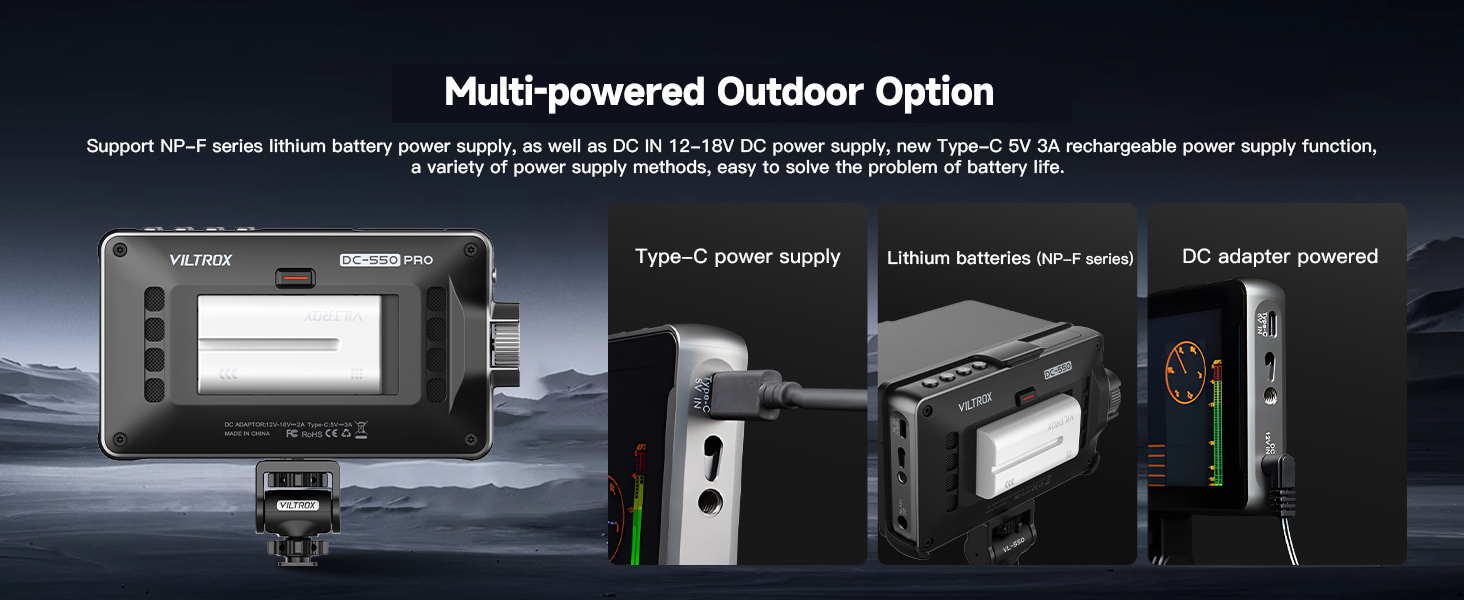
Image: Illustration of the three power supply methods for the monitor: Type-C power bank, NP-F series lithium battery, and DC adapter.
4.2 Attaching the Sunshade Hood
The detachable sunshade hood helps block strong light interference for better outdoor monitoring. Simply align and attach the hood to the top of the monitor. It can be quickly released when not needed.

Image: Visual guide demonstrating the quick open and close mechanism of the sunshade hood.
4.3 Muntatge del monitor
Use the included VL-550 Cold Shoe Adapter to mount the monitor to your camera's hot shoe or other compatible mounting points. The adapter allows for 360° pitch angle and ±85° horizontal rotation for optimal viewing.

Image: Illustration of the VL-550 cold shoe adapter's flexibility, allowing for 360-degree pitch and 85-degree horizontal rotation.
4.4 Configuració de l'idioma inicial
If your monitor's default language is not English, follow these steps to change it:
- Double tap the screen to wake up the menu.
- Click on the top right corner to access the system settings.
- Then click the button that corresponds to "English" (often labeled with Chinese characters first, then English after selection).
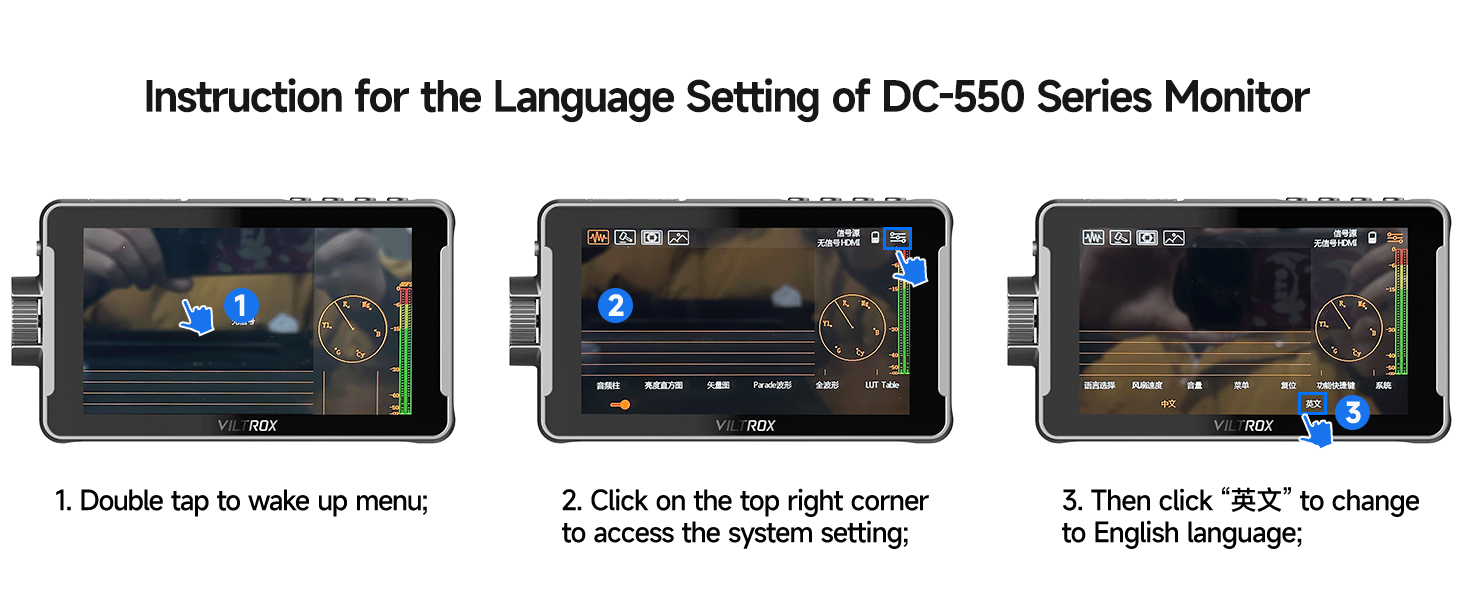
Image: Step-by-step visual instructions for changing the monitor's language setting.
Video: An official VILTROX video demonstrating the features and usage of the DC-550/550Pro monitor, including menu navigation and setup.
5. Funcionament del monitor
5.1 Connecting to a Camera (HDMI)
Connect your camera's HDMI output to the monitor's HDMI input (15) using one of the provided HDMI cables. If you wish to loop the signal to another monitor, use the HDMI output (14).

Imatge: Detallada view of the 4K HDMI Input and Output ports on the VILTROX DC-550 Pro monitor.
5.2 Touch Screen Controls
The DC-550 Pro features a sensitive touchscreen for intuitive navigation and control:
- Doble toc: Access menus and settings.
- Double Finger Swipe: Amplia / redueix.
- Swipe Right Side: Ajusta la llum de fons.
- Swipe Left Side: Ajustar el volum.
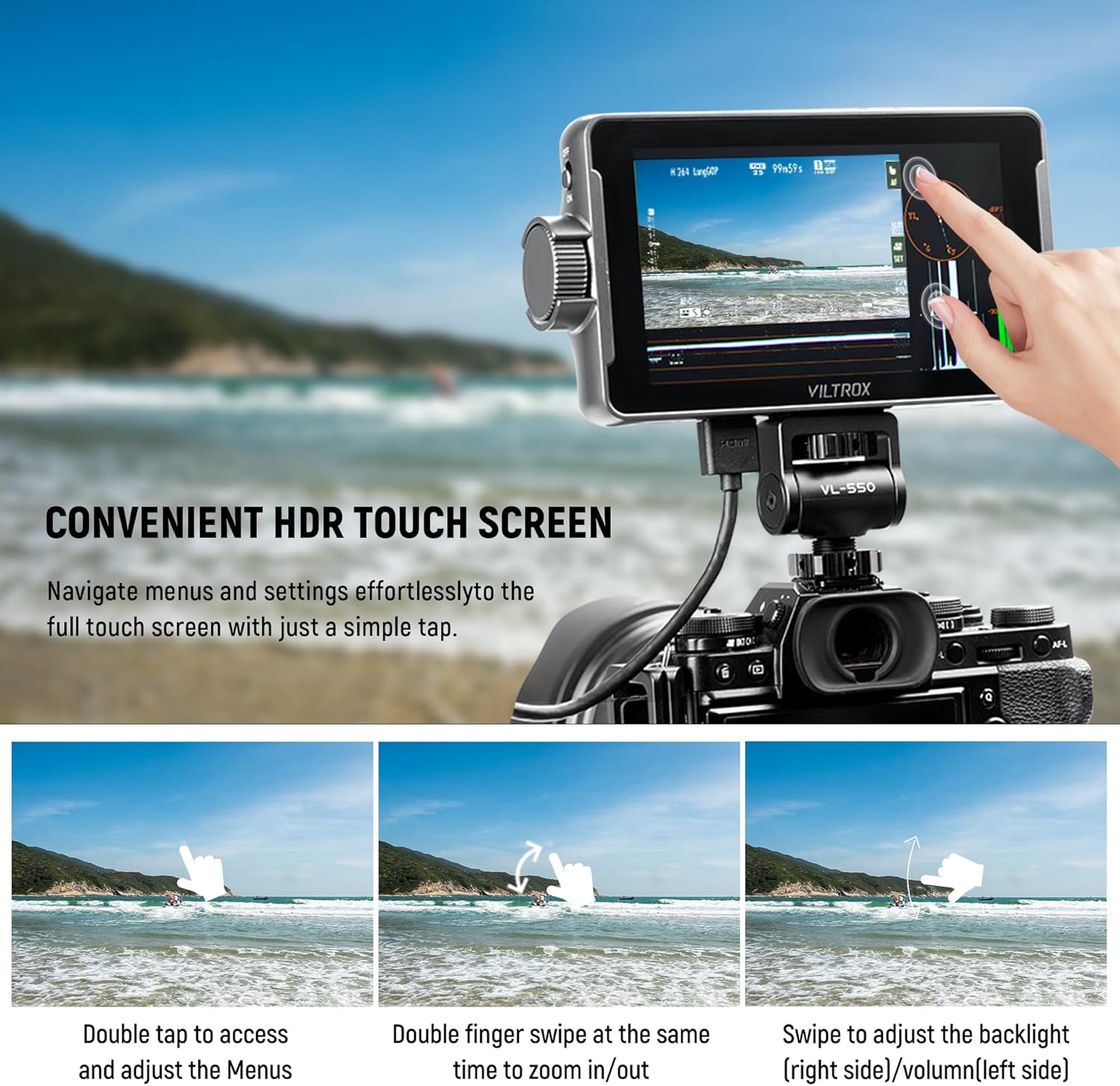
Image: Demonstrates various touch screen gestures for controlling the monitor's functions.
5.3 Funcions de monitorització
The monitor provides a comprehensive suite of professional monitoring tools:
- LUT 3D: Import custom 3D LUTs via SD card (slot 1) to preview different color grades or camera Log modes.
- Auxiliary Focus (Peaking): Destaca les zones enfocades per a un enfocament precís.
- Color fals: Displays exposure levels using a color overlay.
- Histograma: Visualizes the tonal distribution of the image (RGB & Brightness).
- Waveform (RGB Parade): Shows the luminance and color levels across the image.
- Vectorgraph: Displays color saturation and hue.
- Other functions include Volume Bar, Image Flip, Zoom, Scanning Mode, Safe Mark, Mark Ratio, and Camera Mode.
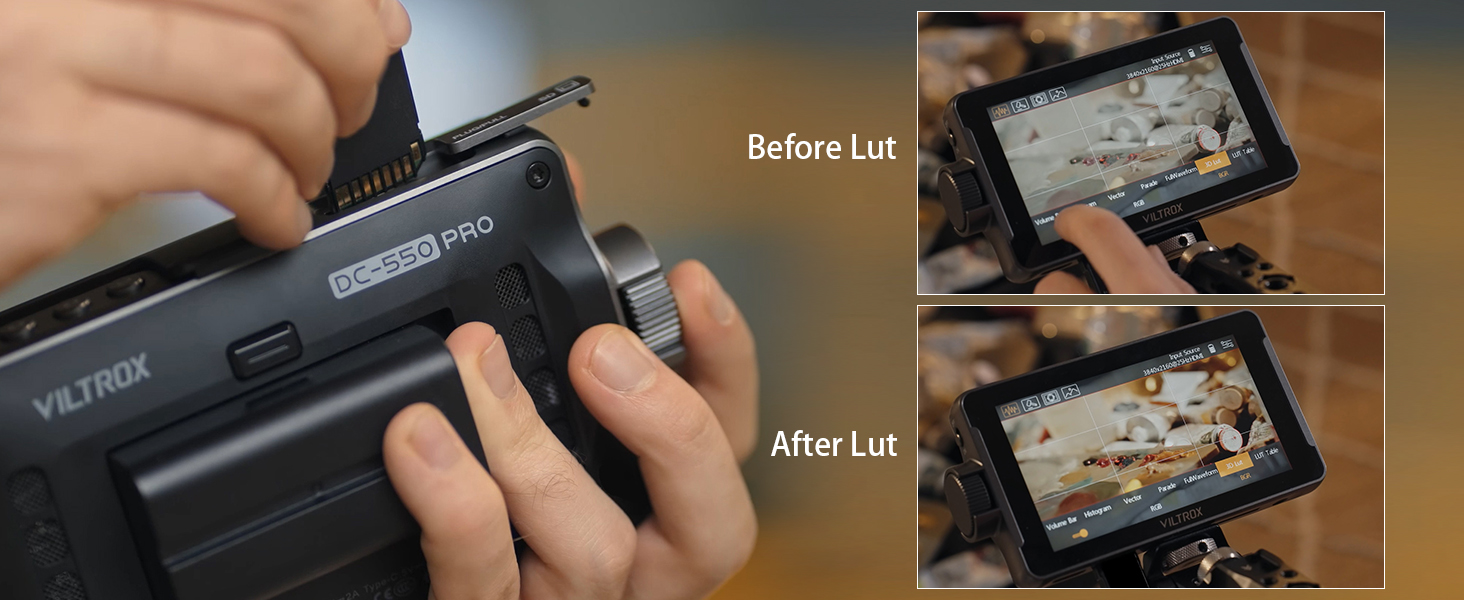
Image: Demonstrates the effect of applying a 3D LUT to the video feed, showing "Before Lut" and "After Lut" views.

Image: A visual representation of the professional monitoring functions available on the monitor, including Parade Wave, RGB Histogram, Vectorscope, Brightness Histogram, Mirror Image, Image Freeze, Pixel to Pixel, Monochrome, Safe Mark, Volume Bar, Peaking, False Colors, Exposure, Zoom, Scanning Mode, 3D LUT, Mark Ratio, and Camera Mode.
6. Manteniment
6.1 Neteja del monitor
To ensure optimal performance and longevity, regularly clean your VILTROX DC-550 Pro monitor:
- Feu servir un drap suau i sense borrissol per netejar suaument la pantalla i la carcassa.
- Per a taques persistents, lleugerament dampNetegeu el drap amb aigua o una solució de neteja segura per a pantalles. Eviteu productes químics agressius.
- Ensure no liquid enters the ports or ventilation openings.
6.2 Emmagatzematge
When not in use, store the monitor in its plastic carry case in a cool, dry place away from direct sunlight and extreme temperatures.

Image: The included plastic carry case, designed to protect the monitor and its accessories during storage and transport.
6.3 Sistema de refrigeració
The monitor is equipped with cooling air inlets (9) and a fan outlet (18) to dissipate heat during operation. Ensure these areas are not obstructed to maintain proper ventilation.

Imatge: Primer pla view of the cooling air inlets on the monitor, indicating airflow for heat dissipation.
7. Solució De Problemes
If you encounter issues with your VILTROX DC-550 Pro monitor, please refer to the following common problems and solutions:
| Problema | Causa possible | Solució |
|---|---|---|
| El monitor no s'encén. | Low or depleted battery; incorrect power connection. | Ensure battery is charged and properly inserted. Check DC or Type-C power connections. |
| No signal displayed. | Incorrect HDMI connection; camera output settings; incompatible resolution. | Verify HDMI cables are securely connected to input (15). Check camera's HDMI output settings (resolution, format). Ensure monitor is set to correct input source. |
| La pantalla és massa tènue/brillant. | Brightness settings. | Adjust brightness using the touchscreen swipe gesture (swipe right side) or through the menu. |
| La pantalla tàctil no respon. | Error temporal de programari; interferències del protector de pantalla. | Restart the monitor. Ensure screen is clean and free of debris. If a screen protector is installed, ensure it's properly applied. |
| Monitor overheating. | Obstructed ventilation; prolonged use in high temperatures. | Ensure cooling air inlets (9) and fan outlet (18) are clear. Operate in a well-ventilated area. Allow monitor to cool down if necessary. |
8. Especificacions
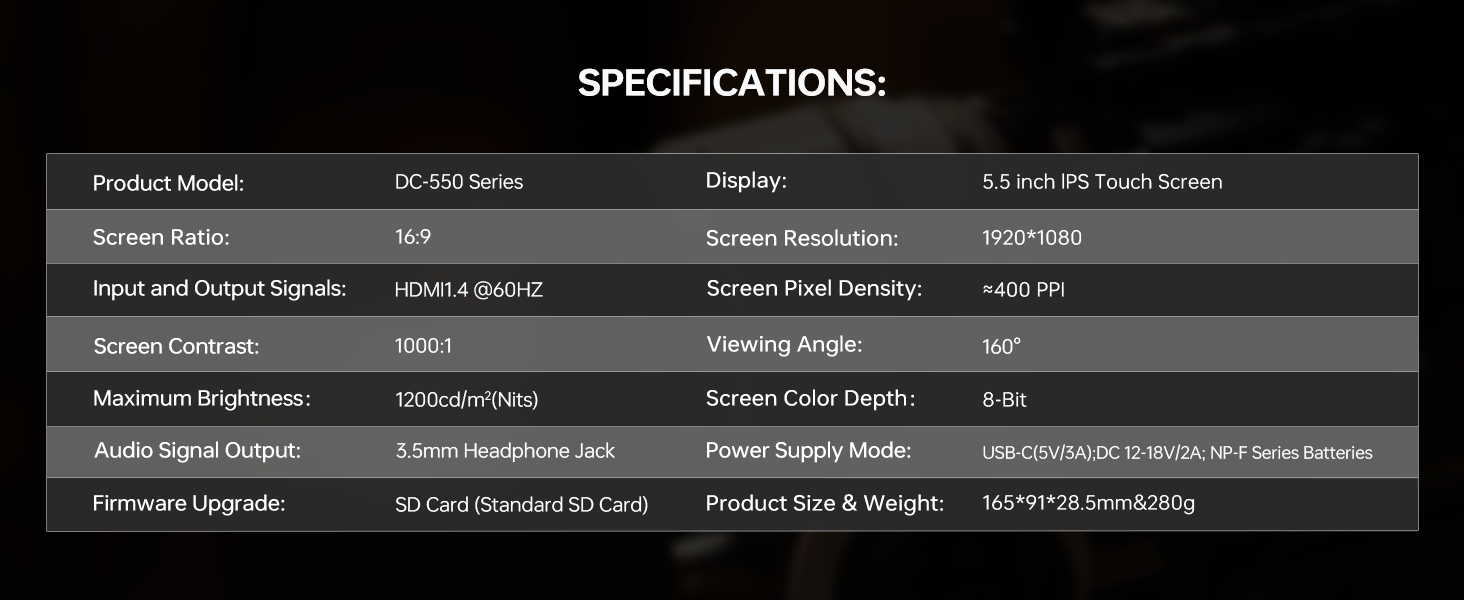
Image: Official specifications table for the VILTROX DC-550 Series monitor.
| Característica | Detall |
|---|---|
| Model de producte | Sèrie DC-550 |
| Mostra | Pantalla tàctil IPS de 5.5 polzades |
| Ràtio de pantalla | 16:9 |
| Resolució de pantalla | 1920*1080 |
| Senyals d'entrada i sortida | HDMI1.4 @60HZ |
| Screen Pixel Density | ≈400 PPI |
| Contrast de pantalla | 1000:1 |
| Viewangle ing | 160° |
| Brillantor màxima | 1200cd/m² (Nits) |
| Screen Color Depth | 8 bits |
| Sortida de senyal d'àudio | Presa d'auriculars de 3.5 mm |
| Mode d'alimentació | USB-C (5V/3A), DC 12-18V/2A, NP-F Series Batteries |
| Actualització del firmware | SD Card (Standard SD Card) |
| Mida i pes del producte | 165*91*28.5mm & 280g |
9. Garantia i Suport
VILTROX provides a 1-year replacement service and friendly after-sales service support to all customers. For any inquiries or support needs, please contact VILTROX customer service through their official channels or the retailer where you purchased the product.
For more information, visit the official VILTROX Store: VILTROX Official Store


