1. Introducció
The STRONG SRT420 is a versatile 2-in-1 Smart TV Box, combining Android TV functionality with a DVB-T2 terrestrial receiver. This device allows you to stream content from popular services like Netflix, Prime Video, Hulu, and YouTube in stunning 4K resolution, access a wide range of apps via Google Play, and receive digital terrestrial television broadcasts. It features built-in Chromecast for easy content sharing and voice control for intuitive operation.
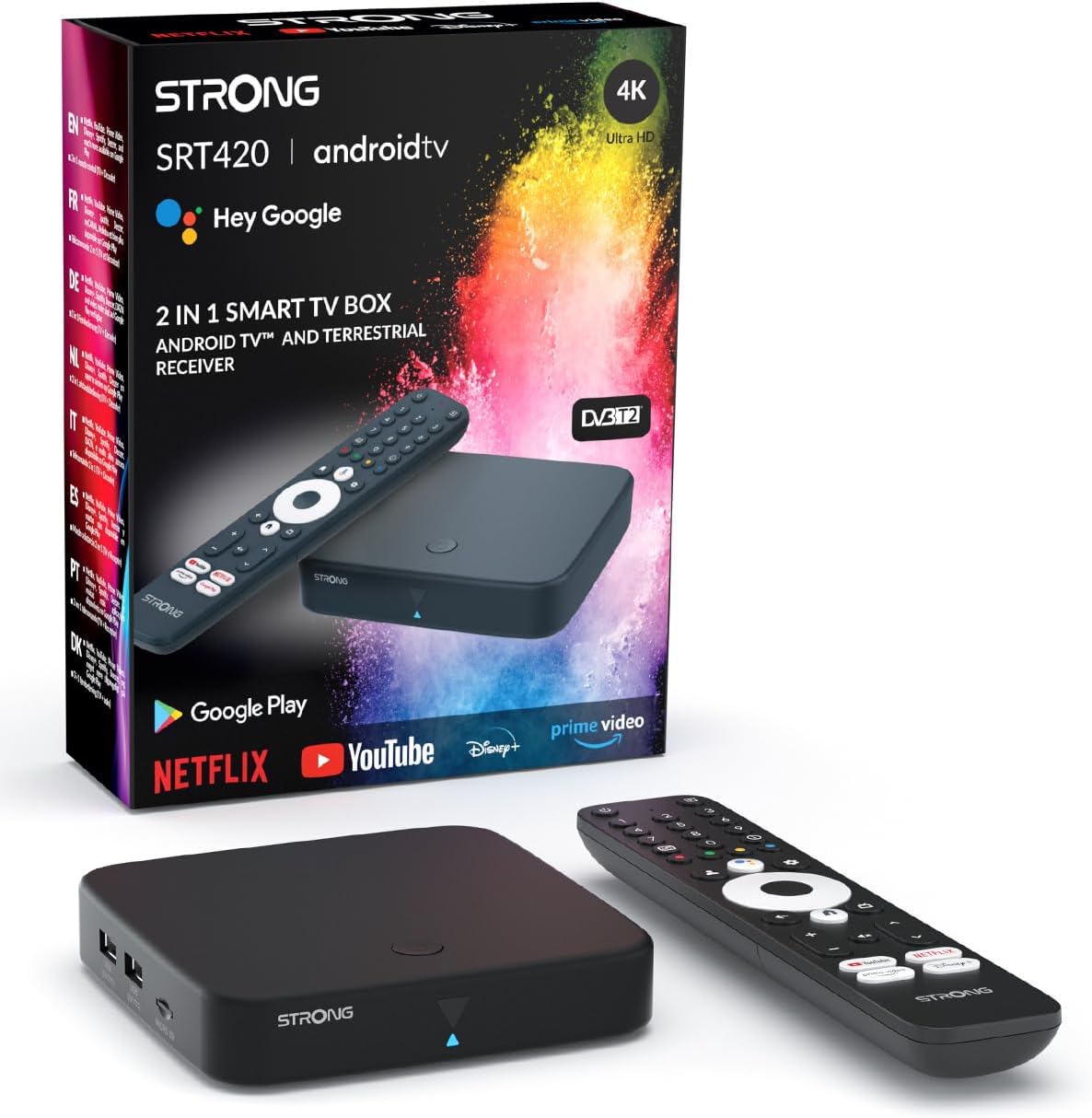
Image: The STRONG SRT420 Android TV Receiver, its remote control, and product packaging.
2. Què hi ha a la caixa
Si us plau, reviseu atentament el contingut del paquet. Si falta algun article o hi ha algun dany, poseu-vos en contacte amb el vostre distribuïdor.
- Android TV Box (SRT420)
- Voice-controlled Remote Control
- Adaptador de corrent (12V / 1A)
- Cable HDMI
- 2 piles AAA (per al comandament a distància)
- Manual d'usuari (aquest document)
3. Guia de configuració
3.1 Connexió del dispositiu
Follow these steps to connect your SRT420 to your television and power source.
- Connectar-se al televisor: Use the provided HDMI cable to connect the HDMI port on the SRT420 to an available HDMI input on your television.
- Connecteu-vos a l'alimentació: Plug the power adapter into the DC 12V/1A port on the SRT420 and then into a wall outlet.
- Connect Antenna (for DVB-T2): If you intend to use the DVB-T2 terrestrial receiver, connect your DVB-T2 antenna to the 'ANT IN' port on the SRT420.
- Connectar-se a la xarxa (opcional): For a wired internet connection, connect an Ethernet cable from your router to the LAN port on the SRT420. For wireless connection, you will configure Wi-Fi during the initial setup.
- Insereix les piles: Open the battery compartment on the remote control and insert the two AAA batteries, ensuring correct polarity.

Imatge: Part posterior view of the SRT420 showing antenna, digital audio, HDMI, RJ45, power, USB, and Micro-SD ports.
3.2 Configuració inicial
Once connected, turn on your TV and select the correct HDMI input. The SRT420 will guide you through the initial setup process.
- Selecció d'idioma: Choose your preferred language from the on-screen options.
- Configuració del compte de Google: Sign in with your Google account. This is required to access Google Play Store, YouTube, and other Google services. If you don't have one, you can create one.
- Connexió de xarxa: Seleccioneu la vostra xarxa Wi-Fi i introduïu la contrasenya o confirmeu la connexió per cable.
- Google Assistant Setup: Follow the prompts to set up Google Assistant for voice control.
- Instal·lació de l'aplicació: The system may prompt you to install essential apps like Netflix, Prime Video, and YouTube.
- DVB-T2 Channel Scan: If an antenna is connected, the device will guide you through scanning for available DVB-T2 channels.
Image: Visual guide for easy operation: 1. Connect to TV, 2. Connect to internet, 3. Start streaming.
4. Instruccions de funcionament
4.1 Navegació per Android TV
The Android TV interface is designed for easy navigation using the provided remote control. Use the directional pad to move between options and the 'OK' button to select.
- Pantalla d'inici: Displays recommended content, installed apps, and settings.
- Aplicacions: Access all your installed applications.
- Configuració: Configure network, display, sound, accounts, and device preferences.
4.2 Control per veu amb l'Assistent de Google
The SRT420 features a voice-controlled remote. Press the Google Assistant button on your remote and speak your commands.
- "Obre Netflix"
- "Cerca action movies"
- "Play music"
- "Quin temps fa?"

Image: The SRT420 streaming box and remote, with a TV screen displaying the Google Assistant interface and app icons.
4.3 Streaming Services and Apps
Access a vast library of content through pre-installed apps and the Google Play Store.
- Preinstal·lat: Netflix, Prime Video, Hulu, YouTube.
- Google Play Store: Download thousands of additional apps, games, and streaming services.

Image: A television screen displaying the Google TV interface with various streaming applications like Netflix, YouTube, Prime Video, and Disney+.
4.4 Chromecast integrat
The SRT420 includes Chromecast built-in, allowing you to cast content from your smartphone, tablet, or computer directly to your TV.
- Ensure your mobile device and the SRT420 are on the same Wi-Fi network.
- Open a Chromecast-enabled app (e.g., YouTube, Netflix) on your mobile device.
- Toca la icona de Cast ▶ and select your SRT420 device.

Image: A television displaying content, with the SRT420 box below it and a hand holding a smartphone casting content to the TV, highlighting the Chromecast feature.
4.5 DVB-T2 Terrestrial Receiver
If you have connected a DVB-T2 antenna, you can access free-to-air digital terrestrial television channels. Use the TV input button on your remote or navigate to the DVB-T2 section in the Android TV interface to switch to live TV.
5. Manteniment
To ensure the longevity and optimal performance of your STRONG SRT420, follow these simple maintenance guidelines:
- Neteja: Use a soft, dry cloth to clean the exterior of the device. Do not use liquid cleaners, aerosols, or abrasive materials, as they may damage the finish or internal components.
- Ventilació: Ensure the device is placed in a well-ventilated area. Do not block any ventilation openings. Overheating can affect performance and lifespan.
- Apagar: If the device will not be used for an extended period, it is advisable to unplug it from the power outlet.
- Actualitzacions de programari: El dispositiu pot rebre actualitzacions de programari automàtiques. Assegureu-vos que estigui connectat a Internet per rebre aquestes actualitzacions, que poden millorar el rendiment i afegir noves funcions.
6. Solució De Problemes
This section addresses common issues you might encounter with your SRT420. If the problem persists, please contact customer support.
| Problema | Possible causa/solució |
|---|---|
| Sense alimentació / El dispositiu no s'encén. |
|
| No hi ha imatge a la televisió. |
|
| Sense connexió a Internet. |
|
| El comandament a distància no respon. |
|
| Apps freezing or device rebooting. |
|
| No DVB-T2 channels found. |
|
7. Especificacions
Key technical specifications for the STRONG SRT420 Android TV Receiver:
- Nom del model: SRT 420
- Color: Negre
- Resolució: 4K UHD
- Serveis d'Internet compatibles: Netflix, Prime Video, Hulu, YouTube (and more via Google Play)
- Tecnologia de connectivitat: Bluetooth, USB, Ethernet, HDMI, WLAN (Wi-Fi)
- Característiques especials: Chromecast built-in, Voice Control (Google Assistant)
- Dimensions del producte: 12 x 12 x 2 cm
- Pes: 0.42 grams
- Font d'alimentació: 12 V / 1 A
- Batteries Required (Remote): 2 piles AAA

Image: Features highlighting powerful technology including Dolby Vision, Dolby Atmos, and 4K UHD support.
8. Garantia i Suport
STRONG offers reliable support for its products.
- Garantia: Aquest producte té una garantia d'4 any. Si us plau, conserveu el comprovant de compra per a reclamacions de garantia.
- Actualitzacions de programari: Software updates are provided to ensure optimal performance and introduce new features. The duration of guaranteed software updates is currently unknown.
- Atenció al client: Per a més ajuda, assistència tècnica o consultes sobre garantia, visiteu el lloc web oficial de STRONG. weblloc web o poseu-vos en contacte amb el vostre distribuïdor local.


