1. Introducció
This manual provides comprehensive instructions for the safe and effective use of your LIEMKE Keiler-2 Thermal Monocular. The Keiler-2 is designed for advanced thermal observation, featuring a high-resolution 12µm VOx sensor and a 50mm f/1.1 lens, enabling clear thermal detection up to 2,500 meters. Please read this manual thoroughly before operating the device to ensure optimal performance and longevity.
Key features include a 640x512 pixel sensor, 2.7X optical zoom with up to 14x digital zoom, five selectable color modes, and a 9-hour battery life with USB-C charging.
2. Contingut del paquet
Upon opening the package, please verify that all components are present and undamaged. The standard package typically includes:
- LIEMKE Keiler-2 Thermal Monocular
- Cable de càrrega USB-C
- Protective Pouch/Case
- Drap de neteja de lents
- Guia d'inici ràpid (si escau)
If any items are missing or damaged, please contact your retailer or LIEMKE customer support immediately.
3. Configuració
3.1. Carregant la bateria
Before first use, fully charge the internal battery. The Keiler-2 features a robust 9-hour battery life and quick USB-C charging.
- Localitza el port USB-C al dispositiu.
- Connect the provided USB-C cable to the monocular and a compatible USB power adapter (not included) or a computer USB port.
- The charging indicator (if present) will show the charging status. Refer to the device's display for battery level.
- Un cop estigui completament carregat, desconnecteu el cable.
3.2. Engegada inicial
Per encendre el dispositiu:
- Press and hold the Power button (typically located on the top panel) for a few seconds until the display illuminates.
- The device will perform a self-test and then display the thermal image.
3.3. Ajust del focus
Adjust the focus to achieve a clear image of your target.
- Rotate the objective lens focus ring (at the front of the device) until the image appears sharp.
- Adjust the diopter on the eyepiece (at the rear) for individual eye comfort and clarity.
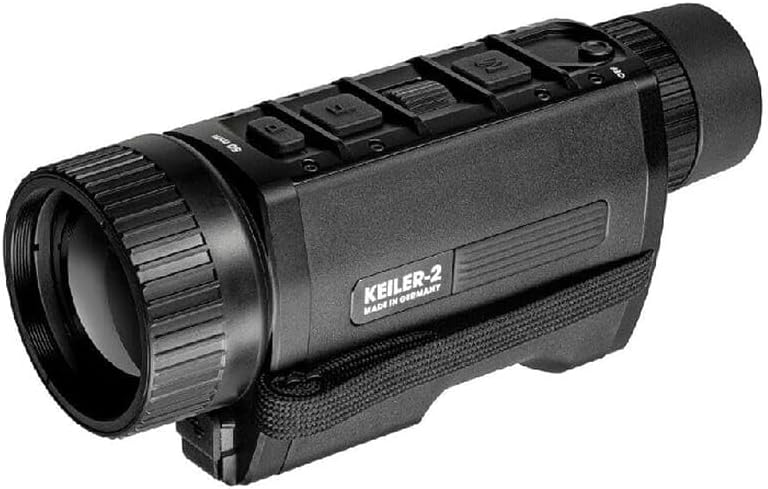
Figure 1: LIEMKE Keiler-2 Thermal Monocular. This image shows the monocular from an angled perspective, highlighting its compact design and control buttons on the top surface.
4. Operating the Monocular
4.1. Controls sobreview
The Keiler-2 features intuitive controls, including a centralized scroll wheel and dedicated buttons for various functions. Familiarize yourself with the button layout for efficient operation, especially in low-light conditions.

Figura 2: lateral view of the LIEMKE Keiler-2. This image displays the side of the monocular, featuring the "LIEMKE THERMAL OPTICS" branding and the strap attachment point.
4.2. Encendre/apagar
- Per encendre: Press and hold the Power button until the display activates.
- Per apagar: Press and hold the Power button until the device shuts down. A brief press may put the device into standby mode.
4.3. Modes de color
The Keiler-2 offers five selectable color modes to adapt to different viewpreferències d'ing i condicions ambientals:
- Blanc calent: Els objectes calents apareixen blancs.
- Negre calent: Els objectes calents apareixen negres.
- Extra Dark: Optimized for specific low-light scenarios.
- Roent: Ressalta les zones més calentes en vermell.
- Arc de Sant Martí: Displays a spectrum of colors for temperature differentiation.
Use the designated button or navigate through the menu to cycle between these modes.
4.4. Funcionalitat de zoom
The monocular features 2.7X optical magnification and up to 14x digital zoom.
- Press the zoom button (or use the scroll wheel in zoom mode) to increase or decrease the digital magnification.
- Note that higher digital zoom levels may reduce image clarity.
4.5. Menu Navigation and Customization
Access the device's menu to adjust settings and customize functions.
- Press the Menu button to enter the main menu.
- Use the scroll wheel to navigate through menu options.
- Press the selection button (often the scroll wheel itself) to confirm a selection.
- The menu can be customized to place frequently used functions at the forefront for quick access. Refer to the on-screen prompts for customization options.
4.6. Multimedia Connectivity (LIEMKE App)
The Keiler-2 supports multimedia connectivity via the LIEMKE App, allowing for real-time sharing and potentially remote control or firmware updates.
- Download the official LIEMKE App from your device's app store.
- Follow the app's instructions to connect your Keiler-2 monocular via Wi-Fi or Bluetooth (refer to device specifications for supported connection types).
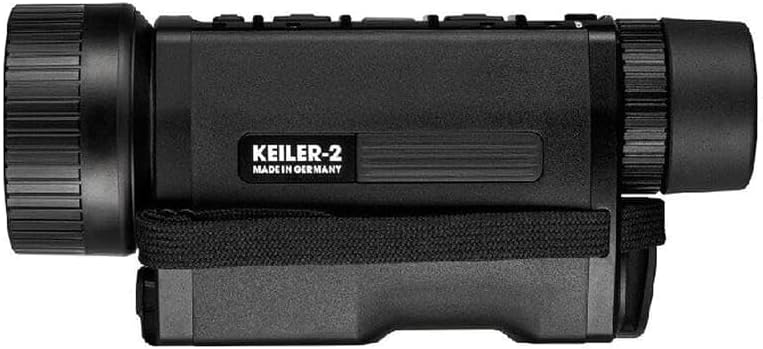
Figura 3: lateral view of the LIEMKE Keiler-2. This image shows the opposite side of the monocular, featuring the "KEILER-2 MADE IN GERMANY" inscription.
5. Manteniment
5.1. Neteja
- Lents: Use the provided lens cleaning cloth or a soft, lint-free cloth specifically designed for optics. Gently wipe the lens surfaces. For stubborn smudges, use a small amount of lens cleaning fluid. Avoid abrasive materials.
- Cos: Netegeu el cos del monocular amb un drap suauamp tela. No utilitzeu productes químics o dissolvents aggressivs.
- Ensure all caps and covers are in place when not in use to protect lenses and ports from dust and moisture.
5.2. Emmagatzematge
- Store the monocular in a cool, dry place, away from direct sunlight and extreme temperatures.
- If storing for extended periods, ensure the battery is partially charged (around 50%) to prolong its lifespan. Avoid storing with a completely depleted or fully charged battery.
- Use the protective pouch or case to prevent scratches and impacts.
5.3. Cura de la bateria
- Eviteu descarregar completament la bateria amb freqüència.
- Charge the battery using only the provided USB-C cable and a compatible power source.
- If the device will not be used for several months, charge it to approximately 50% every 3-6 months.
6. Solució De Problemes
If you encounter issues with your Keiler-2 monocular, refer to the following common problems and solutions:
| Problema | Causa possible | Solució |
|---|---|---|
| El dispositiu no s'encén. | Battery is depleted or low. | Charge the battery using the USB-C cable. Ensure the power button is held long enough. |
| La imatge està borrosa o desenfocada. | Focus rings not adjusted correctly. | Adjust the objective lens focus ring and the eyepiece diopter until the image is sharp. |
| No thermal image displayed. | Lens cap still on; device in standby mode; sensor issue. | Remove lens cap. Press power button briefly to exit standby. If problem persists, contact support. |
| La bateria no es carrega. | Faulty cable or power adapter; dirty USB-C port. | Try a different USB-C cable and power adapter. Clean the USB-C port gently. |
| Els controls no responen. | Error temporal de programari. | Perform a soft reset by holding the power button until the device restarts (if supported), or allow the battery to fully deplete and then recharge. |
If the issue is not resolved by the above steps, please contact LIEMKE customer support for further assistance.
7. Especificacions
| Característica | Detall |
|---|---|
| Model | Keiler-2 |
| Tipus de sensor | 12µm VOx |
| Resolució del sensor | 640 x 512 píxels |
| Lent | 50 mm f/1.1 |
| Interval de detecció | Fins a 2,500 metres (2734 iardes) |
| Ampliació òptica | 2.7X |
| Zoom digital | Fins a 14x |
| Modes de color | Blanc calent, negre calent, extra fosc, vermell calent, arc de Sant Martí |
| Durada de la bateria | Aproximadament 9 hores |
| Interfície de càrrega | USB-C |
| Connectivitat | LIEMKE App (via Wi-Fi/Bluetooth, specific type not detailed) |
8. Garantia i Suport
Warranty information for the LIEMKE Keiler-2 Thermal Monocular is typically provided with the product at the time of purchase. Please refer to the warranty card or documentation included in your product packaging for details regarding coverage, terms, and conditions.
For technical support, service, or any questions not covered in this manual, please contact LIEMKE customer support or your authorized dealer. Contact information can usually be found on the LIEMKE official weblloc web o a la documentació del producte.


